1
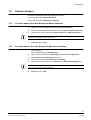
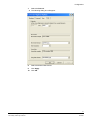
SISTORE MX NVS
Anwendungssoftware für
netzwerkbasierende
Videoaufzeichnung
Installationsanleitung (DE)
Installation Guide (EN)
Ab Softwareversion V2.60
Fire Safety & Security Products
Siemens Building Technologies
Liefermöglichkeiten und technische Änderungen vorbehalten.
Data and design subject to change without notice. / Supply subject to availability.
© 2007 Copyright by
Siemens Building Technologies
Wir behalten uns alle Rechte an diesem Dokument und an dem in ihm dargestellten Gegenstand vor. Der Empfänger anerkennt diese
Rechte und wird dieses Dokument nicht ohne unsere vorgängige schriftliche Ermächtigung ganz oder teilweise Dritten zugänglich machen
oder außerhalb des Zweckes verwenden, zu dem es ihm übergeben worden ist.
We reserve all rights in this document and in the subject thereof. By acceptance of the document the recipient acknowledges these rights
and undertakes not to publish the document nor the subject thereof in full or in part, nor to make them available to any third party without our
prior express written authorization, nor to use it for any purpose other than for which it was delivered to him.
Urheberrechte
Copyright 2007 © Fire & Security Products GmbH & Co. oHG. Alle Rechte
vorbehalten. Die Fire & Security Products GmbH & Co. oHG überträgt dem Käufer
das Recht zur Anwendung der Software. Die vorliegende Dokument darf, auch
auszugsweise, nicht ohne unsere schriftliche Genehmigung reproduziert oder in
eine andere Sprache übersetzt werden.
Gewährleistung
Wir haben dieses Handbuch mit aller Sorgfalt erstellt. Der Inhalt wird regelmäßig
gepflegt und den aktuellen Gegebenheiten angepasst. Es kann jedoch keine
Garantie in Bezug auf Korrektheit und Vollständigkeit der Angaben übernommen
werden. Im Rahmen der gesetzlichen Möglichkeiten ist die Haftung für
unmittelbare Schäden, Folgeschäden und Drittschäden, die aus dem Erwerb
dieses Produktes resultieren, ausgeschlossen. Die Haftung ist in jedem Falle auf
den Produktpreis beschränkt.
Die Angaben in dieser Betriebsanleitung sind zum Zeitpunkt der Veröffentlichung
aktuell. Wir behalten uns vor, nachträglich technische und organisatorische Details
zu ändern.
Warenzeichen
SISTORE ist ein Warenzeichen der Siemens Building Technologies
Fire & Security Products GmbH & Co. oHG.
Kontaktaufnahme
Wenn Sie Fragen oder Anregungen zum Produkt oder zu diesem Handbuch
haben, wenden Sie sich bitte an Ihre örtliche Siemens-Niederlassung oder Ihren
Fachhändler. Besuchen Sie uns auch im Internet unter:
http://www.sbt.siemens.com
Länderspezifische Normen
Die Produkte werden nach den einschlägigen europäischen Sicherheitsnormen
entwickelt und produziert. Gelten am Betriebsort noch zusätzliche landsspezifische
oder örtliche Sicherheitsnormen oder Gesetze für die Planung, die Konzeption, die
Installation, den Betrieb und die Entsorgung des Produktes, so sind diese
zusätzlich zu den Hinweisen in der Produktdokumentation zu beachten.
Zu diesem Dokument
Eine vollständige Version dieses Handbuches befindet sich im Format Adobe
Acrobat (PDF) auf der SISTORE MX NVS CD. Diese ist stets die aktuelle Version.
Alle nachträglichen Änderungen sind - soweit möglich - darin enthalten.
Inhalt
1
1.1
1.2
1.2.1
1.2.2
1.2.3
1.2.4
Sicherheit.................................................................................................5
Zielgruppen ...............................................................................................5
Allgemeine Sicherheitshinweise ...............................................................5
Handhabung..............................................................................................5
Transport...................................................................................................5
Aufbewahrung ...........................................................................................6
Instandhaltung und Wartung.....................................................................6
2
Lieferumfang ...........................................................................................7
3
Bestellangaben........................................................................................7
4
Systemvoraussetzungen........................................................................8
5
5.1
5.2
Softwarekomponenten ...........................................................................9
Netzwerk-Kameras....................................................................................9
RemoteView (Client) .................................................................................9
6
6.1
6.2
6.3
6.4
6.5
6.5.1
6.5.2
Installation .............................................................................................10
SISTORE MX NVS installieren ...............................................................10
Hardware-Treiber nachinstallieren..........................................................14
RemoteView auf Client-PC installieren ...................................................16
SISTORE MX NVS entfernen .................................................................20
Software-Update von SISTORE MX NVS und RemoteView..................20
Version 2.5x auf 2.60 ..............................................................................20
Version 2.6x auf 2.60 ..............................................................................20
7
7.1
7.2
7.3
7.4
7.4.1
7.4.2
7.5
7.6
7.7
7.8
7.9
7.10
7.11
Konfiguration.........................................................................................21
Software aufrufen....................................................................................21
In das System einloggen.........................................................................22
Letzte Benutzer anzeigen lassen............................................................22
Passwort ändern .....................................................................................23
Passwort ändern über den Menüpunkt Neues Passwort........................23
Passwort ändern über den Menüpunkt Benutzerverwaltung ..................23
Sprachversion ändern.............................................................................24
Sprachversion unter Windows XP ändern ..............................................25
Datum und Uhrzeit auf deutsches Format stellen...................................28
Auflösung und Dateiformat .....................................................................30
Zeitzone und Uhrzeit des PCs einstellen................................................31
Zeit des Client PCs von NTP-Server holen ............................................32
Weitere Informationen.............................................................................33
8
Software aktualisieren..........................................................................34
9
Brennen auf CD/DVD ............................................................................34
3
Siemens Building Technologies
Fire Safety & Security Products
08.2007
Sicherheit
10
10.1
10.1.1
10.1.2
10.2
10.3
10.4
10.5
Inbetriebnahme .....................................................................................35
Beispiele für Systemaufbau ....................................................................35
SISTORE MX NVS Server PC ................................................................35
Allgemeines zu Netzwerkkameras..........................................................35
SISTORE MX NVS – IP-Kamera – CKA4810 / 20..................................37
SISTORE MX NVS – SISTORE RemoteView – CKA4810 / CKA4820 ..38
SISTORE MX NVS – SISTORE MX NVS RemoteView – Multiserver
Betrieb .....................................................................................................39
SISTORE MX NVS – MX Multi Channel Box RCI 0601 und GAA..........40
11
11.1
11.1.1
11.1.2
11.2
11.2.1
11.2.2
11.2.3
11.3
11.3.1
11.3.2
11.4
USB Ein-/Ausgangsmodule..................................................................41
Technische Daten USB Ein-/Ausgangsmodule ......................................42
Technische Daten USB Eingangsmodul.................................................42
Technische Daten USB Ausgangsmodul................................................42
USB Ein-/Ausgangsmodule anschließen ................................................42
USB Eingangsmodul USBOPT08 anschließen.......................................42
USB Ausgangsmodul USBREL8 anschließen ........................................43
USB Ein- und Ausgangsmodul USBOPTOREL16 anschließen .............44
Moduladresse zuweisen..........................................................................46
Module mit 8 Ein- bzw. Ausgängen ........................................................46
Module mit 16 Ein- und Ausgängen........................................................46
USB Ein-/Ausgangsmodule konfigurieren...............................................46
4
Siemens Building Technologies
Fire Safety & Security Products
08.2007
Sicherheit
1
Sicherheit
1.1
Zielgruppen
Die Anweisungen in diesem Dokument richten sich nur an die folgende/n
Zielgruppe/n:
1.2
Zielgruppe
Qualifikation
Tätigkeit
Installateur
Besitzt eine zur
Installiert Software zum
Installation und zum
Gerät.
Produkt passende
Fachausbildung und eine
Schulung zum Produkt.
Gerätezustand
Erstmalig in Betrieb
genommenes, fertig
montiertes oder
umgebautes Gerät.
Allgemeine Sicherheitshinweise
– Lesen Sie vor der Installation der Software die allgemeinen Sicherheitshinweise.
– Bewahren Sie dieses Dokument zum Nachschlagen auf.
– Geben Sie dieses Dokument auch bei der Weitergabe des Produktes mit.
1.2.1
Handhabung
Produktbeschädigung durch falsche Handhabung
– Schützen Sie die CD vor Kratzern.
– Reinigen Sie die CD mit einem weichen, trockenen Tuch.
1.2.2
Transport
Produktbeschädigung bei Transport
– Transportieren Sie die CD nur in der CD-Hülle.
5
Siemens Building Technologies
Fire Safety & Security Products
08.2007
Sicherheit
1.2.3
Aufbewahrung
Produktschaden durch falsche Lagerung
– Bewahren Sie die CD nur in einer CD-Hülle auf.
– Bewahren Sie die CD bei einer Luftfeuchtigkeit von 10 – 90 % auf.
– Bewahren Sie die CD bei einer Umgebungstemperatur von -5 – +55 °C auf.
– Bewahren Sie die CD nicht an extrem staubigen Orten auf.
– Bewahren Sie die CD nicht in der Nähe einer magnetischen Strahlungsquelle
auf.
– Schützen Sie die CD vor Nässe.
– Schützen Sie die CD vor direkter Sonneneinstrahlung.
1.2.4
Instandhaltung und Wartung
Datenverlust bei Update
– Sichern Sie alle Daten, bevor Sie ein Update vornehmen.
6
Siemens Building Technologies
Fire Safety & Security Products
08.2007
Lieferumfang
2
Lieferumfang
z USB-Dongle für die Softwarelizenz mit 4, 9, 16 oder 32 Netzwerk-Kameras
Dongle 4
Betrieb mit 4 Netzwerk-Kameras
Dongle 9
Betrieb mit 9 Netzwerk-Kameras
Dongle 16
Betrieb mit 16 Netzwerk-Kameras
Dongle 32
Betrieb mit 32 Netzwerk-Kameras
HINWEIS
Ohne USB-Dongle befindet sich die Software im Demo-Betrieb.
Im Demo-Betrieb können Sie nur eine Netzwerk-Kamera anlegen, parametrieren und auswerten.
z CD
– Software SISTORE MX NVS
– Konfigurations- und Benutzerhandbuch SISTORE MX NVS
– Installationsanleitung SISTORE MX NVS
– Beiblatt Getting Started in sechs Sprachen
3
Bestellangaben
Typ
Artikel-Nr.
Bezeichnung
SISTORE MX NVS 4
S24245-P5099-A1
Softwarelizenz 4 - bis zu 4 Netzwerk-Kameras
können aufzeichnen
SISTORE MX NVS 9
S24245-P5099-A2
Softwarelizenz 9 - bis zu 9 Netzwerk-Kameras
können aufzeichnen
SISTORE MX NVS 16
S24245-P5099-A3
Softwarelizenz 16 - bis zu 16 Netzwerk-Kameras
können aufzeichnen
SISTORE MX NVS 32
S24245-P5099-A4
Softwarelizenz 32 - bis zu 32 Netzwerk-Kameras
können aufzeichnen
Zubehör, nicht im Lieferumfang enthalten:
Typ
Artikel-Nr.
Bezeichnung
USBOPTO8
2GF4811-8CH
USB-Eingangsmodul - 8 Kanäle mit Optokopplerfunktion
USBREL8
2GF4811-8CG
USB-Ausgangsmodul - 8 Kanäle mit Relaisfunktion
USBOPTOREL16
2GF4811-8CJ
USB-Ein- und Ausgangsmodule
mit 16 Opto-Inputs und 16 Relais-Outputs
HINWEIS
Kaufen Sie die Software-Lizenz entsprechend der Anzahl Ihrer Kameras. Eine spätere
Lizenzerweiterung ist nicht möglich.
7
Siemens Building Technologies
Fire Safety & Security Products
08.2007
Systemvoraussetzungen
4
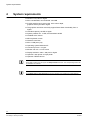
Systemvoraussetzungen
z Pentium IV mindestens 2,6 GHz
z Mind. 512 MB RAM, empfohlen: 1024 MB
z Grafikkarte S-VGA 1024 x 768, 16 Bit Farbtiefe,
64 MB Grafikspeicher oder mehr
z Der Grafikkartentreiber muss die Funktionalität
von Direct Draw ab V8.x komplett unterstützen
z Festplatte 120 GB oder mehr
z Systempartition mind. 10 GB, empfohlen: 20 MB
z CD-/DVD-Laufwerk / Brenner
z MF2-Tastatur, Maus
z Netzwerkanschluss
z Mind. 2 x USB-Ansschluss (2.0)
z Betriebssystem Windows XP
z Internet Explorer 6.x oder höher
z Monitor ab 17-Zoll oder mehr
z Bildschirmauflösung 1024 x 768 Pixel oder höher
z Option: Laserdrucker oder Tintenstrahldrucker
z Option: CD/DVD Brenner
HINWEIS
Bei einigen AMD-Prozessoren ist die Funktion Sabotageerkennung derzeit nicht funktionsfähig. In
der Software sind die entsprechenden Schaltflächen ausgegraut.
HINWEIS
Für die Funktion Banken oder GAA müssen mindestens 2 Datenpartitionen auf der Festplatte
vorhanden sein.
8
Siemens Building Technologies
Fire Safety & Security Products
08.2007
Softwarekomponenten
5
Softwarekomponenten
Bei der Installation des SISTORE MX NVS können Sie die folgenden
Softwarekomponenten installieren:
z SISTORE MX NVS Applikationsprogramm
z Hardware-Treiber nachinstallieren
z RemoteView (Client)
5.1
Netzwerk-Kameras
Die Softwarekomponente Netzwerk-Kameras ermöglicht es über einen PC bis zu
32 Netzwerk-Kameras und USB Ein- und Ausgangsmodule zu konfigurieren.
HINWEIS
Mit der SISTORE MX NVS Applikation können keine Videosignale von analogen Kameras
aufgezeichnet werden.
5.2
RemoteView (Client)
Systemvoraussetzungen:
Die Systemvoraussetzungen finden Sie in Kap. 4: Systemvoraussetzungen.
Der RemoteView ist ein Client, der unabhängig von den anderen
Softwarekomponenten installiert werden kann. Hierüber erfolgt ausschließlich die
Auswertung der Videodaten.
Hierbei werden SISTORE MX NVS RemoteView, SISTORE Player und der
Software-Codec installiert.
9
Siemens Building Technologies
Fire Safety & Security Products
08.2007
Installation
6
Installation
6.1
SISTORE MX NVS installieren
Voraussetzung:
Der Benutzer (user) ist mit mind. Hauptbenutzerrechten (main user), besser noch
mit Administratorrechten (admin user) angemeldet. Das gilt sowohl für die
Neuinstallation der Software als auch für ein nachträgliches Treiber-Update.
Systemvoraussetzungen:
Die Systemvoraussetzungen finden Sie in Kap. 4: Systemvoraussetzungen.
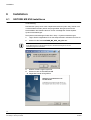
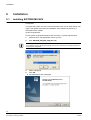
1.
Legen Sie die mitgelieferte CD in das entsprechende Laufwerk Ihres PCs ein.
2.
Starten Sie die Datei SISTORE_MX_NVS_260_SP1.exe.
HINWEIS
Ist das Betriebssystem entsprechend konfiguriert, startet beim Einlegen der CD das
Installationsprogramm automatisch.
3.
Wählen Sie die Programmsprache.
4.
Klicken Sie auf die Schaltfläche OK.
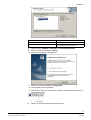
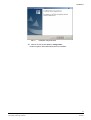
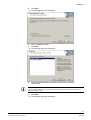
Î
Folgendes Fenster wird geöffnet:
10
Siemens Building Technologies
Fire Safety & Security Products
08.2007
Installation
5.
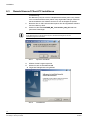
Î
Klicken Sie auf die Schaltfläche Weiter.
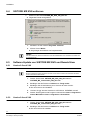
Folgendes Dialogfenster wird geöffnet:
6.
Wählen Sie einen Zielordner aus.
7.
Klicken Sie auf die Schaltfläche Weiter.
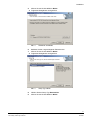
Î
8.
Folgendes Dialogfenster wird geöffnet:
Wählen Sie die gewünschte Softwarekomponente (vgl. Kap. 5
Softwarekomponenten).
HINWEIS
Informationen zur benutzerspezifischen Installation finden Sie in Kapitel 6.2 „Hardware-Treiber
nachinstallieren“.
9.
Î
Klicken Sie auf die Schaltfläche Weiter.
Folgendes Dialogfenster wird geöffnet:
11
Siemens Building Technologies
Fire Safety & Security Products
08.2007
Installation
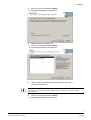
10. Geben Sie hier den Name des Programmordners ein und klicken Sie auf die
Schaltfläche Weiter.
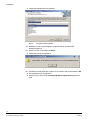
Î
Folgendes Fenster wird geöffnet:
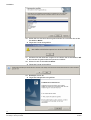
11. Schließen Sie alle laufenden Programme und klicken Sie die Schaltfläche OK.
Î
Nun werden die gewünschten Komponenten installiert.
12. Klicken Sie auf die Schaltfläche Weiter.
Î
Folgendes Fenster wird geöffnet:
13. Bestätigen Sie mit Ja.
Î
Folgendes Dialogfenster wird geöffnet:
12
Siemens Building Technologies
Fire Safety & Security Products
08.2007
Installation
14. Klicken Sie auf die Schaltfläche Fertig stellen.
Î
Der Computer wird neu gestartet.
15. Schließen Sie nach dem Neustart des PCs einen USB-Dongle an den
USB-Anschluss ihres PCs an.
Vergleichen Sie hierzu Kap. 2: Lieferumfang.
16. Leisten Sie den Anweisungen des Dongle-Treibers Folge, bis der DongleTreiber korrekt installiert ist.
17. Starten Sie SISTORE MX NVS neu.
13
Siemens Building Technologies
Fire Safety & Security Products
08.2007
Installation
6.2
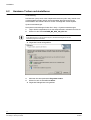
Hardware-Treiber nachinstallieren
Voraussetzung:
Der Benutzer (user) ist mit mind. Hauptbenutzerrechten (main user), besser noch
mit Administratorrechten (admin user) angemeldet. Das gilt sowohl für die
Neuinstallation der Software als auch für ein nachträgliches Treiber-Update.
Systemvoraussetzungen:
Die Systemvoraussetzungen finden Sie in Kap. 4: Systemvoraussetzungen.
1.
Legen Sie die mitgelieferte CD in das entsprechende Laufwerk Ihres PCs ein.
2.
Starten Sie die Datei SISTORE_MX_NVS_260_SP1.exe.
HINWEIS
Ist das Betriebssystem entsprechend konfiguriert, startet beim Einlegen der CD das
Installationsprogramm automatisch.
Î
Folgendes Fenster wird geöffnet:
3.
Aktivieren Sie das Optionsfeld Programm ändern.
4.
Klicken Sie auf die Schaltfläche Weiter.
Î
Folgendes Dialogfenster wird geöffnet:
14
Siemens Building Technologies
Fire Safety & Security Products
08.2007
Installation
Hardware-Treiber
Funktion
CKA4810/CKA4820
Ansteuerung eines CKA-Bedienpultes
Hardware Watchdog
Ansteuerung einer zusätzlichen Baugruppe im PC
(Typ PWDOG1 der Firma Quancom)
5.
Wählen Sie die CKA4810 / CKA4820 oder Hardware Watchdog.
6.
Klicken Sie auf die Schaltfläche Weiter.
Î
7.
Folgendes Dialogfenster wird geöffnet:
Klicken Sie auf die Schaltfläche Fertig stellen.
Î
Der Computer wird neu gestartet.
Î
Nach dem Neustart des Computers erscheint in der Taskleiste neben der Uhr
das Symbol für CKA.
1
8.
CKA-Symbol
Starten Sie SISTORE MX NVS RemoteView neu.
15
Siemens Building Technologies
Fire Safety & Security Products
08.2007
Installation
6.3
RemoteView auf Client-PC installieren
Voraussetzung:
Der Benutzer (user) ist mit mind. Hauptbenutzerrechten (main user), besser
noch mit Administratorrechten (admin user) angemeldet. Das gilt sowohl für
die Neuinstallation der Software als auch für ein nachträgliches Update.
1.
Benutzen Sie ein CD-Laufwerk oder kopieren Sie die mitgelieferte Software
auf einen Memory-Stick.
2.
Starten Sie die Datei SISTORE_MX_ RemoteView_260_SP1.exe vom
genannten Datenträger.
HINWEIS
Ist das Betriebssystem entsprechend konfiguriert, startet beim Einlegen der CD das
Installationsprogramm automatisch.
Abb. 1
Sprache auswählen
3.
Wählen Sie die Programmsprache.
4.
Klicken Sie auf die Schaltfläche OK.
Î
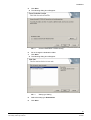
Folgendes Dialogfenster wird geöffnet:
Abb. 2
InstallShield
16
Siemens Building Technologies
Fire Safety & Security Products
08.2007
Installation
5.
Î
Klicken Sie auf die Schaltfläche Weiter.
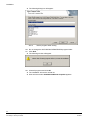
Folgendes Dialogfenster wird geöffnet:
Abb. 3
Zielordner auswählen
6.
Behalten Sie den vorgeschlagenen Zielordner bei.
7.
Klicken Sie auf die Schaltfläche Weiter.
Î
Folgendes Dialogfenster wird geöffnet:
Abb. 4
Setup-Typ wählen
8.
Wählen Sie den Setup-Typ RemoteView.
9.
Klicken Sie auf die Schaltfläche Weiter.
17
Siemens Building Technologies
Fire Safety & Security Products
08.2007
Installation
Î
Folgendes Dialogfenster wird geöffnet:
Abb. 5
Programmordner wählen
10. Behalten Sie den vorgeschlagenen Programmordner SISTORE MX
REMOTEVIEW bei.
11. Klicken Sie auf die Schaltfläche Weiter.
Î
Folgendes Fenster wird geöffnet:
12. Schließen Sie alle laufenden Programme und klicken Sie die Schaltfläche OK.
Î
Die Installation wird durchgeführt.
Î
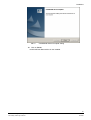
Warten Sie, bis das Fenster InstallShield Wizard abgeschlossen geöffnet
wird:
18
Siemens Building Technologies
Fire Safety & Security Products
08.2007
Installation
Abb. 6
Installation abgeschlossen
13. Klicken Sie auf die Schaltfläche Fertig stellen.
Î
Das Programm SistoreMX RemoteView ist installiert.
19
Siemens Building Technologies
Fire Safety & Security Products
08.2007
Installation
6.4
SISTORE MX NVS entfernen
1.
Starten Sie die Datei SISTORE_MX_NVS_260_SP1.exe
Î
Folgendes Fenster wird geöffnet:
1.
Markieren Sie die Auswahl Programm entfernen.
2.
Klicken Sie auf Weiter
Î
Sie gelangen automatisch ans Programmende.
HINWEIS
Falls das CEVIS bzw. Siemens-Verzeichnis nach der Deinstallation noch vorhanden ist, müssen Sie
es manuell löschen.
6.5
Software-Update von SISTORE MX NVS und RemoteView
6.5.1
Version 2.5x auf 2.60
HINWEIS
Bei einer Aktualisierung des Programms auf eine neuere Version werden die Parameter der älteren
Version automatisch übernommen.
1.
Starten Sie die Datei SISTORE_MX_NVS_260_SP1.exe bzw.
SISTORE_MX_ RemoteView_260_SP1.exe.
2.
Bestätigen Sie alle Fenster mit Weiter bzw. Fertig stellen.
3.
Bestätigen Sie die Aufforderung zum Löschen der alten Version.
Î
6.5.2
Die neue Version wird installiert.
4.
Löschen Sie ggf. das alte Verzeichnis \CEVIS bzw. \SIEMENS manuell.
5.
Starten Sie das gewünschte Programm manuell über Start > Programme >
Sistore MX NVS bzw Start > Programme > RemoteView.
Version 2.6x auf 2.60
1.
Starten Sie die Datei SISTORE_MX_NVS_260_SP1.exe bzw.
SISTORE_MX_ RemoteView_260_SP1.exe.
2.
Bestätigen Sie alle Fenster mit Weiter bzw. Fertig stellen.
Î
Die neue Version ist installiert.
20
Siemens Building Technologies
Fire Safety & Security Products
08.2007
Konfiguration
7
Konfiguration
7.1
Software aufrufen
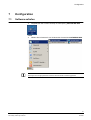
1.
Doppelklicken Sie auf dem Desktop die Verknüpfung SISTORE MX NVS.
ODER
1.
Wählen Sie im Startmenü von Windows das Verzeichnis SISTORE MX NVS.
HINWEIS
Bei Stoppen einer ereignisgesteuerter Aufnahme wird der aktuelle Voralarmring gelöscht!
21
Siemens Building Technologies
Fire Safety & Security Products
08.2007
Konfiguration
7.2
In das System einloggen
1.
Wählen Sie aus dem Menü Datei den Menüpunkt Login.
2.
klicken Sie auf die Schaltfläche Login
Î
3.
in der Symbolleiste.
Es wird folgender Login-Dialog geöffnet:
Machen Sie im Login-Dialog folgende Eingaben:
Benutzername
Geben Sie hier den für Sie vom Administrator angelegten Benutzernamen ein.
Beachten Sie dabei Groß- und Kleinschreibung.
Passwort
Geben Sie hier das für Sie vom Administrator angelegte Kennwort ein. Das
Kennwort wird als *** ausgegeben. Beachten Sie dabei Groß- und
Kleinschreibung.
(Auslieferungszustand: Benutzername = Administrator)
(Auslieferungszustand: Kennwort= Administrator)
4.
Bestätigen Sie mit OK.
HINWEIS
Es wird empfohlen, dieses Passwort zu ändern. Der Benutzername „Administrator“ kann nicht
gelöscht werden.
7.3
Letzte Benutzer anzeigen lassen
1.
Î
Klicken Sie auf den Pfeil in die Schaltfläche Login
.
Es werden Ihnen fünf Benutzer angezeigt, die sich zuletzt angemeldet haben.
22
Siemens Building Technologies
Fire Safety & Security Products
08.2007
Konfiguration
7.4
Passwort ändern
Sie haben zwei Möglichkeiten das Passwort zu ändern:
z Über den Menüpunkt Neues Passwort
z Über den Menüpunkt Benutzerverwaltung
7.4.1
Passwort ändern über den Menüpunkt Neues Passwort
1.
Wählen Sie im Menü Datei den Menüpunkt Neues Passwort.
2.
Geben Sie das existierende Passwort in das Eingabefeld Altes Passwort ein.
3.
Geben Sie Ihr neues Passwort in Neues Passwort und Wiederholung ein.
HINWEIS
Die minimale Passwortlänge beträgt acht Zeichen.
4.
7.4.2
Bestätigen Sie mit OK.
Passwort ändern über den Menüpunkt Benutzerverwaltung
Voraussetzung:
Sie benötigen das Recht Konfiguration.
5.
Î
Wählen Sie aus dem Menü Verwaltung den Menüpunkt Konfiguration.
Das Dialogfenster Konfiguration öffnet sich.
6.
Klicken Sie auf das Register Benutzerverwaltung.
7.
Geben Sie Ihr neues Passwort in Passwort und Passwortbestätigung ein.
HINWEIS
Die minimale Passwortlänge beträgt 8 Zeichen.
8.
Bestätigen Sie mit OK.
23
Siemens Building Technologies
Fire Safety & Security Products
08.2007
Konfiguration
7.5
Sprachversion ändern
1.
Î
Wählen Sie aus dem Menü Verwaltung den Menüpunkt Konfiguration.
Das Dialogfenster Konfiguration wird geöffnet.
2.
Klicken Sie auf das Register System.
3.
Legen Sie die Sprachversion fest, mit der SISTORE MX NVS arbeiten soll.
Î
SISTORE MX NVS sucht alle installierten Sprachen und listet diese in einer
Combobox auf. Es können jederzeit weitere Sprachen installiert werden. Sie
können nun gezielt eine Sprache auswählen oder aber – wie bisher – auf eine
automatische Umschaltung der Sprache zurückgreifen. Bei der automatischen
Umschaltung startet SISTORE MX NVS in der Sprache, die im
Betriebssystem als Landessprache gesetzt ist.
24
Siemens Building Technologies
Fire Safety & Security Products
08.2007
Konfiguration
7.6
Sprachversion unter Windows XP ändern
1.
Wählen Sie Start -> Einstellungen -> Systemsteuerung -> Regions- und
Sprachoptionen.
2.
Wählen Sie das Register Regionale Einstellungen.
Î
3.
Folgendes Dialogfenster wird geöffnet:
Nehmen Sie im Register folgende Einstellungen vor:
Standards und Formate
Deutsch (Deutschland)
Standort
Deutschland
4.
Klicken Sie auf die Schaltfläche Übernehmen.
5.
Wählen Sie das Register Sprachen.
25
Siemens Building Technologies
Fire Safety & Security Products
08.2007
Konfiguration
Î
6.
Î
7.
Folgendes Dialogfenster wird geöffnet:
Klicken Sie auf die Schaltfläche Details.
Folgendes Dialogfenster wird geöffnet:
Nehmen Sie im Register Einstellungen folgende Einstellungen vor:
Standard-Eingabegebietsschema
Deutsch (Deutschland) - Deutsch
8.
Klicken Sie auf die Schaltfläche Übernehmen.
9.
Klicken Sie auf die Schaltfläche OK.
26
Siemens Building Technologies
Fire Safety & Security Products
08.2007
Konfiguration
Î
Das Dialogfenster Regions- und Sprachoptionen öffnet sich:
10. Nehmen Sie im Register Erweitert folgende Einstellungen vor:
Sprache für Programme, die
Unicode nicht unterstützen
Deutsch (Deutschland)
11. Klicken Sie auf die Schaltfläche Übernehmen.
12. Klicken Sie auf die Schaltfläche OK.
Î
Das System wird neu gebootet.
27
Siemens Building Technologies
Fire Safety & Security Products
08.2007
Konfiguration
7.7
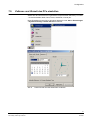
Datum und Uhrzeit auf deutsches Format stellen
1.
Stellen Sie nach den Spracheinstellungen zur Software ggf. Datum und
Uhrzeit auf das deutsche Format.
2.
Wählen Sie Start -> Einstellungen -> Systemsteuerung -> Regions- und
Sprachoptionen.
3.
Klicken Sie auf die Schaltfläche Anpassen.
4.
Wählen Sie das Register Uhrzeit.
Î
Folgendes Dialogfenster wird geöffnet:
5.
Wählen Sie das gewünschte Zeitformat.
6.
Klicken Sie auf die Schaltfläche Übernehmen.
28
Siemens Building Technologies
Fire Safety & Security Products
08.2007
Konfiguration
7.
Î
Wechseln Sie das Register Datum.
Folgendes Dialogfenster wird geöffnet:
8.
Wählen Sie das gewünschte Datumsformat.
9.
Klicken Sie auf die Schaltfläche Übernehmen.
10. Klicken Sie auf die Schaltfläche OK.
29
Siemens Building Technologies
Fire Safety & Security Products
08.2007
Konfiguration
7.8
Auflösung und Dateiformat
Die von SISTORE MX NVS erstellten Bilddateien haben die Endung .K26 oder .avi
– je nach Parametrierung. Diese wird im Register Konfiguration-System im Feld
Aufnahme eingestellt.
Bei den Dateien mit der Endung .k26 handelt es sich um verschlüsselte Bilddateien
in einem AVI-ähnlichen Format, die nur mit dem SISTORE Player ausgewertet
werden können. Erstellt werden die Dateien indem Sie im Menü Konfiguration >
System im Gruppenfeld Aufnahme das Kontrollkästchen Videodateien
verschlüsseln aktivieren.
Abb. 7
Videodateien verschlüsseln
Die .avi-Dateien können mit dem Media Player des Windows Betriebssystems
ausgewertet werden, sofern ein entsprechender Codec im Betriebssystem
hinterlegt ist.
Die Auflösung der Bilder in den Dateien ist abhängig von den Leistungsdaten der
jeweiligen Kamera und den getroffenen Einstellungen.
Die Auflösung der übermittelten Bilder können Sie im Bereich „Konfiguration“ je
nach Anforderung pro Kamera einstellen.
30
Siemens Building Technologies
Fire Safety & Security Products
08.2007
Konfiguration
7.9
Zeitzone und Uhrzeit des PCs einstellen
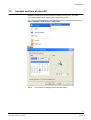
Stellen Sie die Uhrzeit Ihres PCs gemäß der entsprechenden Zeitzone (z. B. GMT
+ 01:00 Amsterdam, Berlin, Bern, Rome, Stockholm, Vienna) ein.
Diese Einstellung können Sie im Windows Startmenü unter Start > Einstellungen
> Systemsteuerung > Datum/ Uhrzeit vornehmen:
Abb. 8
Datum/Uhrzeit über das Start Menü verändern
31
Siemens Building Technologies
Fire Safety & Security Products
08.2007
Konfiguration
7.10
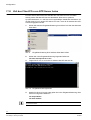
Zeit des Client PCs von NTP-Server holen
Ein NTP-Server liefert immer die aktuelle Zeit. Die Zeit Ihres PCs wird dabei
ständig mit der Zeit des NTP-Servers aktualisiert. Dies ist eine zyklische
Synchronisationsart, d. h. die Zeit wird in regelmäßigen Abständen aktualisiert. Um
die Zeit Ihres PCs von einem NTP-Server zu holen, muss die IP-Adresse des NTPServers angegeben werden.
1.
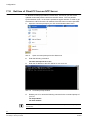
Öffnen Sie dazu die Eingabeaufforderung Ihres Client PCs über das Windows
Start Menü.
Abb. 9
2.
Eingabeaufforderung über Windows Start Menü öffnen
Geben Sie in der Eingabeaufforderung folgenden Befehl ein:
net time /setsntp:xxx.xx.xx.xxx
3.
Tragen Sie für xxx.xx.xx.xxx die IP-Adresse des NTP-Servers ein.
Abb. 10
4.
Eingabeaufforderungsfenster
Starten Sie Ihren PC erneut oder geben Sie in der Eingabeaufforderung Ihres
Client PCs folgenden Befehl ein
net stop w32time
net start w32time
Die IP-Adresse eines zulässigen Servers finden Sie im Internet oder wenden Sie sich an Ihren
Systemadministrator.
32
Siemens Building Technologies
Fire Safety & Security Products
08.2007
Konfiguration
7.11
Weitere Informationen
Ausführliche Informationen zur Software SISTORE MX NVS V2.60 (und dem
vorliegenden WebView) finden Sie in der Onlinehilfe oder in den entsprechenden
Dokumenten auf der Software-CD.
33
Siemens Building Technologies
Fire Safety & Security Products
08.2007
Software aktualisieren
8
Software aktualisieren
Sollte es zu einem späteren Zeitpunkt notwendig sein, die SISTORE MX NVS
Software zu reparieren oder neu zu installieren,
1.
Gehen Sie bitte wie in Kap. 6.2 „Hardware-Treiber nachinstallieren“
beschrieben vor.
2.
Wählen Sie die Option Software aktualisieren (Update).
Î
9
Diese bewirkt, dass alles, was bei der letzten Installation installiert wurde,
nochmals installiert wird. Zu beachten ist, dass hierbei vorhandene Dateien
überschrieben werden können! Nicht überschrieben werden die Dateien mit
den Parametrierungseinstellungen, der Benutzerverwaltung und die
Aufzeichnungen.
Brennen auf CD/DVD
Voraussetzung:
Damit Daten auf CD-/DVD gebrannt werden können, muss auf dem NVS PC die
Brennsoftware Nero V6.x installiert sein.
HINWEIS
Die Funktionen Double Layer und/oder Light Scribe können nur genutzt werden, falls folgende
Voraussetzungen erfüllt sind:
z Es steht ein geeigneter Brenner zur Verfügung.
z Die Brennsoftware Nero ab der Version 6.6.4.x oder Version 7.x ist installiert.
Die Software wurde mit folgenden externen USB-Brennern (CD-und DVD
Kombigeräten) erfolgreich getestet:
– Plextor PX-740UF
– LiteOn SOHW-1673 SX-02
– LG GSA-2164D-R
HINWEIS
Als Datenträger eignen sich alle handelsüblichen CD-R, CD-RW, DVD±R, DVD±RW.
Der Datenträger muss nicht zusätzlich formatiert werden.
34
Siemens Building Technologies
Fire Safety & Security Products
08.2007
Inbetriebnahme
10
Inbetriebnahme
10.1
Beispiele für Systemaufbau
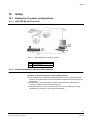
10.1.1 SISTORE MX NVS Server PC
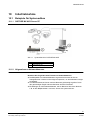
Abb. 11
Systemübersicht SISTORE MX NVS
1
Max. 32 IP-Kameras oder IP-Dome
2
MX NVS Server PC
3
CKA4810/20 (optional)
10.1.2 Allgemeines zu Netzwerkkameras
Beachten Sie Folgendes beim Einsatz von Netzwerkkameras:
z Die Bildqualität von Netzwerkkameras ist generell schlechter als die von
Analogkameras. Ursache ist die nötige Kompression, um das Netzwerk weniger
zu belasten.
z Auf Netzwerkkameras können mehrere Benutzer gleichzeitig zugreifen. Durch
den gleichzeitigen Zugriff mehrerer Benutzer sinkt die Framerate.
z Einstellungen an einer Netzwerkkamera, die ein Benutzer über einen Browser
z. B. an den Bildparametern vornimmt, wirken sich systemweit aus.
35
Siemens Building Technologies
Fire Safety & Security Products
08.2007
Inbetriebnahme
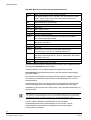
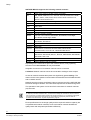
SISTORE MX NVS unterstützt folgende Netzwerkkameras:
Arecont
Vision 2100, Vision 3130 Day, Vision 3130 Night
Axis
205, 206/W, 206M, 210, 211, 212 PTZ, 213 PTZ, 216FD, 221, 223M,
231D+, 232D+, 240Q, 241Q, 241S, Generic HTTP Interface V1.0,
Generic HTTP Interface V2.0
CBC
MP2A, MP3DN Day, MP3DN Night
Digilan
TV7214
Eneo
ENC-1003L
IQ invision
IQ501, IQ603, IQ 752
JVC
VN-C10U; VN-C30U, VN-C625U, VN-C655U
Lumenera
LE175C, LE275C, LE375C
Mobotix
D12 one or two cameras, M1 Models, M10 Models, M10D-Night,
M12 Models, M12D-Night, M22M
Panasonic
KX-HCM-280, WV-NM100/G, WV-NP244E, WV-NP472, WV-NS202,
WV-NS320, WV-NW470
Pixord
205
Samsung
SNC-L200
Siemens
CCIS1337-LP, CCIx1345, CFVA-IP NTSC, CFVA-IP PAL,
CVVA-IP NTSC, CVVA-IP PAL, TELSCAN WEB Server
Sony
Generic HTTP interface, SNC-CS11, SNC-CS3P, SNC-DF40P,
SNC-M1/W, SNC-M3/W, SNC-P1, SNC-P5, SNC-RZ25P, SNC-RZ30P,
SNC-Z20P, SNT-V704
VINWP1
2051
Vivotek
MJPEG Models, PZ6122, VS2402
Je nach Funktionsumfang der Netzwerkkamera werden manche Bedienelemente
des Registers LAN-Kameras nicht aktiviert.
Insgesamt können max. 32 Netzwerkkameras angeschlossen werden.
Einschränkung: Netzwerkkameras können nicht auf analoge Videoausgänge
geschaltet werden.
Der Zugriff auf Netzwerkkameras erfolgt mit deutlich größerer Latenz. Ursache ist
der erhöhte Kommunikationsaufwand zwischen SISTORE MX NVR und einer
Netzwerkkamera.
Netzwerkkameras verursachen deutlich mehr Prozessorlast des SISTORE MX
NVS als Analogkameras. Ausschlaggebend sind die geforderten Frameraten.
Die Bedienung des Systems kann träge werden, wenn alle Netzwerkkameras (32)
genutzt werden.
Um die Prozessorlast nicht über 90 % steigen zu lassen, empfehlen wir, die Auflösung von
Netzwerkkameras niedrig einzustellen (CIF-Format). Die Bildqualität sollte auf ca. 70 % eingestellt
sein. Dabei gilt: Je leistungsfähiger der Server PC, desto besser die Bildqualität und desto niedriger
die Prozessorauslastung. Vergleichen Sie hierzu Kap. „Systemvoraussetzungen“, Seite 8.
Genaue Angaben bezüglich der Bildqualität und der benötigten
Festplattenkapazität sind bei Netzwerkkameras nicht möglich, da jede
Netzwerkkamera unterschiedliche Qualitätsstufen kennt und Angaben
unterschiedlich interpretiert.
36
Siemens Building Technologies
Fire Safety & Security Products
08.2007
Inbetriebnahme
10.2
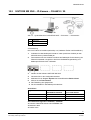
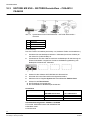
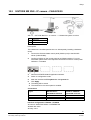
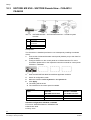
SISTORE MX NVS – IP-Kamera – CKA4810 / 20
Abb. 12
1
Systemübersicht SISTORE MX NVS – IP Kamera –– CKA4810/20
CKA4810/20
2
MX NVS Server
3
Max. 32 IP-Kameras
Voraussetzung:
Der CKA-Treiber ist installiert (siehe Kap. 6.2 „Hardware-Treiber nachinstallieren“).
1.
Schließen Sie das Bedienpult CKA4810 / 4820 (Anschluss COM1A) an den
MX NVS-Server (COM1/COM2) an.
2.
Parametrieren Sie den COM1A-Anschluss am Bedienpult für die Nutzung als
RS232-Schnittstelle. Vergleichen Sie hierzu die Bedienungsanleitung zum
Bedienpult CKA4810 bzw. CKA4820.
3.
Starten Sie die Software SISTORE MX NVS.
4.
Wechseln Sie in den Konfigurationsmodus.
5.
Markieren Sie im Register System das Kontrollkästchen Bedien-Panel.
6.
Klicken Sie auf Übernehmen.
Die Einstellung wird gespeichert.
Die Schnittstelle für das Bedienpult ist aktiviert.
Î
Î
Anschlüsse
Signal
MX NVS Server
CKA4810 / CKA4820
SISTORE RemoteView
9 pol. SubD Stecker
Gnd
5
5
Rxd
3
2
Txd
2
3
Schnittstellenkonfiguration CKA4810 / CKA4820
z Protokoll: SIMATRIX RS232 oder SIEMENS IVM
z Baudrate: 9600
z Parität: keine
37
Siemens Building Technologies
Fire Safety & Security Products
08.2007
Inbetriebnahme
10.3
SISTORE MX NVS – SISTORE RemoteView – CKA4810 /
CKA4820
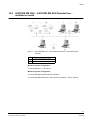
Abb. 13
Systemübersicht SISTORE MX NVS – SISTORE RemoteView –
CKA4810
1
CKA4810/20
2
Client PC mit RemoteView
3
MX NVS Server
4
Max. 32 IP-Kameras
Voraussetzung:
Der CKA-Treiber ist installiert (siehe Kap. 6.2 „Hardware-Treiber nachinstallieren“).
1.
Schließen Sie das Bedienpult CKA4810 / CKA4820 (Anschluss COM1A) an
den Client PC (COM1/COM2) an.
2.
Parametrieren Sie den COM1A-Anschluss am Bedienpult für die Nutzung als
RS232-Schnittstelle. Vergleichen Sie hierzu die Bedienungsanleitung zum
Bedienpult CKA4810 bzw. CKA4820.
3.
Starten Sie die Software SISTORE MX NVS RemoteView.
4.
Wechseln Sie in den RemoteView Konfigurationsmodus.
5.
Markieren Sie im Register System das Kontrollkästchen Bedien-Panel.
6.
Klicken Sie auf Übernehmen.
Die Einstellung wird gespeichert.
Die Schnittstelle für das Bedienpult ist aktiviert.
Î
Î
Anschlüsse
Signal
Client PC
CKA4810 / / CKA4820
SISTORE RemoteView
9 pol. SubD Stecker
Gnd
5
5
Rxd
3
2
Txd
2
3
Schnittstellenkonfiguration CKA4810 / CKA4820
z Protokoll: SIMATRIX RS232 oder SIEMENS IVM
z Baudrate: 9600
z Parität: keine
38
Siemens Building Technologies
Fire Safety & Security Products
08.2007
Inbetriebnahme
10.4
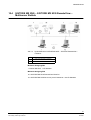
SISTORE MX NVS – SISTORE MX NVS RemoteView –
Multiserver Betrieb
Abb. 14
Systemübersicht SISTORE MX NVS – SISTORE RemoteView –
CKA4810
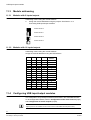
1
1 … max. 32 IP-Kameras / IP-Dome
2
1 … max. 16 Client PC
3
1 … max. 10 MX NVS Server
Minimale Anlagengröße
1 x Server MX NVS, 1 x IP-Kamera
Maximale Anlagengröße
16 x SISTORE MX NVS RemoteView Client PC
10 x SISTORE MX NVS Server mit je 32 IP-Kameras = 320 IP-Kameras
39
Siemens Building Technologies
Fire Safety & Security Products
08.2007
Inbetriebnahme
10.5
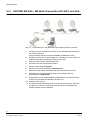
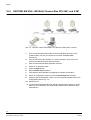
SISTORE MX NVS – MX Multi Channel Box RCI 0601 und GAA
Abb. 15
Systemübersicht – MX NVS Multi-Channel Box RCI 0601 und GAA
1.
Schließen Sie die MX Multi-Channel Box an den SISTORE MX NVS Server
PC (COM1/COM2) an.
Hierzu benötigen Sie den Konverter 485SD9R (FA B&B Electronics).
2.
Schließen Sie die GAA an das RCI0601 an. Informationen hierzu finden Sie
im Benutzerhandbuch MX Multi-Channel Box RCI 0601.
3.
Starten Sie die Software SISTORE MX NVS.
4.
Wechseln Sie in den Konfigurationsmodus.
5.
Wählen Sie das Register System.
6.
Markieren Sie das Kontrollkästchen Bank-Betrieb.
7.
Beenden Sie die Software SISTORE MX NVS und starten Sie sie neu.
8.
Wechseln Sie in den Konfigurationsmodus und markieren Sie das
Kontrollkästchen GAA-Betrieb.
9.
Konfigurieren Sie den Geldausgabeautomatenbetrieb. Informationen hierzu
finden Sie im Konfigurationshandbuch ab Seite 144.
10. Starten Sie den PC neu.
Î
Die Software SISTORE MX NVS wird neu gestartet (automatisch oder über
das Start-Icon auf dem PC Desktop). Hierbei wird auch das Modul GAAHandler gestartet (siehe Taskleiste).
40
Siemens Building Technologies
Fire Safety & Security Products
08.2007
USB Ein-/Ausgangsmodule
11
USB Ein-/Ausgangsmodule
Die USB Ein-/Ausgangsmodule können Sie als Zubehör bestellen. Vergleichen Sie
hierzu Kap. „Bestellangaben“ im SISTORE MX NVS Benutzerhandbuch.
HINWEIS
Sie benötigen keine zusätzlichen Netzteile. Die Spannungsversorgung erfolgt über eine USBSchnittstelle.
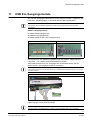
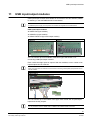
USB Ein-/Ausgangsmodule
z USBOPT08 (Eingangsmodul)
z USBREL8 (Ausgangsmodul)
z USBOPTOREL16 (Ein- und Ausgangsmodul)
USBOPT08
USBREL8
Sie können bis zu vier Module des gleichen Typs anschließen. Vergleichen Sie
hierzu Kap. 11.2: USB Ein-/Ausgangsmodule anschließen.
Jedes Modul hat acht Ein- bzw. Ausgänge. Bei vier Modulen können Sie die
Anzahl der Ein- und Ausgänge auf bis zu 32 erhöhen.
HINWEIS
Wir empfehlen Ihnen bei mehr als zwei Geräten einen USB-Verteiler (Hub) zwischen Ihren PC und die
Geräte zu schalten.
USBOPTOREL16
Sie können bis zu 16 Module dieses Typs anschließen. Jedes Module hat 16
Opto-Eingänge und 16 Relais-Ausgänge.
HINWEIS
Eine Kombination von USBOPTO8 bzw. USBREL8 mit den USBOPTOREL16 ist nicht möglich.
41
Siemens Building Technologies
Fire Safety & Security Products
08.2007
USB Ein-/Ausgangsmodule
11.1
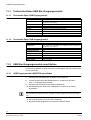
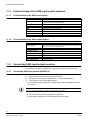
Technische Daten USB Ein-/Ausgangsmodule
11.1.1 Technische Daten USB Eingangsmodul
11.1.2
11.2
Systembus
USB
Moduladresse
Über Steckbrücken einstellbar von 0-3 (Betrieb von bis zu 4 Modulen
des gleichen Typs möglich)
Eingänge
8, optisch getrennt (5 – 30 V)
Eingangsstrom
max. 10 mA
Anzeigen
Initialisierung, Zustand der Eingangssignale
Anschlüsse
Steckbare Schraubklemmen
CE
Ja
Betriebstemperatur
0 bis 70 °C
Spannungsversorgung
über USB
Technische Daten USB Ausgangsmodul
Systembus
USB
Moduladresse
Über Steckbrücken einstellbar von 0-3 (Betrieb von bis zu 4 Modulen
des gleichen Typs möglich)
Ausgänge
8 DIL-Relais (max. 15W/1A)
Schaltbare Spannung
30V
Anzeigen
Initialisierung, Zustand der Relais
Anschlüsse
Steckbare Schraubklemmen
CE
Ja
Betriebstemperatur
0 bis 70 °C
Relaisschaltzeit
1ms (mit Prellen)
USB Ein-/Ausgangsmodule anschließen
Sie können die Module auf einer Hutschiene als Standgerät oder als mobiles Gerät
am PC verwenden.
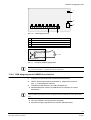
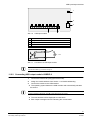
11.2.1 USB Eingangsmodul USBOPT08 anschließen
1.
Schließen Sie das Modul über steckbare Klemmleisten an.
2.
Weisen Sie dem Modul die Moduladresse zu. Vergleichen Sie hierzu
Kap. 11.3: Moduladresse zuweisen.
3.
Schließen Sie das Modul an die USB-Schnittstelle an.
Î
Das Betriebssystem erkennt die USB-Module und aktiviert die Treiber
automatisch.
HINWEIS
Sollte eine Meldung eingeblendet werden, bestätigen Sie diese mit OK bis alle Fenster geschlossen
sind.
Î
Die neue Hardware wird als Quickinfo angezeigt.
Î
Bei jedem Eingang signalisiert eine LED den aktuellen Status.
42
Siemens Building Technologies
Fire Safety & Security Products
08.2007
USB Ein-/Ausgangsmodule
1
2
3
+ – + – + – + – + – + – + – + –
5
Abb. 16
4
USB Eingangsmodul
1
Module Addressing
2
Configuration Status LED
3
USB-Schnittstelle
4
Input Status LED
5
Inputs
+
5 ... 30V
USB Input Module
Abb. 17
-
Anschluss USB Eingangsmodul
HINWEIS
Der Anschluss der Kabel (+/-) ist gemäß der Abb.15 vorzunehmen.
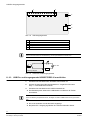
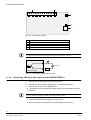
11.2.2 USB Ausgangsmodul USBREL8 anschließen
1.
Schließen Sie das Modul über steckbare Klemmleisten an.
2.
Weisen Sie dem Modul die Moduladresse zu. Vergleichen Sie hierzu
Kap. 11.3: Moduladresse zuweisen.
3.
Schließen Sie das Modul an die USB-Schnittstelle an.
Î
Das Betriebssystem erkennt die USB-Module und aktiviert die Treiber
automatisch.
HINWEIS
Sollte eine Meldung eingeblendet werden, bestätigen Sie diese mit OK bis alle Fenster geschlossen
sind.
Î
Die neue Hardware wird als Quickinfo angezeigt.
Î
Bei jedem Ausgang signalisiert eine LED den aktuellen Status.
43
Siemens Building Technologies
Fire Safety & Security Products
08.2007
USB Ein-/Ausgangsmodule
2
1
3
4
5
Abb. 18
USB Ausgangsmodul
1
Relay Outputs
2
Output Status LED
3
Module Addressing
4
Configuration Status LED
5
USB-Schnittstelle
HINWEIS
Der Anschluss der Kabel ist ohne Bedeutung, da dies potentialfreie Anschlüsse sind.
max. 30V
USB Output Module
Abb. 19
Anschluss USB Ausgangsmodul
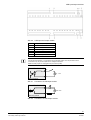
11.2.3 USB Ein- und Ausgangsmodul USBOPTOREL16 anschließen
1.
Schließen Sie das Modul über steckbare Klemmleisten an.
2.
Weisen Sie dem Modul die Moduladresse zu. Vergleichen Sie hierzu
Kap. 11.3: Moduladresse zuweisen.
3.
Schließen Sie das Modul an die USB-Schnittstelle an.
Î
Das Betriebssystem erkennt die USB-Module und aktiviert die Treiber
automatisch.
HINWEIS
Sollte eine Meldung eingeblendet werden, bestätigen Sie diese mit OK bis alle Fenster geschlossen
sind.
Î
Die neue Hardware wird als Quickinfo angezeigt.
Î
Bei jedem Ein-/ Ausgang signalisiert eine LED den aktuellen Status.
44
Siemens Building Technologies
Fire Safety & Security Products
08.2007
USB Ein-/Ausgangsmodule
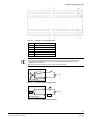
Abb. 20
USB Ein- und Ausgangsmodul
1, 2
Relais/Opto-Outputs
3
0V
4
12 V
5
JP1 Stromversorgung USB/extern
6
USB-Schnittstelle
7
DIP1
8, 9
Opto-Input
HINWEIS
Der Anschluss der Eingangskabel (+/-) ist so aufzulegen, wie die Bedruckung auf dem Ein- und
Ausgangsmodul es anzeigt. Der Anschluss der Ausgangskabel ist ohne Bedeutung, da diese
potentialfreie Anschlüsse sind.
Beachten Sie, dass der Jumper JP1 auf Pin 2 und 3 gesteckt ist (USB).
+
5 ... 30V
USB Input Module
Abb. 21
Anschluss USB Eingangsmodul
max. 30V
USB Output Module
Abb. 22
Anschluss USB Ausgangsmodul
45
Siemens Building Technologies
Fire Safety & Security Products
08.2007
USB Ein-/Ausgangsmodule
11.3
Moduladresse zuweisen
11.3.1 Module mit 8 Ein- bzw. Ausgängen
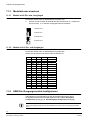
Die Module werden über die Moduladresse angesprochen.
1.
Weisen Sie die Adresse der Module über die Steckbrücken zu. Vergleichen
Sie hierzu Kap. 11.2: USB Ein-/Ausgangsmodule anschließen.
Moduladresse 0
Moduladresse 1
Moduladresse 2
Moduladresse 3
11.3.2 Module mit 16 Ein- und Ausgängen
Die Module werden über die Moduladresse angesprochen.
Weisen Sie die Adresse der Module über die Schalter zu.
11.4
SW1
SW2
SW3
SW4
Moduladresse
On
On
On
On
0
Off
On
On
On
1
On
Off
On
On
2
Off
Off
On
On
3
On
On
Off
On
4
Off
On
Off
On
5
On
Off
Off
On
6
Off
Off
Off
On
7
On
On
On
Off
8
Off
On
On
Off
9
On
Off
On
Off
10
Off
Off
On
Off
11
On
On
Off
Off
12
Off
On
Off
Off
13
On
Off
Off
Off
14
Off
Off
Off
Off
15
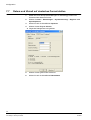
USB Ein-/Ausgangsmodule konfigurieren
Informationen zur Konfiguration von Ein-/Ausgangsmodule finden Sie im
Konfigurationshandbuch SISTORE MX NVS V2.60, Kapitel Alarmgeber
konfigurieren (Eingang) und Schaltausgänge konfigurieren (Ausgang).
HINWEIS
Die Funktion Digitaleingänge steht im SISTORE MX NVS zur Zeit nicht zur Verfügung (Stand März
2007).
46
Siemens Building Technologies
Fire Safety & Security Products
08.2007
Herausgegeben von
Siemens Building Technologies
Fire & Security Products GmbH & Co. oHG
D-76181 Karlsruhe
www.sbt.siemens.com
Dokument Nr. A6V10072823
Ausgabe
08.2007
© 2007 Copyright by
Siemens Building Technologies
Liefermöglichkeiten und technische Änderungen vorbehalten.
Gedruckt in der Bundesrepublik Deutschland
auf umweltfreundlich chlorfrei gebleichtem Papier.
SISTORE MX NVS
Application Software for
Network-Based Video
Recording
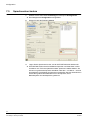
Installation Guide (EN)
Software version V2.60 and higher
Fire Safety & Security Products
Siemens Building Technologies
Liefermöglichkeiten und technische Änderungen vorbehalten.
Data and design subject to change without notice. / Supply subject to availability.
© 2007 Copyright by
Siemens Building Technologies AG
Wir behalten uns alle Rechte an diesem Dokument und an dem in ihm dargestellten Gegenstand vor. Der Empfänger anerkennt diese
Rechte und wird dieses Dokument nicht ohne unsere vorgängige schriftliche Ermächtigung ganz oder teilweise Dritten zugänglich machen
oder außerhalb des Zweckes verwenden, zu dem es ihm übergeben worden ist.
We reserve all rights in this document and in the subject thereof. By acceptance of the document the recipient acknowledges these rights
and undertakes not to publish the document nor the subject thereof in full or in part, nor to make them available to any third party without our
prior express written authorization, nor to use it for any purpose other than for which it was delivered to him.
Copyright
Copyright 2007 © Fire & Security Products GmbH & Co. oHG. All rights reserved.
Siemens Fire & Security Products GmbH & Co. oHG confers upon the purchaser
the right to use the software. It is not permitted to reproduce this document in
whole or in part or translate it into another language without our written consent.
Disclaimer
This manual has been written with all due care. Its content is updated regularly and
adapted to reflect current information and conditions. However, no guarantee can
be made with regard to the accuracy and completeness of the information
provided. No liability can be assumed for direct or consequential losses and thirdparty damages arising from the purchase of this product. In all cases, liability is
limited to the purchase price of the product.
The information in these operating instructions was up to date at the time of
publication. We reserve the right to make subsequent changes to technical or
organizational details.
Trademarks
SISTORE is a trademark of Siemens Building Technologies AG, Fire & Security
Products GmbH & Co. oHG.
Contacting us
If you have questions or suggestions regarding the product or this documentation,
please contact your local SIEMENS representative. You can also visit our Web site
at:http://www.sbt.siemens.com
National standards
The products are developed and manufactured according to all applicable
European safety standards. Any national or local safety standards or laws that
apply to the development, design, installation, operation or disposal of a product
must be adhered to in addition to the instructions in the product documentation.
About this document
A complete version of this manual can be found in Adobe Acrobat format (PDF) on
the SISTORE MX NVS CD. This is the most recent version.
All subsequent alterations have been included as far as possible.
Contents
1
1.1
1.2
1.2.1
1.2.2
1.2.3
1.2.4
Safety .....................................................................................................53
Target readers.........................................................................................53
Work safety information ..........................................................................53
Handling ..................................................................................................53
Transport.................................................................................................53
Storage....................................................................................................54
Service and maintenance .......................................................................54
2
Scope of Delivery ..................................................................................55
3
Details for ordering ...............................................................................55
4
System requirements ...........................................................................56
5
5.1
5.2
Software components ..........................................................................57
Network cameras ....................................................................................57
RemoteView (client) ................................................................................57
6
6.1
6.2
6.3
6.4
6.5
6.5.1
6.5.2
Installation .............................................................................................58
Installing SISTORE MX NVS ..................................................................58
Subsequently installing a hardware driver ..............................................62
Installing RemoteView on a client PC .....................................................64
Removing SISTORE MX NVS ................................................................68
Updating SISTORE MX NVS and RemoteView software.......................68
From version 2.5x to version 2.60...........................................................68
From version 2.6x to version 2.60...........................................................68
7
7.1
7.2
7.3
7.4
7.4.1
7.4.2
7.5
7.6
7.7
7.8
7.9
7.10
7.11
Configuration.........................................................................................69
Starting the software ...............................................................................69
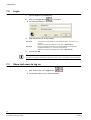
Login .......................................................................................................70
Show last users to log on........................................................................70
Change password ...................................................................................71
Changing the password using the menu item New password................71
Changing the password using the menu item User management..........71
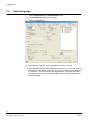
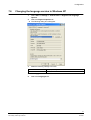
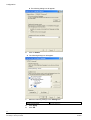
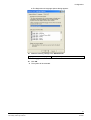
Select language ......................................................................................72
Changing the language version in Windows XP.....................................73
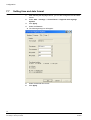
Setting time and date format...................................................................76
Resolution and file format .......................................................................78
Set date and time of client PC ................................................................79
Get time of Client PC from an NTP Server .............................................80
Further information..................................................................................81
8
Software update ....................................................................................82
9
Writing to CD/DVD.................................................................................82
51
Siemens Building Technologies
Fire Safety & Security Products
08.2007
Safety
10
10.1
10.1.1
10.1.2
10.2
10.3
10.4
10.5
Setup ......................................................................................................83
Examples of system configurations ........................................................83
SISTORE MX NVS Server PC ................................................................83
General information about network cameras ..........................................83
SISTORE MX NVS - IP camera - CKA4810/20 ......................................85
SISTORE MX NVS - SISTORE RemoteView - CKA4810 / CKA4820....86
SISTORE MX NVS – SISTORE MX NVS RemoteView – multiserver
mode .......................................................................................................87
SISTORE MX NVS - MX Multi Channel Box RCI 0601 and ATM...........88
11
11.1
11.1.1
11.1.2
11.2
11.2.1
11.2.2
11.2.3
11.3
11.3.1
11.3.2
11.4
USB input/output modules...................................................................89
Technical data of the USB input/output modules....................................90
Technical data of the USB input module.................................................90
Technical data of the USB output module ..............................................90
Connecting USB input/output modules ...................................................90
Connecting USB input module USBOPT08 ............................................90
Connecting USB output module USBREL8 ............................................91
Connecting USB input and output module USBOPTOREL16 ................92
Module addressing..................................................................................94
Modules with 8 inputs/outputs.................................................................94
Modules with 16 inputs/outputs...............................................................94
Configuring USB input/output modules...................................................94
12
Disposal ................................................Fehler! Textmarke nicht definiert.
52
Siemens Building Technologies
Fire Safety & Security Products
08.2007
Safety
1
Safety
1.1
Target readers
The instructions in this document are designed only for the following target
readers:
1.2
Target readers
Qualification
Activity
Condition of the
equipment
Installer
Has appropriate
technical training with
regard to the installation
and the product and has
completed the training
courses for product
specialists.
Installs software on
devices.
New, readily assembled
and installed device or
modified device.
Work safety information
– Read the general safety precautions before installing the software.
– Keep this document for reference.
– Always pass this document on together with the device.
1.2.1
Handling
Damage due to improper handling
– Protect the CD from scratching.
– To clean the CD use a soft dry cloth.
1.2.2
Transport
Damage during transport
– Always transport the CD in the case it originally came in.
53
Siemens Building Technologies
Fire Safety & Security Products
08.2007
Safety
1.2.3
Storage
Damage due to improper storage
– Always store the CD in its protective case.
– Keep the CD in an environment with a relative humidity of 10 – 90 %.
– Keep the CD between -5 and +55 °C.
– Do not store the CD in excessively dusty places.
– Do not keep the CD close to sources of magnetic radiation.
– Protect the CD from moisture.
– Protect the CD from direct sunlight.
1.2.4
Service and maintenance
Data loss after update
– Make sure to backup all data before updating the system.
54
Siemens Building Technologies
Fire Safety & Security Products
08.2007
Scope of Delivery
2
Scope of Delivery
z USB dongle for software licence with 4, 9, 16 or 32 network cameras
Dongle 4
Operation of 4 network cameras
Dongle 9
Operation of 9 network cameras
Dongle 16
Operation of 16 network cameras
Dongle 32
Operation of 32 network cameras
NOTE
If no USB dongle is installed, the software only runs in demo mode.
In demo mode you can configure and evaluate only one network camera.
z CD
– Software SISTORE MX NVS
– SISTORE MX NVS Configuration Manual and User Manual
– SISTORE MX NVS Installation Manual
– Supplement "Getting Started" in six languages
3
Details for ordering
Type
Order No.
Designation
SISTORE MX NVS 4
S24245-P5099-A1
Software licence 4 - recording of up to 4 network cameras
SISTORE MX NVS 9
S24245-P5099-A2
Software licence 9 - recording of up to 9 network cameras
SISTORE MX NVS 16
S24245-P5099-A3
Software licence 16 - recording of up to 16 network cameras
SISTORE MX NVS 32
S24245-P5099-A4
Software licence 32 - recording of up to 32 network cameras
Accessories, not included in delivery!
Type
Order No.
Designation
USBOPTO8
2GF4811-8CH
USB input module - 8 channels with optocoupler function
USBREL8
2GF4811-8CG
USB output module - 8 channels with relay function
USBOPTOREL16
2GF4811-8CJ
USB input and output modules
with 16 optocoupler inputs and 16 relay outputs
NOTE
The software licence you purchase should correspond to the number of cameras installed in your
system. The licence cannot be upgraded at a later date.
55
Siemens Building Technologies
Fire Safety & Security Products
08.2007
System requirements
4
System requirements
z Pentium IV 2,6 GHz or higher
z Min. 512 MB RAM, recommended: 1024 MB
z S-VGA graphics card, 1024 x 768, 16-bit colour depth,
graphics memory 64 MB or higher
z The graphics card driver must fully support Direct Draw functionality V8.x or
higher
z Hard disk capacity 120 GB or higher
z System partition min. 10 GB, recommended: 20 MB
z CD/DVD drive / burner
z MF2 keyboard, mouse
z Network connection
z Min. 2 USB ports (2.0)
z Operating system Windows XP
z Internet Explorer 6.x or higher
z Monitor with min. 17-inch screen
z Display resolution 1024 x 768 pixel or higher
z Optional: Laser printer or inkjet printer
z Optional: CD/DVD burner
NOTE
Some AMD processors do not support the tamper detection function. The corresponding buttons will
be disabled in the software.
NOTE
For the Bank mode or Cash dispenser function the hard disk must at least have 2 data partitions.
56
Siemens Building Technologies
Fire Safety & Security Products
08.2007
Software components
5
Software components
During the installation of the SISTORE MX NVS application you can install the
following software components:
z SISTORE MX NVS application program
z Subsequently install hardware driver
z RemoteView (client)
5.1
Network cameras
This software component permits up to 32 network cameras and USB input/output
modules to be configured via a PC.
NOTE
With SISTORE MX NVS it is not possible to record the video signals supplied by analogue cameras.
5.2
RemoteView (client)
System requirements:
For the system requirements please refer to Section 4: System requirements.
RemoteView is a client application which can be installed independent of the other
software components. It is only used for the evaluation of video data.
In this version SISTORE MX NVS RemoteView, SISTORE Player and the Software
Codec are installed.
57
Siemens Building Technologies
Fire Safety & Security Products
08.2007
Installation
6
Installation
6.1
Installing SISTORE MX NVS
Prerequisite:
To log into the system, the user must at least have main user or rather admin user
rights. This applies to the first-time installation of the software as well as to a
subsequent driver update.
System requirements:
For the system requirements please refer to Section 4: System requirements.
1.
Place the CD in the appropriate drive of your PC.
2.
Start SISTORE_MX_NVS_260_SP1.exe.
NOTE
The installation program will start automatically when the CD is inserted if your operating system has
the appropriate configuration.
3.
Select a language.
4.
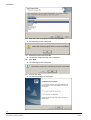
Click OK.
Î
The following window will appear:
58
Siemens Building Technologies
Fire Safety & Security Products
08.2007
Installation
5.
Î
Click Next.
The following dialog box will appear:
6.
Select a destination folder.
7.
Click Next.
Î
8.
The following dialog box will appear:
Select the desired software component (see Section 5: Software
components).
NOTE
For more detailed information on user-specific installation please refer to Section 6.2: Subsequently
installing a hardware driver.
9.
Î
Click Next.
The following dialog box will appear:
59
Siemens Building Technologies
Fire Safety & Security Products
08.2007
Installation
10. Enter the name of the program folder and click Next.
Î
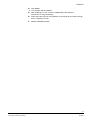
The following window will appear:
11. Close all programs and click OK.
Î
The desired components will now be installed.
12. Click Next.
Î
The following window will appear:
13. Confirm with Yes.
Î
The following dialog box will appear:
60
Siemens Building Technologies
Fire Safety & Security Products
08.2007
Installation
14. Click Finish.
Î
The computer will be restarted.
15. After restarting your PC, connect a USB dongle to the USB port.
See Section 2: Scope of Delivery.
16. Follow the instructions for the installation of the dongle driver until the dongle
driver is installed correctly.
17. Restart SISTORE MX NVS.
61
Siemens Building Technologies
Fire Safety & Security Products
08.2007
Installation
6.2
Subsequently installing a hardware driver
Prerequisite:
To log into the system, the user must at least have main user or rather admin user
rights. This applies to the first-time installation of the software as well as to a
subsequent driver update.
System requirements:
For the system requirements please refer to Section 4: System requirements.
1.
Place the CD in the appropriate drive of your PC.
2.
Start SISTORE_MX_NVS_260_SP1.exe.
NOTE
The installation program will start automatically when the CD is inserted if your operating system has
the appropriate configuration.
Î
The following window will appear:
3.
Select the option Modify.
4.
Click Next.
Î
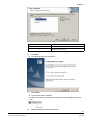
The following dialog box will appear:
62
Siemens Building Technologies
Fire Safety & Security Products
08.2007
Installation
Hardware driver
Function
CKA4810 / CKA4820
Activation of a CKA control panel
Hardware watchdog
Activation of an additional module in the PC (type
PWDOG1 from Quancom)
5.
Select CKA4810 / CKA4820 or Hardware Watchdog.
6.
Click Next.
Î
7.
Î
Î
The following dialog box will appear:
Click Finish.
The computer will be restarted.
When the computer is restarted, the symbol for CKA will appear in the task
bar.
1
8.
CKA symbol
Restart SISTORE MX NVS RemoteView.
63
Siemens Building Technologies
Fire Safety & Security Products
08.2007
Installation
6.3
Installing RemoteView on a client PC
Prerequisite:
To log into the system, the user must at least have main user or rather admin
user rights. This applies to the first-time installation of the software as well as
to a subsequent update.
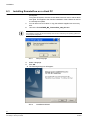
1.
You can either use a CD drive or copy the software supplied onto a memory
stick.
2.
Launch the file SISTORE_MX_ RemoteView_260_SP1.exe.
NOTE
The installation program will start automatically when the CD is inserted if your operating system has
the appropriate configuration.
Abb. 1
Setup language
3.
Select a language.
4.
Click OK.
Î
The following dialog box will appear:
Abb. 2
InstallShield Wizard
64
Siemens Building Technologies
Fire Safety & Security Products
08.2007
Installation
5.
Î
Click Next.
The following dialog box will appear:
Abb. 3
"Choose Destination Location" dialog
6.
Do not change the destination folder.
7.
Click Next.
Î
The following dialog box will appear:
Abb. 4
"Setup type" dialog
8.
Select the setup type RemoteView.
9.
Click Next.
65
Siemens Building Technologies
Fire Safety & Security Products
08.2007
Installation
Î
The following dialog box will appear:
Abb. 5
"Select program folder" dialog
10. Do not change the SISTORE MX REMOTEVIEW program folder.
11. Click Next.
Î
The following window will appear:
12. Close all programs and click OK.
Î
The installation will now be carried out.
Î
Wait until the window InstallShield Wizard Complete appears:
66
Siemens Building Technologies
Fire Safety & Security Products
08.2007
Installation
Abb. 6
"InstallShield Wizard Complete" dialog
13. Click on Finish.
Î
SISTORE MX RemoteView is now installed.
67
Siemens Building Technologies
Fire Safety & Security Products
08.2007
Installation
6.4
Removing SISTORE MX NVS
1.
Start SISTORE_MX_NVS_260_SP1.exe.
Î
The following window will appear:
1.
Select the option Remove.
2.
Click Next.
Î
This automatically takes you to the end of the program.
NOTE
If the CEVIS or Siemens directory still exists after uninstalling the program, it has to be deleted
manually.
6.5
Updating SISTORE MX NVS and RemoteView software
6.5.1
From version 2.5x to version 2.60
NOTE
If you upgrade to a newer version of the program, the parameters of the previous version will be saved
automatically.
1.
Start either SISTORE_MX_NVS_260_SP1.exe or
SISTORE_MX_RemoteView_260_SP1.exe.
2.
Answer Next and/or Finish in the subsequent dialogs.
3.
Confirm that you want to delete the old version.
Î
6.5.2
The new version will now be installed.
4.
If necessary, delete the old \CEVIS or \SIEMENS directory manually.
5.
Select Start > Programs > Sistore MX NVS or Start > Programs >
RemoteView to start the desired program.
From version 2.6x to version 2.60
1.
Start either SISTORE_MX_NVS_260_SP1.exe or
SISTORE_MX_RemoteView_260_SP1.exe.
2.
Answer Next and/or Finish in the subsequent dialogs.
Î
The new version is now installed.
68
Siemens Building Technologies
Fire Safety & Security Products
08.2007
Configuration
7
Configuration
7.1
Starting the software
1.
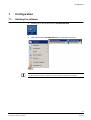
Double-click on the desktop shortcut SISTORE MX NVS.
or
1.
Select the directory SISTORE MX NVS in the Windows start menu.
NOTE
If an event-triggered recording is stopped, the current pre-alarm ring storage will be cleared.
69
Siemens Building Technologies
Fire Safety & Security Products
08.2007
Configuration
7.2
Login
1.
Choose Login from the File menu.
2.
Click on the Login button
Î
3.
in the toolbar.
The following dialog box will appear:
Enter the following in the login dialog:
User name
Enter the user name created for you by the administrator. The entry is casesensitive.
Password
Enter the password created for you by the administrator. The password is
displayed as asterisks (***). The entry is case-sensitive.
(Default in the delivery configuration: user name = Administrator)
(Default in the delivery configuration: password = Administrator)
4.
Confirm with OK.
NOTE
We advice to change the administrator‘s password. The user name “Administrator“ cannot be deleted.
7.3
Show last users to log on
1.
Î
Click on the arrow in the Login button
.
The last five users to log on will be displayed.
70
Siemens Building Technologies
Fire Safety & Security Products
08.2007
Configuration
7.4
Change password
There are two options for changing the password:
z By selecting the menu item New password
z By selecting the menu item User management
7.4.1
Changing the password using the menu item New password
1.
Select New password in the File menu.
2.
Enter the current password in the appropriate field for the Old password.
3.
Enter the new password in the fields New password and Confirm
password.
NOTE
The password should be at least eight characters long.
4.
7.4.2
Confirm with OK.
Changing the password using the menu item User management
Prerequisite:
You need the authorisation Configuration.
5.
Î
Select Configuration in the Administration menu.
The Configuration dialog appears.
6.
Select the User management tab.
7.
Enter the new password in the fields Password and Confirm password.
NOTE
The password should be at least 8 characters long.
8.
Confirm with OK.
71
Siemens Building Technologies
Fire Safety & Security Products
08.2007
Configuration
7.5
Select language
1.
Î
Select Configuration in the Administration menu.
The Configuration dialog box will appear.
2.
Select the System tab.
3.
Stipulate the language in which SISTORE MX NVS is to operate.
Î
SISTORE MX NVS finds all languages and lists them in a combo box. Further
languages can be installed at any time. You can now select a specific language
or – as before – use the automatic language selection. If using the automatic
language selection option, SISTORE MX NVS starts in the language specified
as local language.
72
Siemens Building Technologies
Fire Safety & Security Products
08.2007
Configuration
7.6
Changing the language version in Windows XP
1.
Select Start -> Settings -> Control Panel -> Regional and Language
Options.
2.
Select the Regional Options tab.
Î
3.
The following dialog box will appear:
Make the following settings in this tab:
Standards and formats
German (Germany)
Location
Germany
4.
Click Apply.
5.
Select the Languages tab.
73
Siemens Building Technologies
Fire Safety & Security Products
08.2007
Configuration
Î
6.
Î
7.
The following dialog box will appear:
Click on Details.
The following dialog box will appear:
Make the following settings in the Settings tab:
Default input language
8.
Click Apply.
9.
Click OK.
German (Germany)
74
Siemens Building Technologies
Fire Safety & Security Products
08.2007
Configuration
Î
The Regional und Language Options dialog appears:
10. Make the following settings in the Advanced tab:
Language for non-Unicode programs
German (Germany)
11. Click Apply.
12. Click OK.
Î
The system will be rebooted.
75
Siemens Building Technologies
Fire Safety & Security Products
08.2007
Configuration
7.7
Setting time and date format
1.
After selecting the language version, you can also change the time and date
format.
2.
Select Start -> Settings -> Control Panel -> Regional and Language
Options.
3.
Click Apply.
4.
Select the Time tab.
Î
The following dialog box will appear:
5.
Select the desired time format.
6.
Click Apply.
76
Siemens Building Technologies
Fire Safety & Security Products
08.2007
Configuration
7.
Î
Select the Date tab.
The following dialog box will appear:
8.
Select the desired date format.
9.
Click Apply.
10. Click OK.
77
Siemens Building Technologies
Fire Safety & Security Products
08.2007
Configuration
7.8
Resolution and file format
The files stored by SISTORE MX NVS have the extension .K26 or .AVI depending
on the system parameterization. These settings are made in the Recording
section in the System tab of the Configuration menu.
Files with the extension .K26 are encrypted image files in AVI-similar format. They
can be evaluated only with the SISTORE Player. To create these files, select the
System tab in the Configuration dialog and tick the checkbox Encrypt video files
in the Recording section.
Abb. 7
"Encrypt video files" checkbox
AVI files can be handled with the Media Player of Windows provided that the
operating system provides an appropriate codec.
The resolution of the images stored in these files is dependent on the operating
characteristics of the individual cameras and the settings made.
The resolution of the transmitted images can be configured individually for each
camera.
78
Siemens Building Technologies
Fire Safety & Security Products
08.2007
Configuration
7.9
Set date and time of client PC
Adjust the time of your PC to the time zone where your PC is run, e.g. GMT
+ 01:00 Amsterdam, Berlin, Bern, Rome, Stockholm, Vienna.
You can set these parameters in the dialog box that you open via the Start menu:
Start > Settings > Control Panel > Date/ Time:
Abb. 8
Open Date/Time dialog box from the Start menu
79
Siemens Building Technologies
Fire Safety & Security Products
08.2007
Configuration
7.10
Get time of Client PC from an NTP Server
An NTP Server always provides the current time. The time of your PC will be
updated continuously with the time from the NTP Server . This is a periodic
synchronization mode, i.e. the time is updated at regular intervals. In order to get
the time from a NTP Server the IP address of the NTP Server must be specified.
1.
Open the command prompt of your PC via the Windows Start menu.
Abb. 9
2.
Open command prompt from the Start menu
Enter the following command:
net time /setsntp:xxx.xx.xx.xxx
3.
Enter the IP address of the NTP Server for xxx.xx.xx.xxx.
Abb. 10
4.
Command prompt window
Restart your PC or enter the following command in the command prompt of
your PC:
net stop w32time
net start w32time
The IP address of an appropriate server can be found in the Internet or you can contact your system
administrator.
80
Siemens Building Technologies
Fire Safety & Security Products
08.2007
Configuration
7.11
Further information
For more information on the SISTORE MX NVS V2.60 application software (and
the WebView version), please refer to the online help or to the relevant document
on the software CD.
81
Siemens Building Technologies
Fire Safety & Security Products
08.2007
Software update
8
Software update
Should it be necessary to reinstall or repair the SISTORE MX NVS software,
please proceed as follows:
1.
Follow the description in Section 6.2: Subsequently installing a hardware
driver.
2.
Select the option Update.
Î
9
This will have the effect of re-installing every files that have been installed
during the first installation. It should be noted that existing files may be
overwritten in this procedure! The files containing the configuration settings, the
user management data, and the recorded sequences will not be overwritten.
Writing to CD/DVD
Prerequisite:
In order to backup data on CD/DVD, the burner software Nero V6.x must be
installed on the NVS PC.
NOTE
The functions Double Layer and/or Light Scribe are available only if the following conditions are met:
z A suitable burner is available.
z The burner software Nero Version 6.6.4.x or higher or Version 7.x is installed.
The software has been tested successfully using the following external USB
burners (combined CD/DVD burners):
– Plextor PX-740UF
– LiteOn SOHW-1673 SX-02
– LG GSA-2164D-R
NOTE
Suitable data media are all standard CD-R, CD-RW, DVD±R, DVD±RW.
The data medium need not be formatted additionally.
82
Siemens Building Technologies
Fire Safety & Security Products
08.2007
Setup
10
Setup
10.1
Examples of system configurations
10.1.1 SISTORE MX NVS Server PC
Abb. 11
10.1.2
SISTORE MX NVS system overview
1
Max. 32 IP cameras or IP domes
2
MX NVS server PC
3
CKA4810/20 (optional)
General information about network cameras
Be aware of the following when using network cameras:
z The image quality of network cameras is generally inferior to that of analogue
cameras. The reason for this is the compression required to reduce the load on
the network.
z Multiple users can access network cameras simultaneously. Simultaneous
access by multiple users lowers the frame rate.
z Settings made by a user on a network camera, such as modifying the image
parameters via a browser, have system-wide effects.
83
Siemens Building Technologies
Fire Safety & Security Products
08.2007
Setup
SISTORE MX NVS supports the following network cameras:
Arecont
Vision 2100, Vision 3130 Day, Vision 3130 Night
Axis
205, 206/W, 206M, 210, 211, 212 PTZ, 213 PTZ, 216FD, 221, 223M,
231D+, 232D+, 240Q, 241Q, 241S, Generic HTTP Interface V1.0,
Generic HTTP Interface V2.0
CBC
MP2A, MP3DN Day, MP3DN Night
Digilan
TV7214
Eneo
ENC-1003L
IQ invision
IQ501, IQ603, IQ 752
JVC
VN-C10U; VN-C30U, VN-C625U, VN-C655U
Lumenera
LE175C, LE275C, LE375C
Mobotix
D12 one or two cameras, M1 Models, M10 Models, M10D-Night,
M12 Models, M12D-Night, M22M
Panasonic
KX-HCM-280, WV-NM100/G, WV-NP244E, WV-NP472, WV-NS202,
WV-NS320, WV-NW470
Pixord
205
Samsung
SNC-L200
Siemens
CCIS1337-LP, CCIx1345, CFVA-IP NTSC, CFVA-IP PAL,
CVVA-IP NTSC, CVVA-IP PAL, TELSCAN WEB Server
Sony
Generic HTTP interface, SNC-CS11, SNC-CS3P, SNC-DF40P,
SNC-M1/W, SNC-M3/W, SNC-P1, SNC-P5, SNC-RZ25P, SNC-RZ30P,
SNC-Z20P, SNT-V704
VINWP1
2051
Vivotek
MJPEG Models, PZ6122, VS2402
Depending on the functional scope of the network camera, many operating
elements of the LAN cameras tab may be disabled.
Altogether a maximum of 32 network cameras can be connected.
Limitation: Network cameras cannot be connected to analogue video outputs.
Access to network cameras takes place with significantly greater latency. The
reason for this is the greater communication load between the SISTORE MX NVS
and a network camera.
Network cameras cause a significantly higher processor load of the SISTORE MX
NVS than analogue cameras. The frame rates required are the determining factor.
The operation of the system can be slow if all connections for network cameras
(32) are used.
NOTE:
To keep the processor load below 90 %, we recommend setting the resolution of network cameras
low (CIF format). The image quality should be set to approximately 70 %. The following rule applies:
The higher the performance of the server PC, the higher the image quality and the lower the
processor load. See Section. „System requirements“, page 56.
Exact specifications for the image quality and the required hard drive capacity are
not possible with network cameras, since each network camera has different
quality levels and interprets specifications differently.
84
Siemens Building Technologies
Fire Safety & Security Products
08.2007
Setup
10.2
SISTORE MX NVS - IP camera - CKA4810/20
Abb. 12
1
SISTORE MX NVS – IP camera –– CKA4810/20 system overview
CKA4810/20
2
MX NVS server
3
Max. 32 IP cameras
Prerequisite:
The CKA driver is installed (see Section 6.2: Subsequently installing a hardware
driver).
1.
Connect the CKA4810/4820 control panel (COM1A port) to the MX NVS
server (COM1/COM2).
2.
Configure COM1A on the control panel as an RS232 interface. For more
information please refer to the respective instruction manual for control panel
CKA4810 / CKA4820.
3.
Start the SISTORE MX NVS application software.
4.
Switch to configuration mode.
5.
Mark the checkbox CCTV keyboard on the System tab.
6.
Click Apply.
The setting will be saved.
The interface for the control panel is enabled.
Î
Î
Connections
Signal
MX NVS Server
CKA4810 / CKA4820
SISTORE RemoteView
9-pin SubD connector
GND
5
5
RXD
3
2
TXD
2
3
Interface configuration CKA4810 / CKA4820
z Protocol: SIMATRIX RS232 or SIEMENS IVM
z Baud rate: 9600
z Parity: none
85
Siemens Building Technologies
Fire Safety & Security Products
08.2007
Setup
10.3
SISTORE MX NVS - SISTORE RemoteView - CKA4810 /
CKA4820
Abb. 13
SISTORE MX NVS – SISTORE RemoteView – CKA4810 system
overview
1
CKA4810/20
2
Client PC with
RemoteView
3
MX NVS Server
4
Max. 32 IP cameras
Prerequisite:
The CKA driver is installed (see Section 6.2: Subsequently installing a hardware
driver).
1.
Connect the CKA4810/CKA4820 control panel (COM1A port) to the client PC
(COM1/COM2).
2.
Configure COM1A on the control panel as an RS232 interface. For more
information please refer to the respective instruction manual for control panel
CKA4810 / CKA4820.
3.
Start the SISTORE MX NVS RemoteView application software.
4.
Switch to configuration mode.
5.
Mark the checkbox CCTV keyboard on the System tab.
6.
Click Apply.
The setting will be saved.
The interface for the control panel is enabled.
Î
Î
Connections
Signal
Client PC
SISTORE RemoteView
CKA4810 / CKA4820
9-pin SubD connector
GND
5
5
RXD
3
2
TXD
2
3
Interface configuration CKA4810 / CKA4820
z Protocol: SIMATRIX RS232 or SIEMENS IVM
z Baud rate: 9600
z Parity: none
86
Siemens Building Technologies
Fire Safety & Security Products
08.2007
Setup
10.4
SISTORE MX NVS – SISTORE MX NVS RemoteView –
multiserver mode
Abb. 14
SISTORE MX NVS – SISTORE RemoteView – CKA4810 system
overview
1
1 ... max. 32 IP cameras / IP domes
2
1 … max. 16 Client PCs
3
1 … max. 10 MX NVS servers
Minimum system configuration
1 x server MX NVS, 1 x IP camera
Maximum system configuration
16 x SISTORE MX NVS RemoteView Client PC
10 x SISTORE MX NVS server, each with 32 IP cameras = 320 IP cameras
87
Siemens Building Technologies
Fire Safety & Security Products
08.2007
Setup
10.5
SISTORE MX NVS - MX Multi Channel Box RCI 0601 and ATM
Abb. 15
MX NVS - Multi-Channel Box RCI 0601and ATM system overview
1.
Connect the MX Multi-Channel Box to the SISTORE MX NVS server PC
(COM1/COM2). For this you require the converter 485SD9R (B&B
Electronics).
2.
Connect the ATM to the RCI0601. For more information, refer to the user
guide for the MX Multi-Channel Box RCI 0601.
3.
Start the SISTORE MX NVS application software.
4.
Switch to configuration mode.
5.
Select the System tab.
6.
Mark the Bank mode checkbox.
7.
Terminate the SISTORE MX NVS application software and restart it.
8.
Switch to configuration mode and mark the Cash dispenser checkbox.
9.
Configure the cash dispenser mode. For more information please refer to the
Configuration Manual, pp. 144.
10. Restart the PC.
Î
The SISTORE MX NVS application will be restarted (automatically or via the
start icon on the desktop). The ATM handler module will be started as well
(see task bar).
88
Siemens Building Technologies
Fire Safety & Security Products
08.2007
USB input/output modules
11
USB input/output modules
USB input/output modules are available as accessories. See also Section „Details
for ordering“ in the SISTORE MX NVS User Manual.
NOTE
An additional power supply is not required. The modules are supplied over a USB interface.
USB input/output modules
z USBOPT08 (input module)
z USBREL8 (output module)
z USBOPTOREL16 (input and output module)
USBOPT08
USBREL8
You can connect up to four modules of the same type. See Section 11.2:
Connecting USB input/output modules.
Each module has eight inputs or outputs. With four modules, a max. number of 32
inputs/outputs can be achieved.
NOTE
When using more than two modules, we recommend connecting a USB splitter (hub) between the PC
and the modules.
USBOPTOREL16
You can connect up to 16 modules of this type. Each module has 16 optocoupler
inputs and 16 relay outputs.
NOTE
It is not possible to combine USBOPTO8 or USBREL8 with USBOPTOREL16 modules.
89
Siemens Building Technologies
Fire Safety & Security Products
08.2007
USB input/output modules
11.1
Technical data of the USB input/output modules
11.1.1
Technical data of the USB input module
11.1.2
11.2
System bus
USB
Module address
can be set between 0-3 using jumpers (up to 4 modules of the same
type can be connected simultaneously)
Inputs
8, optically isolated (5 – 30 V)
Input current
max. 10 mA
LEDs
initialization, status of input signals
Connections
pluggable screw terminals
CE
yes
Operating temperature
0 to 70 °C
Power supply
via USB
Technical data of the USB output module
System bus
USB
Module address
can be set between 0-3 using jumpers (up to 4 modules of the same
type can be connected simultaneously)
Outputs
8 DIL relays (max. 15 W/1 A)
Switchable voltage
30 V
LEDs
initialization, status of relays
Connections
pluggable screw terminals
CE
yes
Operating temperature
0 to 70 °C
Relay switching time
1 ms (incl. bounce)
Connecting USB input/output modules
The modules can either be installed in a cabinet or as desk-top units on a PC.
11.2.1
Connecting USB input module USBOPT08
1.
Connect the module via a plug-type terminal strip.
2.
Assign the module address. See Section 11.3: Module addressing.
3.
Connect the module to the USB interface.
Î
The operating system detects the USB modules and automatically activates
the drivers.
NOTE
In case a message is displayed, click OK until all dialog boxes are closed.
Î
The new hardware will be displayed as a QuickInfo.
Î
Each input is assigned an LED indicating the current status.
90
Siemens Building Technologies
Fire Safety & Security Products
08.2007
USB input/output modules
1
2
3
+ – + – + – + – + – + – + – + –
5
Abb. 16
4
USB input module
1
Module addressing
2
Configuration status LED
3
USB port
4
Input status LED
5
Inputs
+
5 ... 30V
USB Input Module
Abb. 17
-
Connection of USB input module
NOTE
Connect the cables (+/-) as shown in Fig. 15.
11.2.2
Connecting USB output module USBREL8
1.
Connect the module via a plug-type terminal strip.
2.
Assign the module address. See Section 11.3: Module addressing.
3.
Connect the module to the USB interface.
Î
The operating system detects the USB modules and automatically activates
the drivers.
NOTE
In case a message is displayed, click OK until all dialog boxes are closed.
Î
The new hardware will be displayed as a QuickInfo.
Î
Each output is assigned an LED indicating the current status.
91
Siemens Building Technologies
Fire Safety & Security Products
08.2007
USB input/output modules
2
1
3
4
5
Abb. 18
USB output module
1
Relay outputs
2
Output status LED
3
Module addressing
4
Configuration status LED
5
USB port
NOTE
The cables can be connected in any way as the outputs are no-voltage connections.
max. 30V
USB Output Module
Abb. 19
11.2.3
Connection of USB output module
Connecting USB input and output module USBOPTOREL16
1.
Connect the module via a plug-type terminal strip.
2.
Assign the module address. See Section 11.3: Module addressing.
3.
Connect the module to the USB interface.
Î
The operating system detects the USB modules and automatically activates
the drivers.
NOTE
In case a message is displayed, click OK until all dialog boxes are closed.
Î
The new hardware will be displayed as a QuickInfo.
Î
Each input/output is assigned an LED indicating the current status.
92
Siemens Building Technologies
Fire Safety & Security Products
08.2007
USB input/output modules
Abb. 20
USB input and output module
1, 2
Relay/optocoupler outputs
3
0V
4
12 V
5
JP1 power supply USB/external
6
USB port
7
DIP1
8, 9
Optocoupler input
NOTE
Connect the input cables (+/-) as printed on the input/output module. The output cables can be
connected in any way as the outputs are no-voltage connections.
Make sure that jumper JP1 is plugged onto pins 2 and 3 (USB).
+
5 ... 30V
USB Input Module
Abb. 21
Connection of USB input module
max. 30V
USB Output Module
Abb. 22
Connection of USB output module
93
Siemens Building Technologies
Fire Safety & Security Products
08.2007
USB input/output modules
11.3
Module addressing
11.3.1
Modules with 8 inputs/outputs
Addressing is done using the module address.
1.
Assign the module addresses using the jumpers. See Section 11.2:
Connecting USB input/output modules.
Module address 0
Module address 1
Module address 2
Module address 3
11.3.2
Modules with 16 inputs/outputs
Addressing is done using the module address.
Assign the module addresses using the DIP switches.
SW1
11.4
SW2
SW3
SW4
Module
address
On
On
On
On
0
Off
On
On
On
1
On
Off
On
On
2
Off
Off
On
On
3
4
On
On
Off
On
Off
On
Off
On
5
On
Off
Off
On
6
Off
Off
Off
On
7
On
On
On
Off
8
Off
On
On
Off
9
On
Off
On
Off
10
Off
Off
On
Off
11
12
On
On
Off
Off
Off
On
Off
Off
13
On
Off
Off
Off
14
Off
Off
Off
Off
15
Configuring USB input/output modules
The configuration of input/output modules is described in the SISTORE MX NVS
V2.60 Configuration Manual, Section Configuration of the alarm sensors (input)
and Configuration of switch outputs (output).
NOTE
Digital inputs are not available with the current version of SISTORE MX NVS (March 2007).
94
Siemens Building Technologies
Fire Safety & Security Products
08.2007
Issued by
Siemens Building Technologies
Fire & Security Products GmbH & Co. oHG
D-76181 Karlsruhe
www.sbt.siemens.com
Document No.
A6V10072823
Edition
08.2007
© 2007 Copyright by
Siemens Building Technologies AG
Data and design subject to change without notice.
Supply subject to availability.
Printed in the Federal Republic of Germany
on environment-friendly chlorine-free paper.