1
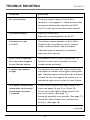
When set to motion record,
Ensure that no interference is seen on the picture
the DVR seems to start
as this can cause the DVR to record unnecessarily.
recording without seeing
If required adjust the orientation of the antenna on
any significant movement
the receiver or move the camera closer to the
receiver to try to improve the reception.
Point the camera away from tree branches or
bushes which may sway in windy weather conditions.
Heavy rain or snow may cause the DVR to start
recording due to the movement of rain in bushes
which may sway in windy weather the picture
viewed. Changes in light could also cause this.
Reduce the sensitivity if needed. (See page 17).
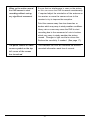
The photo camera or video
This indicates the DVR will overwrite the earliest
camera symbol on the top
recorded information each time it records.
left corner of the screen
has turned red
21