1
CONFIGURATION SETTINGS
VirtualDJ is designed to be very simple and easy to use yet it is also fully customizable to match your
preferred system performance.
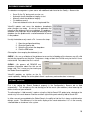
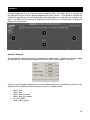
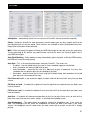
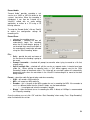
To make changes to VirtualDJ’s configuration, click on the (CONFIG ) button. This will bring you to the
“Settings” dialog. The options in the “Settings” dialog can be viewed and edited by clicking on the
corresponding tab on top of the “Settings” window and include:
SOUND SETUP
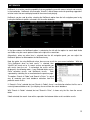
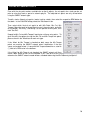
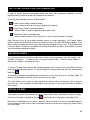
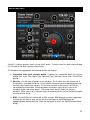
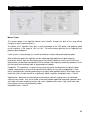
Inputs – If using timecode vinyl or CDs to control VirtualDJ, select the appropriate input configuration
from this pull-down list. Choices are “NONE”, “Single Timcode” for Single control, and “Timecodes” for
Dual Control. Setting up VirtualDJ for Timecode use is covered in detail in the “Timecode” section of
this guide.
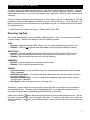
Outputs – Select the preferred output configuration from this pull-down list. Please note that,
depending on your sound card, some output options may not be available for use. Choices are “Single
Output”, “Headphones”, “External Mixer” (2 channel output), or “3-Lines Mixer” (3 channel output).
Sound card(s) – Select the sound card driver which you would like to use with the VirtualDJ software.
Sound card – Select the sound card in this pull-down list.
ASIO Driver (not shown) – If the Sound card selected type is ASIO, then this select the appropriately
installed ASIO driver for use. *See the Quick Guide Timecode Setup for an example.
Ultra-latency ASIO (not shown) – There is two ASIO engines available for VirtualDJ to provide better
latency support. Checked is the original ASIO engine that is optimized for very low latency (renamed
ultra-latency) and is still considered the default engine. Some computers have problems with this
optimization. Unchecked is the NEW 'safer' performance level ASIO engine which has less optimization
for environments that have difficulty with the Ultra-Latency engine.
Output Channels – Select the routing of outputs on soundcard when the Outputs drop-down is set to
one of the following choices - “Headphones”, “External Mixer” (2 channel output), or “3-Lines Mixer” (3
channel output).
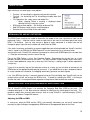
* See the Quick Start Guide for Basic, Headphone, and Timecode setup configurations *
29