1
Administrator's Manual
Contents
Table of Contents
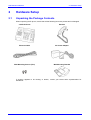
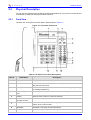
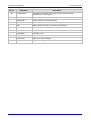
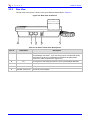
1 Introduction ............................................................................................................... 13 2 Hardware Setup ......................................................................................................... 15 2.1 Unpacking the Package Contents ...................................................................................15 2.2 Physical Description ........................................................................................................16 2.2.1 Front View .......................................................................................................................... 16 2.2.2 Rear View .......................................................................................................................... 18 2.3 Cabling the Phone ...........................................................................................................19 2.4 Mounting the Phone.........................................................................................................20 2.4.1 Placing the Phone on a Desk ............................................................................................20 2.4.1.1 Routing the Phones Cables................................................................................20 2.4.2 Wall-Mounting the Phone ..................................................................................................21 3 Menu-Driven, Display Screen-Based Management ................................................ 23 3.1 Getting to Know Your LCD Screen ..................................................................................23 3.1.1 Areas of the LCD Screen ...................................................................................................23 3.1.2 Accessing Menus ...............................................................................................................24 3.1.3 Entering Characters Using the Keypad .............................................................................25 3.1.4 Displayed Messages ..........................................................................................................27 3.2 Viewing Call History .........................................................................................................27 3.3 Phone Settings ................................................................................................................28 3.3.1 Phone Directory ................................................................................................................. 28 3.3.1.1 Adding Contacts .................................................................................................28 3.3.1.2 Searching for Contacts .......................................................................................29 3.3.1.3 Calling from the Phone Directory .......................................................................29 3.3.1.4 Editing and Deleting Contacts ............................................................................29 3.3.2 Speed Dialing.....................................................................................................................30 3.3.3 Ring Tone .......................................................................................................................... 30 3.3.4 Call Waiting ........................................................................................................................ 31 3.3.5 Call Forward.......................................................................................................................31 3.3.6 Date and Time ................................................................................................................... 32 3.4 Administration ..................................................................................................................32 3.4.1 Network Settings ................................................................................................................ 33 3.4.2 SIP Accounts ..................................................................................................................... 33 3.4.3 Restore Defaults ................................................................................................................ 34 3.4.4 Restart ............................................................................................................................... 34 3.5 Status...............................................................................................................................35 3.5.1 Network Status...................................................................................................................35 3.5.2 Versions ............................................................................................................................. 35 4 Web-based Management .......................................................................................... 37 4.1 Accessing the Web Interface ...........................................................................................37 4.2 Getting Started with the Web ...........................................................................................38 4.3 Quick Setup .....................................................................................................................39 4.4 Personal Settings.............................................................................................................40 4.4.1 Adding Contacts to the Phone Directory............................................................................40 4.4.2 Defining Speed Dials .........................................................................................................41 4.4.3 Regional Call Progress Tones and Uploading Ring Tones ...............................................42 4.4.3.1 Selecting the Region for Call Progress Tones ...................................................42 4.4.3.2 Uploading Ring Tones ........................................................................................43 4.5 Configuring the LAN Interface .........................................................................................44 4.6 VoIP Settings ...................................................................................................................45 4.6.1 Configuring the Signaling Protocol ....................................................................................45 4.6.2 Configuring the Dialing Parameters ...................................................................................49 Version 1.0.2
3
October 2009