1
W406 Hardware User’s Manual
Hardware Connection Description
Installing a SIM Card and SD Card
Installing a SIM Card
The W406 embedded computer has a built-in GSM/GPRS/EDGE cellular module to provide
long-range communication. SIM (Subscriber Identity Module) cards are used to authenticate and
identify subscribers when connecting to a network.
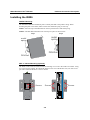
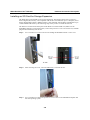
Follow these steps to install a SIM card:
Step1:
Before you install a SIM card, make sure the embedded computer is powered off.
Step2:
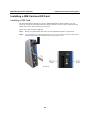
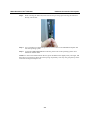
Use a screwdriver to remove the protective cover to access the slot. Note that the SD slot
and SIM card slot for the W406 share the same protective cover.
ÆÆÆÆ
3-6