1
FOXTEL_F120_New_RDN-2310708:FOXTEL_PVR_opmaak
31-07-2008
Using the FOXTEL iQ2 Remote
with the FOXTEL Guide
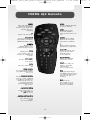
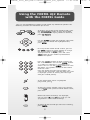
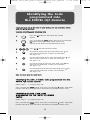
You can use the following buttons on the FOXTEL iQ2 Remote to perform the
following functions on the FOXTEL iQ2 Service
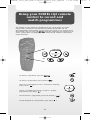
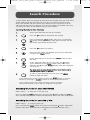
• To display any section of the FOXTEL Guide, press
the corresponding button on your iQ2 Remote,
e.g. for example, to display FOXTEL On Demand,
press on demand.
on demand
av
• Use the arrows to move the highlight around the
screen, then to choose the highlighted item,
press select.
select
• On many of the FOXTEL Guide screens, you use
the colour buttons to choose options or change
the display. When a colour button is
displayed next to an option, press the same
colour button on your FOXTEL iQ2 Remote to
choose that option.
1
2
3
.,-
abc
def
ghi
jkl
mno
4
7
pqrs
5
8
tuv
0
6
9
wxyz
• Press the number buttons to enter numbers on
the screen. You can also use the number buttons
as a short-cut, whenever a numbered list is
shown. You can use the number buttons to write
the letters and symbols marked on the buttons
onto the screen.
Press the button once for the first letter, and
again for the next letter, until the letter you want
is displayed (similar to sending text messages
with your mobile phone).
• To see information about a highlighted
programme, press i
• To exit any screen, without saving any changes,
and go back to the previous FOXTEL Guide screen,
press back.
• When full screens of listings are displayed,
you can press ch + and ch - to ‘page up’ and
‘page down’ a full screen of listings.
• To return to the channel you were last watching,
press FOXTEL.
5
16:15
P