1
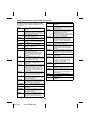
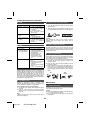
CONTENTS
Page
Page
General Information
Tape Playback
Precautions . . . . . . . . . . . . . . . . . . . . . . . . . . . . . . . . . . . 3
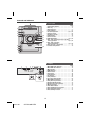
Controls and indicators . . . . . . . . . . . . . . . . . . . . . . 4 - 5
Listening to a cassette tape . . . . . . . . . . . . . . . . . . . . 16
Radio
Preparation for Use
Listening to the radio . . . . . . . . . . . . . . . . . . . . . . . . . . 17
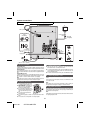
System connections . . . . . . . . . . . . . . . . . . . . . . . . . . . . 6
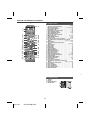
Remote control . . . . . . . . . . . . . . . . . . . . . . . . . . . . . . . . 7
Advanced Features
Using the Radio Data System (RDS) . . . . . . . . . 18 - 20
Timer and sleep operation
(Remote control only) . . . . . . . . . . . . . . . . . . . . . 21 - 22
Enhancing your system . . . . . . . . . . . . . . . . . . . . . . . . 23
Basic Operation
General control . . . . . . . . . . . . . . . . . . . . . . . . . . . . . . . . 7
Setting the clock (Remote control only) . . . . . . . . . . . . . 8
iPod
References
Listening to the iPod . . . . . . . . . . . . . . . . . . . . . . . . 8 - 10
Troubleshooting chart . . . . . . . . . . . . . . . . . . . . . . 23 - 24
Maintenance . . . . . . . . . . . . . . . . . . . . . . . . . . . . . . . . 24
Specifications . . . . . . . . . . . . . . . . . . . . . . . . . . . . . . . 25
CD or MP3/WMA disc Playback
Listening to a CD or MP3/WMA disc . . . . . . . . . . 10 - 11
Advanced CD or MP3/WMA disc playback . . . . . . 11 - 12
MP3/WMA folder mode (only for MP3/WMA files) . . . . 13
USB
Listening to USB mass storage
device/MP3 player. . . . . . . . . . . . . . . . . . . . . . . . . 14 - 15
Advanced USB playback . . . . . . . . . . . . . . . . . . . . . . . 15
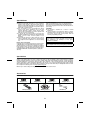
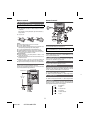
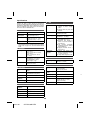
Precautions
■
● The AC power plug is used as a disconnect device and
shall always remain readily operable.
● Do not remove the outer cover, as this may result
in electric shock. Refer internal service to your
local SHARP service facility.
● The ventilation should not be impeded by covering the
ventilation openings with items, such as newspapers,
tablecloths, curtains, etc.
● No naked flame sources, such as lighted candles,
should be placed on the apparatus.
● Attention should be drawn to the environmental
aspects of battery disposal.
● This unit should only be used within the range of 5˚C 35˚C (41˚F - 95˚F).
General
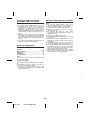
● Please ensure that the equipment is positioned in a
well ventilated area and ensure that there is at least
10 cm (4") of free space along the sides, top and back
of the equipment.
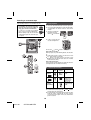
10 cm (4") 10 cm (4") 10 cm (4")
M I N I C O M P O N E N T S YS T E M
CD-DH790
FUNCTION
ON/STAND-BY
VOL
PUSH
OPEN
AUDIO IN
PHONES
10 cm (4")
● Use the unit on a firm, level surface free from vibration.
● Place the speakers at least 30 cm (12") away from any
CRT TV to avoid colour variations across the TV
screen. If the variations persist, move the speakers
further away from the TV. LCD TV is not prone to such
variation.
● Keep the unit away from direct sunlight, strong
magnetic fields, excessive dust, humidity and
electronic/electrical equipment (home computers,
facsimiles, etc.) which generate electrical noise.
● Do not place anything on top of the unit.
● Do not expose the unit to moisture, to temperatures
higher than 60˚C (140˚F) or to extremely low
temperatures.
● If your system does not work properly, disconnect the
AC power lead from the wall socket. Plug the AC power
lead back in, and then turn on your system.
● In case of an electrical storm, unplug the unit for safety.
● Hold the AC power plug by the head when removing it
from the wall socket, as pulling the lead can damage
internal wires.
Warning:
The voltage used must be the same as that specified on
this unit. Using this product with a higher voltage other
than that which is specified is dangerous and may result
in a fire or other type of accident causing damage. SHARP
will not be held responsible for any damage resulting from
use of this unit with a voltage other than that which is
specified.
■
3
04/1/28
CD-DH790NH EN
Volume control
The sound level at a given volume setting depends on
speaker efficiency, location and various other factors. It is
advisable to avoid exposure to high volume levels, to avoid
this, do not turn the volume on to full at switch on and listen
to music at moderate levels. Excessive sound pressure
from earphones and headphones can cause hearing loss.
1
2
3
4
5
6
7
1
2