1
Network Interface
2. How to Connect
Both Ethernet and WLAN can be configured through the printer’s Ethernet interface.
Likewise, both Ethernet and WLAN can also be configured though the printer’s WLAN
interface. When you want to change the Ethernet or WLAN of the printer, the network
settings of the host (PC, PDA, etc) and Ethernet or WLAN of the printer must configured
properly configured so that communication can be established.
(1) Connecting Printer
1) LAN
Connect the LAN cable to the printer
A direct cable or cross cable can be connected to the Hub or Host for use.
2) WLAN
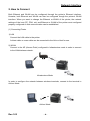
Connect to the AP (Access Point) configured in Infrastructure mode in order to connect
to the LAN/wireless network.
AP
Infrastructure Mode
In order to configure the network between wireless terminals, connect to the terminal in
Ad-hoc Mode.
Ad-hoc Mode
Rev.1.02
-4-