1
Programming
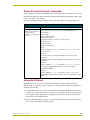
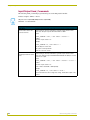
Program Port Commands (Cont.)
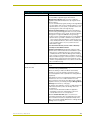
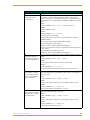
Command
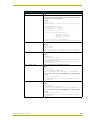
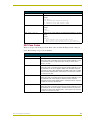
PULSE <D:P:S, or
NAME, CHAN>
Description
Pulses a channel on a device on and off. The device can be on any
system the Master you are connected to can reach. You can specify the
device number, port, and system; or the name of the device that is defined
in the DEFINE_DEVICE section of the program.
Example:
>PULSE[50001:8:50,1]
Sending Pulse[50001:8:50,1]
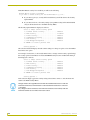
REBOOT <D:P:S>
Reboots the Master or specified device.
Example:
>REBOOT [0:1:0]
Rebooting...
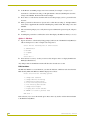
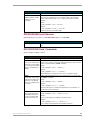
RELEASE DHCP
Releases the DHCP setting for the Master.
Example:
>RELEASE DHCP
The Master must be rebooted to acquire a new DHCP lease.
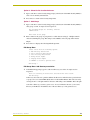
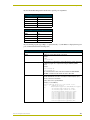
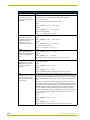
ROUTE MODE
DIRECT|NORMAL
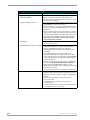
Sets the Master-to-Master route mode:
• Normal mode - allows a Master to communicate with any Master
accessible via the routing tables (shown with the SHOW ROUTE
command). This includes a directly-connected Master (route metric =1)
and indirectly connected masters (route metric greater than 1, but less
than 16).
• Direct mode - allows communication only with masters that are directly
connected (route metric = 1). Indirectly connected masters cannot be
communicated within this mode.
Examples:
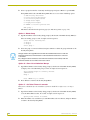
>ROUTE
Route
>ROUTE
Route
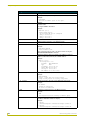
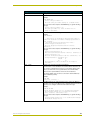
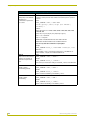
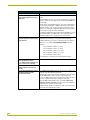
SEND_COMMAND D:P:S or
Name,Command
MODE
Mode
MODE
Mode
DIRECT
"Direct" Set
NORMAL
"Normal" Set
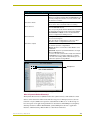
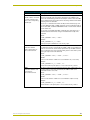
Sends a specified command to a device. The device can be on any system the Master you are connected to can reach. You can specify the
device number, port, and system; or the name of the device that is defined
in the DEFINE_DEVICE section of the NetLinx Program. The data of the
string is entered with NetLinx string syntax. The Command uses the following NetLinx string syntax:
Example:
>Ex: send_command 1:1:1,"'This is a test',13,10"
Ex: send_command RS232_1,"'This is a test',13,10"
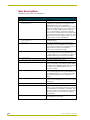
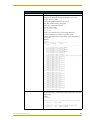
SEND_STRING D:P:S or
Name,String
Sends a string to a device. The device can be on any system the Master
you are connected to can reach. You can specify the device number, port,
and system; or the name of the device defined in the DEFINE_DEVICE
section of the NetLinx Program. The data of the string is entered with
NetLinx string syntax.
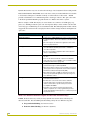
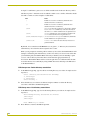
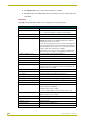
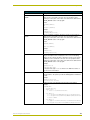
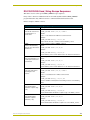
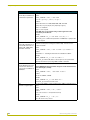
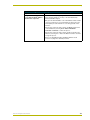
SET DATE
Prompts you to enter the new date for the Master.
When the date is set on the Master, the new date will be reflected on all
devices in the system that have clocks (i.e. touch panels). By the same
token, if you set the date on any system device, the new date will be
reflected on the system’s Master, and on all connected devices.
This will not update clocks on devices connected to another Master (in
Master-to-Master systems).
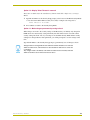
Example:
>SET DATE
Enter Date: (mm/dd//yyyy) ->
164
NetLinx Integrated Controllers