1
Getting to know your phone
Using the memory card
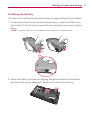
To insert a memory card:
Insert the memory card (not included) into the slot. Make sure the gold
contact area is facing downwards.
WARNING
Do not remove the memory card without unmounting it first. Doing so may damage the
memory card as well as your phone, and the data stored on the memory card may get
corrupted.
To remove the memory card safely:
On the Home screen, touch
> Apps tab > Settings
(DEVICE category) > Unmount SD card > OK.
> Storage
To format the memory card:
Your memory card may already be formatted. If it isn't, you must format it
before you can use it.
NOTE
All files on your memory card are deleted when it is formatted.
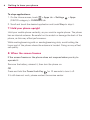
1. On the Home screen, touch
> Apps tab > Settings
> Storage.
2. Touch Unmount SD card and touch OK to confirm it.
3. Touch Erase SD card and then Erase SD card one more time to confirm
your choice.
4. If you have set a pattern lock, enter the pattern lock and touch Erase
everything.
NOTE
If there is content on your memory card, the folder structure may be different after
formatting as all the files will be deleted.
13