1
21
Program Configuration – Image Tab
Image tab
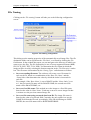
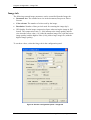
The following scanned image parameters can be controlled from the Image tab:
•
Document size: The scanned area size in the document, Passport or Driver
License.
•
Color scheme: The number of colors used by the image.
•
Resolution: Number of dots-per-inch used for scanning the image (dpi).
•
JPG Quality: Set the image compression factor when saving the image in JPG
format. The compression ratio (11-100) influences the image quality and file
size when the lowest value (11) yields the smallest image size (with the lowest
image quality) and the highest value (100) yields a large image file (with the
highest image quality).
To set these values, select the Image tab in the configuration panel.
Figure 6: Scanner configuration panel – Image tab
ScanShell User Manual version 8.15.5
© Card Scanning Solutions, all rights reserved