1
500151R07
DAVISCOMMS (S) PTE LTD
3. Interfacing the MTD1000 / Evaluation kit for AT commands
communication
3.1 Hyper-terminal settings
How to create a hyper-terminal connection from your PC to your device
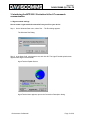
Step 1 On the Windows Start menu, select Run.... The Run dialog appears.
The Windows Run Dialog
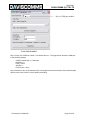
Step 2 In the Open: field, type hypertrm.exe, and click OK. The HyperTerminal splash screen
appears while HyperTerminal loads.
HyperTerminal Splash Screen
HyperTerminal then appears; open to the Connection Description dialog.
Daviscomms Confidential
Page 13 of 39