1
EF3003, SF3003, DF3003
Timer Mode
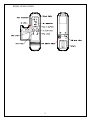
1. You can set the timer to the length of time you want the unit to operate
2. (1 to 120 minutes).
3. Press the TIMER button once. The timer display will blink --4. Press the UP and DOWN buttons to adjust the timer display in minutes.
5. Press the TIMER button once to set the timer.
6. The timer setting can be reset by pressing the TIMER button and using the DOWN
button until the timer display reads ----, press the TIMER button once to set the
timer.
7. Press the POWER button to turn the unit on.
8. The fireplace will automatically shut off when the timer reaches 0 minutes.
Child Proof Function
1. Remove the battery cover on the back of the remote control.
2. Slide the small blue switch down to activate the child proof function.
3. Child Proof will appear on the display screen and all function on the remote will be
locked.
4. To enable normal remote control operation when the child proof function is activated,
press the up and down buttons in the following sequence,
UP-DOWN-DOWN-UP-DOWN the remote functions will now operate normally. The
remote will return to the child proof function if buttons are not pressed after two
minutes.
5. To disable the child proof function remove the battery cover on the back of the
remote and slide the small blue switch up.
Batteries
1. The remote control uses 3 AAA size batteries (included). Replace these batteries at
least every 6 months or when the low battery appears on the remote display screen.
2. When batteries are removed wait at least 1 minute before replacing with new
batteries.
Code selection
If the current remote control is interfering with the operation of other remote control
devices (TV, VCR, garage doors etc.) The code can be changed on the remote.
To change code:
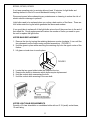
1. Remove the battery cover on the back of the remote control.
2. Slide the four small switches to any configuration other than the factory set code.
3. Remove the batteries, wait for one minute.
4. Install the batteries.
5. Install the battery cover onto the remote.
6. Reinitialize the remote.
2