1
Parent unit operation
View
You can change the screen to view images from different
baby units, or you can turn off the screen.
To view different baby units:
Press
to scroll to the desired baby units. They are
shown in chronological order: CAM 1, CAM 2, CAM 3,
CAM 4 and multi-CAM.
When there is only one paired baby unit, multi-CAM mode is not available.
To turn the screen on or off:
• Press and hold
for 2 seconds to turn off the screen.
• When the screen is turned off, press any key to turn it on.
Talk to the baby unit
You can broadcast messages from the parent unit to any one of the
baby units.
To talk to the baby unit:
1. Press
to choose a desired baby unit.
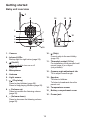
2. Press and hold TALK when the parent unit is in single-CAM mode.
Speak towards the MIC (microphone) on the parent unit. The TALK light
is on when the voice connection to the baby unit is made. Your voice is
broadcast to the baby unit.
• The TALK feature does not work in multi-CAM mode.
• If the speaker volume of the parent unit is set to OFF, it will be reset to the
default volume after you press and hold TALK.
• Lullaby playback is paused when the parent unit is talking the baby unit.
Lullaby playback resumes when the parent unit finishes using the
TALK feature.
31