1
While in the CREW mode, pilot and copilot will hear entertainment input
#1 while the passengers may listen to entertainment input #2.
It is also possible to use only one entertainment input device for both entertainment inputs. A switch (DPDT) should be installed between the single entertainment device and entertainment input #1. This will allow the
pilot and copilot decide if they hear entertainment while in the Crew
mode.
Internal Recorder System (Option 1, only)
The recorder function is automatic. Pressing the momentary switch will
cause the last message to play (incoming radio and transmit sidetone).
This will be heard in the pilot headset only. To hear older messages, push
the playback button repeatedly to “back up” the recorder, until the desired
message is heard.
The recorder is a continuous loop, and newest ones will overwrite the oldest messages. The IRS has an internal squelch that prevents storing ‘dead’
air. A radio signal of more than 1 VRMS is needed to trigger the IRS.
Therefore, if the IRS does not seem to be recording, increase the aircraft
radio volume slightly.
Marker Beacon (PMA6000M, PMA6000M-C)
The optional Marker Beacon Receiver uses visual and audio indicators to
alert you when the aircraft passes over a 75 MHz transmitter.
The Blue lamp, labeled "O," is the Outer Marker lamp and has an associated 400 Hertz 'dash' tone. The lamp and tone will be
keyed at a rate of two tones/flashes per second when the
aircraft is in the range of the Outer Marker Beacon.
The Amber lamp, labeled "M," is the Middle Marker
lamp and is coupled with a 1300 Hertz tone. It is keyed
alternately with short 'dot' and long 'dash' bursts at 95
combinations per minute.
The White lamp, labeled "A," is the Airway/Inner
marker and has a 3000 Hertz 'dot' tone. The lamp and
tone will be keyed at a rate of six times per second.
The audio from the Marker Beacon Receiver can be heard by selecting the
"M" push-button switch.
A 3-position switch is used to set the receiver sensitivity and to test the
indicator lamps. Use "HIGH" sensitivity initially. This allows you to hear
the outer marker beacon about a mile out. Then select the “LOW” sensitivity to give you a more accurate location of the Outer Marker. The momentary down switch position is labeled "TEST" and illuminates all three
lamps simultaneously to assure the lamps are in working order.
8
PMA6000-Mono Pilot Guide
and it be in the "out" position and remove that receiver from the
audio. While selected, the switch will also be annunciated by an internal lamp.
NOTE: In Split Mode, no pushbuttons will be active. The only audio
selected is the com 1 and two, as indicated by their respective lamps.
Speaker Amplifier
The "S" in the push-button section stands for speaker. This
switch will place all selected audio on the cockpit speaker when
this switch is selected. NOTE: with the exception of
unswitched unmuted inputs (Altimeter warning), the speaker
amplifier is not active in the "Split Mode." To reduce power
consumption and internal heat buildup in the avionics stack,
switch off the speaker amplifier when not in use.
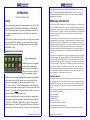
Mic Selector Switch (Fail Safe Operation)
Figure 2 Mic Selector
Unit power is turned on and off by the Mic selector switch. In the OFF or "FAIL-SAFE" position, the pilot is connected directly to Com 1
allowing transmit and receive capability regardless of unit condition. Any time power is removed or turned OFF, the
audio selector will be placed in the fail-safe mode. The first position
clockwise from OFF is COM 1. Both pilot and copilot will be connected to the Com l transceiver. While in the COM 1 or COM 2 mode,
the intercom functions normally. Both the pilot and copilot have
transmit capabilities on the selected transceiver. All hear the selected
audio if the intercom is in the ALL mode. Only the person who
presses their Push To Talk (PTT), will be heard over the aircraft radio. Turning the rotary switch to the COM 2 position will place pilot
and copilot on Com 2.
The PMA6000-Series has an automatic selector mode. Audio from
the selected transceiver is automatically heard in the headsets and
speaker (when selected). You can check this function by switching
from COM 1 to COM 2 and watch the selected audio light on the sePMA6000 –Mono Pilot Guide
3