1
Installing and Removing a Solid State Drive (SSD)
Installing and Removing a Solid State Drive (SSD)
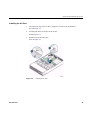
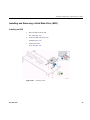
Installing an SSD
1.
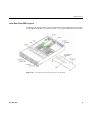
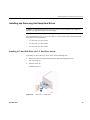
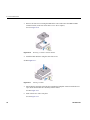
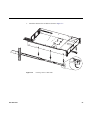
Place the SSD on the air duct.
See A in Figure 4-25.
2. Secure the SSD with four screws.
See B in Figure 4-25.
3. Connect the cables.
See C in Figure 4-25.
Figure 4-25
007-5837-001
Installing an SSD
43