1
Operating The System
TS790+/TS900+ User Manual
Operating The System
Introduction
Initial access to the system is gained by entering a 4 digit passcode. Every time you wish to use
the the system your passcode must be entered correctly. If a passcode is repeatedly entered
incorrectly a code tamper alarm will be generated.
Up to 31 separate user passcodes are available for operating the system. The master user (user
01) is the person responsible for allocating other users to the system.
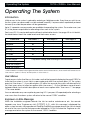
Each user (02-31) may be defined for different authorisation levels. See page 25 for full details,
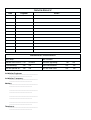
the table below shows the code levels and their menu access:
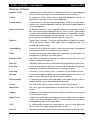
Code level
Master
Standard
Holiday
Set Only
Reset Only
PA Code
Access
Full Set Group
Code Set Group A
Code Set Group B
Code Set Group C
User Menu 1
4
4
4
4
Options 1-9 only
4
User Menu 2
4*
User Menu 3
4*
Used for access control
Only allows setting and unsetting of selected wards
* If the installation company has programmed the master user for limited access, he or she will NOT have access to
“User menu 2" options 6 and 8, and all options in ”User menu 3".
User Menus
To gain access to the User Menus, first make sure that the keypad is displaying the word “OPEN” to
show that the system is unset. Key in a passcode and within five seconds press [. The system
goes into “User menu 1". (If you do not press [ within five seconds the system will attempt to full
set.) Next, press a key to select an option within User menu 1. On the fold down cover of each
keypad a label shows a brief description of each menu option within ”User menu 1”. See page
17 for more details.
You can abandon any menu option by pressing ] . If you press ] repeatedly after selecting a
user menu then the alarm system will return to the normal “OPEN” condition.
Engineer on Site Message
When the installation engineer attends the site for routine maintenance etc. the remote
keypads may show “Engineer on site” (ENGONSITE), whilst this message is displayed the
alarm system remains fully operational. However, before the engineer leaves the site he should
ask one of the users to enter their passcode followed by ], this will clear the "Engineer on site”
message and return the system to the normal “OPEN” condition.
4