1
3.
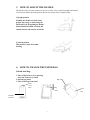
HOW TO ADJUST THE HANDLE
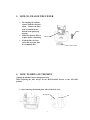
The handle of this vacuum cleaner can be set to either of two position-upright and normal.
To release the handle, press the pedal at the left rear corner of the vacuum cleaner.
1.Upright position
Normally the handle is locked in this
position for storage or when using the
On Board Tools. By pushing the handle
forward until the handle is locked, this
vacuum cleaner will stand on its wheels.
2. Normal position
This position is used for normal
cleaning.
4.
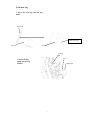
HOW TO CHANGE THE PAPER BAG
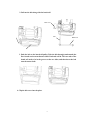
Unload used bag:
1. Take off the front cover by pressing
down the Front Cover Latch
2. Pull out bag stand
3. Take off the bag from stand
Bag stand
Front
Cover
latch
Bag
stand
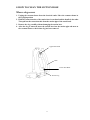
Full Bag
indicator
6
Used
bag