1
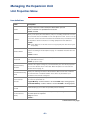
Menu Item Definitions
MasterSwitch plus continued
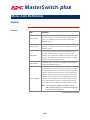
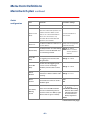
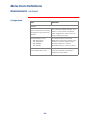
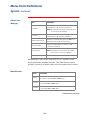
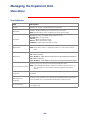
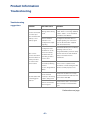
Outlet
configuration
Item
Definition
Available Settings
Outlet Name
Identifies each outlet.
23 characters maximum
Outlet Control
Mode
Establishes mode for associated
outlet. All on-demand operations are
available when the Outlet Control
mode is set to Graceful Shutdown.
When set to Annunciator, only
Immediate On and Immediate Off
operations are available.
Graceful Shutdown or
Annunciator
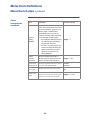
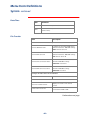
Outlet Link
The Outlet’s HTTP link in URL form or
a Telnet address.
(http://site.com page.htm)
(789.456.123.456)
Restart Delay
The delay between an outlet shutting
off due to a Graceful Shutdown and
the outlet being restarted.
Range: 0–999:54
Note: Time is rounded
down by 6-minute
intervals
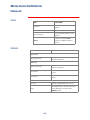
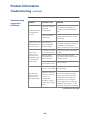
Power On
Delay
Determines the time interval between
the triggering event and the outlet
being turned on.
Range: 0–2:46:39
Power Off
Delay
The time from the triggering event
(such as a server confirming a
shutdown) until the outlet is turned
off.
Range: 0–2:46:39
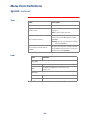
Reboot
Duration
The delay between the outlet shutting
off because of Reboot and the outlet
restarting.
Range: 0–2:46:39
Device
Confirm
Indicates whether the device
connected to the outlet can assert a
shutdown signal.
Yes
No
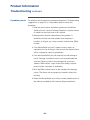
Selects the method MasterSwitch
plus uses for determining when to
assert the outlet’s Low Battery signal
after the UPS has gone on battery.
Programmed Delay:
0–16:39:54
On Runtime Remaining:
When the UPS runtime
remaining falls below
the UPS’s UPS Low
Battery Signal Time
Never
Low Battery
Warning
Control
Continued on next page
–31–