1
Multiple UPS-Output Turnoff
Introduction
To set up the remote turnoff of more than one APC UPS
with one switch, you must have one Remote Power-Off
Device for each UPS. There are two types of setup for
remote turnoff of multiple UPS outputs:
• Cascading (serial)
• Parallel (for voltage input switches only)
Cascading
multiple devices
(serial setup):
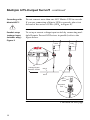
Figure 8
To set up either type of remote switch (contact closure or
voltage input) by cascading Remote Power-Off Devices,
refer to the figure below.
UPS1
To Remote
Switch
UPS2
UPSn
TO UPS
TO UPS
TO UPS
CONFIGURATION
CONFIGURATION
CONFIGURATION
w w w. a p c c . c o
m
RPO / CASCADE IN
POWER-OFF
/ TEST
POWER-OFF
/ TEST
POWER-OFF
/ TEST
w w w. a p c c . c o
w w w. a p c c . c o
m
TO SERVER OR
ACCESSORIES
RPO / CASCADE IN
m
AP9830
UPS REMOTE POWER-OFF
DEVICE
AP9830
UPS REMOTE POWER-OFF
DEVICE
AP9830
UPS REMOTE POWER-OFF
DEVICE
TO SERVER OR
ACCESSORIES
TO SERVER OR
ACCESSORIES
RPO / CASCADE IN
CASCADE OUT
CASCADE OUT
CASCADE OUT
w w w. a p c c . c o
...
m
AP9830
PS REMOTE POWER-OFF
DEVICE
RPO / CASCADE IN
CASCADE OUT
Figure 8:Cascading multiple devices (serial setup)
Continued on next page
13