1
AMM10N
Optional Equipment
Tools and Supplies
•
You will need these tools and supplies to install your
AMM10N:
•
•
•
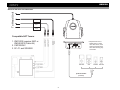
Rear Camera
The AMM10N is "camera ready." Before accessing any
camera features, you must purchase and install a rear
video camera. Once the rear camera is connected and
operating properly, the CAMERA source mode will
become active. While the camera is not installed, the
CAMERA option appears gray, indicating the function is
not available.
Satellite Radio Tuner
See “Satellite Radio Operation” on page 22.
iPod
See “MP3/WMA Operation” on page 28.
Bluetooth Phone
See “Bluetooth Operation” on page 31.
•
•
•
•
•
•
•
•
•
Torx type, flat-head and Philips screwdrivers
Wire cutters and strippers
Tools to remove existing radio (screwdriver, socket
wrench set or other tools)
Electrical tape
Crimping tool
Volt meter/test light
Crimp connections
18 gauge wire for power connections
16 – 18 gauge speaker wire
Disconnecting the Battery
To prevent a short circuit, be sure to turn off the ignition and
remove the negative (-) battery cable prior to installation.
NOTE: If the AMM10N is to be installed in a car equipped
with an on-board drive or navigation computer, do not
disconnect the battery cable. If the cable is
disconnected, the computer memory may be lost. Under
these conditions, use extra caution during installation to
avoid causing a short circuit.
WARNING! Only connect the unit to a 12-volt power
supply with proper grounding.
WARNING! Never install this unit where operation and
viewing could interfere with safe driving conditions.
WARNING! To reduce the risk of a traffic accident (except
when using for rear view video camera) never use the
video display function while driving the vehicle. This is a
violation of federal law.
WARNING! Never disassemble or adjust the unit.
WARNING! To prevent injury from shock or fire, never
expose this unit to moisture or water.
WARNING! Never use irregular discs.
WARNING! To prevent damage to the mechanism inside
this unit, avoid impact to the TFT monitor.
WARNING! Using an improper fuse may cause damage
to the unit and result in a fire.
WARNING! The monitor employs an automatic motorized
mechanism. To prevent damage to the core mechanism,
please do not push, pull or swivel the monitor manually,
other than in the manner explained in “Monitor Left/Right
Angle Adjustment” on page 12.
2