1
Installation, cont’d
Routing the AAP Cables
Bezels
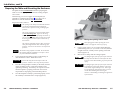
The AAP cables must have freedom of movement to permit
opening and closing the surface mount enclosure. At the same
time, they need to be restrained to prevent them from rubbing
against the edges of the enclosure cable access hole in the
underside of the surface mount enclosure. Rubbing against the
cable access hole edges can damage the cables. Route and
secure the AAP cables as follows:
1.
Open the top panel to extend the AAP cables to their
maximum pull.
2.
Experiment with AAP cable positioning to ensure that the
cables do not rub against the edges of the AAP cable hole
and to ensure that the cable pull does not restrict the
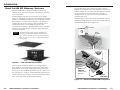
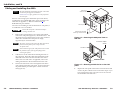
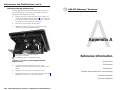
movement of the top panel. Figure 2-9 shows the cables
routed to the side, which proved effective in tests at
Extron.
3.
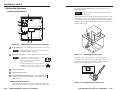
The HSA 822 ships with RJ-45/RJ-11 connector bezel plug-ins in
a variety of colors and a black, blank bezel.
Bezel
To change to a different color RJ-45 connector
bezel or if an RJ-45 connector is not needed or
desired, replace the connector bezel plug-in on
the AAP panel with a bezel of a different color
or a blank plug-in. See “Replacing the Bezels”
in chapter 3.
If no RJ-45 connector is desired, snap
the interior RJ-45 cable onto the rear of
the blank bezel plug-in (shown at
right) to hold it conveniently out of the
way. Retain the removed connector
bezel plug-in for any possible later
use.
Blank Bezel
Plug-in in AAP
Panel
Use tie wraps to secure the AAP cables to the tie-down
holes in the clamshell and enclosure in the locations
shown on figure 2-9.
View from one side
View from the opposite side
Secure the AAP cables at the circled locations.
Figure 2-9 — HSA 822 AAP cable routing
2-12
HSA 822 Hideaway® Enclosure • Installation
HSA 822 Hideaway® Enclosure • Installation
2-13