1
Below is a description of the major functions of the on-screen remote:
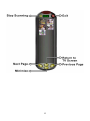
Press the TV button to play video from either cable or antenna.
Press the AV button to play video from a host of input devices such as
VCD, DVD, and VHS.
Press the SV button to play video from a host of input devices such as
VCD, DVD, and VHS.
Press the Channel Scan button to automatically scan channels that are
available for viewing from cable or antenna.
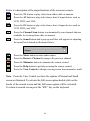
Press the Sound button and a pop up scroll bar will appear for adjusting
the sound level desired as illustrated below:
Press the Mute button to mute audio output.
Press the Restore Channel to jump to the previous channel.
Press the Minimize button to minimize the remote control.
Press the Help button to get help on using the remote control.
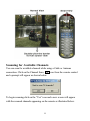
Press the View Control to change viewing screen from normal to small.
Note: From the View Control you have the options of Normal and Small
screen as illustrated. To activate the Full screen option double click on the
border of the normal screen and the Full screen option will be activated.
To return to normal screen press the "ESC" key on the keyboard.
10