1
Explorer V1 Series
V1T and V1C
THE
HERMAL AND LOW LIGHT CAMERA SYSTEM
Installation & Operation Manual
COMPLIES WITH
CE REGULATIONS
PN 29010088 V1.1
ComNav Explorer V1T and V1C Installation & Operation
Welcome
Congratulations on your purchase of ComNav Marine Ltd. Explorer V1T / Explorer V1C
Camera System. At ComNav Marine Ltd., we are dedicated to reliability & quality in all our
products, and the Explorer camera system is a good example of that. We promise to do our
best to ensure your satisfaction with your new Explorer V1 Camera System.
Warranty Notice
Prior to the installation and/or operation of the equipment, ensure that you read, understand,
and accept the conditions of the warranties as detailed in the Warranty Information section of
this manual.
General Notice
This document, ComNav part number 29010088 Version 1 Revision 0, is the approved
Installation and Operation Manual for use with Explorer V1T and V1C Camera System.
Where versions of this manual exist in other languages, the English version shall be
considered authoritative.
Proprietary
The data in this publication shall not be disclosed without permission and shall not be
duplicated, used, or disclosed in whole or in part except to the extent provided in any
contract of which this document is made a part. This restriction does not limit the
customer’s right to use information contained in this document if it is obtainable from
another source without restriction. The data subject to this restriction are contained in all
sheets of this document and related drawings and document specifications herein. ComNav
reserves the right to make changes to its products or specifications at any time, without
notice, in order to improve design or performance and to supply the best possible
product.
Copyright
Copyright © 2011 by ComNav Marine Ltd.. All rights reserved. This publication or any
parts thereof, may not be reproduced in any form without the express written permission
of ComNav Marine Ltd.
Special Note
V1C – Explorer V1 series, low light camera system.
V1T – Explorer V1 series, Thermal imaging camera system.
Please see appendix 2 for ordering information of all available camera systems and
accessories.
Some Features detailed on sales brochures and/or in this manual, are available only with the
advanced camera controller.
Document PN 29010088 V1.1
-1-
ComNav Explorer V1T and V1C Installation & Operation
WARNING: Thermal imaging systems are controlled by Canadian and
International laws and are subject to export controls. Please contact ComNav
Marine Ltd. with any question concerning export compliance for the
application or geographic location of the installation or use of this Thermal
camera system.
There are various versions of this thermal camera system that are approved for
international distribution.
Please contact ComNav Marine Ltd. if you have any questions.
ComNav Maine Ltd.
#15 - 13511 Crestwood Place
Richmond, British Columbia
V6V 2G1, Canada
www.comnav.com
Document PN 29010088 V1.1
-2-
ComNav Explorer V1T and V1C Installation & Operation
Document History
Revision
By
1R0
AB
1R1
AB
Document PN 29010088 V1.1
Description
first release
part numbers change and mounting plate zero point label
-3-
ComNav Explorer V1T and V1C Installation & Operation
About this Manual
This manual provides essential information for the safe and reliable operation of the ComNav
Explorer V1 Camera System. Read this manual in its entirety before using the Camera
System for the first time. Keep the manual handy until you become thoroughly familiar with
the operation of the Explorer V1 camera system.
Note: most of the information in this manual applies to both
models of the Explorer V1 Camera System: the Explorer V1T and the
Explorer V1C.
For easier reading, most references in the text use “V1” – but it
should always be understood as referring to both models. Whenever
a particular item applies only to the V1T or the V1C, it will be so
stated in the text of that item.
Manual Format
This manual has been formatted to be printed on both sides of a standard Letter sized paper
(8.5” x 11”).
If you have obtained this manual as a soft-copy, please note that it is in Adobe® Portable
Document Format (“PDF”), and may be viewed & printed with Adobe Reader®, or compatible
PDF-format viewers.
When printing this manual, select “duplex printing” (or the equivalent term used by your
printer’s software driver), in order to print it in a double-sided format. If your printer does not
have built-in duplexing capability, you can still print this manual double-sided by following the
instructions that came with your printer for doing “hand duplexing”.
You should also select the Auto-Rotate and Centre option in the Print Dialog box, de-select
the Choose Paper Source by PDF page size option. Set Page Scaling to None – Reader’s
default setting is Shrink to Printable Area, and is printer-dependant (usually set at ~97%), but
it is not needed in this instance.
Document PN 29010088 V1.1
-4-
ComNav Explorer V1T and V1C Installation & Operation
Figures & Tables
Table of Contents
Welcome __________________________________________________________________________ 1
Warranty Notice .........................................................................................................................................................1
General Notice ...........................................................................................................................................................1
Proprietary..................................................................................................................................................................1
Copyright....................................................................................................................................................................1
Special Note...............................................................................................................................................................1
Document History.......................................................................................................................................................3
About this Manual ......................................................................................................................................................4
When You Open the Box ____________________________________________________________ 12
Camera Package Contents ..................................................................................................................................12
Joystick Package Contents ..................................................................................................................................12
Safety Notes
____________________________________________________________________ 13
Introducing the Explorer V1 Camera Series ____________________________________________ 14
Explorer V1T – Thermal Imaging Camera............................................................................................................15
Explorer V1C – Low Light Camera ......................................................................................................................16
Installation _______________________________________________________________________ 21
Tools Required .........................................................................................................................................................21
Power Supply ...........................................................................................................................................................21
Environmental Considerations .................................................................................................................................21
Joystick Unit and Controller Unit ..............................................................................................................................21
Camera Unit .............................................................................................................................................................22
Operation .................................................................................................................................................................25
Low Light Camera ....................................................................................................................................................25
Thermal Imaging Camera.........................................................................................................................................26
Care & Maintenance ________________________________________________________________ 30
Protection of Wires and Cabling ...............................................................................................................................30
Periodic Checks .......................................................................................................................................................30
General Precautions.................................................................................................................................................30
Repair.......................................................................................................................................................................30
Fuse Replacement ...................................................................................................................................................30
Cleaning ...................................................................................................................................................................30
Appendix 1 _______________________________________________________________________ 33
Specifications ...........................................................................................................................................................33
System Interface ..............................................................................................................................................34
Power ...............................................................................................................................................................34
Mechanical .......................................................................................................................................................34
Appendix 2 _______________________________________________________________________ 35
Ordering Information ................................................................................................................................................35
Index ____________________________________________________________________________ 47
Notes........................................................................................................................................................................50
Document PN 29010088 V1.1
-5-
ComNav Explorer V1T and V1C Installation & Operation
Figures & Tables
List of Figures
Figure 1 – Typical camera systems setup (Low Light or Thermal)...............................................................................14
Figure 2: Dip Switch location........................................................................................................................................24
Document PN 29010088 V1.1
-6-
ComNav Explorer V1T and V1C Installation & Operation
Figures & Tables
List of Tables
Table 1 - Explorer V1T / V1C Camera Box Content .....................................................................................................12
Table 2 - Explorer V1T / V1C Joystick Box Content .....................................................................................................12
Table 5 – Thermal Camera System Receiver Specifications ......................................................................................33
Table 6 – System Interface Specifications ..................................................................................................................34
Table 7 – Power Specifications ...................................................................................................................................34
Table 8 – Mechanical Specifications ...........................................................................................................................34
Document PN 29010088 V1.1
-7-
ComNav Explorer V1T and V1C Installation & Operation
Document PN 29010088 V1.1
-8-
ComNav Explorer V1T and V1C Installation & Operation
Introduction
Document PN 29010088 V1.1
-9-
ComNav Explorer V1T and V1C Installation & Operation
Document PN 29010088 V1.1
- 10 -
ComNav Explorer V1T and V1C Installation & Operation
Introduction
When You Open the Box
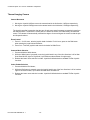
♦ Check that the packaging and the contents are not visibly damaged.
♦ Contact your supplier immediately if any of the parts listed below are missing or damaged
Camera Package Contents
Item
Part #
Description
Quantity
1
21610005
21610006
21610007/9
21610008/10
V1C Low Light camera - NTSC
V1C Low Light camera - PAL
V1T Thermal camera - NTSC 9Hz/30Hz
V1T Thermal camera - PAL 9Hz/30Hz
1
2
31610023
Flush Mount Fixing Plate / White
1
3
31610024
Fixing Screw - Plate to Camera
3
4
31610025
Fixing Screw - Plate to Boat
3
5
31610026
Security Driver
1
6
31610003
Umbilical Cable
1
7
29010088
Installation / Operating Manual
1
Table 1 - Explorer V1T / V1C Camera Box Content
Joystick Package Contents
Item
Part #
Description
1
31610015
Controller Unit
1
2
31610016
31610018
Joystick Controller V1C
Joystick Controller V1T
1
3
31610020
Power cable Tail
1
4
31610021
Data To Camera cable tail
1
5
31610019
Joystick Cable (3M CAT5 STP)
1
Table 2 - Explorer V1T / V1C Joystick Box Content
Document PN 29010088 V1.1
- 11 -
Quantity
ComNav Explorer V1T and V1C Installation & Operation
Introduction
Safety Notes!
The following important notes must be followed carefully to run the camera and respective accessories such as
keypad controllers etc. The camera and accessories are referred to as ‘Camera system’ hereafter in this document.
♦ The Explorer V1T Thermal imaging camera is designed to be used in conjunction with other navigational aids and
should not be used as the sole or primary navigation device.
♦ Some Thermal Imaging Camera models cannot be exported to certain territories without specific Export
Licenses which must be obtained from the relevant trade and industry bodies prior to exportation. Failure to
observe strict import and export regulations is a serious offense. Ensure the correct licenses are obtained
where necessary. For further information contact your Comnav dealer or Comnav support. Contact details
can be found within this document.
♦ Before installing the camera, please read this manual carefully. During installation follow the instructions indicated in
this manual. Please keep this manual safe for future reference. An up to date copy is available on our website:
www.comnav.com
♦ The installation of the Camera system including this camera and any associated accessories, should be carried out
by qualified service personnel or system installers in accordance with local regulations.
♦ Before powering the camera please check the supply voltage and ensure the power supply is safely isolated using
an appropriately rated fuse or circuit breaker. Verify that the supply power is within acceptable range (See
specifications, page 32).
♦ Please ensure the power, video and data umbilical are stowed safely and that terminations to third party hardware or
extension cables are properly shielded from moisture
♦ Do not operate the camera beyond the specified temperature and humidity limits
♦ To prevent electric shock, never remove the screws or the cover of the camera. There are no user serviceable parts
within the camera housing. Refer to qualified and approved Comnav service personnel for servicing
♦ Never aim the camera at the sun or other extremely bright objects
♦ Do not manually move the camera even when it is not powered
Document PN 29010088 V1.1
- 12 -
ComNav Explorer V1T and V1C Installation & Operation
Introduction
Introducing the Explorer V1 Camera Series
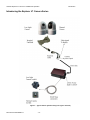
Figure 1 – Typical camera systems setup (Low Light or Thermal)
Document PN 29010088 V1.1
- 13 -
ComNav Explorer V1T and V1C Installation & Operation
Introduction
Explorer V1T – Thermal Imaging Camera
The Explorer V1T Thermal imaging micro PTZ (pan, tilt, zoom) camera has been especially designed for practical and
extreme applications such as marine, and emergency service vehicles.
In addition to its remarkably compact and sleek design, the system is water resistant and has anti-vibration and anticorrosion properties. Special attention was given to the look and size of the device, understanding the need to offer
boat owners high end technology that fits in with its surroundings and without compromising functionality. The High
resolution 384 x 288 pixels (Total pixels 110, 592), boasts a picture resolution 44% greater than its rivals with a
considerably fast pan and tilt speed.
Unlike conventional cameras, Thermal Imaging cameras sense the heat given off by objects or temperature
differences rather than amplifying ambient light.
The camera engine inside the Explorer V1T is so sensitive that it can detect temperature differences as low as 50mK.
Even ice emits thermal energy in the long wave infrared spectrum sensed by the camera. Thermal Imaging cameras
process radiated, rather than reflected energy. Therefore, no source of illumination is required.
Features:
The Explorer V1T is a feature packed devise that has been designed especially to provide the best possible situational
awareness in a wide range of operation conditions. Some features are as follows:
♦ Full weather proof, anti vibration and anti-corrosion. IP66 certified.
♦ Compact integrated design with remote controllable telemetry.
♦ Random scan, cruise and pattern scan.*
♦ Continuous 360 degree pan, 180 degree tilt (90 degree with another 90 degree auto-flip).
♦ 100 user definable preset positions.*
♦ Proportional Pan / Tilt speed in accordance with degree of zoom.
♦ Various Colour Modes - White Hot, Black Hot, Ironbow, Reverse Ironbow
♦ User Selectable Situational Modes - Fog, Night, Marine and Man Over Board
* Not available with the basic style controller Joystick
Proportional Pan and Tilt
Proportional pan automatically reduces or increases the pan and tilt speeds in proportion to the zoom level. At
telephoto zoom, the pan and tilt speeds will be slower for a given amount of joystick deflection then at wide zoom level.
This keeps the image from moving too fast on the monitor when there is a large amount of zoom.
Document PN 29010088 V1.1
- 14 -
ComNav Explorer V1T and V1C Installation & Operation
Introduction
Preset Positions
(Not available with the basic style controller Joystick)
Up to 100 user defined camera positions can be stored in the cameras memory to be accessed individually or as part
of a tour or cruise. Pan, Tilt, and Zoom values are stored when presets are stored. Autofocus is default for preset
positions.
NOTE: Certain presets are assigned to activate other
features such as patterns and image flip.
Auto Cruise
(Not available with the basic style controller Joystick)
Preset positions (up to 39) can be programmed into a tour. Once initiated, the camera will cruise through each preset
position. (Presets 1~39 are included in the tour). Preset #82 initiates Auto Cruise. There’s a 10 second dwell time
between each preset. Auto Cruise loops once the last preset in the tour is completed, starting back at preset 1.
Patterns
(Not available with the basic style controller Joystick)
Up to four patterns can be set, each controlling up to 10 preset positions. Patterns act like ‘mini-tours’. Once initiated,
the camera will move between preset positions in the pattern. Preset #84 starts pattern 1 (Preset #40 ~49), preset #85
starts pattern 2 (Preset #50~59), preset #86 starts pattern 3 (Preset #60~69), preset #87 starts pattern 4 (Preset
#70~99). There is no dwell time between each preset. The camera will sequence back down through the presets once
the last preset within the pattern is called.
Explorer V1C – Low Light Camera
Proportional Pan and Tilt
Proportional pan automatically reduces or increases the pan and tilt speeds in proportion to the zoom level. At
telephoto zoom, the pan and tilt speeds will be slower for a given amount of joystick deflection then at wide zoom level.
This keeps the image from moving too fast on the monitor when there is a large amount of zoom.
Preset Positions
(Not available with the basic style controller Joystick)
Up to 100 user defined camera positions can be stored in the cameras memory to be accessed individually or as part
of a tour or cruise. Pan, Tilt, and Zoom values are stored when presets are stored. Autofocus is default for preset
positions.
NOTE: Certain presets are assigned to activate other
features such as patterns and image flip.
Lens Control (Zoom, Focus, Iris)
ZOOM: Zoom Wide / Zoom Tele. Optical Zoom ratio 1 ~ 26. Digital Zoom x12 thereafter
FOCUS: Focus Near / Focus Far. By default system is auto-focus. After any manual changes to the focus, the camera
will default to auto focus following any pan, tilt or zoom command.
IRIS:
Open / Close. By default system is auto-iris. After any manual changes to the iris, the camera will default to
auto iris following any pan, tilt or zoom command.
Document PN 29010088 V1.1
- 15 -
ComNav Explorer V1T and V1C Installation & Operation
Introduction
Camera Feature Control
(Not available with the basic style controller Joystick)
Preset #92 is reserved to enter the OSD of the camera module allowing the user to adjust various parameters such as
Back Light Compensation, Automatic White Balance, Sharpness, Picture Effects and Shutter Speeds.
Auto Cruise
(Not available with the basic style controller Joystick)
Preset positions (up to 39) can be programmed into a tour. Once initiated, the camera will cruise through each preset
position. (Presets 1~39 are included in the tour). Preset #82 initiates Auto Cruise. There’s a 10 second dwell time
between each preset. Auto Cruise loops once the last preset in the tour is completed, starting back at preset 1.
Patterns
(Not available with the basic style controller Joystick)
Up to four patterns can be set, each controlling up to 10 preset positions. Patterns act like ‘mini-tours’. Once initiated,
the camera will move between preset positions in the pattern. Preset #84 starts pattern 1 (Preset #40 ~49), preset #85
starts pattern 2 (Preset #50~59), preset #86 starts pattern 3 (Preset #60~69), preset #87 starts pattern 4 (Preset
#70~99). There is no dwell time between each preset. The camera will sequence back down through the presets once
the last preset within the pattern is called.
Scans (Auto, Random, Frame)
(Not available with the basic style controller Joystick)
Camera scans through a 180° sweep, 90°left and 90°right of its current position. Preset #96 calls Auto
Scan.
RANDOM: Camera scans randomly through 360° of its current position. Preset #97 calls Random Scan.
FRAME: Camera scans through a 90° sweep, 45°left and 45°right of its current position. Preset #98 calls Frame
Scan.
AUTO:
Image Flip
Inverts the video image vertically (Preset #88).
Document PN 29010088 V1.1
- 16 -
ComNav Explorer V1T and V1C Installation & Operation
Installation
Document PN 29010088 V1.1
- 17 -
ComNav Explorer V1T and V1C Installation & Operation
Document PN 29010088 V1.1
- 18 -
ComNav Explorer V1T and V1C Installation & Operation
Installation
Please refer to the Warranty Information section of this manual before proceeding with
installation of the Explorer V1T/V1C.
Tools Required
General-purpose tools such as a portable drill, pliers, wire cutters, screwdrivers, wire, mounting
bolts and wrenches may be required, as well as an accurate voltmeter or multi-meter.
Hazard warning
Extreme caution is advised when using tools powered by Mains supply
circuit (AC), regardless of whether those circuits are rated for “indoor”,
“outdoor”, “marine” or “industrial” use. Water, especially sea water, is an
excellent conductor of electricity. If AC tools are used, they must be
plugged into a circuit that is adequately protected against Ground Faults
and other safety hazards, and in accordance with local and national
electric codes. Failure to comply may result is severe injury or death.
Battery powered tools are STRONGLY recommended
Power Supply
For reliable operation of your Explorer V1 Camera System, your vessel’s power supply system
must have an adequate breaker circuit, or fused DC (direct current) power supply at a nominal
voltage of 12VDC. A power on/off switch is recommended.
Ensure that adequate wire size is used to handle the expected maximum currents.
Note: It is strongly recommended that the Explorer’s power wiring
be run directly from the power supply – especially for 12 Volt
systems. The minimum supply voltage is specified as 9 Volts, at the
camera connection point. If the voltage drops below 9 Volts, the
camera system may exhibit erratic behaviour, such as periodic
resetting.
Environmental Considerations
Ensure that the Explorer system Operating & Storage Temperature are within the acceptable
range (see Specifications, Mechanical, on page 32).
The Explorer camera components: case, cable & mount are waterproof – but they are not
submersible.
Joystick Unit and Controller Unit
Note: Please take care when choosing the location of
mounting the Joystick controller as it must be installed in the
proximity of the Camera Controller unit, within 3 meters.
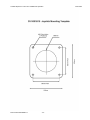
Refer to the last page of the manual for a Joystick Mounting
Template. You may tear this page out to use for marking the
Document PN 29010088 V1.1
- 19 -
ComNav Explorer V1T and V1C Installation & Operation
mounting position and drill holes of the camera joystick
controller.
1. Make sure that the template is drilled out in a proper mounting position;
2. In an external mounting location, apply a sealant silicon bead on the under side of the joystick
controller unit;
3. Position the Joystick unit in the correct orientation and place the unit into the opening;
4. Secure Joystick controller unit to the surface using the four (4) 5mm screws provided;
5. Connect the Cat5 STP cable to the socket at the bottom of the joystick unit, secure the cable with
the screw on water seal socket cap;
Note: Unit controller must be positioned in an internal
comportment, away from wet or moisture
6. Position the controller unit in an appropriate spot and within 2.75 meters of the joystick unit and
secure it with the provided screws.
7. Connect the Serial Data cable (3 pin connector) to the controller unit “CAMERA RS485” socket.
This is a ¼ turn bayonet style connector. Align the connector and turn clockwise until locked;
8. Connect the Power Supply cable (2 pin connector) to the controller unit “POWER 12VDC” socket.
This is a ¼ turn bayonet style connector. Align the connector and turn clockwise until locked;
9. Connect the Cat5 STP cable to the controller unit “JOYSTICK” socket. Secure the cable with the
screw on water seal socket cap;
Warning: Observe polarity when connecting the power cable
to a power source. It is advisable to connect the power via a
breaker or by the use of a fuse. Failure to comply may result in
equipment damage.
10.Connect the Power cable tail to a 12VDC power source. Connect Red wire to +12VDC and Black
wire to Ground (-). The controller unit is rated at 12VDC, 1A.
Camera Unit
Before drilling any holes, take care to ensure there are no
cables, conduits, pipes etc. behind the surface to be drilled.
Be sure to site your camera so that it covers all desired
areas and does not obstruct any doorways or become a
hazard in walkways etc.
Allow sufficient space behind the surface to be drilled for
routing the umbilical cable and its connector.
1.
Use the Surface Mount Fixing Plate as a template to mark camera position and drill
mounting holes; For LowLight Camera, line label indicates zero point orientation (Pan).
Make sure to align it to the vessel's bow;
Before the camera is fixed into place, set the appropriate camera
address, protocol and baud rate. This is done via dip switches
located behind a removable cover plate at the bottom of the camera
Document PN 29010088 V1.1
- 20 -
ComNav Explorer V1T and V1C Installation & Operation
2. Set camera address, communication protocol and baud rate according to the appropriate
tables below (Table 3 & Table 4);
3. Route prewired umbilical cable through mounting plate hole and attach the camera to the
mounting plate;
4. Secure the camera to the mounting plate using the Three (3) screws provided;
5. Position the Camera in its mounting locations and secure the mounting plate using the
Three (3) screws provided;
6. Route the 3 Meter camera umbilical to the camera controller.
7. Connect the Umbilical breakout cable tail to the Camera’s prewired umbilical cable.
Secure cable with threaded connector;
8. Connect extension cables to the breakout tail if required. For a list of available extension
and ordering information, please check the Ordering Information section, pages 34-35;
9. Connect Video cable (BNC Connector) to the input of the video display. An adaptor might be
necessary to make such connection; video is in composite signal format.
Warning: avoid crossing the Data cable with the Power cable
when making electrical connections. Failure to comply may result
in permanent equipment damage.
10. Connect the RS485 Data cable of the Controller Unit to the RS485 cable of the Camera
breakout tail (or extension). Take care to connect Red wire (RS485 A+) to Red and Black
wire (RS485 B-) to Black;
11. Connect the 12VDC power to the camera power connector (2.1mm DC Barrel connector).
Centre pin is +12VDC and outer ring is GND. If the connector is removed, make sure that
the red wire is connected to +12VDC and the white wire to GND.
Note: If the barrel connector is utilized or replaced by another
connector, make sure that it is protected from moisture and that an
environmentally appropriate connector is used.
Document PN 29010088 V1.1
- 21 -
ComNav Explorer V1T and V1C Installation & Operation
SWITCH 1
SWITCH 2
Figure 2: Dip Switch location
SW1
Camera Address
1
2
3
4
5
6
7
8
0
OFF
OFF
OFF
OFF
OFF
OFF
OFF
OFF
1
ON
OFF
OFF
OFF
OFF
OFF
OFF
OFF
2
OFF
ON
OFF
OFF
OFF
OFF
OFF
OFF
3
ON
ON
OFF
OFF
OFF
OFF
OFF
OFF
4
OFF
OFF
ON
OFF
OFF
OFF
OFF
OFF
…
…
…
…
…
…
…
…
…
253
ON
OFF
ON
ON
ON
ON
ON
ON
254
OFF
ON
ON
ON
ON
ON
ON
ON
255
ON
ON
ON
ON
Document PN 29010088 V1.1
ON
ON
ON
ON
Table 3: Camera Address Setting
- 22 -
ComNav Explorer V1T and V1C Installation & Operation
SW2
SW Position
Protocol
1
2
3
4
ON
OFF
OFF
OFF
User
OFF
ON
OFF
OFF
PELCO-P
ON
ON
OFF
OFF
PELCO-D
OFF
OFF
ON
OFF
Reserved
ON
OFF
ON
OFF
Reserved
OFF
ON
ON
OFF
Reserved
SW Position
Baud Rate (BPS)
Image Flip
5
6
7
8
1200
ON
OFF
OFF
-
2400
OFF
ON
OFF
-
4800
ON
ON
OFF
-
9600
OFF
OFF
ON
-
19200
ON
OFF
ON
-
Reserved
OFF
ON
ON
-
Desktop Installation
-
-
-
OFF
Reverse Installation
Table 4: Baud Rate, Protocol and Camera Flip Setting
ON
Note: Reboot the Camera after any configuration change
Operation
Low Light Camera
Note: Prior to powering up, ensure that all the cables and connectors
are properly connected and secured.
Camera Movement
1. Moving the Joystick Up/Down moves the camera head in the tilt direction, Up/Down respectively;
2. Moving the Joystick Left/Right moves the camera head in the pan direction, Left/Right respectively;
The joystick controller is geared so that the pan, tilt and zoom speed increases progressively away from
the central position. The closer the centre point, the slower the control, the further away, the faster the
control. The camera will automatically calculate the degree of zoom and gear the control so that the pan
and tilt speed reduces.
Zoom Control
1. Zoom In – Twist the joystick head clockwise;
2. Zoom Out – Twist the joystick head counter clockwise.
Document PN 29010088 V1.1
- 23 -
ComNav Explorer V1T and V1C Installation & Operation
Thermal Imaging Camera
Camera Movement
1. Moving the Joystick Up/Down moves the camera head in the tilt direction, Up/Down respectively;
2. Moving the Joystick Left/Right moves the camera head in the tilt direction, Left/Right respectively;
The joystick controller is geared so that the pan, tilt and zoom speed increases progressively away from
the central position. The closer the centre point, the slower the control, the further away, the faster the
control. The camera will automatically calculate the degree of zoom and gear the control so that the pan
and tilt speed reduces.
Zoom Control
1. Zoom In – for 2X zoom, twist the joystick head clockwise. For 4X zoom, press on the Red button
when twisting the joystick head clockwise;
2. Zoom Out – Twist the joystick head counter clockwise for Wide Zoom.
Contrast Mode Selection
1. Press and hold the White button;
2. While the White button is pressed, move the joystick head in any of the four directions: Left for Man
Over Board M.O.B, right for Fog Mode, Up for Marina mode and down for night mode.
3. Release the button once selection is made. Joystick will defaults back to standard Tilt/Pan Joystick
functions.
Colour Palette Selection
1. Press and hold the Red button;
2. While the Red button is pressed, move the joystick head in any of the four directions: Left for Ironbow
right for Reverse Ironbow, Up for White Hot and down for Black Hot.
3. Release the button once selection is made. Joystick will defaults back to standard Tilt/Pan Joystick
functions.
Document PN 29010088 V1.1
- 24 -
ComNav Explorer V1T and V1C Installation & Operation
Care & Maintenance
Document PN 29010088 V1.1
- 25 -
ComNav Explorer V1T and V1C Installation & Operation
Document PN 29010088 V1.1
- 26 -
ComNav Explorer V1T and V1C Installation & Operation
Care & Maintenance
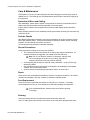
The Explorer V1T and V1C Camera System have been designed to provide many years of
reliable service. The following care and maintenance tips will help to ensure the longevity of
the equipment.
Protection of Wires and Cabling
After installation, ensure that the system’s components are securely mounted and will not
shake loose with the vibrations that are expected in a marine vessel.
Ensure that the cables to the equipment are well secured with clamps and/or alternative
fasteners.
Many potential problems can be avoided by ensuring that cables and wiring do not cause any
connectors strain.
Periodic Checks
After the first six months of operation, a thorough examination of the entire Camera system
MUST BE UNDERTAKEN. Verify that all electrical connections, cables, clamps, mounting
brackets, and mechanical connections are secure.
An annual inspection should be undertaken thereafter.
General Precautions
A few precautions will keep the unit in prime condition:
•
The Camera and control enclosures do not require any special maintenance. An
occasional cleaning is suggested; use a damp cloth and mild soap.
Note: Do not use abrasive cleaners or chemicals. Improper Care
can cause damage to the lens cover coating, degrade the
camera’s performance and may void the warranty.
•
•
•
Avoid exposing the enclosure to solvents, acids, and bases – some of these may
weaken the plastic.
The Camera and control enclosures are designed to be weatherproof and splash
resistant, Do not immersed in water.
Avoid environments exceeding a temperature of 85°C or below -40°C.
Repair
There are no user serviceable parts inside the Camera or controller enclosures. Should the
unit become damaged in any way, Contact an authorized ComNav dealer.
Fuse Replacement
There are no fuses used inside the camera or controller unit. However, it is strongly
recommended that a fuse (or circuit breaker) be used when installing the equipment.
If the fuse/breaker blows, determine the cause before replacing
or resetting
Cleaning
Clean the camera window only with low-pressure fresh water and a soft
cloth. For water spots, wipe the lens cover with a clean, fresh water dampened lens cloth.
Document PN 29010088 V1.1
- 27 -
ComNav Explorer V1T and V1C Installation & Operation
Document PN 29010088 V1.1
- 28 -
ComNav Explorer V1T and V1C Installation & Operation
Appendices
Document PN 29010088 V1.1
- 29 -
ComNav Explorer V1T and V1C Installation & Operation
Document PN 29010088 V1.1
- 30 -
ComNav Explorer V1T and V1C Installation & Operation
Appendices
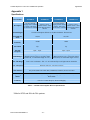
Appendix 1
Specifications
Part Number
21610007/8
21610009/10
216100011/12
216100013/14
Description
Uncooled Thermal
Uncooled Thermal
Uncooled Thermal
Uncooled Thermal
Imaging Camera
Imaging Camera
Imaging Camera 160mm
Imaging Camera 160mm
160mmx130mm˚. 30Hz*
160mmx130mm˚. 30Hz*
x 130mm˚. 9Hz Frame
x 130mm˚. 9Hz Frame
Frame Rate Resolution:
Frame Rate Resolution:
Rate Resolution: 384x288
Rate Resolution: 640x480
384x288
640x480
Thermal Engine
Uncooled Amorphous Silicone (a-Si) Microbolometer Thermal Core
Total Effective
Pixels
110,592
307,200
Thermal
Sensitivity
<50mK
70mK
Pixel Pitch
25µ
17µ
Spectral
Response
8µm ~ 14µm
8µm ~ 12µm
D.R.I Ranges
Detect: 375m Recognize: 95m Identify: 47m
(Based on target 2.3m x 2.3m using 15mm
Fixed Lens, 35˚ Horizontal Angle of View)
Detect: 1150m Recognize: 383m
(Based on target 2.3m x 2.3m using 19mm
Fixed Lens, 29˚ Horizontal Angle of View)
Pan / Tilt Range
Pan: 0~360˚ continuous - Tilt: -15˚~90˚ with auto flip to self right camera orientation
Pan / Tilt Speed
Pan:0.05~240˚/sec - Tilt: 0.03~160˚/sec
Colour Palettes /
Grey Scale (White Hot / Back Hot), Red-Black, Iron Bow, Reverse Iron Bow
Operating
Modes
5 x Preset Contrast Modes: Day Running, Night Running, Fog Mode, Marina Mode, Man Over
Board Mode
Telemetry
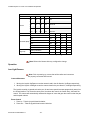
Pelco D / Comnav Propriety Protocol Mapping
Table 5 – Thermal Camera System Receiver Specifications
* 30Hz for NTSC and 25Hz for PAL systems.
Document PN 29010088 V1.1
- 31 -
ComNav Explorer V1T and V1C Installation & Operation
Appendices
System Interface
Parameter
Specification
• RS-485 (V1C and V1T);
• Bespoke;
Communication
Baud Rate
Video Output
4800 (default), 9600, 19200 and 38400
1X BNC 1V P-P / 75Ω Composite
Table 6 – System Interface Specifications
Power
Parameter
Specification
Supply Voltage
9 to 15 VDC
Power Output
Up to 1 A (max) @ 12 VDC
Power Consumption
15 W Max,
Table 7 – Power Specifications
Mechanical
Parameter
Specification
Dimensions
16 cm (H) x 13 cm (D)
(6.3 in. x 5.1 in.) not including mount
Weight
1.2 Kg
Enclosure Rating
IP 66
Operating Temperature
-25°C to +70°C
Storage Temperature
-40°C to +80°C
Relative Humidity
5% to 90%
Shock Resistance
Vibration Resistance
Mil-PRF-28800F, Class 2 Section 4.5.5.3.1
Mil-PRF-28800F, Class 2 Section 4.5.5.4.1
Compliance
CE, FCC, RoHS
Lens
15mm Fixed
Data cable length
• standard:
o 15 metres (50 feet),
(custom lengths are available)
Table 8 – Mechanical Specifications
Document PN 29010088 V1.1
- 32 -
ComNav Explorer V1T and V1C Installation & Operation
Ordering
Appendix 2
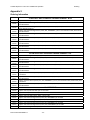
Ordering Information
Part # V1 DIGITALLY RATE STABILIZED THERMAL CAMERAS ‐ NTSC 11610004 11610020 Explorer V1C Low Light Camera, NTSC, c/w JCU, 15m extension cable, flush mount plate & hardware Explorer V1T Thermal Image Camera, NTSC, 9Hz, 384x288Res, c/w JCU 15m extension cable, flush mount plate & hardware Explorer V1T Thermal Image Camera, NTSC, 25Hz, 384x288Res, c/w JCU, 15mextension cable, flush mount plate & hardware Explorer V1T Thermal Image Camera, NTSC, 9Hz, 640x480Res, c/w JCU 15m extension cable, flush mount plate & hardware Explorer V1T Thermal Image Camera, NTSC, 25Hz,640x480Res, c/w JCU, 15m extension cable, flush mount plate & hardware Explorer V1 Dual Camera System, NTSC, 9Hz, 384x288Res, c/w JCU, 15m extension cable, flush mount plate & hardware Explorer V1 Dual Camera System, NTSC, 25Hz, 384x288Res, c/w JCU, 15m extension cable, flush mount plate & hardware Explorer V1 Dual Camera System, NTSC, 9Hz, 640x480Res, c/w JCU, 15m extension cable, flush mount plate & hardware Explorer V1 Dual Camera System, NTSC, 25Hz, 640x480Res, c/w JCU, 15m extension cable, flush mount plate & hardware V1 DIGITALLY RATE STABILIZED THERMAL CAMERAS ‐ PAL 11610006 11610008 11610010 11610012 11610014 11610016 11610018 11610021 Explorer V1C Low Light Camera, PAL, c/w JCU, 15m extension cable, flush mount plate & hardware Explorer V1T Thermal Image Camera, PAL, 9Hz, 384x288Res, c/w JCU, 15m extension cable, flush mount plate & hardware Explorer V1T Thermal Image Camera, PAL, 25Hz, 384x288Res, c/w JCU, 15m extension cable, flush mount plate & hardware Explorer V1T Thermal Image Camera, PAL, 9Hz, 640‐480Res, c/w JCU, 15m extension cable, flush mount plate & hardware Explorer V1T Thermal Image Camera, PAL, 25Hz, 640x480Res, c/w JCU, 15m extension cable, flush mount plate & hardware Explorer V1 Dual Camera System, PAL, 9Hz, 384x288Res, c/w JCU, 15m extension cable, flush mount plate & hardware Explorer V1 Dual Camera System, PAL, 25Hz, 384x288Res, c/w JCU, 15m extension cable, flush mount plate & hardware Explorer V1 Dual Camera System, PAL, 9Hz, 640x480Res, c/w JCU, 15m extension cable, flush mount plate & hardware Explorer V1 Dual Camera System, PAL, 25Hz, 640x480Res, c/w JCU, 15m extension cable, flush mount plate & hardware V1 ACCESSORIES 11610005 11610007 11610009 11610011 11610013 11610015 11610017 11610019 21610003 Explorer V1C Joystick Controller c/w 3m STP Cable 21610004 Explorer V1T Joystick Controller c/w 3m STP Cable 21610005 Explorer V1C Low Light Camera, NTSC, c/w 3m cable 21610007 Explorer V1T Thermal Image Camera,NTSC, 9Hz, 384x288Res c/w 3m cable 21610009 Explorer V1T Thermal Image Camera,NTSC, 25Hz, 384x288Res c/w 3m cable 21610011 Explorer V1T Thermal Image Camera,NTSC, 9Hz, 640x480Res c/w 3m cable 21610013 Explorer V1T Thermal Image Camera,NTSC, 25Hz, 640x480Res c/w 3m cable 21610006 Explorer V1C Low Light Camera, PAL, c/w 3m cable Document PN 29010088 V1.1
- 33 -
ComNav Explorer V1T and V1C Installation & Operation
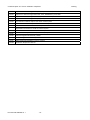
21610008 Explorer V1T Thermal Image Camera, PAL, 9Hz, 384x288Res c/w 3m cable 21610010 Explorer V1T Thermal Image Camera PAL, 25Hz, 384x288 Res c/w 3m cable 21610012 Explorer V1T Thermal Image Camera PAL, 9Hz, 640x480Res c/w 3m cable 21610014 Explorer V1T Thermal Image Camera, PAL, 25Hz, 640x480 Res c/w 3m cable 31610004 15m extension cable for Explorer V1C & V1T Camera System 31610035 25m extension cable for Explorer V1C & V1T Camera System 31610006 Flush Mount Plate for V1C & V1T Camera System 31610032 Adjustable Arm Bracket for V1C & V1T Camera System 31610033 Recess Mount Bracket for V1C & V1T Camera System 31610027 7" Combined Waterproof Monitor/4 Channel Quad Splitter 31610029 4 Channel Digital Video Recorder, 120GB 31610030 8 Channel Digital Video Recorder, 160GB 31610031 Video Distribution Amplifier/1 Input to 4 Output Installation & Operation Manual 29010088 Document PN 29010088 V1.1
- 34 -
Ordering
ComNav Explorer V1T and V1C Installation & Operation
Warranty
End User License Agreement
IMPORTANT - This is an agreement (the "Agreement") between you, the end purchaser ("Licensee") and ComNav
Marine Ltd. ("ComNav") which permits Licensee to use the ComNav software (the "Software") that accompanies this
Agreement. This Software may be licensed on a standalone basis or may be embedded in a Product. Please read and
ensure that you understand this Agreement before installing or using the Software Update or using a Product.
In this agreement any product that has Software embedded in it at the time of sale to the Licensee shall be referred to as
a "Product". As well, in this Agreement, the use of a Product shall be deemed to be use of the Software which is
embedded in the Product.
BY INSTALLING OR USING THE SOFTWARE UPDATE OR THE PRODUCT, LICENSEE THEREBY AGREES TO BE
LEGALLY BOUND BY THE TERMS OF THIS AGREEMENT. IF YOU DO NOT AGREE TO THESE TERMS, (I) DO NOT
INSTALL OR USE THE SOFTWARE, AND (II) IF YOU ARE INSTALLING AN UPDATE TO THE SOFTWARE, DO NOT
INSTALL THE UPDATE AND PROMPTLY DESTROY IT.
COMNAV PROVIDES LIMITED WARRANTIES IN RELATION TO THE SOFTWARE. AS WELL, THOSE WHO USE THE
EMBEDDED SOFTWARE DO SO AT THEIR OWN RISK. YOU SHOULD UNDERSTAND THE IMPORTANCE OF
THESE AND OTHER LIMITATIONS SET OUT IN THIS AGREEMENT BEFORE INSTALLING OR USING THE
SOFTWARE OR THE PRODUCT.
1.
2.
3.
4.
5.
6.
7.
LICENSE. ComNav hereby grants to Licensee a non-transferable and non-exclusive license to use the Software as
embedded in a Product and all Updates (collectively the "Software"), solely in binary executable form.
RESTRICTIONS ON USE. Licensee agrees that Licensee and its employees will not directly or indirectly, in any
manner whatsoever:
a. install or use more copies of the Software than the number of copies that have been licensed;
b. use or install the Software in connection with any product other than the Product the Software was intended to be
used or installed on as set out in the documentation that accompanies the Software.
c. copy any of the Software or any written materials for any purpose except as part of Licensee's normal backup
processes;
d. modify or create derivative works based on the Software;
e. sub-license, rent, lease, loan or distribute the Software;
f. permit any third party to use the Software;
g. use or operate Product for the benefit of any third party in any type of service outsourcing, application service,
provider service or service bureau capacity;
h. reverse engineer, decompile or disassemble the Software or otherwise reduce it to a human perceivable form;
i. Assign this Agreement or sell or otherwise transfer the Software to any other party except as part of the sale or
transfer of the whole Product.
UPDATES. At ComNav's discretion ComNav may make Updates available to Licensee. An update ("Update") means
any update to the Software that is made available to Licensee including error corrections, enhancements and other
modifications. Licensee may access, download and install Updates during the Warranty Period only. All Updates that
Licensee downloads, installs or uses shall be deemed to be Software and subject to this Agreement. ComNav
reserves the right to modify the Product without any obligation to notify, supply or install any improvements or
alterations to existing Software.
SUPPORT. ComNav may make available directly or through its authorized dealers telephone and email support for
the Software. Contact ComNav to find the authorized dealer near you. As well, ComNav may make available user
and technical documentation regarding the Software. ComNav reserves the right to reduce and limit access to such
support at any time.
BACKUPS AND RECOVERY. Licensee shall back-up all data used, created or stored by the Software on a regular
basis as necessary to enable proper recovery of the data and related systems and processes in the event of a
malfunction in the Software or any loss or corruption of data caused by the Software. Licensee shall assume all risks
of loss or damage for any failure to comply with the foregoing.
OWNERSHIP. The Licensee understands that the Licensee does NOT own rights, title and interest in and to the
Software and related materials, including intellectual property rights. The Software is licensed to Licensee, not sold.
TRADEMARKS. "ComNav” and the associated logos are trademarks of ComNav. Other trademarks are the property
of their respective owners. Licensee may not use any of these trademarks without the consent of their respective
owners.
Document PN 29010088 V1.1
- 35 -
ComNav Explorer V1T and V1C Installation & Operation
8.
9.
10.
11.
12.
13.
14.
15.
Warranty
LIMITED WARRANTY. ComNav warrants solely to the Licensee, subject to the exclusions and procedures set
forth herein below, that for a period of one (1) year from the original date of purchase of the Product in which it is
embedded (the "Warranty Period"), the Software, under normal use and maintenance, will conform in all material
respects to the documentation provided with the Software and any media will be free of defects in materials and
workmanship. For any Update, ComNav warrants, for 90 days from performance or delivery, or for the balance of
the original Warranty Period, whichever is greater, that the Update, under normal use and maintenance, will
conform in all material respects to the documentation provided with the Update and any media will be free of
defects in materials and workmanship. Notwithstanding the foregoing, ComNav does not warrant that the
Software will meet Licensee's requirements or that its operation will be error free.
WARRANTY EXCLUSIONS. The warranty set forth in Section (8) will not apply to any deficiencies caused by (a)
the Product not being used as described in the documentation supplied to Licensee, (b) the Software having
been altered, modified or converted in any way by anyone other than ComNav or approved by ComNav, (c) any
malfunction of Licensee's equipment or other software, or (d) damage occurring in transit or due to any accident,
abuse, misuse, improper installation, lightning (or other electrical discharge) or neglect other than that caused by
ComNav. ComNav GPS does not warrant or guarantee the precision or accuracy of positions obtained when
using the Software (whether standalone or embedded in a Product). The Product and the Software is not
intended and should not be used as the primary means of navigation or for use in safety of life applications. The
potential positioning and navigation accuracy obtainable with the Software as stated in the Product or Software
documentation serves to provide only an estimate of achievable accuracy based on specifications provided by
the US Department of Defense for GPS positioning and DGPS service provider performance specifications,
where applicable.
WARRANTY DISCLAIMER. EXCEPT AS EXPRESSLY SET OUT IN THIS AGREEMENT, COMNAV MAKES
NO REPRESENTATION, WARRANTY OR CONDITION OF ANY KIND TO LICENSEE, WHETHER VERBAL OR
WRITTEN AND HEREBY DISCLAIMS ALL REPRESENTATIONS, WARRANTIES AND CONDITIONS OF ANY
KIND INCLUDING FITNESS FOR A PARTICULAR PURPOSE, MERCHANTABILITY, ACCURACY,
RELIABILITY OR THAT THE USE OF THE SOFTWARE WILL BE UNINTERRUPTED OR ERROR-FREE AND
HEREBY DISCLAIMS ALL REPRESENTATIONS, WARRANTIES AND CONDITIONS ARISING AS A RESULT
OF CUSTOM, USAGE OR TRADE AND THOSE ARISING UNDER STATUTE.
LIMITS ON WARRANTY DISCLAIMER. Some jurisdictions do not allow the exclusion of implied warranties or
conditions, so some of the above exclusions may not apply to Licensee. In that case, any implied warranties or
conditions which would then otherwise arise will be limited in duration to ninety (90) days from the date of the
license of the Software or the purchase of the Product. The warranties given herein give Licensee specific legal
rights and Licensee may have other rights which may vary from jurisdiction to jurisdiction.
CHANGE TO WARRANTY. No employee or agent of ComNav is authorized to change the warranty provided or
the limitation or disclaimer of warranty provisions. All such changes will only be effective if pursuant to a separate
agreement signed by senior officers of the respective parties.
WARRANTY CLAIM. In the event Licensee has a warranty claim Licensee must first check for and install all
Updates that are made available. The warranty will not otherwise be honored. Proof of purchase may be
required. ComNav does not honor claims asserted after the end of the Warranty Period.
LICENSEE REMEDIES. In all cases which involve a failure of the Software to conform in any material respect to
the documentation during the Warranty Period or a breach of a warranty, ComNav's sole obligation and liability,
and Licensee's sole and exclusive remedy, is for ComNav, at ComNav's option, to (a) repair the Software, (b)
replace the Software with software conforming to the documentation, or (c) if ComNav is unable, on a reasonable
commercial basis, to repair the Software or to replace the Software with conforming software within ninety (90)
days, to terminate this Agreement and thereafter Licensee shall cease using the Software. ComNav will also
issue a refund for the price paid by Licensee less an amount on account of amortization, calculated on a straightline basis over a deemed useful life of three (3) years.
LIMITATION OF LIABILITY. IN NO EVENT WILL COMNAV BE LIABLE TO LICENSEE FOR ANY
INCIDENTAL, CONSEQUENTIAL, SPECIAL OR INDIRECT DAMAGES INCLUDING ARISING IN RELATION
TO ANY LOSS OF DATA, INCOME, REVENUE, GOODWILL OR ANTICIPATED SAVINGS EVEN IF COMNAV
HAS BEEN INFORMED OF THE POSSIBILITY OF SUCH LOSS OR DAMAGE. FURTHER, IN NO EVENT WILL
COMNAV'S TOTAL CUMULATIVE LIABILITY HEREUNDER, FROM ALL CAUSES OF ACTION OF ANY KIND,
EXCEED THE TOTAL AMOUNT PAID BY LICENSEE TO COMNAV TO PURCHASE THE PRODUCT. THIS
LIMITATION AND EXCLUSION APPLIES IRRESPECTIVE OF THE CAUSE OF ACTION, INCLUDING BUT
NOT LIMITED TO BREACH OF CONTRACT, NEGLIGENCE, STRICT LIABILITY, TORT, BREACH OF
WARRANTY, MISREPRESENTATION OR ANY OTHER LEGAL THEORY AND WILL SURVIVE A
FUNDAMENTAL BREACH.
Document PN 29010088 V1.1
- 36 -
ComNav Explorer V1T and V1C Installation & Operation
Warranty
16. LIMITS ON LIMITATION OF LIABILITY. Some jurisdictions do not allow for the limitation or exclusion of liability
for incidental or consequential damages, so the above limitation or exclusion may not apply to Licensee and
Licensee may also have other legal rights which may vary from jurisdiction to jurisdiction.
17. BASIS OF BARGAIN. Licensee agrees and acknowledges that ComNav has set its prices and the parties have
entered into this Agreement in reliance on the limited warranties, warranty disclaimers and limitations of liability
set forth herein, that the same reflect an agreed-to allocation of risk between the parties (including the risk that a
remedy may fail of its essential purpose and cause consequential loss), and that the same forms an essential
basis of the bargain between the parties. Licensee agrees and acknowledges that ComNav would not have been
able to sell the Product at the amount charged on an economic basis without such limitations.
18. PROPRIETARY RIGHTS INDEMNITY. ComNav shall indemnify, defend and hold harmless Licensee from and
against any and all actions, claims, demands, proceedings, liabilities, direct damages, judgments, settlements,
fines, penalties, costs and expenses, including royalties and attorneys' fees and related costs, in connection with
or arising out of any actual infringement of any third party patent, copyright or other intellectual property right by
the Software or by its use, in accordance with this Agreement and documentation, PROVIDED THAT: (a)
ComNav has the right to assume full control over any action, claim, demand or proceeding, (b) Licensee shall
promptly notify ComNav of any such action, claim, demand, or proceeding, and (c) Licensee shall give ComNav
such reasonable assistance and tangible material as is reasonably available to Licensee for the defense of the
action, claim, demand or proceeding. Licensee shall not settle or compromise any of same for which ComNav
has agreed to assume responsibility without ComNav's prior written consent. Licensee may, at its sole cost and
expense, retain separate counsel from the counsel utilized or retained by ComNav.
19. INFRINGEMENT. If use of the Software may be enjoined due to a claim of infringement by a third party then, at
its sole discretion and expense, ComNav may do one of the following: (a) negotiate a license or other agreement
so that the Product is no longer subject to such a potential claim, (b) modify the Product so that it becomes noninfringing, provided such modification can be accomplished without materially affecting the performance and
functionality of the Product, (c) replace the Software, or the Product, with non-infringing software, or product, of
equal or better performance and quality, or (d) if none of the foregoing can be done on a commercially
reasonable basis, terminate this license and Licensee shall stop using the Product and ComNav shall refund the
price paid by Licensee less an amount on account of amortization, calculated on a straight-line basis over a
deemed useful life of three (3) years.
The foregoing sets out the entire liability of ComNav and the sole obligations of ComNav to Licensee in respect
of any claim that the Software or its use infringes any third party rights.
20. INDEMNIFICATION. Except in relation to an infringement action, Licensee shall indemnify and hold ComNav
harmless from any and all claims, damages, losses, liabilities, costs and expenses (including reasonable fees of
lawyers and other professionals) arising out of or in connection with Licensee's use of the Product, whether direct
or indirect, including without limiting the foregoing, loss of data, loss of profit or business interruption.
21. TERMINATION. Licensee may terminate this Agreement at any time without cause. ComNav may terminate this
Agreement on 30 days notice to Licensee if Licensee fails to materially comply with each provision of this
Agreement unless such default is cured within the 30 days. Any such termination by a party shall be in addition to
and without prejudice to such rights and remedies as may be available, including injunction and other equitable
remedies. Upon receipt by Licensee of written notice of termination from ComNav or termination by Licensee,
Licensee shall at the end of any notice period (a) cease using the Software; and (b) return to ComNav (or destroy
and provide a certificate of a Senior Officer attesting to such destruction) the Software and all related material
and any magnetic or optical media provided to Licensee. The provisions of Sections 6), 7), 8), 9), 10), 15), 21),
26) and 27) herein shall survive the expiration or termination of this Agreement for any reason.
22. EXPORT RESTRICTIONS. Licensee agrees that Licensee will comply with all export control legislation of
Canada, the United States, Australia and any other applicable country's laws and regulations, whether under the
Arms Export Control Act, the International Traffic in Arms Regulations, the Export Administration Regulations, the
regulations of the United States Departments of Commerce, State, and Treasury, or otherwise as well as the
export control legislation of all other countries.
23. PRODUCT COMPONENTS. The Product may contain third party components. Those third party components
may be subject to additional terms and conditions. Licensee is required to agree to those terms and conditions in
order to use the Product.
24. FORCE MAJEURE EVENT. Neither party will have the right to claim damages as a result of the other's inability
to perform or any delay in performance due to unforeseeable circumstances beyond its reasonable control, such
as labor disputes, strikes, lockouts, war, riot, insurrection, epidemic, Internet virus attack, Internet failure, supplier
failure, act of God, or governmental action not the fault of the non-performing party.
Document PN 29010088 V1.1
- 37 -
ComNav Explorer V1T and V1C Installation & Operation
Warranty
25. FORUM FOR DISPUTES. The parties agree that the courts located in Vancouver, BC, Canada and the
courts of appeal there from will have exclusive jurisdiction to resolve any disputes between Licensee and
ComNav concerning this Agreement or Licensee's use or inability to use the Software and the parties
hereby irrevocably agree to attorn to the jurisdiction of those courts. Notwithstanding the foregoing, either
party may apply to any court of competent jurisdiction for injunctive relief.
26. APPLICABLE LAW. This Agreement shall be governed by the laws of the Province of British Columbia,
Canada, exclusive of any of its choice of law and conflicts of law jurisprudence.
27. CISG. The United Nations Convention on Contracts for the International Sale of Goods will not apply to this
Agreement or any transaction hereunder.
28. GENERAL. This is the entire agreement between Licensee and ComNav relating to the Product and
Licensee's use of the same, and supersedes all prior, collateral or contemporaneous oral or written
representations, warranties or agreements regarding the same. No amendment to or modification of this
Agreement will be binding unless in writing and signed by duly authorized representatives of the parties.
Any and all terms and conditions set out in any correspondence between the parties or set out in a
purchase order which are different from or in addition to the terms and conditions set forth herein, shall
have no application and no written notice of same shall be required. In the event that one or more of the
provisions of this Agreement is found to be illegal or unenforceable, this Agreement shall not be rendered
inoperative but the remaining provisions shall continue in full force and effect.
Document PN 29010088 V1.1
- 38 -
ComNav Explorer V1T and V1C Installation & Operation
Warranty
Warranty Information
Limited Warranty
This Limited Warranty (the “Warranty”) covers all Explorer V1 Series Camera products &
accessories (the “Equipment”) sold by ComNav Marine Ltd. (“ComNav”).
LIMITED TWO YEAR WARRANTY
ComNav warrants to the Purchaser, provided that the recommended installation and maintenance
procedures set forth in the manual (the “Manual”) provided with the Equipment have been followed,
and subject always to the other provisions of this Warranty, that the Equipment is free from defects
in workmanship and materials under normal use and service for a period of two (2) year from the
date of purchase of the Equipment by the Purchaser.
EXCLUSIONS
This Limited Warranty is null and void if:
1. The serial number of the Equipment has been removed, altered or mutilated;
2. Any of the anti-tamper seals covering case-screw holes, or other mechanisms for opening the
Equipment’s case, have been removed, broken or otherwise tampered with;
3. There are any defects in it, or damages to it, caused by:
a. Faulty installation or hook-up of the Equipment;
b. Abuse, misuse, or any use of the Equipment in violation of the instructions set forth in the
Manual;
c. Shipping, alterations, or incorrect and/or unauthorized service;
d. Accident, exposure of the Equipment to excessive heat, fire, lightning or other electrical
discharge, or water immersion;
e. Water damage due to failure to fully fasten the plug connected into the equipment’s
power/signal receptacle;
f. Improper or inadequate ancillary or connected equipment.
OTHER LIMITATIONS AND EXCLUSIONS
1. The Equipment is not intended for primary navigation or for use in safety of life applications;
ComNav does not warrant or guarantee that the Equipment will perform in accordance with the
requirements of such usage;
2. ComNav reserves the right to modify the Equipment without any obligation to notify, supply or
install any improvements or alterations to existing Equipment.
NO OTHER WARRANTIES
THE FOREGOING WARRANTY IS EXCLUSIVE OF ALL OTHER WARRANTIES AND
CONDITIONS, WHETHER WRITTEN, ORAL OR IMPLIED, ARISING BY STATUTE OR
OTHERWISE, WITH RESPECT TO THE DESIGN, SALE, INSTALLATION OR USE OF THE
Document PN 29010088 V1.1
- 39 -
ComNav Explorer V1T and V1C Installation & Operation
Warranty
EQUIPMENT, INCLUDING BUT NOT LIMITED TO IMPLIED WARRANTIES OR
CONDITIONS OF MERCHANTABILITY AND FITNESS FOR THE ORDINARY PURPOSES
FOR WHICH THE EQUIPMENT IS USED OR FITNESS FOR A PARTICULAR PURPOSE,
AND ANY OTHER OBLIGATIONS ON THE PART OF COMNAV, ITS EMPLOYEES,
SUPPLIERS, AGENTS, OR REPRESENTATIVES.
LIMITATION OF LIABILITY
The extent of ComNav’s liability for damages of any nature to the end purchaser or any other person
or entity whether in contract or tort, and whether to persons or property, shall in no case exceed, in
the aggregate, the cost of correcting the defect in the equipment or, at ComNav’s option, the cost of
replacing the defective item. In no event will ComNav be liable for any loss of production, loss of
profits, loss of use or for any special, indirect, incidental, consequential or contingent damages, even
if ComNav has been advised of the possibility of such damages. Without limiting the foregoing,
ComNav shall not be liable for any damages of any kind resulting from installation, use, quality,
performance or accuracy of the equipment.
NOTICE OF DEFECT
The Limited Warranty will not apply with respect to any defective Equipment unless written notice
of such defect is given to ComNav, by mail to the address for ComNav set forth below, or by
facsimile to ComNav at 604-207-8008, and unless that written notice is received by ComNav within
ten (10) days of the date upon which the defect first became known to the Purchaser.
Notices sent by mail from within North America will be deemed to be received by ComNav on the
seventh (7th) day first following the date of posting. Notices sent by mail from anywhere else in the
world will be deemed to be received by ComNav on the tenth (10th) day next following the date of
posting. Notices sent by facsimile will be deemed to be received by ComNav on the date of
transmission with appropriate answerback confirmation.
REMEDIES NOT TRANSFERABLE
The Purchaser’s remedies under this Warranty apply only to the original end-user of the ComNav
Equipment, being the Purchaser, and apply only to the original installation of the Equipment. The
Purchaser’s remedies under this Warranty are not transferable or assignable by the Purchaser to
others in whole or in part.
CUSTOMER REMEDIES
1. If the Equipment, or any part thereof, proves to be defective within the warranty period, the
Purchaser shall do the following:
a. contact ComNav, by phoning 604-207-1600, to discuss the nature of the problem and to
obtain return shipping instructions for the defective Equipment;and,
b. prepare a detailed written statement of the nature and circumstances of the defect, to the best
of the Purchaser’s knowledge, and including the date of purchase of the Equipment, the place
of purchase, the name and address of the installer, and the Purchaser’s name, address and
telephone number, all to be sent, along with proof of purchase, to ComNav at the address set
out below, and within the time limits set out above for Notice of Defect.
2. If, upon examination by ComNav, the defect is determined to result from defective workmanship
or material and if the defect has occurred within the warranty period set forth above, the
Equipment or the defective parts thereof shall be repaired or replaced, at ComNav’s sole option,
Document PN 29010088 V1.1
- 40 -
ComNav Explorer V1T and V1C Installation & Operation
Warranty
without charge, and shall be returned to the Purchaser at ComNav’s expense. Return delivery will
be by the most economical means. Should the Purchaser require that the Equipment be returned by
a faster method, the costs incurred by the faster delivery will be pre-paid by the Purchaser.
3. No refund of the purchase price for the Equipment will be made to the Purchaser unless ComNav
is unable to remedy the defect after having a reasonable number of opportunities to do so.
4. Warranty service shall be performed only by ComNav. Any attempts to remedy the defect by
anyone else shall render the warranties set forth in this Warranty null and void.
CHOICE OF LAW AND JURISDICTION
This Warranty is governed by the laws of the Province of British Columbia, Canada. If the Purchaser
acquired the Equipment outside of Canada, each of the parties hereto irrevocably attorn to the
jurisdiction of the courts of the Province of British Columbia, Canada, and further agree to settle any
dispute, controversy or claim arising out of or relating to this Limited Warranty, or the breach,
termination, or invalidity of it, by arbitration under the rules of the British Columbia International
Commercial Arbitration Centre (“BCICAC”). The appointing authority shall be BCICAC [or, if the
BCICAC shall cease to exist, the Chief Justice of the Supreme Court of British Columbia]. BCICAC
shall administer the case in accordance with BCICAC Rules. There shall be one arbitrator and the
place of arbitration shall be Vancouver, British Columbia, Canada.
The United Nations Convention on Contracts for the International Sale of Goods Act, S.B.C 1990, c.
20, and any other statutory enactments of the United Nations Convention on Contracts for the
International Sale of Goods do not apply to this Warranty.
ComNav Maine Ltd.
#15 - 13511 Crestwood Place
Richmond, British Columbia
V6V 2G1
Canada
www.comnav.com
WARNING
The Equipment is an aid to navigation only. It is not intended or designed to replace the person on
watch. A qualified person should always be in a position to monitor the vessel’s heading, and to
watch for navigational hazards, and should be prepared to revert to manual steering immediately if
an undesired change of heading occurs, if the heading is not maintained within reasonable limits, or
when navigating in a hazardous situation.
ALWAYS REMEMBER:
WHENEVER UNDER WAY, A QUALIFIED PERSON ON WATCH IS REQUIRED BY LAW.
Document PN 29010088 V1.1
- 41 -
ComNav Explorer V1T and V1C Installation & Operation
Document PN 29010088 V1.1
- 42 -
ComNav Explorer V1T and V1C Installation & Operation
User Notes
Document PN 29010088 V1.1
- 43 -
User Notes
ComNav Explorer V1T and V1C Installation & Operation
Notes
Document PN 29010088 V1.1
- 44 -
User Notes
ComNav Explorer V1T and V1C Installation & Operation
Document PN 29010088 V1.1
- 45 -
User Notes