1
ComNav Explorer V1T and V1C Installation & Operation
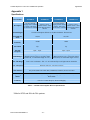
SW2
SW Position
Protocol
1
2
3
4
ON
OFF
OFF
OFF
User
OFF
ON
OFF
OFF
PELCO-P
ON
ON
OFF
OFF
PELCO-D
OFF
OFF
ON
OFF
Reserved
ON
OFF
ON
OFF
Reserved
OFF
ON
ON
OFF
Reserved
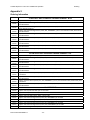
SW Position
Baud Rate (BPS)
Image Flip
5
6
7
8
1200
ON
OFF
OFF
-
2400
OFF
ON
OFF
-
4800
ON
ON
OFF
-
9600
OFF
OFF
ON
-
19200
ON
OFF
ON
-
Reserved
OFF
ON
ON
-
Desktop Installation
-
-
-
OFF
Reverse Installation
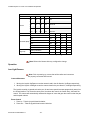
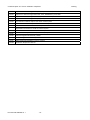
Table 4: Baud Rate, Protocol and Camera Flip Setting
ON
Note: Reboot the Camera after any configuration change
Operation
Low Light Camera
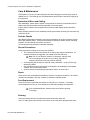
Note: Prior to powering up, ensure that all the cables and connectors
are properly connected and secured.
Camera Movement
1. Moving the Joystick Up/Down moves the camera head in the tilt direction, Up/Down respectively;
2. Moving the Joystick Left/Right moves the camera head in the pan direction, Left/Right respectively;
The joystick controller is geared so that the pan, tilt and zoom speed increases progressively away from
the central position. The closer the centre point, the slower the control, the further away, the faster the
control. The camera will automatically calculate the degree of zoom and gear the control so that the pan
and tilt speed reduces.
Zoom Control
1. Zoom In – Twist the joystick head clockwise;
2. Zoom Out – Twist the joystick head counter clockwise.
Document PN 29010088 V1.1
- 23 -