1
5.0
Frequently Asked Questions
Q1:
What should I do first (after viewing the printed material from the box)?
A1:
Make sure the hardware works well enough to run the Tutorial. After software installation,
plug in a Dev Board, and go through the DVK tutorial. The tutorial is located in the “EZ-USB
DVK User’s Guide“ which can be found in the “Start“ menu under Cypress >usb >help. The
tutorial is short and worthwhile.
Q2:
What is the first example to try?
A2:
While following the tutorial, you will read the Device ID from the Development Board, and
then load the dev_io example. It turns on the LED so you know that firmware has been
loaded and runs OK.
Q3:
Where's a soft copy of the EZ-USB Getting Started?
A3:
Look at "C:\CYPRESS\USB\Doc\General\EZ-USB Getting Started.PDF".
Q4:
Where's a soft copy of the EZ-USB Technical Reference Manual?
A4:
Look at "C:\CYPRESS\USB\Doc\FX2LP\EZ-USB_TRM.pdf". This is a very well written and
readable manual, and is the key reference you will want to use. Bring up the soft copy so
you can search for the material you are most interested in very quickly.
Q5:
Where's the EZ-USB datasheet?
A5:
See "C:\CYPRESS\USB\Doc\FX2LP\CY7C68013.pdf".
Q6:
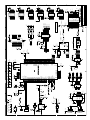
Where's the EZ-USB Development Board schematic (pdf and Orcad files)?
A6:
See "C:\CYPRESS\USB\Hardware\FX2LP\DEVBD REVx\" where "x" is the latest Rev.
Q7:
Where can I find the errata sheet(s)?
A7:
Look at: "C:\CYPRESS\USB\Doc\FX2LP\EZ-USB beta release notes.pdf" and
"C:\CYPRESS\USB\Doc\FX2LP\EZ-USB Chip Errata.pdf"
Q8:
How do I to generate "myapp" from (frameworks)?
A8:
Create a (frameworks based) project folder by just copying the "fw" example folder
(C:\CYPRESS\USB\Target\Fw\LP) to a new location (i.e. under "Examples") and then
rename the folder to the new project name. Remove the .hex file, and .Uv2 file. Rename
periph.c to <NewPrj>.c, and then create a new uV2 project file. See: the “EZ-USB Firmware
Frameworks” section of the “EZ-USB DVK User’s Guide” for more information.
Q9:
How do I build an EEPROM image for burning my code?
A9:
See the tutorial for information about generating EEPROMs.
EZ-USB Development Board
Page -17