1
MAGIC-PRO MP-7VIP-A
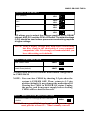
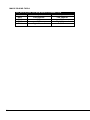
2-5.6 IRQ DESCRIPTION
IRQ66
IRQN 0N
Function Description6
System TimerNN
IRQN 1N
Keyboard ControllerN
2N
IRQN 2N
Programmable InterruptN
N/A
IRQN 3N
Serial Port (COM 2)N
11
IRQN 4N
Serial Port (COM 1)N
12
IRQN 5NN
Priority
1
13N
IRQN 6N
Floppy Disk ControllerN
14
IRQN 7N
Parallel Port (LPT1)N
15
IRQN 8N
Real Time Clock (RTC)N
3
IRQN 9NN
4
IRQN 10NN
5N
IRQN 11NN
6N
IRQN 12N
PS/2 Mouse PortN
7
IRQN 13N
CoprocessorN
8
IRQN 14N
Primary IDE ChannelN
9
IRQN 15N
Secondary IDE ChannelN
10
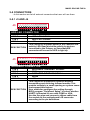
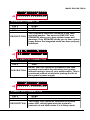
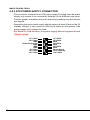
• Both ISA and PCI expansion cards may require IRQs. System IRQs are
available to cards installed in the ISA expansion bus first, then any remaining IRQs are available to PCI cards. Currently, there are two types of ISA
cards.
• The original ISA expansion card design, now referred to as “Legacy” ISA
card, requires that you configurate the card’s jumpers manually and then
install it in any available slot on the ISA bus. To see a map of your used and
free IRQs in Windows 98, the Control Panel in My Computer, contains a
System icon, which gives you a Device Manager tab. Double-Clicking on a
specific hardware device gives you a Resources tab which shows the Interrupt number and address. Double-Clicking Computers to see all the interrupts and addresses for your system. Make sure that no two devices use
the same IRQ or your computer will experience problems when those two
devices are in use at the same time.
25