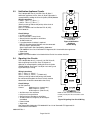
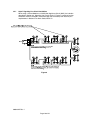
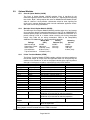
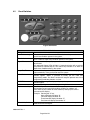
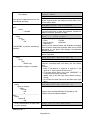
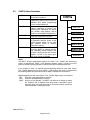
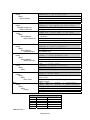
1
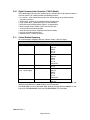
7100 Series Fire Alarm Control
Installation/Operating Manual
Document: 9000-0447
Print Date: 6/6/07
Rev. I
P/N 9000-0447 Rev. I ECN: 06-528
Copyright © 1998
Honeywell International Inc.
All Rights Reserved
Published in U.S.A.
12 Clintonville Road, Northford, CT 06472-1610 USA • TEL: (203) 484-7161 • FAX: (203) 484-7118
www.gamewell-fci.com
Fire Alarm System Limitations
While a fire alarm system may lower insurance rates, it is not a substitute for fire insurance!
The installation MUST be in accordance with the
following standards:
• National Fire Alarm Code (NFPA 72)
• National Electrical Code (NFPA 70)
• Life Safety Code (NFPA 101)
• NFPA 92A – Recommended Practice for
Smoke Control Systems
This manual is designed for use by factorytrained installers and operators of the GamewellFCI, 7100 Series, Fire Alarm Control. All
illustrations, functional descriptions, operating
and installation procedures, and other relevant
information are contained in this manual.
The contents of this manual are important, and
the manual must be kept with the fire alarm
control panel at all times. If building ownership is
changed, this manual, including any testing and
maintenance information, must be passed along
to the new owner(s).
The fire alarm control panel is part of a system.
Manuals and instructions for other devices
forming part of the system should be kept
together. Purchasers who install this system for
use by others must leave the instructions with the
user. A copy of these instructions is included with
each product and is available from the
manufacturer.
This equipment is Listed by various listing
agencies for use in fire alarm systems. Use only
components which are compatible with the
Gamewell-FCI System. The installation MUST be
in accordance with the instructions in this
manual. THEREFORE:
• DO NOT deviate from the procedures
described in this manual.
• DO NOT assume any details not shown in the
instructions.
• DO NOT modify any electrical or mechanical
features.
• DO comply with all codes and standards set
forth by the Authority Having Jurisdiction.
The term “Authority Having Jurisdiction” has
become a standard term in the fire alarm
industry. An acceptable definition of “Authority
Having Jurisdiction” is:
Fire alarm systems installed in the USA fall under
the jurisdiction of some authority. In some areas
this may be a local fire department; in other areas
it may be a building inspector, insurance firm, etc.
Different authorities may have their own local
requirements for the way the fire alarm system is
installed and used. Most local authorities base
their requirements on the National Fire Protection
Agency (NFPA) codes, but there may be
important differences. You must install this
system in the way in which the Authority Having
Jurisdiction requires. If you do not know which
authority has jurisdiction in your area, contact
your local fire department or building inspector for
guidance. It is important that you tell users to be
aware of any requirements defined by the
Authority Having Jurisdiction.
WARNING: Touching components which are
improperly installed, applied or operated could be
hazardous and possibly fatal. Short circuits could
cause arcing that could result in molten metal
injuries. Therefore, only qualified technicians familiar
with electrical hazards should perform checkout
procedures.
Safety glasses should be worn, and test equipment
used for voltage measurements should be designed
for this purpose and be in good working order.
ENVIRONMENTAL CONSIDERATIONS:
It is important that this equipment be operated
within its specifications:
• Recommended operating
temperature range:
• Absolute maximum
operating temperature
range:
• Operating humidity:
60° to 80° F
(15° to 27° C)
32° to 120° F
(0° to 49° C)
Not to exceed 93%
Non-condensing at
90° F (32° C)
Operating this equipment within the
recommended temperature range will extend the
useful life of the system standby batteries.
INSTALLATION CONSIDERATIONS:
Check that you have all of the equipment you
need to make the installation. Follow the field
wiring diagrams and installation notes in this
manual.
Install the equipment in a clean, dry environment
(minimal dust). Avoid installing equipment where
vibrations will occur.
Remove all electronic assemblies prior to drilling,
filing, reaming, or punching the enclosure. When
possible, make all cable entries from the sides;
being careful to separate the power-limited
conductors
from
the
non
power-limited
conductors. Before making modifications, verify
that they will not interfere with battery,
transformer and printed circuit board location.
Do not over-tighten screw terminals. Overtightening may damage threads, resulting in
E3 Series™ is a trademark of Honeywell International Inc.
9000-0447 Rev. I
i
MAINTENANCE:
To keep your fire alarm system in excellent
working order, ongoing maintenance is required
per the manufacturer’s recommendations and UL
and NFPA Standards, and applicable state and
local codes. At a minimum, the requirements of
Chapter 7 of NFPA, the National Fire Alarm
Code, shall be followed. A preventative
maintenance agreement should be arranged
through the manufacturer’s local representative.
Though smoke detectors are designed for long
life, they may fail at any time. Any smoke
detector, fire alarm system, or any component of
that system shall be repaired or replaced
immediately.
OTHER CONSIDERATIONS:
The equipment was tested according to EC
directive 89/336/EEC for Class A equipment and
was verified to the limits and methods of EN
55022.
An automatic fire alarm system—typically
made up of smoke detectors, heat detectors,
manual pull stations, audible warning devices,
and a fire alarm control panel with remote
notification capability can provide early warning
of a developing fire. Such a system, however,
does not assure protection against property
damage or loss of life resulting from a fire.
reduced terminal contact pressure and difficulty
with screw terminal removal. Disconnect all
sources of power before servicing, removing, or
inserting any circuit boards. Control unit and
associated equipment may be damaged by
removing and/or inserting cards, sub-assemblies,
or interconnecting cables while the unit is
energized.
WIRING CONSIDERATIONS:
This fire alarm control panel contains powerlimited circuits. You cannot connect external
sources of power to these circuits without
invalidating their approval.
Verify that wire sizes are adequate for all
initiating device and notification appliance
circuits. Most devices cannot tolerate more than
a 10% drop from the specified device voltage.
The installer must make sure that the wiring and
devices installed in the system meet the current
National Electrical Code, NFPA 70, and all
applicable state and local building code
requirements.
Use the conductor size and type required by local
codes. (See NFPA 70, Article 760). Wiring
resistance must not be more than that shown on
the field wiring diagrams.
To reduce errors and help in servicing the
system, all conductors should be tagged or
otherwise coded and logged at installation to
identify circuit assignment and polarity. If the
conductors are logged with a code, keep the log
that explains the code with the manual, so that it
is available to other people working on the panel.
Like all solid state electronic devices, this system
may operate erratically or be damaged when
subjected to lightening induced transients.
Although no system is completely immune to
lightening transients and interference, proper
grounding will reduce susceptibility. We do not
recommend the use of overhead or outside aerial
wiring due to the increased susceptibility to
nearby lightening strikes. Consult with the
Gamewell-FCI Technical Support Department if
any problems are anticipated or encountered.
To prevent the spread of fire, use proper patching
materials to areas where system wiring passes
through the fire-rated walls or floors.
The Manufacturer recommends that smoke
and/or heat detectors be located throughout a
protected
premise
following
the
recommendations of the current edition of the
National Fire Protection Association NFPA
Standard 72, manufacturer’s recommendations,
State and local codes. A study by the Federal
Emergency Management Agency (an agency of
the United States government) indicated that
smoke detectors may not into alarm in as many
as 35% of all fires. While fire alarm systems are
designed to provide early warning against fire,
they do not guarantee warning or protection
against fire. A fire alarm system may not provide
timely or adequate warning, or simply may not
function, for a variety of reasons:
Smoke detectors may not sense fire where
smoke cannot reach the detectors such as in
chimneys, in or behind walls, on roofs, or on the
other side of closed doors. Smoke detectors also
may not sense a fire on another level or floor of a
building. A second-floor detector, for example,
may not sense a first-floor or basement fire.
SURVIVABILITY:
Per the National Fire Alarm Code, NFPA 72, all
circuits necessary for the operation of the
notification appliances shall be protected until
they enter the evacuation signaling zone that
they serve. Any of the following methods shall be
considered acceptable as meeting these
requirements:
1)
2)
3)
A 2-hour rated cable or cable system
A 2-hour rated enclosure
Performance alternatives approved
Authority Having Jurisdiction
Particles of combustion or “smoke” from a
developing fire may not reach the sensing
chambers of smoke detectors because:
• Barriers such as closed or partially closed
doors, walls, or chimneys may inhibit particle or
smoke flow.
by
• Smoke particles may become “cold,” stratify,
and not reach the ceiling or upper walls where
detectors are located.
9000-0447 Rev. I
ii
• Smoke particles may be blown away from
detectors by air outlets.
signal. It is the property owner's responsibility to
conduct fire drills and other training exercise to
make people aware of fire alarm signals and
instruct them on the proper reaction to alarm
signals. In rare instances, the sounding of a
warning device can cause temporary or
permanent hearing loss.
• Smoke particles may be drawn into air returns
before reaching the detector.
The amount of “smoke” present may be
insufficient to alarm smoke detectors. Smoke
detectors are designed to alarm at various levels
of smoke density. If such density levels are not
created by a developing fire at the location of
detectors, the detectors will not go into alarm.
A fire alarm system will not operate without any
electrical power. If AC power fails, the system will
operate from standby batteries only for a
specified time and only if the batteries have been
properly maintained and replaced regularly.
Smoke detectors, even when working properly,
have sensing limitations. Detectors that have
photo-electronic sensing chambers tend to detect
smoldering fires better than flaming fires, which
have little visible smoke. Detectors that have
ionizing-type sensing chambers tend to detect
fast-flaming fires better than smoldering fires.
Because fires develop in different ways and are
often unpredictable in their growth, neither type of
detector is necessarily best and a given type of
detector may not provide adequate warning of a
fire.
Equipment used in the system may not be
technically compatible with the control panel. It is
essential to use only equipment listed for service
with your control panel.
Telephone lines needed to transmit alarm
signals from a premise to a central monitoring
station may be out of service or temporarily
disabled. For added protection against telephone
line failure, backup radio transmission systems
are recommended.
The most common cause of fire alarm
malfunction is inadequate maintenance. To keep
the entire fire alarm system in excellent working
order, ongoing maintenance is required per the
manufacturer's recommendations, and UL and
NFPA standards. At a minimum, the
requirements of NFPA 72 -2002-1999 shall be
followed. Environments with large amounts of
dust, dirt or high air velocity require more
frequent maintenance. A maintenance agreement
should be arranged through the local
manufacturer's
representative.
Maintenance
should be scheduled monthly or as required by
National and/or local fire codes and should be
performed by authorized professional fire alarm
installers only. Adequate written records of all
inspections should be kept.
Smoke detectors cannot be expected to provide
adequate warning of fires caused by arson,
children playing with matches (especially in
bedrooms), smoking in bed, and violent
explosions (caused by escaping gas, improper
storage of flammable materials, etc.).
Heat detectors do not sense particles of
combustion and alarm only when heat on their
sensors increases at a predetermined rate or
reaches a predetermined level. Rate-of-rise heat
detectors may be subject to reduced sensitivity
over time. For this reason, the rate-of-rise feature
of each detector should be tested at least once
per year by a qualified fire protection specialist.
Heat detectors are designed to protect property,
not life.
IMPORTANT! Smoke detectors must be
installed in the same room as the control panel
and in rooms used by the system for the
connection of alarm transmission wiring,
communications, signaling, and/or power. If
detectors are not so located, a developing fire
may damage the alarm system, crippling its
ability to report a fire.
While installing a fire alarm system may make the
owner eligible for a lower insurance rate, a fire
alarm system is not a substitute for insurance.
Property owners should continue to act prudently
in protecting the premises and the people in the
premises and should properly insure life and
property and buy sufficient amounts of liability
insurance to meet their needs.
Audible warning devices such as bells may not
alert people if these devices are located on the
other side of closed or partly open doors or are
located on another floor of a building. Any
warning device may fail to alert people with a
disability or those who have recently consumed
drugs, alcohol or medication. Please note that:
Limit-C-9-2005
Strobes can, under certain circumstances, cause
seizures in people with conditions such as
epilepsy.
Studies have shown that certain people, even
when they hear a fire alarm signal, do not
respond or comprehend the meaning of the
9000-0447 Rev. I
iii
Installation Precautions
Adherence to the following will aid in problem-free installation with long-term reliability:
WARNING - Several different sources of
power can be connected to the fire alarm
control panel. Disconnect all sources of power
before servicing. Control unit and associated
equipment may be damaged by removing and/or
inserting cards, modules, or interconnecting
cables while the unit is energized. Do not attempt
to install, service, or operate this unit until
manuals are read and understood.
initiating and indicating device loops. Most
devices cannot tolerate more than a 10% I.R.
drop from the specified device voltage.
Like all solid state electronic devices, this
system may operate erratically or can be
damaged when subjected to lightening induced
transients. Although no system is completely
immune
from
lightening
transients
and
interference, proper grounding will reduce
susceptibility. Overhead or outside aerial wiring is
not recommended, due to an increased
susceptibility to nearby lightening strikes. Consult
with the Technical Services Department if any
problems are anticipated or encountered.
CAUTION - System Re-acceptance Test after
Software Changes: To ensure proper system
operation, this product must be tested in
accordance with NFPA 72 after any programming
operation or change in site-specific software. Reacceptance testing is required after any change,
addition or deletion of system components, or
after any modification, repair or adjustment to
system hardware or wiring. All components,
circuits, system operations, or software functions
known to be affected by a change must be 100%
tested. In addition, to ensure that other
operations are not inadvertently affected, at least
10% of initiating devices that are not directly
affected by the change, up to a maximum of 50
devices, must also be tested and proper system
operation verified. Equipment used in the system
may not be technically compatible with the
control panel. It is essential to use only
equipment Listed for service with this control
panel.
Disconnect AC power and batteries prior to
removing or inserting circuit boards. Failure to do
so can damage circuits.
Remove all electronic assemblies prior to any
drilling, filing, reaming, or punching of the
enclosure. When possible, make all cable entries
from the sides or rear. Before making
modifications, verify that they will not interfere
with battery, transformer, or printed circuit board
location.
Do not tighten screw terminals more than 9 inlbs. Over-tightening may damage threads,
resulting in reduced terminal contact pressure
and difficulty with screw terminal removal.
This
system
contains
static-sensitive
components. Always ground yourself with a
proper wrist strap before handling any circuits so
that static charges are removed from the body.
Use static suppressive packaging to protect
electronic assemblies removed from the unit.
This system meets Underwriter’s Laboratories
requirements for operation at 0-49º C/32-120º F
and at a relative humidity (non condensing) of
85% at 30°C (86°F) per NFPA, and 93% ± 2% at
32°C ± 2°C (89.6°F ± 1.1°F) per UL 93% ± 2%
RH (non-condensing) at 32°C ± 2°C (90°F ± 3°F).
However, the useful life of the system's standby
batteries and the electronic components may be
adversely affected by extreme temperature
ranges and humidity. Therefore, it is
recommended that this system and its
peripherals be installed in an environment with a
normal room temperature of 15-27º C/60-80º F.
Follow the instructions in the installation,
operating, and programming manuals. These
instructions must be followed to avoid damage to
the control panel and associated equipment.
FACP operation and reliability depend upon
Precau-D1-9-2005
proper installation.
Verify that wire sizes are adequate for all
FCC Warning: This equipment generates, uses, and can radiate radio frequency energy and, if not installed and used in
accordance with the instruction manual, may cause interference to radio communications. It has been tested and found
to comply with the limits for Class A computing device pursuant to Subpart B of Part 15 of FCC Rules, which is designed
to provide reasonable protection against such interference when operated in a commercial environment. Operation of
this equipment in a residential area is likely to cause interference, in which case the user will be required to correct the
interference at the user’s expense.
If these instructions are not clear, or if additional information or clarification is needed, please consult your local
authorized Gamewell-FCI distributor.
Because of design changes and product improvements, the information in this manual is subject to change without
notice. Gamewell-FCI reserves the right to change hardware and/or software design, which may subsequently affect the
contents of this manual. Gamewell-FCI assumes no responsibility for any errors that may appear in this manual. Neither
this manual nor any part of it may be reproduced without the advance written permission of Gamewell-FCI.
9000-0447 Rev. I
iv
Documentation Feedback
Your feedback helps us keep our documentation up-to-date and accurate. If you have any
comments or suggestions about our online Help or printed manuals, you can email us.
• Please include the following information:
• Product name and version number (if applicable)
• Printed manual or online Help
• Topic Title (for online Help)
• Page number (for printed manual)
• Brief description of content you think should be improved or corrected
• Your suggestion for how to correct/improve documentation
Send email messages to:
[email protected]
Please note this email address is for documentation feedback only. If you have any technical
issues, please contact Technical Services.
9000-0447 Rev. I
v
TABLE OF CONTENTS
1.0
System Overview................................................................................................................ 4
1.1 Description ........................................................................................................................ 4
1.2 Features ............................................................................................................................ 4
1.2.1 Standard Features ..................................................................................................... 4
1.2.2 Optional Features ...................................................................................................... 5
1.3 Control and Indicators ....................................................................................................... 5
1.3.1 Switch Controls .......................................................................................................... 5
1.3.2 LED Indicators ........................................................................................................... 5
1.3.3 Audible Sounder ........................................................................................................ 5
1.4 Optional Modules .............................................................................................................. 5
1.4.1 Digital Alarm Communicator (DACT)......................................................................... 5
1.4.2 Class A Option Module (CAOM)................................................................................ 5
1.4.3 Municipal Circuit Option Module (MCOM) ................................................................. 6
1.4.4 Printer Transient Module (PTRM).............................................................................. 6
1.4.5 LCD-7100 Remote Serial Annunciator Module ......................................................... 6
1.4.6 LDM-7100 Remote LED Driver Module ..................................................................... 6
1.4.7 INI-7100-UTP, Intelligent Network Interface, Unshielded, Twisted-Pair.................... 6
1.4.8 INI-7100-FO, Intelligent Network Interface, Fiber-Optic ............................................ 6
1.5 Specifications .................................................................................................................... 6
2.0
Installation........................................................................................................................... 9
2.1 General.............................................................................................................................. 9
3.0
Basic System Module (BSM)............................................................................................ 11
Table 3-1 Field Wiring Connections...................................................................................... 11
Table 3-2 LEDs Jumpers ...................................................................................................... 12
3.1 Power .............................................................................................................................. 12
3.1.1 AC Input ................................................................................................................... 12
3.1.2 Battery Connections................................................................................................. 12
3.1.3 Auxiliary Power Output, Resettable/Non-resettable (Special Application) .............. 12
3.1.4 Earth Ground Connection ........................................................................................ 12
3.2 Relay Connections .......................................................................................................... 13
Table 3-3 Battery Standby Chart .......................................................................................... 14
3.3 Notification Appliance Circuits......................................................................................... 15
3.4 Signaling Line Circuits..................................................................................................... 15
3.4.1 Style 7 Signaling Line Circuit Installation................................................................. 16
3.5 Analog Sensors ............................................................................................................... 17
3.5.1 Address Switches .................................................................................................... 17
3.5.2 Drift Compensation .................................................................................................. 17
3.6 Addressable Modules...................................................................................................... 17
3.6.1 Address Switches .................................................................................................... 17
3.7 Deleted. ........................................................................................................................... 17
3.8 Deleted. ........................................................................................................................... 17
3.9 Optional Modules ............................................................................................................ 18
3.9.1 Class A Option Module (CAOM).............................................................................. 18
3.9.2 Municipal Circuit Option Module (MCOM) ............................................................... 18
3.9.3 Printer Transient Module (PTRM)............................................................................ 18
Table 3-4 Optional Module Wiring Connections ................................................................... 18
3.10
Digital Communicator Operation (7100-D Model) ................................................... 19
3.11
Central Station Reporting ........................................................................................ 19
Table 3-5 UL Listed Receivers Compatible with the 7100.................................................... 19
3.12
7100-D DACT Event Reporting Codes .................................................................... 20
Table 3-6 DACT-E3 Event Reporting Codes ........................................................................ 20
3.13
Telephone Requirements ........................................................................................ 21
3.14
Digital Communicator............................................................................................... 21
3.15
Telephone Company Rights and Warnings ............................................................. 21
9000-0447 Rev. I
Page 1 of 42
3.16
FCC Required Information ....................................................................................... 21
3.17
Repairs..................................................................................................................... 21
3.18
Optional Accessories ............................................................................................... 22
3.18.1
LCD-7100 Serial Remote Annunciator ................................................................ 22
Table 3-7 Resistance Limitations.......................................................................................... 22
3.18.2
LDM-7100 LED Driver Module ............................................................................ 22
Table 3-8 Resistance Limitations.......................................................................................... 22
4.0
Programming/Operation Instructions................................................................................ 23
4.1 LED Indicators................................................................................................................. 23
Table 4-1 LED Indicators ...................................................................................................... 23
4.2 Panel Switches................................................................................................................ 24
Table 4-2 Switches ............................................................................................................... 24
5.0
System Programming ....................................................................................................... 25
5.1 MAIN Menu Selections.................................................................................................... 25
5.1.1 Addresses/Default settings after Autoconfiguration................................................. 25
5.2 CONFIG. Menu Selections.............................................................................................. 27
Table 5-1 7100 Series Menu System ................................................................................... 28
Table 5-2 Sensor Sensitivity Settings ................................................................................... 29
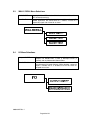
5.3 WALK / DRILL Menu Selections ..................................................................................... 34
5.4 I/O Menu Selections........................................................................................................ 34
5.5 CLOCK Menu Selections ................................................................................................ 36
5.6 LOG Menu Selections ..................................................................................................... 38
5.7 INFO Menu Selection...................................................................................................... 38
6.0
Power Up Procedure ........................................................................................................ 40
6.1 General............................................................................................................................ 40
6.2 To set the system time (Keyswitch must be engaged). .................................................. 40
6.3 Automatic Configuration.................................................................................................. 40
Table 6-1 7100 Series Device Types and Functions ............................................................ 41
Figure 11 Power-Limited/Non Power-Limited Wiring............................................................ 42
9000-0447 Rev. I
Page 2 of 42
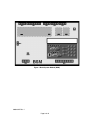
Figure 1 Basic System Module (BSM)
9000-0447 Rev. I
Page 3 of 42
1.0 System Overview
1.1
Description
The Gamewell-FCI 7100 is a multiprocessor-based analog/addressable system, designed for commercial, industrial and institutional fire alarm applications. It is available
with either one or two signaling line circuits.
The 7100 Series is Listed by Underwriter’s Laboratories, Standard UL 864, 9th Edition. It
is suitable for the following signaling services:
• Automatic Fire Detector Alarm
• Manual Fire Alarm
• Waterflow Alarm
• Supervisory
• Automatic Smoke Alarm, non-coded and master coded operation
• Releasing Device Service
The 7100 Series complies with the requirements of the following National Fire Protection
Association (NFPA) Standards:
• NFPA 13 - Installation of Sprinkler Systems
• NFPA 16 - Deluge Foam-Water Sprinkler Systems
• NFPA 72 - National Fire Alarm Code:
- Central Station Fire Alarm Systems
- Local Fire Alarm Systems
- Auxiliary Fire Alarm Systems
- Remote Station Fire Alarm Systems
- Proprietary Fire Alarm Systems
1.2
Features
1.2.1
Standard Features
•
•
•
•
•
•
•
•
•
•
•
•
•
•
•
•
•
Two (2) Class B, Style 4 Signaling Line Circuits
Two (2) Class B, Style Y Notification Appliance Circuits
Alarm and Trouble dry contacts
Accommodates 99 Gamewell-FCI Approved, UL Listed compatible analog
sensors per SLC
Accommodates 98 Gamewell-FCI Approved, UL Listed compatible
addressable monitor/control devices per SLC
80-character alphanumeric LCD display
280 event history buffer (non-volatile)
Power-limited
Resettable/Non-resettable 1.0 amp. @ 24 VDC power output, FWR
Alarm verification
Walk test
Multi-level alarm processing
Positive alarm Sequence (PAS) operation
NAC coding
Trouble reminder
Integral RS-232 port
Key Switch - keyed alike with the door lock and renders the key pad
inoperative until activated.
9000-0447 Rev. I
Page 4 of 42
1.2.2
Optional Features
•
•
•
•
1.3
Class A Module (CAOM) with Disconnect Switches for NACs and SLCs
Digital Alarm Communicator (DACT) (Model 7100-D)
RS-232 Printer Transient Module (PTRM), Supervised
Municipal Circuit Option Module (MCOM)
Control and Indicators
1.3.1
Switch Controls
•
•
•
•
•
Alarm Acknowledge
Trouble Acknowledge
Signal Silence
System Reset/Lamp test
Programming buttons
- Menu/Back
- Back Space/Edit
- OK
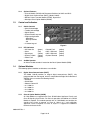
• 12 button keypad
Figure 2
1.3.2
LED Indicators
•
•
•
•
•
1.3.3
1.4
AC Power On
Alarm
Supervisory
System Trouble
Power Fault
(green)
(red)
(yellow)
(yellow)
(yellow)
•
•
•
•
Ground Fault
NAC 1 Silenced
NAC 2 Silenced
System Silenced
(yellow)
(yellow)
(yellow)
(yellow)
Audible Sounder
An Alarm/Trouble sounder is located on the Basic System Module (BSM).
Optional Modules
The following optional modules and features are available:
1.4.1
Digital Alarm Communicator (DACT)
The Model 7100-D provides an integral digital communicator (DACT), fully
programmable from the keypad, which is compatible with Digital Alarm Receivers
(DACRs) that can receive the following formats:
• SIA DC8
• SIA DCS20
• Ademco Contact ID
• 3+1 1400 Hz
• 3+1 2300 Hz
• 4+2 1400 Hz
• 4+2 2300 Hz
1.4.2
Class A Option Module (CAOM)
All 7100 Models are supplied with Class B Notification Appliance Circuits and
Class B Signaling Line Circuits. For Class A operation, the addition of a CAOM
Module is required. This module operates with all 7100 Models and enables the
signaling line circuits to operate as Class A, Style 6 or 7 and notification
appliance circuits to operate as Class A, Style Z. It supplies the additional
terminals for these circuits.
9000-0447 Rev. I
Page 5 of 42
1.4.3
Municipal Circuit Option Module (MCOM)
The MCOM Module can trip a Local Energy City Master Box, or operate in
reverse polarity mode for leased line connection. It can also energize a solenoid
for releasing.
1.4.4
Printer Transient Module (PTRM)
The serial output on the BSM is connected via an existing RS-232 RJ-11
connector, J3. This can be used to communicate to the control with a laptop
computer while at the panel. The PTRM module is intended for systems where a
permanent connection is required. This type of connection requires that the RS232 port have sufficient transient protection to comply with the applicable codes
for wiring leaving the confines of the control box, as well as the proper isolation of
the signal to prevent damage or interference caused by the connection to certain
EDP devices. Connections are limited to the same room. The PTRM supplies
supervision and transient protection as well as the necessary isolation.
1.4.5
LCD-7100 Remote Serial Annunciator Module
The LCD-7100 Serial Remote Annunciator provides an 80-character display and
function keys for “Alarm Acknowledge”, “Trouble Acknowledge”, “Signal Silence”,
“System Reset/Lamp Test” and “System Drill Test”.
The 80-character display shows all pertinent information except for menus.
1.4.6
LDM-7100 Remote LED Driver Module
Each LDM-7100 LED Driver Module provides 7100 Control Panel output for
thirty-three (33) remote LEDs. Three (3), LDM-7100 modules may be mounted in
a single annunciator for a maximum total of 99 points per annunciator.
The annunciator may be located up to 4,000 feet from the panel and up to four
(4), additional annunciators can be connected, configured identically with the
first.
1.4.7
INI-7100-UTP, Intelligent Network Interface, Unshielded, Twisted-Pair
E3 Broadband Network interface to the 7100 FACP using copper wire network
™
terminations only. It occupies one node on the E3 Series Broadband Network.
OR
1.4.8
INI-7100-FO, Intelligent Network Interface, Fiber-Optic
E3 Broadband Network interface connection to the 7100 FACP using either fiberoptic cable or copper wire network terminations. It occupies one node on the E3
Broadband Network.
Note: The Network Graphic Annunciator Module (NGA) is required when more
than seven (7), 7100 Series panels are networked. See the E3 Broadband
Installation/Operating Manual Part Number: 9000-0575 for details.
1.5
Specifications
Power Supply Output
Supervisory current
1.0 amp. (max.) (24 VDC nominal)
Alarm current
3.335 amp. (max.) (24 VDC nominal)
9000-0447 Rev. I
Page 6 of 42
Notification Appliance Circuits (TB1)
• Two (2) regulated power outputs
• Power-limited
• Supervised
• Non-coded
• Max. alarm load 1.5 amp. /circuit
Special application: See Compatibility Addendum/ P/N 9000-0427 for a list of
Gamewell-FCI Approved, UL Listed notification appliances.
Use U.L. Listed End of Line Resistor EOL-N (47K), P/N 4700-0512
Alarm Dry Contacts (TB2)
• Form “C”
• Rated 2 amp. @ 30 VDC Resistive
Alarm signals latch in. Supervisory and System Trouble signals do not latch in.
Trouble Dry Contacts (TB2)
• Form “C”
• Rated 2 amp. @ 30 VDC Resistive
Transfer Relay Control (TB2) (Special Application)
Transmit loss of AC power or brown out to Gamewell-FCI Model DRBC-1 battery
charger.
• Power-limited
• Unsupervised
Signaling Line Circuits (TB3)
• One (1) or two (2) Class “B”, Style 4 circuits
• 24 VDC nominal
• Power-limited
• Supervised
• 40 Ohm max. line resistance
• 0.5 µf max. capacitance
Capacity of 99 analog sensors and 98 addressable devices per circuit
Earth Ground Connection (TB4)
AC Input (TB6)
• 120/240 VAC, 50/60 Hz, 2 amp. @ 120 VAC, 1 amp. @ 240 VAC
• Non-power-limited
NOTICE: Terminal TB4 must be connected to an earth ground connection per Article 760 of
the National Electrical Code. Failure to make a proper earth ground connection to a metallic
cold water pipe or driven ground rod to this terminal will result in loss of lightening protection,
reduce the tolerance of the system to transients, and will adversely affect the operation of the
system. Panel neutral or conduit ground is not acceptable; minimum wire size is 14 AWG.
24 VDC external power, system (TB4) (Special Application)
• Unregulated, FWR
• Resettable and non-resettable
• 1.0 amp. max. each circuit, 1.0 amp. max. combined
• Unsupervised
9000-0447 Rev. I
Page 7 of 42
Battery Connection (TB7)
• Supervised
• 24 VDC nominal
• Maximum battery size 31 AH
• Non-power-limited
• 0.6 A max. battery charge current
The RS-232 port, consists of an RJ11 connector which provides a standard serial port for
the connection to a Listed output device for supplementary type service. Typical
examples of such devices include any UL Listed EDP device (remote printer or video
terminal), any UL Listed Signaling Device (such as the Keltron VS4095/5 printer), or any
UL Listed Signal System Unit.
Ratings:
15 VDC (max.)
.05 amp. (max.) current
9600 baud
1
8 bits, 1 stop bit, no parity.
2
3
4
5
6
Connections to the RJ11 serial connector are as follows:
Terminal
Description
2
RXD
3, 4
GND
5
TXD
6
Supervision
Available cables for RS-232 connection are:
Part No.
6100-0077
Model
RJ11-DB9PC
Figure 3
Description
RJ11 to 9-pin DB9
(Connector only - PC Laptop)
6100-0074
RJ11-DB25
RJ11 to 25-pin (DB25) (connector only-printer)
6100-0075
RJ11C-6
RJ11 to RJ11 cable, 6-inches
6100-0076
RJ11C-20
RJ11 to RJ11 cable, 20 feet
NOTE: The BSM is shipped with jumpers installed on the middle three pairs of pins on
J2. These jumpers must be removed when the PTRM is installed.
Figure 4
9000-0447 Rev. I
Page 8 of 42
2.0 Installation
2.1 General
Components are ordered and shipped in separate packaging for the enclosure and Basic
System Module kit. The 7100 is intended for installation indoors, in a dry location. The
shipping carton contains an installation drawing, backbox, Basic System Module (BSM),
power transformer and door.
1) Refer to the System Assembly Drawing, P/N 9000-0457.
2) The BSM module consists of a main operating board with pluggable terminal strips, an
80-character LCD display and programming keypad. Install this module immediately
unless any optional modules are to be used in the system. The optional modules are
supplied separately, and should be installed on the BSM before it is mounted in the
backbox. Before installing the BSM into the system backbox, refer to the installation
instruction sheets shipped with each module for the proper installation procedures.
3) Install the transformer into the backbox. Connect the transformer to the BSM.
4) Install the door after the BSM is in place.
Note that the door can only be installed (or removed) when it is opened at least 90°
from the backbox.
9000-0447 Rev. I
Page 9 of 42
Figure 5 7100 Wire Connections
9000-0447 Rev. I
Page 10 of 42
3.0 Basic System Module (BSM)
Table 3-1 Field Wiring Connections
Designation
TB1-1
TB1-2
TB1-3
TB1-4
TB2-1
TB2-2
TB2-3
TB2-4
TB2-5
TB2-6
TB2-7
TB2-8
TB3-1
TB3-2
TB3-3
TB3-4
TB4-1
TB4-2
TB4-3
TB4-4
TB5-1
TB5-2
TB5-3, -4
TB6-1
TB6-2
TB6-3
TB7-1
TB7-2
TB9-1
TB9-2
TB9-3
TB9-4
TB9-5
TB9-6
TB9-7
TB9-8
Description
TRBL
TRBL
TRBL
ALM
ALM
ALM
COM B
COM A
AC “Hot”
Ground
AC Neutral
Batt+
BattDACT
DACT
DACT
DACT
DACT
DACT
DACT
DACT
Comments
NAC Circuit 1 (+) Class B, Style Y
NAC Circuit 1 (-) Class B, Style Y
NAC Circuit 1 (+) Class B, Style Y
NAC Circuit 2 (-) Class B, Style Y
Trouble contacts, N/O, 2 amp @ 30 VDC (resistive)
Trouble contacts, Common
Trouble contacts, N/C
Alarm contacts, N/O, 2 amp. @ 30 VDC (resistive)
Alarm contacts, Common
Alarm contacts, N/C
Transfer control
Not used
Signaling Line Circuit 1 (+) Class B, Style 4
Signaling Line Circuit 1 (-) Class B, Style 4
Signaling Line Circuit 2 (+) Class B, Style 4 (7100-2, -2D only)
Signaling Line Circuit 2 (-) Class B, Style 4 (7100-2, -2D only)
Resettable Power, 24 VDC 1.0 amp.
Non-resettable Power, 24 VDC 1.0 amp.
System Common
Earth Ground
To LCD-7100 TB1-2
To LCD-7100 TB1-1
Not used
120 VAC “Hot”, 50/60 Hz 2 amp., 240 VAC “Hot”, 50/60 Hz 1 amp.
Ground
120 VAC Neutral, 240 VAC “Hot”
Battery terminal (+)
Battery terminal (-)
Line 1 Tip In (non-power-limited) From street
Line 1 Ring In (non-power-limited) From street
Line 1 Tip Out (non-power-limited) To phone
Line 1 Ring Out (non-power-limited) To phone
Line 2 Tip In (non-power-limited) From street
Line 2 Ring In (non-power-limited) From street
Line 2 Ring Out (non-power-limited) To phone
Line 2 Ring Out (non-power-limited) To phone
9000-0447 Rev. I
Page 11 of 42
Table 3-2 LEDs Jumpers
Designation
LEDs
LED25
LED26
Jumpers
W1
W2
W3
W4
J6
JMP1
3.1
Description
Yellow
Yellow
Comments
Line 1 Trouble
Line 2 Trouble
Not used
OUT to disable battery
IN – No Local Phone Line 1
IN – No Local Phone Line 2
Connection to keypad
Cut for 240 VAC input operation
Power
3.1.1
AC Input
Connection of the 120/240 VAC, 50/60 Hz power source must be made per the
requirements of the National Electrical Code, NFPA 70, Article 760, the
applicable NFPA requirements, and/or the Authority Having Jurisdiction.
Guidelines to follow are:
• Connections must be to a dedicated branch circuit.
• Connections must be mechanically protected.
• All means of disconnecting the circuit must be clearly marked: “FIRE ALARM
CIRCUIT CONTROL".
• Accessible only to authorized personnel.
• For 240 VAC operation, no conductor shall have a potential greater than 150 V
to ground.
See Table 3-1 for AC input and battery connections.
IMPORTANT: Always apply AC power first, then connect the batteries.
3.1.2
Battery Connections
• TB7-1 is positive. See Table 3-1.
• TB7-2 is negative. See Table 3-1.
• Observe polarity
See Table 3-3 for Battery Calculations
3.1.3
Auxiliary Power Output, Resettable/Non-resettable (Special Application)
• TB4-1 Resettable, 24 VDC, max. 1.0 amp., FWR. Suitable for use with
projected beam smoke detectors SPB-24, or DH Series duct detectors.
• TB4-2 Non-resettable, 24 VDC, max. 1.0 amp., FWR. Suitable for use with the
Firemark door holders.
NOTE: Total output is 1.0 amp max. combined.
• TB4-3 Common negative
• TB4-4 Not used
3.1.4
Earth Ground Connection
• TB4-4 Earth Ground
9000-0447 Rev. I
Page 12 of 42
3.2
Relay Connections
System Trouble Contacts
• TB2-1 Normally Open
• TB2-2 Common
• TB2-3 Normally Closed
Transfers on any trouble condition and/or supervisory alarm.
System Alarm Contacts
• TB2-4 Normally Open
• TB2-5 Common
• TB2-6 Normally Closed
Transfers upon any system alarm except supervisory.
9000-0447 Rev. I
Page 13 of 42
Table 3-3 Battery Standby Chart
Qty
Module
BSM-1
BSM-2
BSM-1D
BSM-2D
PTRM
CAOM
MCOM
LCD-7100
LDM-7100
INI-7100
Description
Basic System Module, 1 SLC
Basic System Module, 2 SLC
Basic System Module, 1 SLC w/DACT
Basic System Module, 2 SLC w/DACT
Printer Transient Module
Class A Option Module
Municipal Circuit Option Module
Optional Remote Serial Annunciator
LED Driver Module
Intelligent Network Interface Module
Supv.
Current
0.056 A
0.065 A
0.075 A
0.085 A
0.020 A
0.001 A
0.001 A
0.050 A
0.035 A
0.040 A
Alarm
Current
0.076 A
0.085 A
0.095 A
0.095 A
0.020 A
0.001 A
0.001 A
0.075 A
0.200 A*
0.040 A
Total
Supv.
Current
Total
Alarm
Current
Addressable Modules
Smoke and heat sensors
Notification Appliances
Aux. Power Devices
Misc. Devices
TOTALS
A
Total Supv. Current
B
Enter number of standby hours required**
C
Multiply Line A times hours in Line B – enter
D
Total alarm current from above
E
Enter alarm sounding period in hours. (5 minutes = .084 hr.)
F
Multiply Line D times Line # - enter
G
Total of Lines C & F – enter
H
Multiply Line G by 1.2 – enter (Total ampere/hours required***)
NOTE:
* With all LEDs and optional buzzer energized.
** 24 hrs for NFPA 72 protected premises or Central Station signaling, or Auxiliary, or Remote Supervising
Station Fire Alarm Systems.
*** Use the next size battery with a capacity greater than required. Maximum 31 A/H capacity.
9000-0447 Rev. I
Page 14 of 42
3.3
Notification Appliance Circuits
The 7100 provides two (2), 24 VDC Class B, Style Y
notification appliance circuits. Class A, Style Z operation is
accomplished by adding the Class A Option (CAOM) Module.
Wiring Instructions
• NAC 1 - TB1-1 (+), TB1-2 ( - )
• NAC 2 - TB1-3 (+), TB1-4 ( - )
(Polarity markings indicate the polarity of the circuit in
alarm condition).
Use U.L. Listed End of Line Resistor EOL-N (47K),
P/N 4700-0512
Circuit Ratings
• 24 VDC regulated
• Max. alarm load 1.5 amp./circuit
• Ground fault test impedance: 20 kOhms
• 18 AWG minimum
Figure 6 Notification
• If synchronization of strobes is required
Appliance
MDL-FC Synchronization Modules must be connected.
Circuit Wiring
Class B, Style Y operation only
Special application: See Compatibility Addendum/
P/N 9000-0427 for a list of Gamewell-FCI Approved, UL Listed notification appliances.
• Supervised
• Power-limited
NOTE: The CAOM module is furnished with the End of Line resistor installed.
3.4
Signaling Line Circuits
The 7100 provides one (1), or two (2), 24 VDC Class B,
Style 4 signaling line circuits. Class A, Style 6 or 7
operation is accomplished by adding the Class A Option
(CAOM) Module. See Figure 7 for Style 4 or 6 wiring, and
Figure 8 for Style 7 wiring.
Wiring Instructions
SLC 1 - TB3-1 (+), TB3-2 ( - )
SLC 2 - TB3-3 (+), TB3-4 ( - ) (7100-2 only)
(Polarity markings indicate the polarity that should
be maintained throughout the circuit. Polarity must be
observed on all devices connected to the circuit).
Circuit Ratings
24 VDC (nominal)
Current:
0.090 amp max. (supervisory)
0.097 amp max. (alarm)
0.750 amp max. (short circuit)
• 40 Ohms max. line resistance
NOTE: A white wire lead of The NCM-1
• 0.5 µf max. line capacitance
module (if used) must be connected to earth
• Ground fault test impedance: 20 kOhms
ground.
• 18 AWG minimum, straight lay or twisted-pair
Figure 7 Signaling Line Circuit Wiring
unshielded
• Power-Limited
• Supervised
See Compatibility Addendum/ P/N 9000-0427 for a list of Gamewell-FCI Approved, UL
Listed sensors and modules.
9000-0447 Rev. I
Page 15 of 42
3.4.1
Style 7 Signaling Line Circuit Installation
When using a Control Module as a Notification Appliance Circuit (NAC), the isolation
described in Section 3.4, Signaling Line Circuits, Style 7, Figure 7 is required, or riser
conductors must be installed in accordance with the survivability from attack by fire
requirements in National Fire Alarm Code, NFPA 72.
Figure 8
9000-0447 Rev. I
Page 16 of 42
3.5
Analog Sensors
The 7100 accommodates only Gamewell-FCI approved, UL Listed, analog sensors and
bases. See the Gamewell-FCI Publication, P/N 9000-0427 for a list of approved sensors
and bases. Each signaling line circuit can accommodate 99 sensor address points, using
Address numbers 01 to 99.
3.6
3.5.1
Address Switches
Addresses are set via the rotary switches on each sensor or module. Setting the
address is accomplished by turning each of the two (2) rotary switches until they
point to the numbers indicating the proper address (e.g., SW1 @ #2 and SW2 @
#5 would indicate address #25).
3.5.2
Drift Compensation
The 7100 contains a program which performs continuous testing of analog
sensors, including sensitivity tests. This program will compensate all analog
sensors for age and environmental conditions. Should a problem occur in a
sensor, a “Failed Test”, “Dirty” or “Very Dirty” indication for the specific device will
appear on the system display and be recorded in the Event Log and the Serial
Port.
Addressable Modules
The 7100 accommodates only Gamewell-FCI approved, U.L. Listed, addressable monitor
and/or control modules. See the Gamewell-FCI Compatibility Addendum, P/N 9000-0427
for a list of approved modules. Each SLC can accommodate 98 addressable module
points, using Addresses 101 through 198.
In the event of common mode noise problems, a Noise Control Module (NCM-1) may be
installed. See Figure 7. The white wire lead must be connected to earth ground.
3.6.1
Address Switches
These addresses are set via the rotary switches on each module. Setting the
address is accomplished by turning each of the two (2) rotary switches until they
point to the numbers indicating the proper address (e.g., SW1 @ #5 and SW2 @
#7 would indicate address # 157). Note that the “100" digit is pre-set in all
addressable modules.
IMPORTANT: In systems incorporating the Positive Alarm Sequence (PAS)
in conjunction with addressable modules, (AMM-2F, -4F, -4SF), only one (1)
initiating device may be connected to each module (address).
EXAMPLE: Connect only one manual station per AMM-2F module.
3.7
Deleted.
3.8
Deleted.
9000-0447 Rev. I
Page 17 of 47
3.9
Optional Modules
3.9.1
Class A Option Module (CAOM)
The Class A Option Module (CAOM) provides Class A signaling for the
notification appliance circuits and Class A, Style 6 or 7 signaling for the signaling
line circuits. Style 7 wiring requires the use of an M500X Isolator Module on both
sides of a device. It also provides a disconnect switch for each signaling line
circuit and a common disconnect switch for both notification appliance circuits.
See Table 3-4 for wiring connections.
3.9.2
Municipal Circuit Option Module (MCOM)
The Municipal Circuit Option Module (MCOM) provides output for a local energy
city master box, releasing solenoid programmed via the FCP or CAMWORKS, or
reversed polarity output for leased line connection intended for connection to a
polarity reversal circuit of a remote station receiving unit having compatible
ratings. See Table 3-4 for wiring connections. Refer to the Compatibility
Addendum P/N 9000-0427 for a list of compatible solenoids.
Master Box
Polarity
Releasing
Ratings
(NPL)
Reversal (PL)
Service
Nominal voltage
24 VDC
24 VDC
24 VDC
Supervisory current .0018 amp.
.012 amp.
.0005 amp.
Alarm current
.510 amp. (max.) .012 amp.
.700 amp.
Line resistance
35 ohms (max.)
2 ohms (max)
Trip coil resistance
14.5 ohms (max.)
3.9.3
Printer Transient Module (PTRM)
The Printer Transient Module (PTRM) provides sufficient transient protection to
the RS-232 output to comply with the applicable codes for wiring leaving the
confines of the control box, as well as the proper isolation of the signal to prevent
damage or interference caused by a connection to certain EDP devices.
Table 3-4 Optional Module Wiring Connections
CAOM Module
Designation
Description
Comments
TB1-1
NAC1
NAC Circuit 1, Class A return (+)
TB1-2
NAC1
NAC Circuit 1, Class A return (-)
TB1-3
NAC2
NAC Circuit 2, Class A return (+)
TB1-4
NAC2
NAC Circuit 2, Class A return (-)
TB2-1
SLC1
SLC Circuit 1, Class A return (+)
TB2-2
SLC1
SLC Circuit 1, Class A return (-)
TB2-3
SLC2
SLC Circuit 2, Class A return (+)
(7100-2, -2D only)
TB2-4
SLC2
SLC Circuit 2, Class A return (-)
(7100-2, 2D only)
MCOM Module
TB1-1
Output (+)
TB1-2
Output (-)
Jumpers
W1
MCOM
UP for Polarity Reversal operation
DOWN for city master box or releasing operation.
W2
MCOM
UP for Polarity Reversal operation
DOWN for city master box or releasing operation.
PTRM Module
Jumper
W1
PTRM
OUT for supervision of PTRM Module
IN for no supervision
NOTE: The BSM is shipped with jumpers installed on the middle three pairs of pins on J2.
These jumpers must be removed when the PTRM is installed.
9000-0447 Rev. I
Page 18 of 42
3.10
Digital Communicator Operation (7100-D Model)
The 7100-D digital communicator model features numerous formats for communication to
a central station. The 7100-D provides the following functions:
• Line seizure - takes control of the phone lines, disconnecting any premises phones
using the same lines.
• Off/On-Hook - perform on and off-hook status to phone lines.
• Listen for dial tone - 440 Hz tone typical in most networks.
• Dialing the Central Station phone number – programmable.
• Discern proper Central Station “ACK” and “Kiss-off” tone.
• Transmit data to the Central Station.
• Verify that data has been accepted by the Central Station.
• Hang-up and release phone lines.
• Communicate in a variety of formats.
3.11
Central Station Reporting
UL Listed receivers compatible with the 7100 are listed in Table 3-5 below:
Table 3-5 UL Listed Receivers Compatible with the 7100
Manufacturer
Silent Knight
Receiver Model
Model 9000†
Formats
SIA-8
SIA-20
SK4/2
3/1 14
3/1 23
Silent Knight
Model 9800/9500
SIA-8
SIA-20
SK4/2
3/1 14
3/1 23
Contact ID
Ademco
Model 685
3/1 14
3/1 23
Sur-Gard
SG-MLR2-DG
SIA-8
(Ver. 1.64 or higher)
SIA-20
SK4/2
3/1 14
3/1 23
Contact ID
Osborne Hoffman
Quickalert
SIA-8
SIA-20
† If you are using the Model 9000 and the message “HELP” appears on the printer after
attempting to download, the 9000 software must be upgraded.
The Model 9000 must have the Model 9307 software package, Revision 900501 or later,
to print the PROGRAMMING PASS and PROGRAMMING FAIL messages.
9000-0447 Rev. I
Page 19 of 42
3.12
7100-D DACT Event Reporting Codes
The 7100-D DACT event reporting codes are shown in Table 3-6 below:
Table 3-6 DACT-E3 Event Reporting Codes
Event
SIA
Contact ID
4/2
3/1
Fire Alarm (Smoke or Manual Station)
FA GGT
1 110 00 GGT
0T
0
Fire Alarm Restored
FH GGT
3 110 00 GGT
2T
2
Waterflow Alarm
SA GGT
1 113 00 GGT
0T
0
Waterflow Alarm Restored
SH GGT
3 113 00 GGT
2T
2
Trouble (except Waterflow or Special AMM)
FT GG0
1 373 00 GG0
8T
8
Trouble Restored
FJ GG0
3 373 00 GG0
7T
7
Trouble (Waterflow AMM)
ST GG0
1 370 00 GG0
8T
8
Trouble Restored (Waterflow AMM)
SJ GG0
3 203 00 GG0
7T
7
Trouble (Special AMM)
UT GG0
1 370 00 GG0
8T
8
Trouble Restored (Special AMM)
UJ GG0
3 370 00 GG0
7T
7
Supervisory / Tamper (Module)
SS GGT
1 203 00 GGT
6T
6
Supervisory Restored (Module)
SR GGT
3 203 00 GGT
7T
7
PAS/Action/Supervisory (Sensor)
FS GGT
1 200 00 GGT
6T
6
PAS/Action/Supervisory Restored (Sensor)
FR GGT
3 110 00 GGT
7T
7
Disable (except Waterflow or Special AMM)
FB GG0
1 571 00 GG0
8T
8
Disable Restored
FU GG0
3 571 00 GG0
7T
7
Disable (Waterflow AMM)
SB GG0
1 570 00 GG0
8T
8
Disable Restored (Waterflow AMM)
SU GG0
3 570 00 GG0
7T
7
Disable (Special AMM)
UB GG0
1 570 00 GG0
8T
8
Disable Restored (Special AMM)
UU GG0
3 570 00 GG0
7T
7
AC Fail
AT 0
1 301 00 000
8T
8
AC Fail Restored
AR 0
3 301 00 000
7T
7
Phone Line 1 Fault
LT 1
1 351 00 000
81
8
Phone Line 1 Fault Restored
LR 1
3 351 00 0000
71
7
Phone Line 2 Fault
LT 2
1 352 00 000
82
8
Phone Line 2 Fault Restored
LR 2
3 352 00 000
72
7
Automatic Test (NORMAL)
RP 0
1 602 00 000
90
9
Automatic Test (With Exception)
RP991
1 602 00 991
91
9
For Contact ID and SIA Formats:
GG = group number assigned to the device, 00-99
(For networked systems, GG = Node number)
T = Type of device or event causing the event to be reported.
0= Non-loop event
1= Any event or device type not listed below
2= Manual Station
3= Supervisory Device (Non-latching)
4= Supervisory Device (Latching)
5= Waterflow (Non-silenceable)
6= Smoke Alarm
8= Multilevel Device
Note:Special AMMs include the following functions:
Reset Switch, Silence Switch, Drill Switch, Alarm Acknowledge Switch, Trouble Acknowledge
Switch.
9000-0447 Rev. I
Page 20 of 42
3.13
Telephone Requirements
• DC Ringer Equivalence Number (REN) = 0.5B
• AC Ringer Equivalence Number = 1.3
• Complies with FCC Part 8
The REN is used to determine the quantity of devices that may be connected to the
telephone line. Excessive RENs on the telephone line may result in the devices not
ringing in response to an incoming call. In most, but not all areas, the sum of the RENs
should not exceed five (5). To be certain of the number of devices that may be connected
to the line, as determined by the total RENs, contact the telephone company to determine
the maximum REN for the calling area.
3.14
Digital Communicator
Before connecting the 7100-D to the public switched telephone network, the installation
of two (2) lines is necessary. The following information is provided if required by the local
telephone company:
Manufacturer:
Gamewell-FCI
12 Clintonville Road
Northford, CT 06472-1610 USA
Product Model Number: 7100-D
FCC Registration Number: 6KWUSA-34215-AL-T
Ringer Equivalence: 0.5B
3.15
Telephone Company Rights and Warnings
The telephone company, under certain circumstances, may temporarily discontinue
services and/or make changes in its facilities, services, equipment or procedures which
may affect the operation of this digital communicator. However, the telephone company is
required to give advance notice of such changes or interruptions. If the digital
communicator causes harm to the telephone network the telephone company reserves
the right to temporarily discontinue service. Advance notification will be provided except
in cases when advance notice is not practical. In such cases, notification will be provided
as soon as possible. The opportunity will be given to correct any problems and to file a
complaint.
DO NOT CONNECT THIS PRODUCT TO COIN TELEPHONE, GROUND START OR
PARTY LINE SERVICES.
• When the digital communicator activates, premise phones will be disconnected.
• Two separate phone lines are required. Do not connect both telephone interfaces to the
same telephone line.
• The digital communicator must be connected to the public switched telephone network
upstream of any private telephone system at the protected premises.
• This equipment is designed to be connected to the telephone network or premises
wiring via terminal blocks.
3.16
FCC Required Information
This equipment complies with Part 68 of the FCC Rules. The Ringer Equivalence
Number (REN) is listed in Section 3.13, while the FCC Registration Number is listed in
Section 3.14. These numbers must be provided to the telephone company, if requested.
3.17
Repairs
The 7100-D Digital Communicator does not contain any user-serviceable parts. The unit
must be returned to the factory for repair through an authorized Gamewell-FCI distributor.
9000-0447 Rev. I
Page 21 of 42
3.18
Optional Accessories
3.18.1 LCD-7100 Serial Remote Annunciator
The LCD-7100 Serial Remote Annunciator provides an 80-character display and
function keys for the following:
- “Alarm Acknowledge”
- “System Reset/Lamp Test”
- “Trouble Acknowledge”
- “System Drill Test”
- “Signal Silence”
• The 80-character display shows all pertinent information except for menus.
• Keypad functions are enabled only when the keylock is turned to the
“Unlocked” position, with the exception of the “Trouble Acknowledge” switch
which silences the local audible trouble sounder.
• Operating LEDs provided are as follows:
- “Alarm”
- “Power Fault”
- “NAC #1 Silenced”
- “Supervisory”
- “System Silenced”
- “NAC #2 Silenced”
- “System Trouble”
• The LCD-7100 is flush or surface-mounted on a standard 4-gang electrical box.
• The 7100 Series control can accommodate up to five (5), remote LCD-7100
annunciators which may be located up to 4,000 feet from the main control
panel. See Table 3-7 below for resistance limitations of the connecting circuit.
Table 3-7 Resistance Limitations
No. of LCD-7100 Units
1
2
3
4
5
Max resistance of 24 VDC power
70 38
24
17
4
circuit (ohms) to most distant LCD
3.18.2 LDM-7100 LED Driver Module
Each LDM-7100 LED Driver Module provides 7100 Control Panel output for
thirty-three (33), remote LEDs. Three (3), LDM-7100 modules may be mounted in
a single annunciator for a maximum total of 99 points per annunciator.
The annunciator may be located up to 4,000 feet from the panel and up to four
(4), additional annunciators can be connected, configured identically with the
first. See Table 3-8 for resistance limitations for the connecting circuit.
Note, that if more than four (4), LDM-7100 modules are installed, an external
regulated and power-limited power supply Listed for use with fire protective
signaling units is required.
The module is intended for mounting inside the enclosure of a UL Listed remote
annunciator. It may be mounted by means of mounting screws or stacked using a
metal hex standoff kit. Wire routing and installation methods are to be in
accordance with the annunciator installation instructions.
Table 3-8 Resistance Limitations
Qty. of LDM-7100 modules
1
2
3
4
5
to 15
Max resistance of 24 VDC power
40 20
14 10 See above.
Circuit (ohms) to most distant LDM
NOTE 1: Maximum attenuation for the entire fiber-optic line is 8 dB.
NOTE 2: The use of fiber-optic cable is not permitted in New York City.
9000-0447 Rev. I
Page 22 of 42
4.0 Programming/Operation Instructions
4.1 LED Indicators
Figure 9 LED Indicators
Designation
AC Power On
Alarm
Supervisory
System Trouble
Power Fault
Ground Fault
NAC 1 Silenced
NAC 2 Silenced
System Silenced
Table 4-1 LED Indicators
Description
Comments
(green)
Lights to indicate presence of 120/240 VAC input.
(red)
Lights when system is in alarm, flashes until alarm is
acknowledged.
(yellow)
Lights when supervisory condition exists, flashes until
trouble acknowledge is performed.
(yellow)
Lights to indicate trouble condition, flashes until
trouble is acknowledged.
(yellow)
Lights during a LOW or NO Battery condition.
(yellow)
Lights to indicate a ground on a field conductor
(yellow)
Lights to indicate that NAC Circuit has been silenced
via the Signal Silence Switch (if programmed as
silenceable).
(yellow)
Lights to indicate that NAC Circuit has been silenced
via the Signal Silence Switch (if programmed as
silenceable).
(yellow)
Lights when a System Silence has been performed.
Flashes when disabled.
9000-0447 Rev. I
Page 23 of 42
4.2
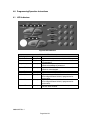
Panel Switches
Figure 10 Switches
Table 4-2 Switches
Designation
Alarm Acknowledge
Trouble Acknowledge
Signal Silence
Lamp Test/Reset
Menu/Back
BKSP/Edit
OK
Alphanumeric Keys
PK-625 Key Switch
Comments
Silences the panel audible sounder. This switch must be pressed once for
each Alarm condition present in the system.
Silences the panel audible sounder. This switch must be pressed once for
each Trouble or Supervisory condition present in the system.
Press once and any outputs programmed as silenceable will be
deactivated.
(All applicable silence LEDs will light). A second activation will re-activate
the previously silenced outputs. This switch only functions if an Alarm or
Supervisory condition exists in the system.
Press momentarily and all LEDs (including all elements in the display) will
light momentarily. Press and hold to reset the system.
Used in programming. The display will prompt the operator as to which
function applies. “Menu” is pressed to initially put the 7100 into
programming mode. The “Back” function will step the operator out of the
programming mode one element at a time.
Used in programming. The display will prompt the operator as to which
function applies.
Accepts any changes made in the programming field.
These 12 keys allow the user to choose a specific point address by using
the numbers for point sensitivity reading, disabling an address, etc.
Press each key the number of times necessary to display the correct
character on the display.
Example: Pressing the “2” key,
Once will display the letter “A”
Twice will display the letter “B”
Three times will display the letter “C”
Four times will display the number “2”
This key switch is keyed alike with the door lock, and must be operated in
order to activate the keypad.
9000-0447 Rev. I
Page 24 of 42
5.0
System Programming
System programming can be performed either by front
panel programming as shown below or via portable
computer and the Gamewell-FCI Field Configuration
Program.
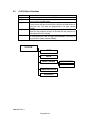
5.1
MAIN Menu Selections
CONFIG
Where automatic configuration of the
system is accomplished, as well as all of
the system global programming, input to
output group programming and NAC
coding.
WALK/DRILL
Allows the user to select Audible or Silent
Walk Test as well as activating and deactivating the System Drill function.
Allows the user to activate (turn on) or deactivate (turn off) any output in the system.
Selection supplies the options for
programming the system time, date,
day/night weekend and holidays.
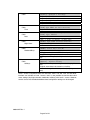
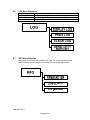
Options for manipulating the Event Log are
display, print, clear (buffer) and selecting
to print only the Sensitivity Report.
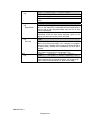
Gives the user basic system information
such as the current firmware version, the
last configuration date as well as the last
menu Designation used during the last
system configuration update.
I/O
CLOCK
LOG
INFO
5.1.1
Addresses/Default settings after Autoconfiguration
Sensors occupy Addresses 01-99 on the signaling line
circuits. Sensors are ion, photoelectronic, or thermal. They
are latching and non-verified when autoconfigured.
Monitor/Control modules occupy Addresses 101-198. The
type of device assigned to a monitor module during
autoconfiguration depends on the address as shown below:
Address
Device
100-149
Manual station
150-159
Supervisory switch
160-169
Waterflow switch
170
Silence switch
171
Reset switch
172
Fire Drill switch
173
Alarm/Acknowledge switch
174
Trouble/Supv. Acknowledge switch
175
Aux switch
176-179
Tamper switch
180-184
Control panel
185-189
Remote zone
190-198
Normally open contacts
AOM modules are silenceable and activate on general alarm (day or night). AOM modules modified
by breaking off tabs are non-silenceable and activate on general alarm (day or night).
9000-0447 Rev. I
Page 25 of 42
Main
Any selection
(Only opens if adequate access has not
already been obtained)
Main
Config
Password
Main
Config
Inputs
Type
Edit
(If BKSP/EDIT is pressed, and editing is
possible).
Main
Config
Inputs
Type
Define Type
(After response category is accepted)
Main
Config
Inputs (or Outputs)
Select
Location
Edit
_____________or_________________
Main
Config
System ID
Edit
Various
(If OK is pressed when an illegal value
has been entered).
[GAIN ] Type password for level 3:
[ACCESS] 000000
keypad: enters password (shows as “XXX…” on display)
OK: if password is valid for desired level (or higher), opens
access, logs the event, and continues to next menu. If not,
returns to Main Menu.
[CHANGE ] Level 1, User 1 111111
[PASSWORD] select key in password
keypad: enters new password for specified level and user
<>: scrolls through levels and users.
If current access level is lower than selection, password is
shown as XXXXXX, otherwise as digits.
[DEFINE] AMM Type 43
(Alarm)
[TYPE ] 1: select response
<>: scrolls through available response categories:
• Alarm
• Tamper
• Manual Station
• Waterflow
• Supervisory
Note that Alarm, Manual Station and Waterflow all produce
alarm response, except Manual Station which may use PAS
(depending on the global PAS settings) and Waterflow
disables silencing.
OK: accepts the response selection and opens the Edit
Device Type Menu.
[EDIT
] Spark De (__ Alpha, repeat
[TYPE LBL] move, EDIT flip case, OK
Initially, label comes up all underscores.
Keypad: enters text via telephone codes. Scrolls through the
numeral’s associated lower case letters, plus the numeral
itself.
Example:
• Press “2” key once for ‘a’, again for ‘b’, again for ‘c’, and
again for ‘2’. Press again to scroll back to ‘a’.
• To change to/from upper case, press “BKSP/EDIT”, or
scrolls to the previous or next letter.
• “BACK” exits to the Add Type menu without making a
change.
• OK accepts new label and exits to the Select Input Type
Menu.
[EDIT 1ST] (____ Alpha key, repeat
[LOC WORD] move, EDIT flip case, OK
Keypad: enters text (See Edit Device Type Menu). OK:
accepts new text for selected address.
Error! Entry is not valid. Press BACK, then
change value or press BACK again.
9000-0447 Rev. I
Page 26 of 42
5.2
CONFIG. Menu Selections
AUTO
GLOBAL
INPUTS
OUTPUTS
GROUPS
DIALER
Is the selection used to either initialize
the system or update it.
Is the key feature to the simplicity of
programming. Most system as well as
individual SLC device programming
can be accomplished here.
Allow the user to insert point-to-point
address information to sensors and
monitor points individually for device
type, location, input group(s), and to
modify any of the global programming.
Gives
the
same
programming
capabilities supplied to the inputs.
Supply the option to allow either Alarm
or Supervisory devices access to the
system general output list for each
type (General Alarm or General
Supervisory outputs).
Configuration gives the user the ability
to turn the DACT on, program primary
and secondary phone numbers and
accounts, the format that the receiver
requires, as well as the event types
that are or are not transmitted.
NOTE:
The DACT account programming options for Alarm, Test, Trouble and Supervisory
events are defaulted to “MUST” in the Reporting Options section. In order to use this
panel for remote signaling purposes all events must be transmitted off-premises.
If one account is used, it is required that the Reporting Option for each event (Alarm,
Test, Trouble, Supervisory) be set to “MUST”. If two accounts are used, it is required that
the reporting option for each event be set to “MUST” between the two accounts.
Reporting options for each event (Alarm, Test, Trouble, Supervisory) are as follows:
OFF
Event will not be reported to the account.
CAN
Event can be reported to this account.
MUST Event must be reported. The DACT will continue to attempt to report
this condition until all attempts have been made. If the DACT cannot
report the event, the event will remain in the system memory and will be
retransmitted with a subsequent event.
9000-0447 Rev. I
Page 27 of 42
Table 5-1 7100 Series Menu System
Menu Tree
Main
Main
Config
Main
Config
Auto
Main
Config
Global
Display and Selections
[MAIN] 1: Config 2: Walk/Drill 3:I/O
4: Clock 5: View 6: Log 7:Info
1: Opens System Config Menu (PW-L4 required)
2: Opens Walk Test / Drill Menu (PW-L1 required)
3: Opens I/O Control Menu (PW-L2 required)
4: Opens Set Clock Menu (PW-L1 required)
5: Opens System Config Menu for viewing only
(PW-L3 required)
6: Opens Event Log Menu (PW-L1 required)
Note: View option is identical to the Config option,
allowing access to all the configuration menus, but
prevents changing of any settings. The limiting factor
between View and Config is the password level used.
[SYSTEM] 1: Auto 2: Global 3: Inputs
[CONFIG] 4: Outputs 5: Groups 6: Passwords
1: Opens Autoconfig Menu
2: Opens Global Config Settings Menu
3: Opens Select Input Device Menu
4: Opens Select Output Device Menu
5: Opens Select Group Menu
6: Opens Change Password Menu
[AUTO- ] 1: Clear, then … 2: Update SLCs
[CONFIG]
1: Clears system configuration, then reads SLCs.
2: Reads SLC, finds changes. New devices get default
config, missing devices are marked off-line. No change to
globals or groups. (via confirm screen)
[GLOBAL] 1: I/O Devices 2: NACs 3: Codes
[CONFIG] 4: System ID
5: Dialer 6: Misc.
1: Opens Device Defaults Menu
2: Opens NAC Settings Menu
3: Opens Coded Pattern Setup Menu
4: Opens System ID Menu
5: Opens Dialer Settings Menu
6, 7: Opens Misc. Globals Menus
NOTES:
1) In general, “BACK” exits the current menu and returns it to the previous menu without
changing any settings. “OK” accepts any changes that have been made and returns to the
previous menu, except in special cases where it continues to the next menu in a group. (See
Menu 35).
2) The Set/View Configuration functions use the same menus, but behave differently depending
on the Main menu selection and password given. If the “Config” option is selected and a valid
Level 4 password is entered, the menus are fully operational. If the “Views” option is selected,
or if the password is not valid for Level 4, then the menus may be examined but no changes
can be made.
9000-0447 Rev. I
Page 28 of 42
Main
Config
Global
Device defaults
Main
Global
ConfigDevice defaults
Default Verification
Main
Config
Global
Device Defaults
Default Sensitivity
Main
Config
Global
Device Defaults
PAS Parameters
Main
Config
Global
Device defaults
Multilevel Params
Main
Config
Global
NACs
2: Opens Set NAC Coding Menu.
Main
Config
Global
NACs
Delay Times
Main
Config
Global
NACs
Coding
[SET
] 1: Verification 2: Sensitivity
[DEFAULTS] 3: PAS 4: Multilevel
1: Opens Set Default Verify Options Menu.
2: Opens Set Default Sensitivity Menu.
3: Opens Set PAS Parameters Menu.
4: Opens Set Multilevel Parameters Menu.
[DFLT ] 1: Dflt Ion, Photo Verify (None)
[VERIFY] 2: Dflt Manual Sta Verify (None)
1: Scrolls through None, Smoke, PAS.
2: Toggles between None and PAS.
[DFLT] DAY 1: Photo (Low) 2: Ion (Low)
[SENS] NIT 3: Photo (Med.) 4: Ion (Med.)
1: Scrolls through selections for photo sensor daytime
sensitivity.
2: As above for Ion.
3: As above for photo night time sensitivity.
4: As above for Ion.
[PAS
]
1: Night Bypass (ON)
[OPTION] T1 (15sec) T2 (180sec)
1: Toggles Night Bypass ON/OFF.
T1 and T2 parameters are fixed in firmware; they are shown
for reference only.
[MULTI] 1: Alert Threshold (35%)
[LEVEL] 2: Action Threshold (65%)
1: Scrolls through Alert Threshold options (20, 35, 50, 65%)
2: Scrolls through Action Threshold options (35, 50, 65, 80%)
OK: accepts settings as shown (if valid)
[NAC
] 1:Delay Times
[OPTIONS] 2: Coding & Silencing
1: Opens Set NAC Delays Menu.
[NAC ] 1: Silence Inhibit (None)
[DELY] 2: Cutoff (None)
1: Scrolls through Silence Inhibit Delay options (None, 1 min,
3 min, 5 min)
2: Scrolls through Signal Cutoff Delay options (None, 5 min,
10 min, 15 min)
[NAC ] NAC 1 1: (Coded)
3: (Silenceable)
[MISC] NAC 2 2: (Steady) 4: (Nonsilenceable)
1: Toggles NAC 1 between Coded and Steady.
2: Toggles NAC 2 between Coded and Steady.
3: Toggles NAC 1 between Silenceable and Non-silenceable.
4: Toggles NAC 2 between Silenceable and Non-silenceable.
Table 5-2 Sensor Sensitivity Settings
Photo
Ion
Low
2.0
1.3
L/M
1.75
1.2
Med.
1.5
1.0
M/H
1.25
0.88
High
1.0
0.77
9000-0447 Rev. I
Page 29 of 42
Main
Config
Global
Codes
Main
Config
Global
System ID
or
Main
Config
Inputs (or Outputs)
Select
Location
Main
Config
Global
Misc. [6]
Main
Config
Global
Misc. [7]
[CODED] 1: Set Day Alarm (MT60) Config
[PATTS]
to select condition
<>: selects response condition from: Day Alarm, Night Alarm,
Action, Supervisory, Aux.
1: Scrolls through coded pattern selections: MT60, MT120,
Temporal, CA Code, Coded 4s.
[L,AAA]
FLR1 Lobby
Config
[LOCTN] 7,9 chng 1st ^
chng 2nd
Enter label using keypad and shift key. Press button until
desired letter appears. Use BKSP/EDIT to capitalize.
Use arrow keys <> to shift message from left to right or vice
versa.
NOTE: If this menu is opened from the Global Config Menu,
System ID selection (Menu 5 option 4), SYSTM ID is displayed;
otherwise, L,AAA LOCTN as shown above.
1: Toggles Multiple Trouble Acknowledge ON/OFF
2: Toggles Alarm/Trouble Reminder ON/OFF
3: Scrolls Walk Test Timeout (30m, 60m, 90m)
4: Toggles RS232 Supervision Message ON/OFF
[MISC] 1: MutiAck (ON) 2: Reminder (ON) Config
[OPTS] 3: WT Timeout (30m)
4: SupvMsg (ON)
[LCD] Number of Remote Displays (1)
[Annunc]
NOTE:
Some menus may appear in different contexts, but with slightly different behavior. For example,
the “Select Device” menu is used in both the Config Inputs and Config Outputs sections to
determine which device is to be affected. The process of selection is the same, but when the
selection is complete, the result (that is, which menu opens next) differs.
NOTE: The Alarm Verification Feature is disabled when sensor cross-zoning is employed.
9000-0447 Rev. I
Page 30 of 42
Main
Config
Inputs or Outputs
_______________or_________
Main
I/O
Control or Ena/Dis
Main
Config
Inputs
Select
Main
Config
Inputs
Select
Type
Inputs
Select
Group
Input
Select
Verify
Inputs
Select
Sens
Inputs
Select
View
[SELECT] Loop, Address: 1,001
[DEVICE] Key in or use <,>
# keys: enters SLC & address (restriction: Address 200)
<>: Scrolls up or down to next available device.
OK: Accepts address, opens Configure Input Device Menu,
Configure Output Device Menu, Control Output Menu, or
Enable/Disable Device Menu, as appropriate.
[CONFIG] 1: Type 2: Group 3: Verify 4: Sens
[L, AAA] 5: Location 6: View 7: Copy L, AAA
1: Opens Set Input Type Menu.
2: Opens Assign Input To Group Menu.
3: Opens Set Verify/PAS Function Menu (sensors only).
4: Opens Set Sensitivity Menu (Ion, Photo devices only).
5: Opens Set SLC Device Location Menu.
6: Displays all settings for current device.
7: Copies all settings of the specified device (last input modified)
[L, AAA] Ion Duct Det
01 (Alarm)
[TYPE ] ^ Key in Input Type # or use <,>
<>: scroll through types which match this physical device.
# keys: enter type number (no restrictions; see Type Table)
Shows type and associated Response.
BKSP/EDIT: If selected device type is editable, or if it is not editable
but there is room to create a new user-editable type, opens Add
Type menu (Menu 35). ^indicates that editing is possible.
[L,AAA] Group 007
(00=no group)
[GROUP] Key in Group# or use <,>
No restrictions on group assignment.
[L,AAA] 1: Verification (Default)
Options are: Default, None, Smoke Verify (Ion/Photo only), PAS
[L,AAA] 1: Day Sensitivity (Default)
[SENS ] 2: Night Sensitivity
(Default)
1: Scrolls through Day Sensitivity options.
2: Scrolls through Night Sensitivity options.
Options vary by type, may include: Default, 1.00%, …2.00%
[L,AAA] Ion Duct Det
FLR2 Storeroom
Alarm Grp23 Vfy:Default 1.75%
Shows: SLC and Address, Device Type, Location Label, Device
Response, and I/O Group. Shows Verify/PAS settings and day
sensitivity setting if applicable (if device is set for default sensitivity,
shows default day sensitivity). No changes can be made.
9000-0447 Rev. I
Page 31 of 42
Main
Config
Outputs
Select
Main
Config
Outputs
Select
Type
Select
General Response
Select
I/O Group
Select
View
Main
Config
Groups
Main
Config
Groups
Select
General
Response
[CONFIG] 1: Type 2: General Resp 3: Groups
[L,AAA ] 5: Location
6: View 7: Copy L,AAA
1: Opens Set Output Type Menu.
2: Opens Assign Output To Group(s) Menu.
3,4: Unused.
5: Opens Set SLC Device Location Menu.
6: Displays all settings for this device.
7: Copies settings of the specified device (last output modified).
[L,AAA] 34 Silenceable Signal AOM
Key in Output Type# or use <,>
<>: scroll through types which match this physical device # keys:
Enter type number (no restrictions: see Type Table)
Output device types cannot be edited.
If the new type is an input device, “OK” key returns to the System
Config Menu, otherwise to Output Config.
[L,AAA] Activates for Day Alarm
(YES)
[GNL RSP] select condition 1: YES/NO
1: Toggles specified general group membership YES/NO.
[L,AAA]
Group 1:
36
(00 = none)
[GROUPS] Key in group # <,> change
<>: scrolls through list of general groups.
Number keys: set group number.
[L, 1AA] Slncbl NAC Main Lobby
ALd ALn ACT SPV TOR WKT TBL
02 00 00
<>: select which of the three possible groups to set.
Shows: SLC and Address, Type, Location, General responses,
Group membership. General responses show above abbreviations.
[SELECT] Group number: 03
[GROUP ] Key in group# or use <,>
If the output is activated in that condition, or – if not.
# keys: enters group number.
<>: Scrolls up or down to next group.
[GROUP] Activates General Alarm (NO)
[ 03 ] Activates Genrl Supervisory (YES)
OK: Accepts group number, opens Configure Group Menu.
1: Toggles General Alarm response on/off (applies to alarms
initiated by Alarm, Manual, Waterflow, and Aux devices, for both Day
and Night general alarm).
2: Toggles General Supervisory response on/off (applies to offnormals initiated by Supervisory and Tamper devices).
If a group contains inputs of several types (an unusual case), the
appropriate general flag is applied for each new alarm/off-normal.
9000-0447 Rev. I
Page 32 of 42
Main
Config
DACT
(opens only if DACT is installed)
Main
Config
DACT
Account Options
Main
Config
DACT
Account Options
Reporting Options
Main
Config
DACT
Account Options
Account ID Options
Main
Config
DACT
Account Options
CIC Number
- and Phone Number
Main
Config
DACT
Line Options
Main
Config
DACT
Account Options
Comm Format
Main
Config
DACT
Account Options
Comm Format
[CONFG] 0:Options 1:Line1 2:Line2
[DACT ] 3:Account1
4:Account
2
0: Opens DACT Options Menu.
1: Opens Phone Line Options Menu for Line 1.
2: Opens Phone Line Options Menu for Line 2.
3: Opens Account Options Menu for Account 1.
4: Opens Account Options Menu for Account 2.
[ACCTn] 1: Format
2: Reporting
[OPTS ] 3: AccountID
4: CIC & Phone#
1: Opens Communications Format Menu Account n.
2: Opens Reporting Options Menu for Account n.
3: Opens Account ID Menu for Account n.
4: Opens Account CIC / Phone Number Menu for Account n.
[ACCTn ] 1:Alarms (Must) 2:Test (Can)
[REPRT] 3: Trbl (Can) 3:Spvsry (Off)
1: Selects reporting option for Alarms [Off, Can, Must].
2: Selects reporting option for Test [Off, Can, Must].
3: Selects reporting option for Troubles [Off, Can, Must].
4: Selects reporting option for Supervisory [Off, Can, Must].
[ACCTn] 000000
[ID # ] Type all 6 digits (leading 0s)
# keys: enters account ID number for account n.
BKSP, <,> not operational.
Note: all 6 digits must be entered, with leading zeroes if necessary.
[ACCTn ] CIC:SSSSSSSS #:SSSSSSSSSSSSSSSS
[CIC, #] Type digits, BKSP/EDIT,
# keys: enters CIC (dialing prefix) or phone number for account n.
<,>: moves backward or forward through numbers.
BKSP: Scrolls through special characters S (no digit), *, #, comma
(2 sec. Pause), and @ (dial Tone Select) without advancing cursor.
When desired character appears, press “>” to advance.
Note: Cursor is on first digit of phone # when menu opens.
[LINEn] 1: Dialing Mode (0)
[OPTS ] 2: Line Monitor (ON)
1: Scrolls through Dialing Mode options for Line n [0…4]
0=USA Tone or rotary (40/60), 1=USA Rotary only, 2=Tone only,
3=Tone or European Rotary (33/67), 4=European Rotary only.
2: Toggles Line Monitoring ON/OFF for Line n.
Note: periodic line test is enabled when either line’s Line Monitor
setting is 1.
[ACCTn] 1:Format (0)
[FORMT]
1: Scrolls through communication format options for Account n
[0…6]
0=SIA DCS 8, 1=SIA DCS 20, 2=Ademco Contact ID, 3=4/2
1400 Hz, 4=3/1 1400 HZ, 5=3/1 2300 HZ, 6=4/2 2300 HZ
[DACT] 1: DACT (OFF) :FirstTest 00:00 Config
[OPTS] 2:ACDelay
(10)
3:Tests/day (1)
1: Toggles DACT operation ON/OFF.
2: Toggles AC Fault reporting delay (0, 10, 20 hours).
3. Scrolls through number of lines tests per day [1…4].
<,>: Scrolls First Line Test Time setting (15-minute steps).
9000-0447 Rev. I
Page 33 of 42
5.3
WALK / DRILL Menu Selections
Drill ON/OFF
Audible Test
5.4
Is a simple ON or OFF selection. ON will activate the NACs, while
OFF will deactivate them.
Is a simple ON or OFF selection for an audible walk test. The
audible appliances will sound twice for a trouble, 3 times for a
supervisory signal and 4 times for an alarm.
I/O Menu Selections
Output ON/OFF
Enable/Disable
Forces the toggling on or off of a specified output. These
outputs can include NAC 1, NAC 2, Municipal Circuit (if
present) and any Addressable Control Point.
Allows the user to take any addressable device on either SLC
and disconnect it through software. While disabled, a point will
report a trouble until it is enabled, but will not cause or
respond to an alarm.
9000-0447 Rev. I
Page 34 of 42
Main
Walk/Drill
Main
I/O
Main
I/O
Select
Output On/Off
Main
I/O
Select
Enable/Disable
[Walk/] 1: Drill (OFF) 2:Audble Test (OFF)
[DRILL] 3: Silent Test (OFF)
1: Toggles Fire Drill ON/OFF.
2: Toggles Audible Walk Test ON/OFF.
3: Toggles Silent Walk Test ON/OFF.
[I/O ] 1: Output On/Off
[CTRL] 2: Enable/Disable Device
1: Opens Select Device to Control Menu.
2: Opens Select Device to Enable Menu.
Note: These are the same menus as used in the Configure section,
or similar, except after selection they proceed to the following menus.
[CNTRL]
NAC 1 (AUTO)
[L,AAA ] 1:On/Auto
1: Toggles selected output ON/AUTO.
Output selections include NAC1, NAC2, and Muni Circuit (if present).
These appear at the bottom of the output device scroll list, and can
be entered by keypad as addresses 0001, 0002, and 0003.
(Note that AOMs start at address 1101). If the selected device is an
AOM, its location is shown, otherwise NAC 1, NAC2, or Municipal
Circuit. Status LEDs and relays are not considered to be
programmable outputs.
[ENA/DIS]
Municipal Circuit (ENABLED)
[L,AAA ]
1: Enable/Disable
1: Toggles selected device ENABLED/DISABLED
9000-0447 Rev. I
Page 35 of 42
5.5
CLOCK Menu Selections
Time
Date
Night Hours
Night Start
Night End
Holidays
Is set in 24 hour notation. It is set with hours then minutes “HHMM”.
Is set as month, date and year “MMDDYY”.
Sets the Day/Night programming. If no time is set here, the system will
always remain in the Day mode.
Will initiate the Night/Weekend programming which is generally used
to make certain sensors more sensitive to particles of combustion than
during the day. This must be programmed in 24 hour notation
(HHMM).
Will conclude the Night/Weekend programming. Weekend Days is
where the user programs the days of the week that the premises are
unoccupied (the same as Night).
Is where the the user programs the days of the year that the premises
are unoccupied (the same as Night and Weekends). This must be
programmed as month and date (MMDD).
CLOCK
TIME
DATE
NIGHT HOURS
NIGHT START
NIGHT END
WEEKEND DAYS
HOLIDAYS
9000-0447 Rev. I
Page 36 of 42
Main
Clock
Main
Clock
Time
[SET ]1: Time 2: Date 3: Night
[CLOCK]4: Weekend 5: Holidays
1: Opens Set Time Menu.
2: Opens Set Date Menu.
3: Opens Set Night Hours Menu.
4: Opens Set Weekend Schedule Menu.
5. Opens Set Holiday Schedule Menu.
[SET ] 13:44 (1:44 PM)
[TIME] Type HHMM (24-hour notation)
keypad: enter time.
Main
Clock
Date
[SET ] 07/16/98 (Thu July 16, 1998)
[DATE] Type MMDDYY
keypad: enter date.
Main
Clock
Night Hours
[SET ] Start 17 End 07 (5:00P7:00A)
[NIGHT] Type SSEE (24-hour notation)
Keypad: enter night start and end hours.
Main
Clock
Weekend Days
[SET ] Saturday (YES)
[WKEND] select day 1:Yes/No
Main
Clock
Holidays
1: Toggles weekend mode YES/NO for day shown.
<>: scrolls through days of the week.
If YES, system will operate in Night mode during the entire
day.
[SET
] 12/25
Type MMDD
0000-delete
[HOLIDY] another holiday
If NO, system will operate in Night mode during night hours
only.
Keypad: enters date to be treated as a holiday.
<>: scrolls through list of holiday entries (accepting current
one).
NOTE:
Level 1 access is required to enter the “Set Clock” menu. The “Set Time” and “Set Date”
functions are available at Level 1 access, and it is also possible to view the other clock
menu settings (day/night schedule, weekends, holidays) with Level 1 access. However,
Level 3 access must be obtained before these configuration settings can be changed.
9000-0447 Rev. I
Page 37 of 42
5.6
LOG Menu Selections
Display Log
Print Log
Clear Log
Sensitivity Report
5.7
Opens the System Display to all events in the buffer memory.
Sends the entire buffer memory to the RS-232 port.
(Hard reset) will eliminate all events stored in the buffer memory.
Will send sensor sensitivity information to the RS-232 port.
INFO Menu Selection
Displays the Firmware Version installed in the 7100. The last configuration and the
numerical designation of the Menu Item used for the last configuration update.
9000-0447 Rev. I
Page 38 of 42
Main
Log
Main
Log
Show Events
Main
Log
Print Log
Main
Log
[VIEW] 1:Display Log 2: Print Log
[LOG ] 3:Clear Log
4:Sens. Report
1: Opens Show Events Menu.
2: Opens Print Log Menu.
3: Prompts for OK; if accepted, clears the Event Log and resets
panel.
4: Initiates a sensor sensitivity printout.
(Display shows a log entry)
Scrolls through all logged events, beginning with the most recent
event. If user attempts to scroll beyond the end (or beginning) of
the log, End of log is displayed briefly, then the last (or first)
event is redisplayed.
Display cannot give instructions, since it contains all the
information about the event being displayed (same as the
display you would see when the event occurred).
[PRINT} 1: All events 2:Last 20
[LOG]
If there is no log printout in progress, starts a printout as shown
above. Once the printout begins, or if a printout is in progress
when this menu is opened, the message and function change to
“3:Abort printout”. Printout starts immediately, not when OK is
pressed.
If printout completes while this menu is still open, the text of the
menu doesn’t change until the user presses a key.
[PANEL]
Software
Last Cfg. Change
[INFO ]
V1.2-001
12:23
07/23/99 33
Shows the system software version, time and date of the most
recent change to the configuration program, and number of the
menu used to make the change (i.e., what was changed).
9000-0447 Rev. I
Page 39 of 42
6.0
Power Up Procedure
6.1
General
Ensure that all cables and optional modules (if any) are installed and secured per the
installation instructions. DO NOT install any field wiring at this time.
1. Connect the End-of-Line devices to the notification appliance and municipal (if
installed) circuits.
2. Power the panel with AC first. The system initializes and indicates a “Battery Missing”
condition.
3. Connect the batteries, taking care to observe polarity.
4. The system should be in normal condition. You may proceed with the installation of
field wiring. Check all wiring prior to the connection to the control panel. Do not use
this panel as a circuit tester.
6.2
To set the system time (Keyswitch must be engaged).
1. Press the MENU/Back button on the keypad and enter the Level 1 password,
XXXXXX.
2. Press the OK button.
3. The Main Menu displayeds. Press the Number 4 and the Clock Menu displays.
4. The following table includes the numbers and the purpose of each number.
Opens the Time setup.
Number 1
Opens the Date setup.
Number 2
Opens the Day/Night setup.
Number 3
Opens the Weekend setup.
Number 4
Opens the Holiday setup.
Number 5
Note: Use the keypad to enter the data. Use the OK button when each section is
completed. The OK button acts as an Enter Key.
5. Press the Reset/Lamptest button and ensure that the time and date remain correct.
6.3
Automatic Configuration
1. Press the Menu/Back button on the keypad and enter the Level 4 password,
YYYYYY.
2. Press the OK button.
3. The Main Menu displays. Press the Number 1 and the Configuration Menu displays.
4. Press the Number 1 to open the Automatic Configuration Menu. Numbers 2 through
5 are for specific programming and are covered in previous sections.
5. Since this is the first time the system is being configured, press the Number 1 to
initiate the Clear, Then Configure process. This will place all of the system settings
to the factory default and then read all of the devices correctly connected to the two
(2), SLCs. After this process is complete, the system may be given an initial test to
assure all of the devices have been installed into the system memory.
NOTE: Automatic configuration does not set the DACT. The DACT must be programmed.
9000-0447 Rev. I
Page 40 of 42
#
1
2
3
4
5
6
7
8
9
10
11
12
13
14
15
16
17
18
19
20
Device Type
Table 6-1 7100 Series Device Types and Functions
Physical
Response
Action in Alarm Condition
Ion Sensor
Ion Duct Sensor
Photo Sensor
Photo Duct Sensor
Photo/Thermal
Thermal
Ion
Photo
Smoke
Alarm
Thermal
Alarm
Smoke Det
Manual Station
Plenum Det
N.O. Contact
Heat Det
SubLoop
Waterflow Silenceable
Beam Det
Duct Det
FACP Alarm
Remote Zone
Smoke/Heat
Manual Alarm
21
22
Waterflow NonSilenceable
AMM
23
Non-Reporting Actuator
Latch
AMM
Non-Reporting Actuator Nonlatch
Non-Reporting Ion Non latch
Non-Reporting Photo Non latch
Ion
Photo
27
28
Ion Multilevel
Photo Multilevel
Ion
Photo
29
30
31
32
33
34
Signal Silence
Reset
Drill
Alarm Acknowledge
Trouble/Supv Acknowledge
Aux
Silenceable Signal
Nonsilenceable Signal
Silenceable Contacts
Nonsilenceable Contacts
49
Waterflow NS
AMM
AMM
Signal
AOM
Form C
AOM
AMM
Trips general supervisory
outputs, SUPERVISORY
LED, TROUBLE Relay.
Alarms and Troubles
restore.
Alarms latch,
Trouble restore.
Same as ALARM but inhibits panel silence.
Alarms latch
Non-Report
40
User-Defined Device Types
Supervisory NL
Supervisory L
24
25
26
36
37
38
39
Alarm condition latches,
trouble condition is
restorable.
Alarm
AMM
End-Of-Line
Trips other outputs per
Day Alarm or Night
Alarm Response, or by
group.
Smoke Alarm may be
verified or PAS;
Manual Alarm may be
PAS.
AMM
Supervisory Switch
(Non Latching)
Tamper Switch (Latching)
35
Trips ALARM LED and
ALARM Relay
Multilevel
Activates group, but
produces no other
response.
Alarms restore
Produces “Alert”, “Action”, or “Alarm” response
depending on global %-of-alarm settings
Silence
Reset
Fire Drill
Alrm Ack
Trbl/Supv Ack
Aux
Non-latching
Produces the specified function
EOL
Used for address M99 only
Produces “Short” indication
(Output)
Choice of Alarm,
Supervisory NL,
Tamper L,
Waterflow NS
9000-0447 Rev. I
Page 41 of 42
No “Short” indication
Per selected response
Figure 11 Power-Limited/Non Power-Limited Wiring
9000-0447 Rev. I
Page 42 of 42
Limited Warranty
Honeywell International Inc. warrants products manufactured by it to be free from
defects in materials and workmanship for eighteen (18) months from the date of
manufacture, under normal use and service. Products are date stamped at time of
manufacture. The sole and exclusive obligation of Honeywell International Inc. is to
repair or replace, at its option, free of charge for parts and labor, any part that is
defective in materials or workmanship under normal use and service. All returns for
credit are subject to inspection and testing at the factory before actual determination is
made to allow credit. Honeywell International Inc. does not warrant products not
manufactured by it, but assigns to the purchaser any warranty extended by the
manufacturer of such products. This warranty is void if the product is altered or repaired
by anyone other than Honeywell International Inc. or as expressly authorized by
Honeywell International Inc. in writing, or is serviced by anyone other than Honeywell
International Inc. or its authorized distributors. This warranty is also void if there is a
failure to maintain the products and systems in which they operate in a proper and
workable manner. In case of defect, secure a Return Material Authorization form from
our Return Authorization Department.
This writing constitutes the only warranty made by Honeywell International Inc., with
respect to its products. Honeywell International Inc., does not represent that its
products will prevent any loss by fire or otherwise, or that its products will in all cases
provide the protection for which they are installed or intended. Buyer acknowledges that
Honeywell International Inc., is not an insurer and assumes no risk for loss or
damages or the cost of any inconvenience, transportation damage, misuse, abuse,
accident or similar incident.
HONEYWELL INTERNATIONAL INC. GIVES NO WARRANTY, EXPRESS OR
IMPLIED, OF MERCHANTABILITY, FITNESS FOR ANY PARTICULAR PURPOSE, OR
OTHERWISE WHICH EXTENDS BEYOND THE DESCRIPTION ON THE FACE
HEREOF. UNDER NO CIRCUMSTANCES SHALL HONEYWELL INTERNATIONAL
INC. BE LIABLE FOR ANY LOSS OF OR DAMAGE TO PROPERTY, DIRECT,
INCIDENTAL OR CONSEQUENTIAL, ARISING OUT OF THE USE OF, OR INABILITY
TO USE HONEYWELL INTERNATIONAL INC.’S PRODUCTS. FURTHERMORE,
HONEYWELL INTERNATIONAL INC. SHALL NOT BE LIABLE FOR ANY PERSONAL
INJURY OR DEATH WHICH MAY ARISE IN THE COURSE OF, OR AS A RESULT OF,
PERSONAL, COMMERCIAL OR INDUSTRIAL USE OF ITS PRODUCTS.
This warranty replaces all previous warranties and is the only warranty made by
Honeywell International Inc. No increase or alteration, written or verbal, of the
obligation of this warranty is authorized.
Warn-HL-05-2007.fm
9000-0447 Rev. I
Gamewell-FCI
12 Clintonville Road
Northford, CT 06472-1610 USA
203-484-7161
fax: 203-484-7118
www.gamewell-fci.com
9000-0447 Rev. I