1
Chapter 7 – Configuring the DMI4
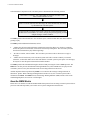
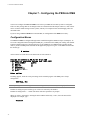
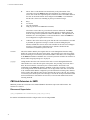
This menu appears:
Advanced
1. PBX...
2. SMDI...
3. Activation Code...
4. Reset To Factory Defaults...
Q. Quit
Enter option:
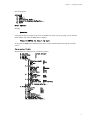
Entering
Q<enter>
or pressing the ESC key brings you up to the next higher level menu. If you keep going, you exit from the
menus and the card returns to SMDI mode. It displays:
Press M <ENTER> to return to menu
At this point, the DMI4 is functioning and it is safe to exit the terminal software and start the voicemail
system.
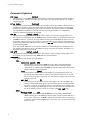
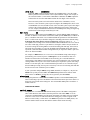
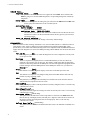
Parameter Table
The parameters are arranged in a tree structure as follows:
1.
2.
3.
4.
5.
PBX Type
[Nortel Norstar]
Prime Number
[]
MWI On
[]
MWI Off
[]
Advanced...
1. PBX...
1. Extension Length [0]
2. aLaw
[OFF]
3. MWI End
[]
Q. Quit
2. SMDI...
1. Message Desk
[1]
2. CPID Mask
[0000000]
3. MWI Ports
[]
4. Disconnect
[OFF]
5. Include Names
[OFF]
Q. Quit
3. Inband Tones...
1. Suppress Tones
[ON]
2. Delay (ms)
[300]
Q. Quit
4. Activation Code...
1. Serial Number
04022
2. Activation Code
[856-476-7401]
Q. Quit
4. Reset To Factory Defaults...
Q. Quit
5. Diagnostics...
1. Port (1-4)
[1]
2. Warnings
[ON]
3. Trace
[OFF]
4. Raw
[OFF]
5. Time
[OFF]
6. Show Config...
7. Show Signal Levels...
8. Show Name Table...
9. Refresh Name Table...
10. Download New Firmware...
31