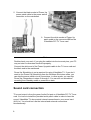
1
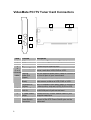
VideoMate PCI TV Tuner Card Connectors
5
6
7
1
2
3
4
Item
Function
1
TV Tuner-In
2
FM Tuner-In
3
IR
4
Audio-In (Blue)
(1 to 4
converter External
cable) Audio-Out
(Green)
S-Video-In
(Black)
Composite-In
(Yellow)
5
To Sound Card
AUX-IN
6
To Case Power
Switch
7
To Mainboard
Power Switch
Connector
6
Description
Connect to a TV antenna or TV cable feed.
Connect to an FM antenna feed.
Connect the IR receiver here.
Use an audio patch cable to connect to an audio
source, such as a VCR, DVD or VCD.
Use the supplied audio patch cable to connect to
the Line-In port of your sound card.
Use an S-Video patch cable to connect to a
video source, such as a VCR, DVD or VCD.
Use a Composite video patch cable to connect to
a video source, such as a VCR, DVD or VCD.
Use an internal audio patch cable to connect to
the AUX-IN port of your sound card.
Connect the ATX Power Switch cable of your
computer case here.
Use the supplied power switch patch cable to
connect to the ATX Power Switch pins on the
mainboard.