1
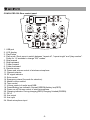
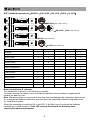
ISO 9001|ISO 14001|OHSAS 18001 Recharge its inbuilt Lithium battery before first use After unpacking the unit for the first time, please recharge the unit for about 4~5 hours before operation. This is absolutely necessary as the built-in rechargeable battery might have been discharged naturally due to long shipment and storage time, even though it had been fully charged in the factory prior to shipment. To charge the battery, just plug in the DC end of the switch mode power supply into the DC IN of the unit and charging will start automatically. During the charging process, the charging indicator LED will be RED. When this LED turns GREEN, this battery is then fully charged. Operating procedures To operate this portable sound unit, switch on the main POWER switch, which will be GREEN. If it turns RED, its battery power might be too low and recharging is necessary. The main power switch does not switch on the wireless microphone and USB digital player as each of them has an individual Power / Volume control. Operating the built-in wireless microphone system To use the wireless microphone, first switch on the main power switch, then switch on the WR power/volume control switch. Switch on the corresponding transmitter and set this system to the same frequency and RF signal LED will grow. Operating the wired microphone There is a MIC IN jack with dedicated volume control for this portable sound unit. To use a wired microphone, just plug the end with a phone jack plug into MIC IN. Switch on the Power/volume control knob (PWR/MIC) and rotate it to adjust the volume. Operating the USB Digital Player To use the USB Digital Player, first switch on the main power switch, then switch on the AUX/USB power/volume control switch and rotate it to adjust the volume. Plug USB into the port and begin your music playing and setting. How to use each buttons of this digital player: II: Press to play/pause the music. : Press to skip forward. : Press to skip backward. : Press to skip folders forward. : Press to skip folders backward. MODE: Hold press to switch between "repeat all", "repeat single" and "play random". Press to change "EQ" modes. -4-