1
INSTALLATION
Burglary Zones
10.1 Description
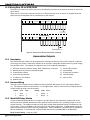
On XR20/XR40 panels, terminals 12 to 24 are the nine burglary zones. For programming purposes, the zone
numbers are 1 to 9. The zone conÞgurations on terminals 12 to 24 are described below. The XRSuper6
terminals 12 to 18 are the Þve burglary zones with terminal 16 providing the ground for zone 5 (terminal 18).
Terminal Function
Terminal
Function
12
Zone 1 voltage sensing
19
Ground for zones 5 & 6
13
Ground for zones 1 & 2
20
Zone 6 voltage sensing
14
Zone 2 voltage sensing
21
Zone 7 voltage sensing
15
Zone 3 voltage sensing
22
Ground for zones 7, 8, & 9
16
Ground for zones 3 & 4 (& 5 on XRSuper6) 23
Zone 8 voltage sensing
17
Zone 4 voltage sensing
24
Zone 9 voltage sensing
18
Zone 5 voltage sensing
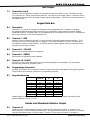
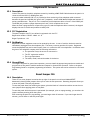
The voltage sensing terminal measures the voltage ßowing through the 1k Ohm End-of-Line resistor to the
zone’s ground terminal. Dry contact sensing devices can be used in series (normally-closed) or in parallel
(normally-open) with any of the burglary protection zones.
10.2 Operational Parameters
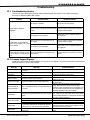
Each burglary protection zone detects three conditions: open, normal, and short.
The parameters for each are listed below:
Condition
Open
Normal
Short
Resistance on zone
over 1300 ohms
600 to 1300 ohms
under 600 ohms
1K Ohm
Normally
Closed
Voltage on right terminal
over 2.0 VDC
1.2 to 2.0 VDC
under 1.2 VDC
1K Ohm
Normally Open
1K Ohm
Combination Normally Open
and Normally Closed
Figure 4: Protection Zone Contact Wiring
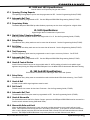
10.3 Zone Response Time
A condition must be present on a zone for 500 milliseconds before it is detected by the panel. Ensure
detection devices used on the protection zones are rated for use with this delay.
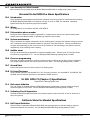
10.4 Keyswitch Arming Zone
You can use a momentary keyswitch on a zone programmed as an Arming type for use in arming and
disarming the system without a code.
Digital Monitoring Products
10
XRSuper6/XR20/XR40 Installation Guide