1
3
Controls & Displays
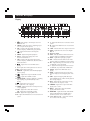
Display
1
)
_
VOFF
DOFF
2 3 4 5 6 7 890
SRS TS
PRGSVE
GRP RNDM TRK
TITLE PROG CHP
- = ~
DOLBY D
A-B
ALL
1
!
@
192kHz
96 kHz
AUDIO TOTAL SING
+
1 2
¡
1
2
3
4
5
6
7
8
9
3 4
™
5 6
£
7 8
¢
9 10
∞
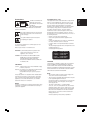
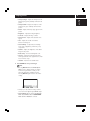
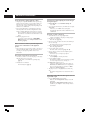
– Lights during a camera-angle section of a
DVD-Video disc
PRGSVE – Lights when unit is outputting progressive scan (non-interlaced) video
GRP – Indicates that the number below in the
character display is a DVD-Audio group number
– Lights when Remote Control Signal is
received
RNDM – Lights during random playback
SRS TS – Lights when playing a disc with
TruSurround switched on
TRK – Indicates that the number below in the
character display is a DVD-Audio, CD, Video CD or
MP3 track number
– Lights when a disc with DTS audio is
playing
A–B – Lights when A-B repeat has been selected
10
– Lights during repeat play
11 DOLBY D – Lights when a disc with Dolby Digital
audio is playing
12
13
– Lights when a Super Audio CD is loaded
– Lights when a DVD is loaded
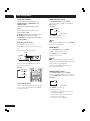
14 192kHz/96kHz – Indicates a DVD disc containing
high-sampling rate (192kHz/96kHz) audio is
playing
15
– Lights when a disc is paused
16 3 – Lights when a disc is playing
17 COND – Lights when the disc has had preferences
set (see page 21)
18 VCD – Lights when a Video CD is loaded
CD – Lights when a Audio CD is loaded
19 MP3 – Lights when replaying MP3 audio
20 N – Lights when NTSC has been selected as the TV
system
14
§
¶
•
# $ %^&*(
COND MP3 N P M
VCD
ELAP
DOWN MIX
L C R
L FE
LS S RS
STEREO MULTI
ª
º
≠
Ÿ
–
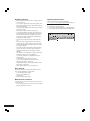
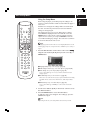
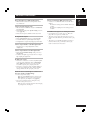
21 P – Lights when PAL has been selected as the TV
system
22 M – Lights when ‘Multi’ has been selected as the
TV system
23 V OFF – Indicates that video output is turned off
24 D OFF – Lights when the unit is set to Digital
Out off
25 Character display
26 TITLE – Indicates that the number below in the
character display is a DVD-Video title number
27 PROG – Lights when replaying a program
28 CHP – Indicates that the number below in the
character display is a DVD-Video chapter number
29 ALL – Lights when ‘Repeat all’ has been selected
for VCD, CD or Super Audio CD
30 1 – Lights when track repeat has been selected
for VCD, CD, Super Audio CD, or DVD-Audio
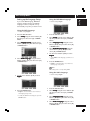
31 AUDIO – Lights when a DVD-Audio disc is
playing
32 TOTAL – Indicates that the time shown in the
character display is the total playing time of the
disc
33 SING – Lights when playing VCD, CD, Super
Audio CD, DVD-Audio or MP3 and the playback
time is being displayed
34 ELAP – Lights when the elapsed time is being
displayed for a title, chapter, or track
35 STEREO – Lights when a Super Audio CD is
playing stereo sounds
36 MULTI – Lights when a Super Audio CD is
playing multi-channel sounds
37 DOWN MIX – Lights when multi-channel DVDAudio, Dolby Digital, DTS or MPEG audio is
downmixed, such as to two-channel stereo
38 L, C, R, LFE, LS, S, RS – show which channels
are recorded on the disc playing