1
TTYs
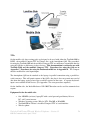
On the mobile side, these testing tools are designed to be used with either the TextLink9100 by
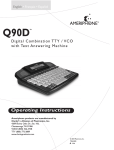
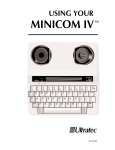
DSPG , the modified Compact TTY by Ultratec, Inc. or the Ameriphone Q90. The procedures
for using the TextLink9100 and the modified Compact TTY are much more streamlined than for
using the Q90 due to differences in these devices. This documentation is written for use with
TextLink 9100 and the modified Compact TTY. Procedures for using the Q90 are in
Appendix C. Procedures for using the Intelemodem2400 are in Appendix D. The Compact
must be modified for serial input/output.
The Ameriphone Q90 can be attached to the laptop via parallel connection using a parallel-toserial converter. This will permit capture of the Q90’s data, but it does not permit auto-send of
data from the laptop; typing of messages would be required of the tester. A separate keyboardinput is not available for this device. (See Appendix C for extra procedures required.)
On the landline side, the Intele-Modem or NXi 300/370 modem can be used for automatic data
capture.
Equipment list for the mobile side:
•
•
•
•
One 100 MHz (or faster) laptop PC with a serial port and good battery life or a
DC AC power inverter.
Windows operating system (Win 9x, NT4, Win ME, or Win2000)
TextLink9100 or Ultratec’s modified Compact TTY w/ serial interface
Wireless phone
Tools for Field Testing TTYs with Wireless Telephones – Version 1.2
DSPG Communication, April 5 2001
2