1
Sentinel setup
ENTERING INTERNET PROTOCOL
ADDRESS PROPERTIES
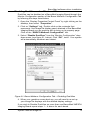
Entering address properties for the first time
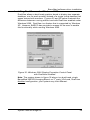
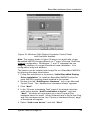
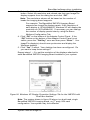
Note: When you enter the address properties for the first time, there
is no time limit for entering the address properties.
But if the address properties have already been entered before (which
you cannot distinguish when you start Sentinel Setup), there is a time
limit of 2 minutes for entering the properties.
In that case, follow the procedure described in the following chapter
"Changing the address properties".
Fixed or dynamic IP-addresses?
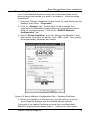
With the Sentinel Setup software, you can either enter a fixed IPaddress or acquire an IP-address dynamically using the Dynamic
Host Configuration Protocol (DHCP). This is possible when a DHCP
server is available.
Important
We advise to enter a fixed IP-address. Therefore, ask the network
administrator for a valid IP-address.
If you should use a DHCP server to find an IP-address, there is a
disadvantage: It is possible that the IP-address automatically changes
after some time.
If a user then tries to establish connection with the ImageTile by using
the original IP-address, this will not be possible.
However, this problem can be avoided by linking a host name to
the IP-address.
Moreover, it will be far more convenient for the user to consult the
ImageTile on the web by surfing to a meaningful host name instead of
an IP-address.
For more information, please consult your network administrator.
System manual ImageTile
107