1
Intel RAID
Degraded RAID Array
A RAID 1, RAID 5 or RAID 10 volume is reported as degraded when one of its hard drive
members fails or is temporarily disconnected, and data mirroring is lost. As a result, the
system can only utilize the remaining functional hard drive member. To re-establish
data mirroring and restore data redundancy, refer to the procedure below that corresponds to the current situation.
Missing Hard Drive Member
1. Make sure the system is powered off.
2. Reconnect the hard drive.
3. Reboot the system to Windows; the rebuild will occur automatically.
Failed Hard Drive Member
1. Make sure the system is powered off.
2. Replace the failed hard drive with a new one that is of equal or greater capacity.
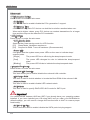
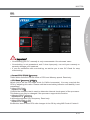
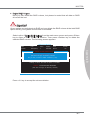
3. Reboot the system to Intel RAID Option ROM by press <Ctrl> and <I> keys simultaneously during the Power-On Self Test (POST).
RAID Volumes
ID
Name
0
Volume0
Level
RAID 1(Mirror)
Physical Disks:
Port Device Model
1
XXXXXXXXXXXXX
2
XXXXXXXXXXXXX
Strip
N/A
Size
XXX.XGB
Serial #
XXXXXXXXXXXXX
XXXXXXXXXXXXX
Status
Degraded
Size
XXX.XGB
XXX.XGB
Bootable
Yes
Type/Status(Vol ID)
Member Disk (0)
Member Disk (0)
Press <CTRL-I> to enter Configuration Utility..
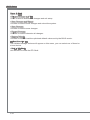
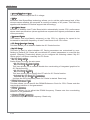
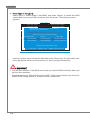
4. Select the port of the destination disk for rebuilding, and then press ENTER.
[ MAIN MENU
1.
2.
]
4.
Recovery Volume Options
Create RAID Volume
[ DEGRADED VOLUME DETECTED ]
4.
Recovery Volume Options
Delete RAID Volume
“Degraded” volume and disk available
for rebuilding detected. Selecting
5.
Exit
a disk initiates a rebuild.
Rebuild
completes
in
the
operating
system.
[ DISK / VOLUME INFORMATION
]
RAID Volumes :
Select the port of the destination disk for rebuilding (ESC to exit):
None defined.
Port Drive Model
Serial #
Size
1
XXXX-XXXXXXXX XXXXXXXXXXXXXX
XXX.XGB
Physical Devices :
Port Device Model
Serial #
Size Type/Status (Vol ID)
1
XXXX-XXXXXXXX
XXXXXXXXXXXXXX
XXX.XGB Non-RAID Disk
[ ↑↓] - Previous/ Next [ENTER] - Select [ESC] - Exit
2
XXXX-XXXXXXXX
XXXXXXXXXXXXXX
XXX.XGB Non-RAID Disk
[ ↑↓] - Select
B-12
[ESC] - Exit
[ENTER] - Select Menu