1
Table of Contents
Technical Data .................................................................................... 1 - 1
Basic Specifications.....................................................................................................1 - 2
Optional Accessories .............................................................................................................. 1 - 9
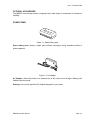
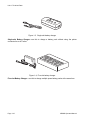
Power Items ............................................................................................................................ 1 - 9
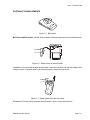
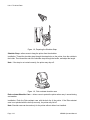
Portability enhancements...................................................................................................... 1 - 11
Connectivity options.............................................................................................................. 1 - 13
Overview.............................................................................................. 2 - 1
Overview......................................................................................................................2 - 2
Product Features .................................................................................................................... 2 - 2
Bluetooth/Wireless Communication ........................................................................................ 2 - 2
Safety Precautions.................................................................................................................. 2 - 3
Setup.................................................................................................... 3 - 1
Setup ...........................................................................................................................3 - 2
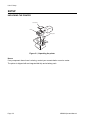
Unpacking the printer.............................................................................................................. 3 - 2
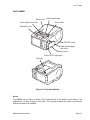
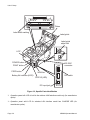
Part Names ............................................................................................................................. 3 - 3
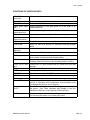
Functions of various parts....................................................................................................... 3 - 5
Charging the battery pack with a charger ............................................................................... 3 - 6
Charging the battery pack with the printer .............................................................................. 3 - 7
Using the battery pack ............................................................................................................ 3 - 8
Using the optional AC Adapter for power.............................................................................. 3 - 10
Loading the label roll (Continuous mode) ............................................................................. 3 - 11
Loading the label roll (Dispense mode) ................................................................................ 3 - 13
Operation and Configuration............................................................... 4 - 1
Operation and Configuration .......................................................................................4 - 2
Turning the Printer On or Off .................................................................................................. 4 - 2
Turning the printer On............................................................................................................. 4 - 2
Turning the printer Off............................................................................................................. 4 - 2
Setting the DIP Switches ........................................................................................................ 4 - 3
Performing a Test Print ........................................................................................................... 4 - 4
Printing via the RS-232C Interface ......................................................................................... 4 - 6
Basic Specifications for RS-232C Interface ............................................................................ 4 - 6
Input and Output Signals ........................................................................................................ 4 - 7
Printing via the IrDA Interface ................................................................................................. 4 - 7
Printing via the Optional Wireless LAN Interface .................................................................... 4 - 8
Printing via the Optional Bluetooth Interface........................................................................... 4 - 8
Optional LCD screen............................................................................................................. 4 - 10
Adjusting Display Contrast.................................................................................................... 4 - 10
Printer Configuration ............................................................................................................. 4 - 11
Configuration Modes............................................................................................................. 4 - 13
Normal Mode ........................................................................................................................ 4 - 13
Label Sensor Selection ......................................................................................................... 4 - 14
Dispense Mode ..................................................................................................................... 4 - 15
Download Mode .................................................................................................................... 4 - 16
MB200i Operator Manual