1
User Interface
This section explains all of the screens and menus that appear on your computer
display while you are using the FA-B30 Software. For full details about operational
procedures, see the pages that are referenced in this section.
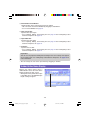
Input Panel
1
2 3 4
5
6
7
8
9
0
q
w e
r
t
j
h
y
u
g
i
o
f
d
s
a
p
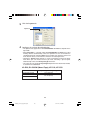
1 Recall Phrase Button
Recalls a previously saved term or expression for insertion into the Text Input Box.
• See “Inserting Phrases, and the Current Date and Time” on page 27.
2 Save Phrase Button
Saves the text that is highlighted in the Text Input Box into phrase memory.
• See “Saving Text in Phrase Memory” on page 28.
3 History Box
Displays a history of past print jobs.
• See “To recall a past print job” on page 40.
15
FAB30_Ver1.02_E_p13-23.p65
15
04.11.22, 11:40 AM