1
INTRODUCTION
SPECIAL FEATURES AT A GLANCE!
Congratulations on your purchase of this exciting new
chess computer! Perfect for all types of players, this
computer can be whatever you want it to be—a challenging opponent that will test the skills of even advanced
players, a perfect chess partner for intermediate players,
or a patient chess coach for beginners! Chess is a very
fascinating game, and this computer includes a tremendous number of features that will let you enjoy the game
even more. So, go ahead—study the features at your
leisure, play some great games, and above all, have fun!
• Strong 64K program boasts an estimated Swedish Elo rating
of 2200—ideal for advanced players!
• Features powerful 32 bit RISC microprocessor!
• The 256 level setting means you can constantly improve your
skills.
• Offers 64 levels of play for learning, variety, and experimentation—including Speed Chess, Tournament, Training,
Problem Solving, and even special Fun Levels designed
expressly for beginners!
• Watch the computer as it thinks—you’ll see the principal
variation, the computer’s evaluation of the current position, its
search depth, and more!
• Need a hint? Just ask for a move suggestion!
• Set up positions and problems for further study.
• Use the advanced, high-speed Selective Search or try out the
powerful Brute Force Search!
• Includes large, user-selectable openings.
• Coach Mode allows beginners to learn as they play—even
gives blunder and capture warnings!
• Features chess clock with countdown feature and unique
“ticking” sound option.
• Take back up to about 200 individual moves!
• Play against another person with the computer acting as
referee.
• Great problem-solver—up to mate in eight moves!
• Retains your current position and up to about the last 200
individual moves!
• Advanced energy-saving features—Automatic Power Down
and built-in Power Management Intelligence help to save
energy and conserve batteries!
• Four different Power Saving Mode options enhance the
playing range by further weakening play while saving power,
extending the life of your batteries up to about eight times!
1. GETTING STARTED: THE BASICS
1
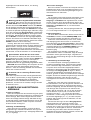
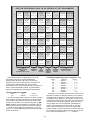
First, Install the Batteries or Optional Adapter
Your chess computer runs on six “AA” (Type AM3/
R6) batteries, and we recommend alkaline batteries for
longer battery life. Make sure the computer is turned off,
and insert the batteries as shown at the front of the
manual. Then, press GO to turn the computer on. After the
unit automatically verifies the board lights and LCD display
segments, a beep will signal that the computer is ready for
play. If the unit fails to respond (static discharge may
cause it to lock up), use a paper clip or another sharp
object to press down into the hole marked ACL on the top
edge of the unit (next to the adapter socket) for at least
one second. This resets the computer.
To conserve energy and extend battery life, this unit
features integrated Power Management Intelligence,
whereby the computer enters a special Power Saving
Mode at various times during the game. There will be no
visible indication to you when this mode is in effect. You
will, however, definitely end up replacing your batteries
less often! Note that this mode also weakens the
computer’s play. For details on changing Power Saving
Modes or turning this option off, see Section 6.2. To
further reduce power consumption, you may also want to
set the Auto Power Down option, as noted in Section 6.1.
This feature causes the unit to turn itself off automatically
after about 15 minutes if no keypresses or moves are
made during that time.
If you would rather not power your computer with
batteries, you may purchase an optional Mephisto/Saitek
AC-DC adapter. Please use only the adapter specified for
use with this computer (see Section 7.3), as the use of
any other adapter will invalidate the unit’s warranty. To
use the adapter, first press STOP to turn off the computer, connect the adapter to the mains power supply,
and then push the plug at the end of the adapter cable
into the socket on the computer. Press GO to turn it on.
IMPORTANT: To ensure that the computer’s memory
contents are not lost, keep good batteries installed in the
unit even when you are using the optional adapter.
d. Take the piece and gently press it down on the square
to which you are moving. A second beep sounds and
the computer then starts thinking.
Note: At the beginning of a game, the computer’s reply
is often instantaneous on many levels, because it is
playing moves which are stored in its openings. For full
details, see Section 2.7.
3
Now It’s The Computer’s Turn
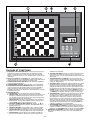
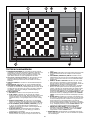
When the computer makes its move, it beeps and
shows its move in the display. It also turns on two board
lights indicating the horizontal row and vertical column of
the piece it wishes to move. Press the indicated piece
down gently on the square until you hear a beep. The
computer then uses lights to show you where that piece
should go. Move the piece to the indicated square and
press the piece down to complete the computer’s move.
2
Ready to Play? Here’s How to Move!
Follow these steps to start a game:
a. Press GO to turn the computer on.
b. Press CLEAR and ENTER simultaneously to reset the
computer for a new game of chess. Then, set up the
pieces in their starting positions, with the White pieces
nearest to you. If you are unsure of the piece
positions, refer to the rules.
c. To make a move, lightly press down on the piece you
want to move until you hear a beep. The sensory
board recognizes the piece automatically, and two
board lights turn on to indicate that piece. The display
window also shows the color, the piece, and the
square that was pressed.
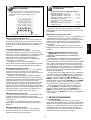
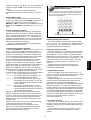
The display shows the color, the piece, and the move.
4
Change Your Mind? Take Back!
Whenever it is your turn to move, you may press
TAKE BACK then press WHITE/– to retract a move. The
display shows the move to be taken back and the to
square of that move is also indicated with the board lights.
Press the indicated piece down on the square, and the
computer shows you where that piece came from. Press
the piece down on the from square to complete the takeback. Repeat by pressing WHITE/– and then pressing the
indicated board square to retract more moves. You may
4