1
frequency range of the receiver. You can compensate for this by
removing turns from L1 if necessary.
Two-Band Option
If you’d like a two-band receiver with noncritical tuning, use
a 150-pF capacitor for C1 and install a miniature toggle switch
with very short leads to add an additional 250-pF fixed-value mica
capacitor in parallel with C1. With the capacitor in the circuit, the
receiver will then tune the 80-meter band.
Packaging the Radio
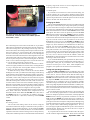
This close-up shows the interconnection of seriesconnected D1, C4 and R4 between the TUNING capacitor
and VOLUME control.
drill a mounting hole in the bottom of the film can or pill bottle.
Then, drill two small holes in the side of the coil form, near the top,
where the winding starts. (By winding from the top of the coil
form to the bottom, the winding bottom is kept well above the PC
board, preventing any circuit loading that could decrease the
receiver’s selectivity.) Feed one end of the coil wire through the
first hole to the inside of the form, then out through the second. Tie
a knot at the point in the wire where it enters the form—this keeps
the wire in place and prevents it from loosening later on. Be sure
to leave a two to three inch length of wire at each end of the coil
so you can make connections to the PC board.
You can wind the coil in either direction, clockwise or counterclockwise. Tightly wind the wire onto the form, counting the turns
as you go. Keep the turns close together and don’t let the wire
loosen as you wind; this takes a little practice.
To make the coil tap, wind 11 turns on the coil form. While
holding the wire with your thumb and index finger, mark the tap
point and remove the insulation at that point. Solder a two to threeinch piece of wire to the tap. Continue winding turns until the coil
is finished (13 turns total). Keep the free end of the wire in place
using a piece of tape and drill two more holes in the coil form
where the winding ends. Feed the wire end in and out of the coil
as before and tie a knot at the end to hold the winding in place.
When the coil is finished, remove the tape then carefully solder the
three wires from the coil (bottom, tap and top) to their points on
the PC board keeping the wire lengths as short as possible.
For best performance, the floating detector must be wired using
short, direct connections. Therefore, these components are not
mounted on the PC board. Mount the VOLUME control, R5, close to
the TUNING capacitor, C1. Connect D1, C4 and R4 in series between the hot side of C1 (the stator) and the top of the VOLUME
control.
Options
Fine-Tuning Control
You can add a fine-tuning control to the receiver using the
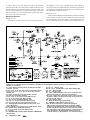
circuit shown in the inset of Figure 1. D6 functions as a poor man’s
Varactor (voltage-variable capacitor). As the voltage from FINETUNING control R8 is increased, the diode is reverse biased and its
capacitance decreases. This fine-tuning control is cheap and easy
to add, but its added capacitance somewhat reduces the maximum
The recommended RadioShack project box includes metal and
plastic tops. Use the metal top as a large front panel by mounting
it to one side of the box using two small screws and nuts through
two of the four predrilled holes. Then drill the control mounting
holes and mount the three controls and the ON/OFF switch on the
metal panel. The radio is easier to operate if you mount the TUNING capacitor and the regeneration ( REGEN) control on opposite
sides of the front panel. The VOLUME and REGEN controls are best
mounted near the bottom of the front panel to keep their connecting wires to the PC board as short as possible. You can use the
RadioShack hook-up wire for the VOLUME and REGEN control
connections if you twist the wires closely together and keep their
lengths very short. Otherwise, use shielded wires for these connections. You can mount the ON/OFF switch last, in any convenient location. Use one of the two remaining holes in the metal
front panel to attach a wire connecting the panel to the PC board
ground. Attach the PC board and the coil to the bottom of the
project box using small screws. Mount the headphone jack on the
box rear, close to the PC board and the LM386. Attach the
RadioShack 39-inch whip antenna to one of the back corners of the
box using a small screw and nut.
If you use the RadioShack jack specified for J1 (RS 274-276),
connect together pins 2 and 5 and attach that common lead to C8.
Ground pin 1 of the jack. If you intend to use a small speaker,
connect it between pins 1 and 3. Then, when headphones are
plugged in, the speaker will be disconnected automatically.
Testing and Operating the Receiver
Set the VOLUME and REGEN controls to midrange, plug in the
headphones, extend the whip antenna, attach the battery and turn
on the receiver. You can check to ensure that the audio stage is
functioning by placing a finger on the center lug (wiper) of the
VOLUME control and listen for a buzz. If the audio stage is working, adjust the REGEN control until the set produces a sound, indicating that Q1 is oscillating. If Q1 is not oscillating, carefully
check the wiring and measure the voltages labeled on the schematic using a high-impedance DVM or multimeter. Common problems are Q1 being wired backwards (emitter and collector connections reversed) and the wires from coil L1 connected to the wrong
places on the PC board.
Use two hands when operating the receiver: one for tuning, the
other for controlling regeneration. For international broadcast
stations or AM phone operation on 40 meters, carefully adjust the
REGEN control so that Q1 is just below oscillation. For CW and
SSB, increase the REGEN level so that the set just oscillates providing the required local oscillation for these modes. This receiver
picks up lots of stations with just its whip antenna, although using
a ground connection will greatly reduce any hand-capacitance effects. To pull in more stations during daylight hours, a 10 to 15foot (or longer) length of insulated hook-up wire can be used as an
external antenna. Simply wrap the end of this wire a couple of
times around the whip antenna.
If you operate this receiver close to another radio, the regen’s
30-µW oscillator might interfere with it. Those who are interested
September 2000
63