1
Getting Started
Downloading the Virtual Device-Mi Application Using ZDownloader
Deleting Printers from the List
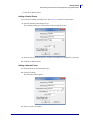
To delete printers from the list, perform the following steps:
1. Select one or more printers to delete.
2. Click the “Delete Printer(s)” toolbar button
.
OR
Right-click on one of the selected printers and select “Delete Printer(s)”.
The printer is removed from the list.
01/26/2015
Virtual Device-Mi User Guide
P1076806-001
21