1
R
Model CC9100 User Guide
CD Changer
Downloaded From Disc-Player.com Marantz Manuals
WARNING: TO PREVENT FIRE OR SHOCK HAZARD, DO
IMPORTANT NOTICE
NOT EXPOSE THIS APPLIANCE TO RAIN OR MOISTURE.
The serial number for this equipment is located on the rear panel.
Please write this serial number on your enclosed warranty card
and keep it in a secure area. This is for your security.
IMPORTANT
The lightning flash with arrowhead symbol, within an
equilateral triangle, is intended to alert the user to the
presence of uninsulated "dangerous voltage" within the
product's enclosure that may be of sufficient magnitude
to constitute a risk of electric shock to persons.
CAUTION:
TO PREVENT THE RISK OF ELECTRIC SHOCK, DO
NOT REMOVE COVER (OR BACK). NO USER-SERVICEABLE PARTS INSIDE. REFER SERVICING TO
QUALIFIED SERVICE PERSONNEL.
The exclamation point within an equilateral triangle is
intended to alert the user to the presence of important
operating and maintenance (servicing) instructions in
the literature accompanying the appliance.
ENGLISH
CAUTION
RISK OF ELECTRIC SHOCK
DO NOT OPEN
IMPORTANT SAFETY INSTRUCTIONS
READ INSTRUCTIONS — All the safety and operating
instructions should be read before the product is
operated.
RETAIN INSTRUCTIONS — The safety and operating
instructions should be retained for future reference.
HEED WARNINGS — All warnings on the product and in
the operating instructions should be adhered to.
FOLLOW INSTRUCTIONS — All operating and use
instructions should be followed.
CLEANING — Unplug this product from the wall outlet
before cleaning. The product should be cleaned only
with a polishing cloth or a soft dry cloth. Never clean
with furniture wax, benzine, insecticides or other volatile
liquids since they may corrode the cabinet.
ATTACHMENTS — Do not use attachments not
recommended by the product manufacturer as
they may cause hazards.
WATER AND MOISTURE — Do not use this product
near water — for example, near a bathtub, wash
bowl, kitchen sink, or laundry tub; in a wet basement;
or near a swimming pool; and the like.
ACCESSORIES — Do not place this product on an
unstable cart, stand, tripod, bracket, or table. The
product may fall, causing serious injury to a child or
adult, and serious damage to the product. Use only
with a cart, stand, tripod, bracket, or table
recommended by the manufacturer, or sold with the
product. Any mounting of the product should follow
the manufacturer’s instructions, and should use a
mounting accessory recommended by the
manufacturer.
CART — A product and cart combination should be
moved with care. Quick stops, excessive force, and
uneven surfaces may cause the product and cart
combination to overturn.
VENTILATION — Slots and openings in the cabinet are
provided for ventilation and to ensure reliable
operation of the product and to protect it from
overheating, and these openings must not be
blocked or covered. The openings should never be
blocked by placing the product on a bed, sofa, rug,
or other similar surface. This product should not be
placed in a built-in installation such as a bookcase
or rack unless proper ventilation is provided or the
manufacturer’s instructions have been adhered to.
POWER SOURCES — This product should be operated
only from the type of power source indicated on the
marking label. If you are not sure of the type of
power supply to your home, consult your product
dealer or local power company.
LOCATION – The appliance should be installed in a
stable location.
NONUSE PERIODS – The power cord of the appliance
should be unplugged from the outlet when left unused for a long period of time.
OBJECT AND LIQUID ENTRY — Never push objects of
any kind into this product through openings as they
may touch dangerous voltage points or short-out
parts that could result in a fire or electric shock.
Never spill liquid of any kind on the product.
SERVICING — Do not attempt to service this product
yourself as opening or removing covers may expose
you to dangerous voltage or other hazards. Refer all
servicing to qualified service personnel.
DAMAGE REQUIRING SERVICE — Unplug this product
from the wall outlet and refer servicing to qualified
service personnel under the following conditions:
÷ When the power-supply cord or plug is damaged.
÷ If liquid has been spilled, or objects have fallen into
the product.
÷ If the product has been exposed to rain or water.
÷ If the product does not operate normally by following
the operating instructions. Adjust only those controls
that are covered by the operating instructions as an
improper adjustment of other controls may result in
damage and will often require extensive work by a
qualified technician to restore the product to its
normal operation.
÷ If the product has been dropped or damaged in any
way.
÷ When the product exhibits a distinct change in
performance — this indicates a need for service.
REPLACEMENT PARTS — When replacement parts
are required, be sure the service technician has
used replacement parts specified by the
manufacturer or have the same characteristics as
the original part. Unauthorized substitutions may
result in fire, electric shock, or other hazards.
SAFETY CHECK — Upon completion of any service or
repairs to this product, ask the service technician to
perform safety checks to determine that the product
is in proper operating condition.
WALL OR CEILING MOUNTING — The product should
not be mounted to a wall or ceiling.
HEAT — The product should be situated away from heat
sources such as radiators, heat registers, stoves, or
other products (including amplifiers) that produce
heat.
GROUNDING OR POLARIZATION
÷ If this product is equipped with a polarized alternating
current line plug (a plug having one blade wider than
the other), it will fit into the outlet only one way. This
is a safety feature. If you are unable to insert the plug
fully into the outlet, try reversing the plug. If the plug
should still fail to fit, contact your electrician to
replace your obsolete outlet. Do not defeat the safety
purpose of the polarized plug.
÷ If this product is equipped with a three-wire grounding
type plug, a plug having a third (grounding) pin, it will
only fit into a grounding type power outlet. This is a
safety feature. If you are unable to insert the plug into
the outlet, contact your electrician to replace your
obsolete outlet. Do not defeat the safety purpose of
the grounding type plug.
POWER-CORD PROTECTION — Power-supply cords
should be routed so that they are not likely to be
walked on or pinched by items placed upon or
against them, paying particular attention to cords at
plugs, convenience receptacles, and the point
where they exit from the product.
OUTDOOR ANTENNA GROUNDING — If an outside
antenna or cable system is connected to the product,
be sure the antenna or cable system is grounded so
as to provide some protection against voltage surges
and built-up static charges. Article 810 of the National
Electrical Code, ANSI/NFPA 70, provides information
with regard to proper grounding of the mast and
supporting structure, grounding of the lead-in wire
to an antenna discharge unit, size of grounding
conductors, location of antenna-discharge unit,
connection to grounding electrodes, and
requirements for the grounding electrode. See
Figure A.
LIGHTNING — For added protection for this product
during a lightning storm, or when it is left unattended
and unused for long periods of time, unplug it from
the wall outlet and disconnect the antenna or cable
system. This will prevent damage to the product
due to lightning and power-line surges.
POWER LINES — An outside antenna system should not
be located in the vicinity of overhead power lines or
other electric light or power circuits, or where it can
fall into such power lines or circuits. When installing
an outside antenna system, extreme care should be
taken to keep from touching such power lines or
circuits as contact with them might be fatal.
OVERLOADING — Do not overload wall outlets, extension
cords, or integral convenience receptacles as this
can result in a risk of fire or electric shock.
ANTENNA
LEAD IN
WIRE
GROUND
CLAMP
ELECTRIC
SERVICE
EQUIPMENT
ANTENNA
DISCHARGE UNIT
(NEC SECTION 810-20)
GROUNDING CONDUCTORS
(NEC SECTION 810-21)
GROUND CLAMPS
Fig. A
POWER SERVICE GROUNDING
ELECTRODE SYSTEM
(NEC ART 250, PART H)
NEC — NATIONAL ELECTRICAL CODE
CAUTION
• Use of controls or adjustments or performance of procedures other than those specified herein may result in hazardous radiation
Downloaded From exposure.
Disc-Player.com Marantz Manuals
• The use of optical instruments with this product will increase eye hazard.
1
This equipment has been tested and found to comply with the limits for a Class B digital device, pursuant to Part 15 of the FCC Rules. These
limits are designed to provide reasonable protection against harmful interference in a residential installation. This equipment generates,
uses, and can radiate radio frequency energy and, if not installed and used in accordance with the instructions, may cause harmful
interference to radio communications. However, there is no guarantee that interference will not occur in a particular installation. If this
equipment does cause harmful interference to radio or television reception, which can be determined by turning the equipment off and on,
the user is encouraged to try to correct the interference by one or more of the following measures:
–
Reorient or relocate the receiving antenna.
–
Increase the separation between the equipment and receiver.
–
Connect the equipment into an outlet on a circuit different from that to which the receiver is connected.
–
Consult the dealer or an experienced radio/TV technician for help.
Information to User
Alteration or modifications carried out without appropriate authorization may invalidate the user's right to operate the equipment.
[For Canadian model]
CAUTION: TO PREVENT ELECTRIC SHOCK DO NOT
USE THIS (POLARIZED) PLUG WITH AN EXTENSION CORD,
RECEPTACLE OR OTHER OUTLET UNLESS THE BLADES
CAN BE FULLY INSERTED TO PREVENT BLADE EXPOSURE.
ATTENTION: POUR PREVENIR LES CHOCS ELECTRIQUES NE PAS UTILISER CETTE FICHE POLARISEE
AVEC UN PROLONGATEUR, UNE PRISE DE COURANT OU
UNE AUTRE SORTIE DE COURANT, SAUF SI LES LAMES
PEUVENT ETRE INSEREES A FOND SANS EN LAISSER
AUCUNE PARTIE A DECOUVERT.
CAUTION
This product satisfies FCC regulations when shielded cables and
connectors are used to connect the unit to other equipment. To
prevent electromagnetic interference with electric appliances
such as radios and televisions, use shielded cables and connectors for connections.
[For Canadian model]
This Class B digital apparatus complies with Canadian
ICES-003.
[Pour le modèle Canadien]
Cet appareil numérique de la classe B est conforme à la
norme NMB-003 du Canada.
This player is for consumer use. If the player is used in a business
(for example, used for a long period at a restaurant), the player will
not be covered under warranty. CD video, VIDEO CD, CD
graphics and CD-ROM discs can not be played with this player.
Downloaded From Disc-Player.com Marantz Manuals
2
Location
BASIC OPERATIONS
To listen in order from the first track .............................
To select the disc and track ..........................................
To select a play mode ...................................................
Playing a disc that is not loaded in the rack .................
To play a track you want to hear ...................................
To start playback from a specific disc ..........................
Opening or closing the hood during playback .............
VARIOUS OPERATIONS
To program and play only the discs you want to hear ..
To repeat playback .......................................................
To store your favorite tracks ..........................................
To find out which discs you’ve listened to recently ......
To playback tracks/discs at random .............................
To program tracks/discs in a desired order .................
To scan quickly through tracks on a disc .....................
To use the TIME/CHARA button ....................................
Title Input ......................................................................
Input title of CUSTOM groups .......................................
Correcting a title that has already been input ...............
Displaying titles or artist's name ...................................
Finding the desired CD by the disc title
or artist's name ..............................................................
11
11
11
12
12
12
12
13
14
14
15
15
16
18
18
19
22
22
23
VARIOUS
OPERATIONS
When this unit is brought into a warm room from previously cold
surroundings or when the room temperature rises sharply, condensation may form inside, and the unit may not be able to attain
its full performance. If this occurs, allow the unit to stand for
about an hour or raise the room temperature gradually.
BEFORE YOU USE THE PLAYER ....................................... 4
CAUTIONS REGARDING HANDLING ................................ 5
CONNECTIONS .................................................................. 6
NAMES OF PARTS .............................................................. 8
HOW TO LOAD THE DISCS ............................................. 10
BASIC
OPERATIONS
Condensation
CONTENTS
BEFORE
OPERATING
Install the player in a well-ventilated location where it will not be
exposed to high temperatures or humidity.
Do not install the player in a location which is exposed to direct
rays of the sun, or near stoves or radiators. Excessive heat can
adversely affect the cabinet and internal components. Installation
of the player in a damp or dusty environment may also result in a
malfunction or an accident. (Avoid installation near cookers etc.,
where the player may be exposed to oily smoke, steam or heat.)
Do not install the player on a tottered stand nor in an unstable or
inclined place.
ENGLISH
Thank you for buying this MARANTZ product.
Please read through these user guides so you will know
how to operate your model properly. After you have
finished reading the user guide, put them away in a safe
place for future reference.
23
TROUBLESHOOTING ....................................................... 24
SPECIFICATIONS ............................................................. 25
Downloaded From Disc-Player.com Marantz Manuals
3
BEFORE YOU USE THE PLAYER
HERE’S WHAT YOU CAN DO!
301 CD changer for the compact 17 inch width
The new roulette-type mechanism allows for a capacity of 301 CDs.
One-disc jump-in playback thanks to a single loader slot
The CC9100 is equipped with a single loader that lets you easily play a disc that is not loaded in the rack. What's more, a
priority key makes for excellent operability of the jump-in play function.
Compatible with recordable CDs
As well as regular CDs, this unit can play CD-R and CD-RW discs.
CD Text compatibility for automatically storing and displaying disc titles
In addition to the title input function, the CC9100 is also CD Text compatible. Furthermore, the use of a dot matrix FL
makes it easy to manage discs.
Titles can be input using an IBM-compatible PC keyboard as well as with the provided
remote control unit.
Many handy functions for taking maximum advantage of the changer
The CC9100 is equipped with three listening modes (ALL, SINGLE and CUSTOM) with 10 custom files, as well as a direct
button for even greater operability. What's more, a jog dial on the main unit makes it even easier to select discs, input titles
and so on.
Disc detection function
When the hood is closed, the set automatically detects whether or not a disc is loaded.
Energy-saving design
This unit is designed to use 1W of energy when this player is in standby mode.
CONFIRM SUPPLIED ACCESSORIES
Remote controller x 1
PUT BATTERIES INTO THE REMOTE
CONTROL UNIT
Audio cable x 1
RANDOM
TIME/
CHARA
TITLE
INPUT
DISPLAY
1
SEARCH
ABC
DEF
2
3
GHI
JKL
4
5
6
TUV
WXYZ
8
9
PQRS
7
MNO
MARK
0
Open the lid of the battery compartment on the rear of the remote
control unit, and insert the batteries, taking care to align the ª
and · polarities correctly.
CURSOR
DISC
DISC
–
+
DISC
SET
REPEAT
TRACK
SET
MODE
HIGHLIGHT
PROGRAM
PREVIOUS
D-BUS Remote Control cable x 1
CLEAR
BEST
REMOTE CONTROLLER
Size AA/R6 dry cell
batteries x 2
Other included items
• Warranty card
• User guide
(this manual)
Downloaded From Disc-Player.com Marantz Manuals
4
Notes!!
• In order to prevent battery leakage, remove the batteries when
not using the remote control unit for an extended period (one
month or more). If leakage occurs, carefully wipe away any
battery fluid inside the compartment, and replace the batteries
with new ones.
• Do not allow books or other objects to rest on top of the re-mote
control unit, since the buttons may be depressed, causing
faster exhaustion of the batteries.
Incorrect use of batteries may cause leakage or rupture.
Always be sure to follow these guidelines:
A. Always insert batteries into the battery compartment
correctly matching the positive ª and negative ·
polarities, as shown by the display inside the compartment.
B. Never mix new and used batteries.
C. Batteries of the same size may have different voltages,
depending on brand. Do not mix different brands of
batteries.
CAUTIONS REGARDING HANDLING
Precautions regarding installation
Cleaning the player
Storing discs
• This unit can play CD-R and CD-RW discs. However, it may not
be possible to play unfinalized discs* which have very little
recording time left on them.
* What is finalization?
Finalizing a CD-R or CD-RW disc means making a recorded
disc playable on an ordinary CD player. In the case of CD-RWs,
the player must be specifically compatible with CD-RW discs for
it to play them.
• When holding discs, do not touch their signal surfaces. Hold by
the edges, or by one edge and the center hole.
• Do not affix gummed labels or tape to the label surfaces. Also,
do not scratch or damage the label.
• Discs rotate at high speed inside the player. Do not use
damaged (cracked or warped) discs.
• Do not play a CD with a special shape (having other shape than
a circular disc, such as a heart shaped disc). Otherwise
malfunction may occur.
• The CD accessories (stabilizer protection sheet, protection ring,
etc.) which are marketed for improving the sound quality or
protecting discs as well as the disc cleaner should not be used
with this system because they may cause malfunction.
BASIC
OPERATIONS
• Discs are made of the same kinds of plastic used for conventional analog audio records. Be careful not to allow discs to
warp; always store discs in their cases vertically, avoiding
locations with high heat or humidity, or extremely low temperatures. Avoid leaving discs in cars, since the seat of a car in
direct sunlight can become unbelievably hot.
• Always read and abide by the precautionary notes listed on
disc labels.
Playing CD-R and CD-RW discs in this CD changer
BEFORE
OPERATING
To clean the PLAYER, wipe with a soft, dry cloth. For stubborn dirt,
wet a soft cloth with a mild detergent solution made by diluting
one part detergent to 5 or 6 parts water, wring well, then wipe off
the dirt. Also use a dry cloth to wipe the surface dry. Do not use
volatile liquids such as benzene and thinner which are harmful to
the unit.
With this player, use discs which display these
marks shown below. (Optical audio digital discs.)
ENGLISH
• Placing and using the compact disc player for long periods on
heat-generating sources such as amplifiers will affect performance. Avoid placing the player on heat-generating sources.
• Install this compact disc player as far as possible from tuners
and TV sets. A compact disc player installed in close proximity
to such equipment may cause noise or degradation of the picture.
• Such noise may be particularly noticeable when
an indoor antenna is used. In such cases, make
use of an outdoor antenna, or turn off power to
the compact disc player.
• Please place this unit on a level surface.
CD lens cleaner
Cleaning and handling compact discs
• The presence of fingerprints or smudges on the surface of the
disc will not directly affect the recorded signals, but depending
on the degree of contamination, the brightness of the light
reflected from the signal surfaces may be reduced, causing
degradation of sound quality. Always keep your discs clean by
wiping them gently with a soft cloth from the inner edge toward
the outer periphery.
• If a disc becomes very dirty, dip a soft cloth in water, and after
wringing it out well, wipe the dirt away gently, and then remove
any water drops with another soft, dry cloth.
• Do not use record cleaning sprays or anti-static agents on
discs. Also, never clean discs with benzene, thinner, or other
volatile solvents, since damage to the disc surface may result.
Record
cleaning
sprays
VARIOUS
OPERATIONS
The player's pickup lens should not become dirty in normal use, but
if for some reason it should malfunction due to soiling, consult your
nearest MARANTZ authorized service center. Lens cleaners for CD
players are commercially available, but special care should be
exercised in their use since some may cause damage to the lens.
Re-transporting
When transporting this unit in the future, remove all discs from the
rack. Turn off the POWER ON/STANDBY switch, wait for “OFF” to
go out from the display. Then unplug the power cord.
Precautions concerning use of optical fiber cables
• Fully insert the optical fiber cable plugs all the way into the
jacks.
• Be careful not to fold or crimp the cable. When coiling an
optical fiber cable for storage, make sure the diameter of the
coil is 15 cm (5-15/16 in.) or larger.
• Use an optical fiber cable with a length of 3 m (10 ft.) or less.
• Protect the optical fiber cable plugs from scratches and dust.
• When the unit is not connected using an optical fiber cable, be
sure to keep the protective dust cap plugged into the optical
digital output jack at all times.
More than
15 cm
(5-15/16 in.)
Thinner
Benzene
Downloaded From Disc-Player.com Marantz Manuals
5
CONNECTIONS
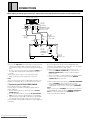
Before making or changing the connections, switch off the power and disconnect the power cord from the AC outlet.
Normal conections
AV surround receiver
CD
R L
REMOTE
CONTROL
DIGITAL
OPTICAL IN
IN
Red
R
L
White
OUT
C-x
To another
MARANTZ audio
component with a
remote sensor.
Audio cable
B
C-z
Optical
fiber
cable
D-BUS remote
control cable
A-z
Red
White
R
L
R
L
LINE OUT
OPTICAL
DIGITAL OUT
IN
INTERNAL
OUT
EXTERNAL
REMOTE CONTROL
C-x
INTERNAL/
EXTERNAL
switch
INTERNAL
EXTERNAL
A-x
Power cord
CC9100
A Making connections
C System Control Connections
z Connect the LINE OUT jacks of this unit to the input jacks (CD
By connecting this CD changer to another MARANTZ audio
component using a D-BUS remote control cable, you can operate
the components remotely as a single system.
or AUX) of the amplifier. Make sure that the white plugs are
connected to the left (L) jacks and the red plugs to the right (R)
jacks.
• Be sure not to connect this unit to the amplifier’s PHONO jacks,
as sound will be distorted and normal playback will not be
possible.
x Connect the power cord to a household AC wall outlet.
• Make sure plugs are inserted fully into the wall outlet.
Note!!
If you connect the power cord to a “SWITCHED” AC outlet on an
amplifier, you will not be able to use this unit's memory function.
B Connecting the OPTICAL FIBER CABLE
CD can be played using the digital output.
This unit can be connected to an amplifier equipped with an
optical digital jack.
1. Remove the protective dust cap from this unit’s OPTICAL
DIGITAL OUT jack.
2. Use an optical fiber cable to connect the OPTICAL DIGITAL
OUT jack of this unit to the optical input jack of the amplifier.
• Align the plug of the optical fiber cable with the optical digital
jack and fully insert the plug to make a secure connection.
Use a separately sold optical fiber cable for the optical digital jack
connections.
Downloaded From Disc-Player.com Marantz Manuals
6
z When connecting to a component with a remote sensor,
connect the REMOTE CONTROL IN jack of this unit to the
REMOTE CONTROL OUT jack of the component with the
remote sensor.
• When connecting to a component which is not equipped with a
remote sensor, connect the component to the REMOTE
CONTROL OUT jack of this unit.
x When using this unit independently, set INTERNAL/EXTERNAL
switch to INTERNAL. When using this unit in a system
incorporating a MARANTZ AV surround receiver, tuner or timer
equipped with a remote sensor, set the switch to EXTERNAL.
Note!!
Always set this switch to INTERNAL unless the unit is connected
to other MARANTZ equipment with the REMOTE CONTROL IN/
OUT jacks. When this switch is set to EXTERNAL, the unit’s
remote sensor window is disabled.
Connecting a keyboard
Esc
F1
~
!
‘
1
@
Caps Lock
Shift
F3
#
2
Q
Tab
F2
$
3
W
A
^
5
R
D
X
F5
%
4
E
S
Z
F4
F
C
^
6
T
}
]
"
’
?
/
F12
Backspace
=
{
[
:
;
>
.
F11
+
P
L
<
,
F10
_
0
O
K
M
F9
)
9
I
J
N
F8
(
8
U
H
B
F7
&
7
Y
G
V
F6
|
\
Enter
Shift
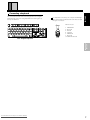
The keyboard connection jack is a six-pin mini DIN-type.
When purchasing a keyboard, make sure that it accepts
this type of connector.
Print Scroll
Pause
Screen Lock
Inserl
Home
Page
Up
Delete
End
Page
Down
DIN-Connector
Num
Lock
7
/
*
8
9
Home
Pg Up
4
5
1
2
End
6
+
3
Pg Dn
Enter
Ctrl
Alt
Alt
Ctrl
ENGLISH
The connection terminal of this unit is designed for a U.S.-English
Keyboard. Take care when using keyboards from other regions as
the keys are different.
0
Ins
Del
6
4
5
3
1 2
1 +KBD DATA
2 Reserved
3 Ground
4 +5.0 Vdc
5 +KBD CLK
6 Reserved
Shield Frame Ground
<U. S. -English keyboard>
BEFORE
OPERATING
BASIC
OPERATIONS
VARIOUS
OPERATIONS
Downloaded From Disc-Player.com Marantz Manuals
7
NAMES OF PARTS
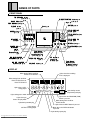
FRONT PANEL
TIME/CHARA button
' 13, 18, 19
RANDOM button
DIRECT CUSTOM buttons
' 15
' 13
Jog dial ' 10, 12,19
' 16
PROGRAM button
CLEAR button
Hood
' 13, 17
MODE button
ENTER
' 10
' 12, 19
TITLE/DISPLAY
CD CHANGER CC9100
' 11, 13
DIRECT CUSTOM
button
DISC/CHARA
1
2
3
4
5
6
7
8
9
' 23
TITLE/INPUT button
' 19, 22
PUSH ENTER
STANDBY
10
MODE
CLEAR
PROGRAM
RANDOM
DISPLAY
INPUT
TITLE/SEARCH
SEARCH
TIME/CHARA
indicator
button
TITLE
OPEN/CLOSE
UNLOAD
PLAY/PAUSE
' 23
STOP
STANDBY
POWER
ON/STANDBY
SINGLE LOADER
ACCESS
STOP button
PLAY
' 11
KEYBOARD
POWER ON/
PLAY/PAUSE button
' 11
STANDBY
switch
' 10, 11
Track/Manual
search button
Remote sensor
'9
(reverse direction)
SINGLE LOADER
ACCESS button
' 12
(4/1)
' 11, 12
PC keyboard
OPEN/CLOSE button
connection
' 10, 11
terminal
' 21
Track/Manual
search button
(forward direction)
SINGLE LOADER
PLAY button ' 12
UNLOAD button
' 10
(¡/¢)
' 11, 12
DISPLAY
Blinks during TRACK SCAN or
TRACK TITLE SCROLL.
Lights when the remaining
time is displayed.
Blinks during DISC SCAN or
DISC TITLE SCROLL or
DISC TITLE INPUT.
RENTAL
DISC
TRACK
REMAIN MIN
SEC
Lights when a CD is
being played.
ALL RANDOM REPEAT - 1 BEST
SINGLE CD TEXT PREVIOUS SCAN
Lights during custom
programming and play.
CUSTOM
PROGRAM
Lights during pause mode.
Lights when you
choose the play mode.
Lights during random play.
Lights when the PROGRAM (PGM)
button is pressed.
Blinks during DISC SCAN or
TRACK SCAN.
Lights when the BEST button is pressed.
Lights when a
CD TEXT is being played.
Blinks when the PREVIOUS button
is pressed.
Lights during repeat play.
Downloaded From Disc-Player.com Marantz Manuals
8
NAMES OF PARTS
REMOTE CONTROL UNIT
⁄4
RANDOM
x
TIME/
CHARA
⁄5
TITLE
INPUT
DISPLAY
SEARCH
c
⁄6
ABC
v
DEF
1
2
3
GHI
JKL
MNO
4
5
6
PQRS
TUV
WXYZ
8
9
7
MARK
b
n
m
0
CURSOR
⁄7
⁄8
,
DISC
DISC
–
+
DISC
SET
.
REPEAT
TRACK
SET
MODE
HIGHLIGHT
PROGRAM
CLEAR
PREVIOUS
BEST
⁄1
⁄2
¤2
¤3
¤4
¤5
⁄3
REMOTE CONTROLLER
BASIC
OPERATIONS
⁄0
¤1
BEFORE
OPERATING
⁄9
¤0
VARIOUS
OPERATIONS
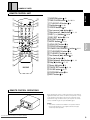
z RANDOM button 15
x TIME/CHARA button 13, 18, 19
c TITLE/DISPLAY button 23
v Digit buttons 11, 20
b CUSOR buttons 22
n Fast reverse (1) button 11
m Skip (reverse) (4) button 11, 12
, DISC (–/+) buttons 13, 23
. DISC SET button 11, 16
⁄0 REPEAT button 14
⁄1 MODE button 11, 13
⁄2 HIGHLIGHT button 18
⁄3 PREVIOUS button 15
⁄4 POWER ON/STANDBY button 10,11
⁄5 TITLE/SEARCH button 23
⁄6 TITLE/INPUT button 20, 22
⁄7 Fast forward (¡) button 11
⁄8 Play (3) button 11
⁄9 Skip (forward) (¢) button 11, 12
¤0 Stop (7) button 11, 15
¤1 Pause (8) button 11
¤2 TRACK SET button 11, 16
¤3 CLEAR button 13, 17
¤4 PROGRAM button 16
¤5 BEST button 14
ENGLISH
z
REMOTE CONTROL OPERATIONS
When operating the remote control unit, point the unit's infrared
signal transmitter at the remote control receiver (Remote Sensor)
on the front panel of the player. The remote control unit can be
used within a range of about 5 meters (16 feet) from the remote
sensor, and within angles of up to about 30 degrees.
5m
(16 ft.)
30°
30°
0
Notes!!
• If the remote control sensor window is in a position where it
receives strong light such as sunlight or fluorescent light,
control may not be possible.
Downloaded From Disc-Player.com Marantz Manuals
9
HOW TO LOAD THE DISCS (Be sure to read this before operation)
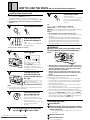
Loading discs into the rack
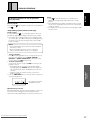
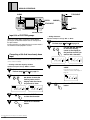
7
OPEN/CLOSE
Press OPEN/CLOSE.
The hood will close.
When the hood closes, the rack is
revolved once for disc detection
(disc loaded/not loaded detection
function).
• You can load up to 300 discs in the rack.
The numbers marked on the rack are used as the disc
numbers. These are marked in a clockwise order from 1 to 300.
• The following procedure describes how to load discs from
disc No. 1.
1
Press POWER ON/STANDBY.
STANDBY
POWER
ON/STANDBY
2
ABC
DEF
1
2
3
GHI
JKL
MNO
4
5
6
PQRS
TUV
WXYZ
7
8
9
MARK
0
CURSOR
Ensure that the disc No.
shown on the display is
"1".
If disc number "1" is not displayed,
press digit button 1 .
WARNING:
(Carry out step 3 within 5 seconds.)
3
UNLOAD
Do not put your hand or any other object inside
the rack, otherwise injury or part damage may
result.
Press UNLOAD.
«
RENTAL
DISC
Tip:
Difference between OPEN/CLOSE and UNLOAD
OPEN/CLOSE: The hood is simply opened or closed.
UNLOAD: The slot corresponding to the disc No. being displayed
rotates to the center position then the hood is opened.
Notes!!
• Do not attempt to open the hood with your hand.
• Be careful not to pinch your fingers when opening and closing
the hood.
• If PLAY operation (PLAY, BEST, HIGHLIGHT, PREVIOUS) is
carried out before disc detection finishes, PLAY operation will
proceeded to without detection. In this case, detection will
operate after PLAY is finished. Detection may not function
properly depending on the color or shape etc., of the disc.
TRACK
REMAIN MIN
SEC
ALL RANDOM REPEAT - 1 BEST ADLC CUSTOM
SINGLE CD TEXT PREVIOUS SCAN PROGRAM
The hood will open.
When UNLOAD is pressed, the
hood opens to the disc corresponding to the disc No. displayed
on the front of the unit.
4
Load the disc into the
rack with the label side
(printed surface) facing to
the right.
Label side faces right.
(Side to be played faces left.)
Note!!
• Inserting more than one disc into the slot will damage the discs
and cause the unit to malfunction.
5
DISC/CHARA
Turn the jog dial clockwise to rotate the rack.
When the jog dial is turned
clockwise, the rack turns in the
direction in which the disc number
increases (1, 2, 3 ...).
When turned counterclockwise, the
rack turns in the opposite
direction.
6
To remove the discs...
1 Press UNLOAD.
2 Select the number of the disc you want to unload
Load other discs into the rack by repeating steps 4 and 5 for each of them.
Downloaded From Disc-Player.com Marantz Manuals
10
• While changing or inserting discs, be careful not to press
any buttons on the main unit or the remote control. The rack
may move suddenly, and then your fingers may be caught
between discs and the side of door.
• When changing or inserting discs, make sure the rack is
stopped. Do not attempt to put a disc in when the rack is
moving.
• Do not put anything other than CDs inside the rack.
• Load only one disc into each disc slot.
• Do not apply force to the rack. This can cause a malfunction.
• 8-cm (3-in.) discs cannot be played as they are. First attach the
8-cm (3-in.) disc adapter to each 8-cm (3-in.) disc and load
them together in the player.
• Never start playback by placing the 8-cm (3-in.) disc adapter
alone, without attaching it to a disc.
• The unit will not operate if the hood is opened during playback.
Be sure to close the hood before attempting any operation.
• To load or remove a disc in or from the slot which is seen through
the hood, press OPEN/CLOSE. The hood is opened, “HOLD” is
displayed and the disc can be loaded in or ejected from the slot
seen through the hood. Even while “HOLD” is being displayed,
the rack can be rotated by pressing DISC (–/+).
by turning the jog dial or pressing DISC (–/+) on the
remote control unit.
• The rack rotates until the selected disc comes to the front
of the unit.
3 Remove from the rack.
4 Press OPEN/CLOSE.
BASIC OPERATIONS
• You can also use the remote control.
TIME/
CHARA
DIRECT CUSTOM
1
MODE
2
Digit buttons
DISC/CHARA
3
TITLE
INPUT
DISPLAY
SEARCH
4
5
6
7
8
9
1
CLEAR
PROGRAM
RANDOM
DISPLAY
INPUT
STANDBY
indicator
PLAY/PAUSE
STOP
STANDBY
POWER
ON/STANDBY
SINGLE LOADER
ACCESS
PLAY
7
6 2
4/1, ¡/¢
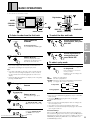
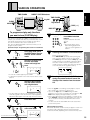
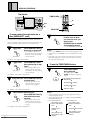
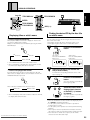
To listen in order from the first track
STANDBY
POWER
ON/STANDBY
6
TUV
WXYZ
MNO
8
9
Press POWER ON/
STANDBY.
MARK
0
CURSOR
2 3
7
8
DISC SET
MODE
KEYBOARD
1
3
JKL
5
1/¡
TITLE
UNLOAD
2
GHI
4
SEARCH
TIME/CHARA
OPEN/CLOSE
DEF
PQRS
7
PUSH ENTER
10
MODE
1
ABC
4 /¢
DISC
DISC
–
+
DISC
SET
REPEAT
TRACK
SET
MODE
PROGRAM
CLEAR
TRACK SET
To select the disc and track
ABC
DISC
SET
2
PQRS
Press 6 (or 3).
The tracks are played in order
starting from the first track on the
disc with the lowest disc No.
• If you choose a play mode beforehand, the tracks/discs are
played back according to the respective play mode.
To stop play
STOP
Press 7.
To select a play mode
MODE
Press MODE during play
or stop mode.
Press a few times to choose the
mode you desire.
Playback occurs according to the
chosen mode.
ALL
:All discs are played back.
SINGLE :One disc is played back.
CUSTOM :Only discs stored in the CUSTOM file are played back
(1 to 10) (see pages 13 to create a custom file).
3 ALL
3 SINGLE
In stop mode:
VARIOUS
OPERATIONS
Tips:
• If you play a CD TEXT, the disc titles can be entered automatically in the memory. During the playback of a disc, the title of
the disc and that of the track being played are shown on the
display.
• During CD TEXT disc playback, the display can be changed by
pressing TITLE/DISPLAY.
Use the digit buttons to
select the track, and
press TRACK SET.
BASIC
OPERATIONS
2
TRACK
SET
7
BEFORE
OPERATING
Use the digit buttons to
select the disc, then press
DISC SET.
To turn the power off ...
Press POWER ON/STANDBY again.
PLAY/PAUSE
ENGLISH
1
RANDOM
CD CHANGER CC9100
CUSTOM 2
During playback:
3 ALL
3 SINGLE
To pause play
PLAY/PAUSE
Press 6 (or 8).
To start playback again, press
6.
To skip to another track
Tap 4/1, ¡/¢ (or 4/
¢ on the remote control unit).
To fast forward/reverse.
Hold-down 4/1, ¡/¢
(or 1/¡ on the remote
control unit).
Downloaded From Disc-Player.com Marantz Manuals
• When you select SINGLE during playback, only the current disc
will be played.
• If you press MODE during program mode, the program
contents will be erased.
Notes!!
• When you turn the power ON, playback starts according to the
last selected play mode.
• If you did not select a play mode, playback starts in ALL.
• SINGLE is selected automatically when playing the disc loaded
in the Single Loader slot.
<Last disc memory>
When you press 7 or turn the power OFF, the unit memorizes the
disc that was being played. The next time you press 6, playback
will start from that same disc.(This feature is available except in the
PROGRAM play, BEST play, PREVIOUS scan, HIGHLIGHT scan
and RANDOM play modes.)
11
BASIC OPERATIONS
2
Jog dial
ABC
1
CD CHANGER CC9100
DIRECT CUSTOM
DISC/CHARA
1
2
3
4
5
6
7
8
9
3
JKL
MNO
5
6
TUV
WXYZ
8
9
PQRS
7
ENTER
DEF
2
GHI
4
3
MARK
0
CURSOR
PUSH ENTER
10
1
MODE
CLEAR
PROGRAM
RANDOM
DISPLAY
INPUT
SEARCH
TIME/CHARA
TITLE
OPEN/CLOSE
UNLOAD
PLAY/PAUSE
STOP
STANDBY
POWER
ON/STANDBY
SINGLE LOADER
ACCESS
PLAY
KEYBOARD
4/1, ¡/¢
7
6
3
SINGLE
PROGRAM
DISC(–/+)
CLEAR
Press 4/1, ¡/¢
during play or pause to
choose the track number
you desire (or press 4/
¢ on the remote control).
Press SINGLE LOADER
ACCESS.
Loading the disc into the
Single Loader slot with
the label side (printed
surface) facing to the
right.
LOADER
PLAY
TRACK
SET
MODE
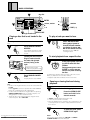
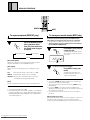
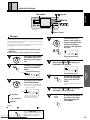
To play a track you want to hear
During pause, press 6 after
choosing the track.
To start playback from a specific disc
DISC/CHARA
Label side faces right
(Side to be played faces left)
3
+
DISC
SET
The hood will open with the single
loader slot located in the front of
the unit.
2
DISC
–
REPEAT
Use the single loader slot to play discs that are not loaded in the
rack .
ACCESS
4 /¢
DISC
OPEN/CLOSE
Single Loader slot
Playing a disc that is not loaded in the
rack
1
7
Press SINGLE LOADER
PLAY.
In the player pause, turn the
jog dial to select the disc
number.
During pause, press 6 or
ENTER ( 3 on the remote
control unit) after choosing
the disc.
(To perform this operation from the remote control unit, use the
DISC (–/+) buttons to select the disc number.)
• Playback starts from the first track of the chosen disc.
The play mode is set to SINGLE.
Tips:
• The disc in the single loader slot can also be selected with the
jog dial.
Use the jog dial to select the spot after disc number 300 and
before disc number 0 (where “P0” is displayed).
• If a disc has been loaded in the Single Loader slot, pressing
SINGLE LOADER PLAY allows you to play it anytime, even
during playback of a disc stored in the rack.
• To play the disc in the Single Loader slot using the remote
control unit, press “0” and DISC SET.
Opening or closing the hood during
playback
To open the hood during playback
OPEN/CLOSE
Press the OPEN/CLOSE
button and hold it in for
about 2 seconds.
• “HOLD” is displayed after opening the hood.
• In this case, the rack does not rotate.
• When the playback of the current disc has completed, the unit
enters stop mode. The next disc is played after the hood has
been closed.
OPEN/CLOSE
Downloaded From Disc-Player.com Marantz Manuals
12
To close the hood, press
OPEN/CLOSE again.
Note!!
If the hood is opened during play, UNLOAD and SINGLE
LOADER ACCESS function are defeated.
VARIOUS OPERATIONS
DIRECT CUSTOM buttons
TIME/CHARA
TITLE
INPUT
DISPLAY
ENGLISH
TIME/
CHARA
TIME/CHARA
SEARCH
ABC
DEF
2
3
CD CHANGER CC9100
DIRECT CUSTOM
CLEAR
MODE 1
1
2
3
4
5
6
7
8
1
DISC/CHARA
Jog dial
9
PUSH ENTER
10
MODE
CLEAR
PROGRAM
RANDOM
DISPLAY
INPUT
SEARCH
2
3
5
GHI
JKL
4
5
6
TUV
WXYZ
8
9
PQRS
7
Digit buttons
MNO
MARK
0
CURSOR
TIME/CHARA
TITLE
OPEN/CLOSE
UNLOAD
PLAY/PAUSE
STOP
STANDBY
POWER
DISC (–/+)
SINGLE LOADER
ON/STANDBY
ACCESS
PLAY
KEYBOARD
DISC SET 4 5
MODE
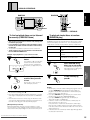
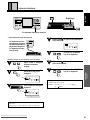
To program and play only the discs
you want to hear (CUSTOM play)
MODE
(
2
)
MARK
JKL
0
5
Select the custom number with the remote
control unit’s digit buttons.
RENTAL
DISC
TRACK
REMAIN MIN
CLEAR
To start playback
1
2
3
Press DIRECT CUSTOM
buttons.
4
5
6
7
8
9
Playback starts from the lowest
disc No.
Tips:
• Pressing the direct custom
buttons during playback will
carry out custom registration of
that disc.
10
Checking the numbers of the stored discs.
Remote control unit operation.
Press TIME/CHARA repeatedly (3 times) during stop
mode so that the display changes as shown below.
Press DISC(–/+). Each time you press DISC(–/+), a disc
number stored in the CUSTOM file is displayed. When
all the disc numbers have been displayed, the disc
number changes to a blank. (To perform this operation
on the main unit, turn the jog dial clockwise.)
RENTAL
DISC
TRACK
REMAIN MIN
SEC
ALL RANDOM REPEAT - 1 BEST ADLC CUSTOM
SINGLE CD TEXT PREVIOUS SCAN PROGRAM
ALL RANDOM REPEAT - 1 BEST ADLC CUSTOM
SINGLE CD TEXT PREVIOUS SCAN PROGRAM
Blink
• If some disc number appears, press CLEAR.
• To perform this operation on the main unit, Press direct custom
button 5.
3
Select the disc number
with the remote control
unit’s digit buttons.
DEF
3
RENTAL
DISC
TRACK
REMAIN MIN
SEC
ALL RANDOM REPEAT - 1 BEST ADLC CUSTOM
SINGLE CD TEXT PREVIOUS SCAN PROGRAM
• The disc number can also be selected with DISC (–/+) or the
main unit’s jog dial. In this case, because custom registration
will function after approx. 2 seconds, step 4 is not necessary.
4
5
Press DISC SET.
DISC
SET
ABC
1
2
Repeat steps 3 and 4 to
store other discs.
RENTAL
DISC
TRACK
REMAIN MIN
Pressing the front panel’s CLEAR button
during the custom mode will cancel the
displayed disc number from the custom
file.
VARIOUS
OPERATIONS
)
CLEAR
SEC
5
(
PROGRAM
BASIC
OPERATIONS
In the stop mode, press
the MODE button several
times to set the custom
mode.
TRACK
SET
MODE
BEFORE
OPERATING
MODE
+
DISC
SET
Operation example : Programming discs 3 and 12 in custom file 5
1
DISC
–
REPEAT
DIRECT CUSTOM
This unit lets you program up to 300 of your favorite discs. For
example, you can store all the discs of your favorite artist, or some
other group of personal selections, and play only those discs.
You can even add other discs to the custom later on.
Also, there are 10 programmable custom files in which you can
program any discs you like.
DISC
• When the jog dial is used during custom playback, only the
discs stored in the custom file can be selected.
• If you use the digit buttons and DISC during CUSTOM
playback to choose a disc not stored in the CUSTOM file, “NO
DISC” will be displayed for approximately 3 seconds.
• When a disc appointed to the CUSTOM file is not loaded in the
rack, “NO DISC” is displayed for approximately 3 seconds, the
disc is erased from memory, and CUSTOM searches for the
next disc.
• The discs stored in the CUSTOM file will not be erased when
you turn off the power.
(Memory Back-Up Function)
Memorized data will be stored in memory for approx. 1 month even
if the power cord is unplugged. However, this period may be
shortened somewhat, depending on the amount of memory used.
SEC
DISC
SET
Downloaded From Disc-Player.com Marantz Manuals
ALL RANDOM REPEAT - 1 BEST ADLC CUSTOM
SINGLE CD TEXT PREVIOUS SCAN PROGRAM
13
VARIOUS OPERATIONS
1
2
3
GHI
JKL
4
5
6
PQRS
TUV
WXYZ
8
9
7
MNO
MARK
0
CURSOR
DISC
DISC
–
+
DISC
SET
REPEAT
REPEAT
HIGHLIGHT
TRACK
SET
MODE
PROGRAM
PREVIOUS
CLEAR
BEST
BEST
To repeat playback (REPEAT play)
The operation is available only from the remote control unit.
REPEAT
Press the REPEAT button
during playback. Each
time you press the button,
the repeat mode changes
as follows.
3 One track repeat
To store your favorite tracks (BEST play)
To use the one-touch memory, just press the BEST button
while playing a track you like. You can store up to 50 tracks.
• The operation is available only from the remote control unit.
• These operations can not be performed on the CD inserted
into the SINGLE LOADER SLOT.
Press BEST while playing
a track you like.
BEST
The BEST indicator blinks and the
disc and track number are stored
in memory.
3 ALL repeat
(ALL/SINGLE/CUSTOM)
OFF 2
(One track repeat)
RENTAL
DISC
TRACK
Repeats in one of the following 3 ways according to the play
mode.
ALL
: Repeats all the tracks on all the discs (1 - 300).
SINGLE
: Repeats all the tracks on the selected disc.
SEC
ALL RANDOM REPEAT - 1 BEST ADLC CUSTOM
SINGLE CD TEXT PREVIOUS SCAN PROGRAM
Repeats the current or a selected track during play operations
other than HIGHLIGHT scan and PREVIOUS scan.
(ALL repeat)
REMAIN MIN
Blink
<To listen to the memorized tracks>
BEST
Press BEST during stop
mode.
The BEST indicator lights and
playback starts from the most recently memorized track.
CUSTOM : All of the discs classified under one of the 10
CUSTOM banks are played repeatedly.
(OFF)
Cancels repeat play and returns the unit to normal play mode.
• To stop repeat playback, press 7.
• During ALL repeat mode, if the ALL, SINGLE or CUSTOM play
mode is not displayed, the currently playing program mode (i.e.
PROGRAM play, BEST play, PREVIOUS scan or HIGHLIGHT
scan) will be repeated.
Downloaded From Disc-Player.com Marantz Manuals
14
• If you press CLEAR during Best playback, the current track is
erased and the next track starts to play.
• You cannot memorize a track twice by pressing BEST during
Best playback.
• If you press BEST to memorize a track when 20 tracks are
already memorized, the oldest track is erased from memory and
the new track is memorized.
• The memorized contents are stored, even when the power is
turned off.
(Memory Back-Up Function)
Memorized data will be stored in memory for approx. 1 month even
if the power cord is unplugged. However, this period may be
shortened somewhat, depending on the amount of memory used.
VARIOUS OPERATIONS
RANDOM
RANDOM
TIME/
CHARA
DIRECT CUSTOM
TITLE
INPUT
DISPLAY
1
CD CHANGER CC9100
SEARCH
ABC
DEF
2
3
GHI
JKL
4
5
6
TUV
WXYZ
8
MNO
9
DISC/CHARA
1
2
3
4
5
6
PQRS
7
MARK
7
8
0
9
CURSOR
3
PUSH ENTER
10
MODE
CLEAR
PROGRAM
RANDOM
DISPLAY
INPUT
SEARCH
TIME/CHARA
TITLE
OPEN/CLOSE
UNLOAD
PLAY/PAUSE
STOP
ENGLISH
RANDOM
STANDBY
POWER
SINGLE LOADER
ON/STANDBY
ACCESS
PLAY
KEYBOARD
7
6
DISC
DISC
–
+
DISC
SET
REPEAT
HIGHLIGHT
TRACK
SET
MODE
PROGRAM
PREVIOUS
7
CLEAR
BEST
PREVIOUS
To find out which discs you’ve listened
to recently (PREVIOUS scan)
RANDOM selects tracks at random from the disc(s) in the current
play mode and plays each track once. The selected play mode
stops after its contents are played back. (Refer to chart below.)
Play mode selected
SINGLE
Plays all the tracks from a single disc at
random.
CUSTOM
Plays all tracks in the discs stored in the
CUSTOM file in a random order.
Press the PREVIOUS
button.
RENTAL
DISC
TRACK
REMAIN MIN
SEC
The unit plays a 10 second portion
located one minute into the first
track of each disc, starting from
the last disc you played: 13, 12, 9,
2, 1.
BASIC
OPERATIONS
Plays all tracks in all discs in a random
order.
Example: If you played discs 1, 2, 9, 12 and 13 in order.
PREVIOUS
Play contents
ALL
BEFORE
OPERATING
• This function scans the discs in reverse order, starting from
the last disc you played.
• It can remember up to 20 discs. If the total number of discs
exceeds 20, the oldest disc will be erased to make room for
the new disc.
• The operation is available only from the remote control unit.
• These operations can not be performed on the CD inserted
into the SINGLE LOADER SLOT.
To playback tracks/discs at random
(RANDOM play)
Press RANDOM during
either play or stop mode.
RANDOM
The RANDOM indicator lights up
and random play according to the
current play mode starts.
ALL RANDOM REPEAT - 1 BEST ADLC CUSTOM
SINGLE CD TEXT PREVIOUS SCAN PROGRAM
RANDOM
Press 3 ( 6 ) when you
reach the disc you want
to hear.
STOP
To stop random play,
press 7.
Previous disc scan is canceled
and normal play resumes.
PLAY/PAUSE
(
)
VARIOUS
OPERATIONS
(
Blink
)
• To cancel the scanning, press 7.
• Discs played during random, program, HIGHLIGHT scan, Best
and Single Loader playback are not included in the PREVIOUS
scan.
• If the first track is less than 1 minute long, the first 10 seconds
of the track the beginning will be played. If the first track is less
than 10 seconds long, the entire track will be played.
(Memory Back-Up Function)
Memorized data will be stored in memory for approx. 1 month
even if the power cord is unplugged. However, this period may be
shortened somewhat, depending on the amount of memory used.
Notes!!
• Random play cannot be activated during the program mode. (If
you press RANDOM during program play or best play, the
program contents will be erased and the unit will start to play
tracks at random from all the discs.)
• If you press REPEAT during random play, the contents of the
random mode are repeated. (RANDOM REPEAT)
• If you press MODE during random play, random play is
switched to the ALL or SINGLE play.
• If all discs contain no more than 25 tracks, random play can
play every track in the discs once.
If any of the discs contain more than 25 tracks, random play
plays the same number of tracks as the total number of tracks
in the discs, but the tracks with track number 26 or more are not
always played once.
• If disc detection has not finished, random play will begin after it
has detection has finished.
Downloaded From Disc-Player.com Marantz Manuals
15
VARIOUS OPERATIONS
1
TIME/
CHARA
2
3
4
TITLE
INPUT
DISPLAY
1
SEARCH
ABC
DEF
2
3
CD CHANGER CC9100
DIRECT CUSTOM
DISC/CHARA
1
2
3
4
5
6
GHI
JKL
4
5
6
TUV
WXYZ
8
9
PQRS
7
MNO
MARK
7
8
0
9
CURSOR
5
PUSH ENTER
10
MODE
CLEAR
PROGRAM
RANDOM
DISPLAY
INPUT
SEARCH
7
TIME/CHARA
TITLE
CLEAR
OPEN/CLOSE
UNLOAD
PLAY/PAUSE
STOP
STANDBY
POWER
SINGLE LOADER
ON/STANDBY
ACCESS
PLAY
8
7
KEYBOARD
2
DISC
REPEAT
HIGHLIGHT
5 6
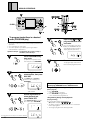
To program tracks/discs in a desired
order (PROGRAM play)
+
DISC
SET
4
3
DISC
–
4
TRACK
SET
MODE
PROGRAM
PREVIOUS
CLEAR
CLEAR
BEST
1
4
JKL
DISC
SET
5
• The remote control is the most convenient way to perform these
operations.
• You can program up to 36 steps.
• The same operation is possible by pressing the button
indicated between parentheses.
DEF
TRACK
SET
3
Repeat steps 2 and 3 to
program additional discs
and tracks.
Once the track times have been
added, the PROGRAM indicator
stops blinking and the following
display appears (Total Time).
Operation example : Programming disc 2, track 7 as step 1,
and disc 5, track 3 as step 2.
RENTAL
1
PROGRAM
Press PROGRAM during
stop mode.
(To perform this operation on the
main unit, press the PROGRAM.)
PROGRAM
(
DISC
TRACK
REMAIN MIN
TRACK
REMAIN MIN
SEC
ALL RANDOM REPEAT - 1 BEST ADLC CUSTOM
SINGLE CD TEXT PREVIOUS SCAN PROGRAM
5
Press 3.
The program play starts from the
track that was programmed first.
)
RENTAL
DISC
SEC
PLAY/PAUSE
ALL RANDOM REPEAT - 1 BEST ADLC CUSTOM
CUSTOM
SINGLE CD TEXT PREVIOUS SCAN PROGRAM
2
ABC
DISC
SET
2
(
)
Use the digit buttons to
select the disc, then press
DISC SET.
(Use DISC(–/+) or Jog dial to
select the disc number, press
PROGRAM.)
(
PROGRAM
DISC
DISC
–
+
)
RENTAL
DISC
TRACK
REMAIN MIN
SEC
ALL RANDOM REPEAT - 1 BEST ADLC CUSTOM
SINGLE CD TEXT PREVIOUS SCAN PROGRAM
<Programming tracks during normal play>
The PROGRAM indicator
starts to blink.
3
Use the digit buttons to
select the track, and
press TRACK SET.
PQRS
7
TRACK
SET
(Use 4/1, ¡/¢ to select the
disc number, press PROGRAM.)
RENTAL
(
PROGRAM
)
16
TRACK
REMAIN MIN
SEC
ALL RANDOM REPEAT - 1 BEST ADLC CUSTOM
SINGLE CD TEXT PREVIOUS SCAN PROGRAM
RENTAL
Downloaded From Disc-Player.com Marantz Manuals
DISC
DISC
TRACK
REMAIN MIN
ALL RANDOM REPEAT - 1 BEST ADLC CUSTOM
SINGLE CD TEXT PREVIOUS SCAN PROGRAM
The following operations can only be performed during
normal play, HIGHLIGHT scan or PREVIOUS scan
SEC
(Direct program)
1. Press PROGRAM.
• Program mode is activated.
2. Press PROGRAM during playback.
• The current track is programmed.
<Programming during normal playback>
(Preprogramming)
You can program during normal playback.
2 3 4
(\Operation example 1
)
• The player changes to program play when the current track
finishes playing back.
• To change to program mode directly, press 3.
VARIOUS OPERATIONS
<Programming an entire disc as one step>
(Disc all program)
If you skip step 3 of the operation example, disc 2 is programmed
as step 1 .
Notes!!
• If step 5 is carried out before the accumulated time is
displayed, the program play starts and the time is not displayed.
• When UNLOAD is pressed while a program has been entered,
the disc for the 1st program step comes on the center position
and the hood opens.
• The display is not shown if the total time of the program is 100
minutes or more.
ENGLISH
The following operations can only be performed
during stop mode
<Programming a pause (remote control only)>
(Pause program)
If you press 8 at step 4 , you can program a pause. When you
press 8, “PA” appears in the display instead of the disc number.
• For example, when making a program for recording both sides
of a cassette tape, press 8 to insert a pause after programming
the tracks for one side. After turning the tape over, press 8 to
resume recording.
DISC
TRACK
REMAIN MIN
VARIOUS
OPERATIONS
RENTAL
BASIC
OPERATIONS
• To erase a program...
Press 7 twice during playback (or once in stop mode). You can
also erase the program by pressing MODE, RANDOM,
PREVIOUS, or SINGLE LOADER PLAY in either play or stop
mode (or by pressing BEST in stop mode).
• To cancel a program step
In stop mode, each time you press CLEAR, the last step in the
program is erased.
• If a programmed disc is missing or inserted backwards
during program play, “NO DISC” appears in the display, the
step is automatically erased, and playback proceeds to the
next step.
• Program contents are stored in memory even when the
power is turned off.
• Press the TIME/CHARA twice to check the number of steps that
have been programmed.
BEFORE
OPERATING
Notes!!
• You cannot program a pause as the first step, nor program
two pauses in a row.
• When you program a pause, it counts as 1 step and
reduces the total number of tracks you can program.
SEC
ALL RANDOM REPEAT - 1 BEST ADLC CUSTOM
SINGLE CD TEXT PREVIOUS SCAN PROGRAM
This indicates the number
of programmed steps.
(Memory Back-Up Function)
Memorized data will be stored in memory for approx. 1 month even
if the power cord is unplugged. However, this period may be
shortened somewhat, depending on the amount of memory used.
Downloaded From Disc-Player.com Marantz Manuals
17
VARIOUS OPERATIONS
TIME/CHARA
TIME/
CHARA
TIME/CHARA
TITLE
INPUT
DISPLAY
1
SEARCH
ABC
DEF
2
3
CD CHANGER CC9100
DIRECT CUSTOM
DISC/CHARA
1
2
3
4
5
6
GHI
JKL
4
5
6
TUV
WXYZ
8
9
PQRS
7
MNO
MARK
0
7
8
9
CURSOR
3
PUSH ENTER
10
MODE
CLEAR
PROGRAM
RANDOM
DISPLAY
INPUT
SEARCH
TIME/CHARA
TITLE
OPEN/CLOSE
UNLOAD
PLAY/PAUSE
STOP
6
STANDBY
POWER
SINGLE LOADER
ON/STANDBY
ACCESS
DISC
PLAY
KEYBOARD
7
DISC
–
+
DISC
SET
REPEAT
HIGHLIGHT
To scan quickly through tracks on a
disc (HIGHLIGHT scan)
• The operation is available only from the remote control unit.
This function plays a 10 second portion located 1 minute from the
start of each track on all the discs in the current play mode.
<Disc scan>
HIGHLIGHT
Press once
Press HIGHLIGHT during
either play or stop mode.
• The unit plays a 10 second
portion located 1 minute into the
first track of each CD, starting
from the first CD.
The ”DISC” and “SCAN” indicator blinks.
<Track scan>
HIGHLIGHT
Press twice
Press HIGHLIGHT twice
during either play or stop
mode.
• The unit plays a 10 second
portion located 1 minute into
each track in the program.
Press once
The “TRACK” and “SCAN” indicator blinks.
<Best selection memory scan>
Press HIGHLIGHT during
best selection memory
playback.
HIGHLIGHT
Press once
• The unit plays a 10 second
portion located 1 minute into
each track in the best selection
memory.
The “TRACK” and “SCAN” indicator blinks.
Downloaded From Disc-Player.com Marantz Manuals
18
CLEAR
BEST
• To cancel HIGHLIGHT scan, press 7.
Notes!!
• You can use 4/¢ to skip to another track during track scan.
• If the player is in ALL REPEAT mode, the HIGHLIGHT scan will
repeat.
• If the track is less than 1 minute long, the first 10 seconds of the
track will be played. If the track is less than 10 seconds long,
the entire track will be played.
To use the TIME/CHARA button
Press TIME/CHARA
during playback.
TIME/CHARA
Each time you press TIME/
CHARA, the display changes as
follows.
The “TRACK” and “SCAN” indicator blinks.
HIGHLIGHT
PROGRAM
PREVIOUS
<To return to normal playback>
Press 3 (or 6) when
you reach the track you
want to hear.
HIGHLIGHT scan is canceled
and normal play resumes.
• The unit plays a 10 second
portion located 1 minute into
each track of each CD, starting
from the first CD.
<Program scan> Press HIGHLIGHT during
program mode.
MODE
HIGHLIGHT
7
TRACK
SET
(
TIME/
CHARA
)
= Disc number, Track number and
Elapsed Time.
«
Remaining time (TRACK)
«
Remaining time (DISC)
«
Total time (TOTAL)
Notes!!
• Time remaining on the track may not be displayed for tracks
numbered greater than 24.
• Time remaining on the disc is not displayed during RANDOM,
PROGRAM or BEST play.
• During PROGRAM play
• During BEST play
Disc number, Track
Disc number, Track
= number and Elapsed
= number and Elapsed
Time.
Time.
«
«
Remaining time
Remaining time (TRACK)
(TRACK)
«
«
Total number of steps
Total program time
memorized in BEST
and number of steps
(TOTAL)
(TOTAL)
VARIOUS OPERATIONS
1
TIME/CHARA
3 Jog dial
ENGLISH
CD CHANGER CC9100
DIRECT CUSTOM
DISC/CHARA
1
2
3
4
5
6
7
8
9
4 ENTER
PUSH ENTER
10
MODE
CLEAR
RANDOM
PROGRAM
DISPLAY
INPUT
SEARCH
TIME/CHARA
TITLE
OPEN/CLOSE
UNLOAD
PLAY/PAUSE
STOP
STANDBY
POWER
2
6
8
SINGLE LOADER
ON/STANDBY
ACCESS
PLAY
TITLE/INPUT
KEYBOARD
4 4/1, ¡/¢
Title Input
4
DISC/CHARA
• Inputting characters using the jog dial on the
main unit
Operation example : To give CD number 17 the title “BEST”
Turn the jog dial to select
the number of the CD to
which you want to give a
title.
DISC/CHARA
2
RENTAL
TITLE
TRACK
REMAIN MIN
SEC
ALL RANDOM REPEAT - 1 BEST ADLC CUSTOM
SINGLE CD TEXT PREVIOUS SCAN PROGRAM
5
In the play or stop mode,
press the TITLE/INPUT
button.
INPUT
DISC
Repeat steps 3 and 4 to input all the
characters of the disc title.
RENTAL
DISC
TRACK
REMAIN MIN
SEC
DISC
TRACK
REMAIN MIN
SEC
6
ALL RANDOM REPEAT - 1 BEST ADLC CUSTOM
SINGLE CD TEXT PREVIOUS SCAN PROGRAM
INPUT
TITLE
3
Turn the jog dial to select
the desired character.
DISC/CHARA
(To perform this operation from the
remote control unit, use the DISC
”–“ and ”+“ buttons.)
Blink
= A...Z (letters)
≠
1...9, 0 (numbers)
≠
Symbols
RENTAL
DISC
TRACK
REMAIN MIN
”DISC“ will blink during disc title
input.
7
SEC
ALL RANDOM REPEAT - 1 BEST ADLC CUSTOM
SINGLE CD TEXT PREVIOUS SCAN PROGRAM
”B“ is displayed as the first
character in the disc title.
Once all the characters of
the disc title have been
input, press the TITLE/
INPUT.
VARIOUS
OPERATIONS
ALL RANDOM REPEAT - 1 BEST ADLC CUSTOM
SINGLE CD TEXT PREVIOUS SCAN PROGRAM
Blink
RENTAL
BASIC
OPERATIONS
1
Press ENTER on the
center of the jog dial, or
press the ¡/¢ button
to move the blinking
section on the display to
the right.
BEFORE
OPERATING
Disc titles and artist's name can be given to discs loaded in the rack.
The titles can have up to 12 characters, including letters (A to Z and
a to z), numbers and symbols.
Characters can be input either using the jog dial on the main unit or
the digit buttons on the remote control unit.
8
Repeat steps 3 and 4 to input all the
characters of the artist’s name.
INPUT
TITLE
Once all the characters of
the artist’s name have
been input, press the
TITLE/INPUT.
Symbols:
#“$!%)&
(‘
<∗
;=:>/~
+
?
–}@
.,|^_
{]`\[
(Space)
Press the TIME/CHARA to switch
between capital and small letters.
(This operation is only possible
when letters are displayed.)
Downloaded From Disc-Player.com Marantz Manuals
TIME/CHARA
19
VARIOUS OPERATIONS
TIME/CHARA
Digit buttons 1 3 5 7
TIME/
CHARA
TITLE
INPUT
DISPLAY
SEARCH
ABC
1
2
3
GHI
JKL
4
5
6
PQRS
TUV
WXYZ
8
9
7
2
DEF
6
8 TITLE/INPUT
MNO
MARK
CURSOR 4
5
0
7
CURSOR
DISC
4¢
DISC
–
+
DISC
SET
REPEAT
TRACK
SET
MODE
PROGRAM
CLEAR
[Example: To input ”JAZZ“]
• Inputting characters using the remote control unit's
digit buttons
1
DEF
3
Use the digit buttons to
select the number of the
CD to which you want to
give a title.
Operation
1
Press
TITLE
INPUT
Title display
.
JKL
2
Press 5 twice.
3
Press 2 twice.
4
Press 9 5 times.
5
Press
ABC
WXYZ
2
TITLE
INPUT
Press the TITLE/INPUT
button.
Pressing this button during
playback will input the title on the
disc playing back.
In the custom play mode, the
custom title input mode is set
rather than the disc title input
mode.
3
ABC
2
32=A=B=C
2
4
CURSOR
Select each character to
be entered by pressing a
digit button.
The character which can be
entered varies every time the
button is pressed.
Press the CURSOR button
to move the flashing
cursor on the display to
the right.
• If the next character to be entered belong to a different digit
button from the previous character, it is not required to press the
cursor > button.
5
6
7
8
Repeat steps 3 and 4 .
TITLE
INPUT
Once all the characters of
the disc title have been
input, press the TITLE/
INPUT button.
Repeat steps 3 and 4 to input all the
characters of the artist's name.
TITLE
INPUT
Once all the characters of
the artist's name have
Downloaded From Disc-Player.com Marantz Manuals
been input, press the
20
TITLE/INPUT button.
.
CURSOR
WXYZ
6
Press 9 5 times.
7
Press
TITLE
INPUT
.
• Pressing the stop button (7) during the title input operation
returns to the condition before the input operation 1 .
MARK
Symbols available with the MARK button ( 0 )
!“ # $ % &‘ ( ) ∗ + , – ./ :;< = > ? @ [ \ ] ^ _ ` { | } ~
(Space)
TIME/
CHARA
TIME/CHARA button (
case letters.
) switches the uppercase and lower-
• For discs equipped with CD Text, the first 12 characters of the
disc title are automatically stored in the memory, and the 12character title is displayed each time that disc is selected.
• To give your own title to a disc equipped with CD Text, input a
space at the first character, then start the your title from the
second character.
Once this is done, the title will no longer switch automatically
when that disc is selected.
Notes!!
• Disc titles cannot be given to discs in the single loader slot.
• Disc titles cannot be given to discs equipped with CD Text
during playback. Press the stop button to set the stop mode
before doing so.
VARIOUS OPERATIONS
ENGLISH
CD CHANGER CC9100
DIRECT CUSTOM
F1
DISC/CHARA
1
2
3
4
5
6
7
8
9
Digit keys
PUSH ENTER
10
MODE
CLEAR
PROGRAM
RANDOM
DISPLAY
INPUT
SEARCH
TIME/CHARA
TITLE
OPEN/CLOSE
UNLOAD
PLAY/PAUSE
STOP
STANDBY
POWER
SINGLE LOADER
ON/STANDBY
ACCESS
PLAY
KEYBOARD
ENTER
PC keyboard connection terminal
• Enter characters using the keyboard.
4
PUSH ENTER
DISPLAY
SEARCH
TITLE
OSE
UNLOAD
PLAY/PAUSE
Repeat step 3 to input all the characters
of the disc title.
STOP
KEYBOARD
RENTAL
DISC
TRACK
REMAIN MIN
SEC
ALL RANDOM REPEAT - 1 BEST ADLC CUSTOM
SINGLE CD TEXT PREVIOUS SCAN PROGRAM
5
ENTER
Press the F1 or ENTER
key of PC keyboard.
Operation example : To give CD number 17 the title ”BEST”
1
Input “1” and “7” using the
keyboard's numeric
keypad.
7
6
7
Press the F1 key of PC
keyboard.
F1
Repeat step 3 to input all the characters
of the artist's name.
F1
ENTER
Press the F1 or ENTER
key of PC keyboard.
Blink
RENTAL
DISC
TRACK
REMAIN MIN
SEC
ALL RANDOM REPEAT - 1 BEST ADLC CUSTOM
SINGLE CD TEXT PREVIOUS SCAN PROGRAM
VARIOUS
OPERATIONS
2
1
BASIC
OPERATIONS
F1
BEFORE
OPERATING
PC keyboard connection terminal Connect
the IBM-compatible PC
keyboard through the
PC keyboard connection terminal.
INPUT
Keys used for character input
Character keys : A~Z,a~z,0~9
3
Enter characters using the
keyboard.
Blink
RENTAL
DISC
TRACK
REMAIN MIN
Symbols : ! “ # $ % & ‘ ( ) ∗ + , – . / : ; < = > ? @ [ \ ] ^ _ `
{ | } ~ (Space)
SEC
ALL RANDOM REPEAT - 1 BEST ADLC CUSTOM
SINGLE CD TEXT PREVIOUS SCAN PROGRAM
“B” is displayed as the first
character in the disc title.
Press the SHIFT or CAPS key to switch between capital and
small letters.
(This operation is only possible when letters are displayed.)
Downloaded From Disc-Player.com Marantz Manuals
21
VARIOUS OPERATIONS
CLEAR
TIME/
CHARA
DIRECT CUSTOM
1
2
DEF
1
2
3
GHI
JKL
MNO
PQRS
DISC/CHARA
7
3
TITLE/INPUT
SEARCH
ABC
4
CD CHANGER CC9100
TITLE
INPUT
DISPLAY
5
6
TUV
WXYZ
8
9
MARK
4
7
5
8
ENTER
6
9
0
CURSOR
CURSOR
PUSH ENTER
10
MODE
CLEAR
PROGRAM
RANDOM
DISPLAY
INPUT
SEARCH
TIME/CHARA
TITLE
OPEN/CLOSE
UNLOAD
PLAY/PAUSE
STOP
STANDBY
POWER
SINGLE LOADER
ON/STANDBY
ACCESS
TITLE/INPUT
DISC
PLAY
DISC
–
+
KEYBOARD
DISC
SET
REPEAT
TRACK
SET
MODE
PROGRAM
CLEAR
CLEAR
4/1, ¡/¢
Input title of CUSTOM groups
• Adding characters
During the custom mode, custom titles can be input by
pressing the TITLE/INPUT button. Refer to “Title input” for
the input method.
Custom group titles are displayed when the custom mode is
set and when custom playback is started.
Operation example: To change “BET” to “BEST”
1
Set the character input mode.
Perform steps 1 and 2 on page 19.
2
Use the 4/1 , ¡/¢
to move the flashing
cursor on the display to
the position at which you
want to add a character.
Correcting a title that has already been
input
RENTAL
Titles that have already been input can be corrected (characters
can be cleared or added).
• Clearing a character input by accident
TRACK
REMAIN MIN
RENTAL
SEC
4
REMAIN MIN
SEC
CLEAR
Press the CLEAR button
to clear that character.
INPUT
TITLE
Press the TITLE/INPUT
button.
Downloaded From Disc-Player.com Marantz Manuals
22
TRACK
ALL RANDOM REPEAT - 1 BEST ADLC CUSTOM
SINGLE CD TEXT PREVIOUS SCAN PROGRAM
ALL RANDOM REPEAT - 1 BEST ADLC CUSTOM
SINGLE CD TEXT PREVIOUS SCAN PROGRAM
3
DISC
RENTAL
DISC
TRACK
REMAIN MIN
SEC
ALL RANDOM REPEAT - 1 BEST ADLC CUSTOM
SINGLE CD TEXT PREVIOUS SCAN PROGRAM
RENTAL
DISC
TRACK
REMAIN MIN
SEC
ALL RANDOM REPEAT - 1 BEST ADLC CUSTOM
SINGLE CD TEXT PREVIOUS SCAN PROGRAM
4
INPUT
TITLE
DISC
SEC
For instructions on inputting
characters, refer to “Title input” on
page 19.
Use the 4/1 or ¡/
¢ button to move the
flashing cursor on the
display under the character you want to clear.
RENTAL
REMAIN MIN
Select the character to be
added.
Set the character input mode.
Perform steps 1 and 2 on page 19.
2
TRACK
ALL RANDOM REPEAT - 1 BEST ADLC CUSTOM
SINGLE CD TEXT PREVIOUS SCAN PROGRAM
3
Operation example:To change “BAEST” to “BEST”
1
DISC
Press the TITLE/INPUT
button.
VARIOUS OPERATIONS
DIRECT CUSTOM
TITLE/DISPLAY
TIME/
CHARA
DISC/CHARA
1
2
3
4
5
6
7
8
DEF
1
2
3
GHI
JKL
MNO
4
9
SEARCH
ABC
PQRS
7
ENTER
TITLE
INPUT
DISPLAY
5
6
TUV
WXYZ
8
9
TITLE/SEARCH
F2
ENGLISH
Jog dial
MARK
0
CURSOR
PUSH ENTER
10
DISPLAY
INPUT
SEARCH
TITLE
OPEN/CLOSE
UNLOAD
PLAY/PAUSE
STOP
KEYBOARD
TITLE/SEARCH
TITLE/DISPLAY
DISC
DISC
–
+
DISC
SET
REPEAT
TRACK
SET
MODE
PROGRAM
DISC(–/+)
CLEAR
Displaying titles or artist’s name
• For discs equipped with CD Text
DISPLAY
You can search for a specific CD using the first letter of the disc
title or name of the artist.
Searching by using the disc title is called “title search”, and
searching by using the artist’s name is called "artist search".
1
SEARCH
Press the TITLE/SEARCH
button.
3 Track title
3 Disc title
F2
Artist's name 2
RENTAL
• Some CD TEXT data does not include “Artist's name”.
• When scroll display of Track title, Disc title and Name of artist
has finished, the display will return to Track title.
DISC
2
• When scroll display of Disc title and Name of Artist has finished,
the display will return to Disc title.
RENTAL
DISC
TRACK
REMAIN MIN
SEC
ALL RANDOM REPEAT - 1 BEST ADLC CUSTOM
SINGLE CD TEXT PREVIOUS SCAN PROGRAM
For instructions on inputting characters, refer to “Title
input” on page 19.
3
3 Artist's name
SEC
Input the first letter of the desired disc
title (or artist’s name).
SEARCH
(
3 Disc title
REMAIN MIN
Artist search
Press the TITLE/SEARCH
button twice.
4
(
F2
Press the TITLE/SEARCH
button.
(The same operation is possible by
pressing the jog dial.)
)
DISC
DISC
–
+
VARIOUS
OPERATIONS
If the title input function has been used to input a disc title and
artist's name, the display switches as shown below each time the
TITLE/DISPLAY button is pressed.
When a disc title and Artist's name have been input.
TRACK
ALL RANDOM REPEAT - 1 BEST ADLC CUSTOM
SINGLE CD TEXT PREVIOUS SCAN PROGRAM
• For discs not equipped with CD Text
DISPLAY
)
Title search
Press the TITLE/SEARCH
button once.
BASIC
OPERATIONS
(
BEFORE
OPERATING
When playback starts, the track title is displayed. After several
seconds, the display starts scrolling.
Display can be switched as shown below by pressing the TITLE/
DISPLAY button.
Finding the desired CD by the disc title
or artist’s name
A different search result is
displayed each time one
of the DISC (–/+) buttons
is pressed.
)
(The same operation is possible by
turning the jog dial.)
• When the desired disc has been found and is displayed, press
3 or ENTER to start playing that disc.
• The title (artist) search mode is canceled if no operation is
performed for 5 seconds.
• The title (artist) search operation can also be performed during
playback.
• When a space has been input before the first letter of the Disc
title or Name of artist, the letter after that space will be detected.
• When detection is carried out at a space, the disc will be
detected as a disc without title input.
Downloaded From Disc-Player.com Marantz Manuals
23
TROUBLESHOOTING
Incorrect operations are often mistaken for trouble and malfunctions. If you think that there is something wrong with this component, check the points
below. Sometimes the trouble may lie in another component. Investigate the other components and electrical appliances being used.
If the trouble cannot be rectified even after exercising the checks listed below, ask your nearest MARANTZ authorized service center or your
dealer to carry out repair work.
Symptom
No sound
Cause
Remedy
• Output cables are connected incorrectly or
loosely.
• Incorrect operation of stereo amplifier.
• Pin plugs and/or amplifier terminals are dirty.
• Player is in pause mode.
• The disc is loaded with the label side leftward.
When playback is started, it
stops immediately.
Pauses or stops during
playback.
• Disc is inserted in the wrong way.
Remote control will not
function.
• Dead batteries.
• Obstruction between player and remote control
unit.
• Connect properly.
• Check the settings of amplifier switches and
sound volume controls.
• Clean away dirt.
• Press 3 or 8.
• Reload the disc with the label side rightward.
• Insert the disc correctly with the label side
leftward.
• Clean the smudges from the disc and then
play it again.
• Smudges, etc., on the disc.
• Replace batteries.
• Relocate remote control unit or remove
obstruction.
Abnormal functioning of this unit may be caused by static electricity, or other external interference. To restore normal operation unplug the AC
power cord and then plug it in again.
SELF-DIAGNOSTICS FUNCTION
The unit incorporates the self-diagnostic function.
When an abnormality is detected during operation of the unit, an error message (service No.) appears on the unit‘s display automatically. Treat
the error by following the instructions in ”Countermeasures”.
Display on the unit
RENTAL
DISC
TRACK
REMAIN MIN
SEC
Service No.
ALL RANDOM REPEAT - 1 BEST ADLC CUSTOM
SINGLE CD TEXT PREVIOUS SCAN PROGRAM
Service No.
Unit Status
Countermeasures
U1
The disc may not be loaded properly in the rack.
• Reload the discs properly.
(Insert only one disc in a slot.)
• Check if there is a foreign object attached
onto the disc.
• Check if there is a foreign object in the rack.
U2
There is an operation error in the mechanical
section.
• Check if there is a foreign object in the rack.
• Unplug the power cord then plug it in again.
U3
There is an error related to the hood.
• Check if the hood is caught by anything.
• Unplug the power cord then plug it in again.
If the same display appears again, there may be an error in the mechanical section. When requesting servicing, please also let us know the
service number displayed on the unit.
Downloaded From Disc-Player.com Marantz Manuals
24
SPECIFICATIONS
4. Accessories
Type ......................................... Compact disc digital audio system
Power requirements ................................................ AC 120V, 60 Hz
Power consumption ................................................................. 15 W
Power consumption in standby mode ....................................... 1 W
Operating temperature .............................................. +5°C – +35°C
(+41°F – +95°F)
Weight ( without package ) .................................... 7.8 kg (17.2 lbs)
External dimensions ..................... 440 (W) X 434 (D) X 193 (H) mm
(17-5/16 (W) X 17-1/8 (D) X 7-5/8 (H) in.)
•
•
•
•
•
•
2. Audio section
3. Input/Output terminal
POWER-CORD CAUTION
Handle the power cord by the plug. Do not pull out the plug by
tugging the cord and never touch the power cord when your
hands are wet as this could cause a short circuit or an electric
shock. Do not place the unit, a piece of furniture, etc., on the
power cord, or pinch the cord. Never make a knot in the cord or tie
it with other cords. The power cords should be routed such that
they are not likely to be stepped on. A damaged power cord can
cause a fire or give you an electrical shock. Check the power cord
once in a while. When you find it damaged, ask your nearest
MARANTZ authorized service center or your dealer for a replacement.
BASIC
OPERATIONS
Audio line output jack
Remote Control IN/OUT jack
Optical digital output jack
PC keyboard input jack
!!etN
o
Specifications and design subject to possible modification without
notice, due to improvements.
DIRECT CUSTOM
DISC/CHARA
1
2
3
4
5
6
7
8
9
POWER ON DEMO display
PUSH ENTER
10
CLEAR
PROGRAM
RANDOM
DISPLAY
INPUT
SEARCH
TIME/CHARA
TITLE
OPEN/CLOSE
UNLOAD
STANDBY
POWER
ON/STANDBY
SINGLE LOADER
ACCESS
PLAY
KEYBOARD
PLAY/PAUSE
STOP
POWER ON DEMO display mode allows you to see variations of
the display. To enter the POWER ON DEMO display mode, press
POWER ON/STANDBY and then 4/ 1 within 1 second after
turning on the power.
To cancel the POWER ON DEMO display mode, press any button.
VARIOUS
OPERATIONS
CD CHANGER CC9100
MODE
BEFORE
OPERATING
Frequency response .................................................. 2 Hz - 20 kHz
S/N ratio ......................................................... 98 dB or more (EIAJ)
Dynamic range .............................................. 96 dB or more (EIAJ)
Harmonic distortion ....................................... 0.003 % or less (EIAJ)
Level difference between channels ................ 1.0 dB or less (EIAJ)
Output voltage ........................................................... 2 Vrms (EIAJ)
Wow and flutter ................................ less than ±0.001 % (W.PEAK)
( below measurable level ) (EIAJ)
Channels ........................................................... 2-channel ( stereo )
Remote controller ...................................................................... 1
Size AA/R6 dry cell batteries ..................................................... 2
Audio cable ............................................................................... 1
D-BUS remote control cable ..................................................... 1
Warranty card (U.S. and Canadian models only) ..................... 2
User Guide (this manual) .......................................................... 1
ENGLISH
1. General
Downloaded From Disc-Player.com Marantz Manuals
25
COUNTRY
ALGERIE
ARMENIA
AUSTRALIA
AUSTRIA
BAHREIN
BANGLADESH
BELGIUM
BULGARIA
CANADA
CYPRUS
CZECH REPUBLIC
DENMARK
DUBAI
EGYPT
ESTONIA
F.Y.R.O.M.
FINLAND
FRANCE
GERMANY
GREECE
HEADQUARTERS EUROPE:
HONG KONG
HUNGARY
ICELAND
INDIA
IRAN
IRELAND
ISRAEL
ITALY
IVORY COAST
JAPAN
KOREA
KUWAIT
LATVIA
LEBANON
LITHUANIA
MALAYSIA
MALTA
MAURITIUS
MILITARY MARKET EUROPE
NETHERLANDS
NEW ZEALAND
NORWAY
OMAN
POLAND
PORTUGAL
PROFESSIONAL EUROPE
PROFESSIONAL U.S.A.
QATAR
REUNION
ROMANIA
RUSSIA
SAUDI ARABIA
SINGAPORE
SLOVAKIA
SLOVENIA
SOUTH AFRICA
SPAIN
SRI LANKA
SWEDEN
SWITZERLAND
SYRIA
TAHITI
TAIWAN
THAILAND
TUNESIA
TURKEY
U.K.
U.S.A.
YUGOSLAVIA
EXPORT
www.marantz.com
COMPANY
Azur 2000
NGYIG Ltd.
Scan audio Pty. Ltd.
Huber & Prohaska GmbH
Ambassador Stores
Target
Van der Heyden Audio N.V.
Ariescommerce GmbH
Lenbrook Industries Limited
Empire Hifi systems Ltd.
Audio International
Audio Nord
V.V.& SONS
Solimco
HiFi Club Estonia
T.P. KODI
Audio Nord
Marantz France
Marantz Deutschland
Adamco S.A.
Marantz Europe B.V.
Marantz Asia Ltd.
Infovox Ltd.
ID Electronics Ltd.
NOVA Audio Private
Home Co.
Marantz Ireland
Elmor Ltd.
Marantz Italy
Hifivoir
Marantz Japan Inc.
Mk Enterprises Ltd.
alAlamiah Electronics Intl.
Ace Ltd.
AZ Electronics S.A., 1,
Accapella Ltd.
Wo Kee Hong Electronics Sdn. Bhd.
Doneo Co Ltd.
SKR Electronics Ltd.
PASCO GmbH
Marantz Domestic Sales
Scan audio Pty. Ltd.
Audio Nord
Mustafa & Jawad Trading CO.
Philips Polska Sp. z.o.o.
Corel2
Marantz Professional Products
Marantz Professional Products
Almana & Partners W.W.L.
Vision +
Nova Music Entertainment
Absolute Audio
Adawlia Univ. Electr. Apl
Forward Marketing (S) Pte. Ltd.
Bis Audio s.r.o.
Bofex
Coherent Imports (PTY) Ltd.
Marantz Spain
The listening Room
Audio Nord
Sound Company AG
Hamzeh & Partners
Covecolor
Pai-Yuing Co. Ltd.
MRZ Standard Co. Ltd.
Societe EDEVIG
Türk Philips Ticaret A.S.
Marantz Hifi UK Ltd.
Marantz America Inc.
ITM Company
Marantz Domestic Sales
ADDRESS
8, Lotissement Ben Hatadi, Alger, Algerie
47 A/75 St. Lalaiants, 375000 Yerevan, Armenia
4 Station Street, Thornleigh NSW 2120, Australia
Taborstraße 95 / Ladestraße 1, Gebäude Hangartner, A-1200 Wien, Austria
P.O. Box 237,141, Government Avenue, Manama,Bahrein
1078, Ramjoy Mohanja Lane Asadgonj, Chittagong 4000, Bangladesh
Brusselbaan 278, 9320 Erembodegem, Belgium
Makedonia Blvd. 16, 1606 Sofia, Bulgaria
633 Granite Court, Pickering, Ontario
P.O. Box 5604, Nicosia, Cyprus
Sokolska 41, 67902 Rajecko, OKR,Blansko, Czech Republic
Dali Allé 1, 9610 Noerager, Denmark
P.O. Box 105, Dubai, U.A.E.
9, El Attibaa St. Doki, Cairo, Egypt
Ehte 4, 90503 Haapsalu, Estonia
ul.Cedomir Kantargiev 21a, Skopje, Former Yugoslavian Republic of Macedonija
Uudenmaankatu 4-6, Helsinki SF-00120, Finland
A division of Marantz Europe B.V., P.O. Box 301, 92 156 Suresnes Cedex, France
Hakenbusch 3, 49078 Osnabrück, Germany
188, Hippocratous Street, 11471 Athens, Greece
Building SFF-2, P.O. Box 80002, 5600 JB Eindhoven, The Netherlands
Unit 1706, Metroplaza II, 223 Hing Fong Road, Kwai Fong, N.T., Kowloon, Hong Kong
Terez Krt.31, 1067 Budapest, Hungary
Armula 38, 108 Reykjavik, Iceland
8,Punam Co-op.Society 29/30 Road#5, Union Park MUMBAI 400052, India
5th floor no 878 Philips Building Enghelab ave, P.O. 11365/7844 Tehran, Iran
Clonskeagh, Dublin 14, Ireland
52 Heh Beiyar Street, Kikar Hamedina, Tel Aviv, Israel
Via Casati 23, 20052 Monza (Milano), Italy, Servizio Consumatori 1678-20026, Numero Verde
B.P. 2428, Abidjan 01, Ivory Coast
35-1 Sagami Ohno 7-Chome, Sagamihara-shi, Kanagawa 228-8505, Japan
121-210, 2F Shinhan Bldg., 247-17 Seokyo-dong, Mapo-ku, Seoul, Korea
P.O. Box 8196, Salmiah 22052, Kuwait
61, LacPlesa Str., Riga LV 1011, Latvia
P.O. Box 11 2833, Beirut, Lebanon
Ausros, Vartu G/5, Pasazo SKG., 2001 Vilnius, Lithuania
102 Jalan SS 21/35, Damansara Utama, 47400 Petaling Jaya, Selangordarul Ehsan, Malaysia
78 The Strand, Sliema SLM07, Malta
P.O. Box 685, Bell Village, Port Louis, Mauritius
PO BOX 1280, Sandhausen 69200, Germany
A division of Marantz Europe B.V., Building SFF2, P.O. Box 80002, 5600 JB Eindhoven, The Netherlands
4 Station Street, Thornleigh NSW 2120, Australia
Sandkerveien 64, Oslo 0483, Norway
P.O. Box 1918, Ruwi, Oman
Al.Jerozolimskie 195b, 02 222 Warszawa, Poland
Comércio de Electrónica Lda., Av. Luís Bívar, No 85 A, 1050 Lisboa, Portugal
Kingsbridge House, Padbury Oaks, 575-583 Bath Road, Longford, Middlesex UB7 0EH, U.K.
Distributed by: Superscope Technologies Inc., 1000 Corporate Blvd. Ste.D, Aurora, Illino
P.O. Box 49, Doha, Qatar
180 Rue du Marechal Leclerc, 97400 Saint Denis, Ile de la Reunion
5, Zagazului Str. Bl.1G,apt.18, sector 1,Bucharest, Romania
7/2, Montazhnaya Street, 107497 Moscow, Russia
P.O. Box 2154, Alkhobar 31952, Saudi Arabia
Wo Kee Hong Centre, 29 Leng Kee Road, Singapore 159099, Singapore
Nam. SNP 10, 96001 Zvolem, Slovakia
Smartinska 152, HALA V/3, 61000 Ljubljana, Slovenia
P.O. Box 1614, Alberton, 1450, South Africa
Martinez Villergas 2, Apartado 2065, Madrid 28027, Spain
Mezzanine Floor, The Landmark 385, Galle Road, Colombo - 3, Sri Lanka
Almedalsvagen 4, Gotenborg 402-23, Sweden
Postfach, 8010 Zürich, Switzerland
Hafez Ibrahim Str. No 117, Damascus Shalan, Syria
Av. Prince Hinoi, Cours de l'union sacré, P.O. Box 2334, Papeete, Tahiti
6th No 148 Sung Kiang Road, Taipei 10429, Taiwan R.O.C.
746-750 Mahachai Road, Wangburapa, Bangkok 10200, Thailand
40, Avenue du Golfe Arabe, El Menzah, 1004, Tunesia
Yukari Dudullu Organize sanayi Bolgesi, 2.Cadde no.28, 81260 Umraniye-Istanbul, Turkey
Kingsbridge House, Padbury Oaks, 575-583 Bath Road, Longford, Middlesex UB7 0EH, U.K.
440 Medinah Road, Roselle, IL 60172, U.S.A.
Omladinskih Brigada 86, 11070 Belgrade, Yugoslavia
A division of Marantz Europe BV,Building SFF2, P.O. Box 80002, 5600 JB Eindhoven, TheThe Netherlands
R
is a registered trademark.
00/04 MITi
Printed in Japan
Downloaded From Disc-Player.com Marantz Manuals
305W851250
<PRE1292-A>