1
VARIOUS OPERATIONS
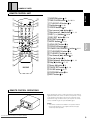
CLEAR
TIME/
CHARA
DIRECT CUSTOM
1
2
DEF
1
2
3
GHI
JKL
MNO
PQRS
DISC/CHARA
7
3
TITLE/INPUT
SEARCH
ABC
4
CD CHANGER CC9100
TITLE
INPUT
DISPLAY
5
6
TUV
WXYZ
8
9
MARK
4
7
5
8
ENTER
6
9
0
CURSOR
CURSOR
PUSH ENTER
10
MODE
CLEAR
PROGRAM
RANDOM
DISPLAY
INPUT
SEARCH
TIME/CHARA
TITLE
OPEN/CLOSE
UNLOAD
PLAY/PAUSE
STOP
STANDBY
POWER
SINGLE LOADER
ON/STANDBY
ACCESS
TITLE/INPUT
DISC
PLAY
DISC
–
+
KEYBOARD
DISC
SET
REPEAT
TRACK
SET
MODE
PROGRAM
CLEAR
CLEAR
4/1, ¡/¢
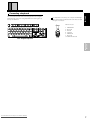
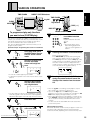
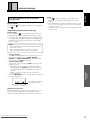
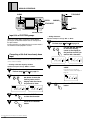
Input title of CUSTOM groups
• Adding characters
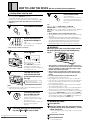
During the custom mode, custom titles can be input by
pressing the TITLE/INPUT button. Refer to “Title input” for
the input method.
Custom group titles are displayed when the custom mode is
set and when custom playback is started.
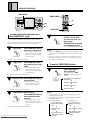
Operation example: To change “BET” to “BEST”
1
Set the character input mode.
Perform steps 1 and 2 on page 19.
2
Use the 4/1 , ¡/¢
to move the flashing
cursor on the display to
the position at which you
want to add a character.
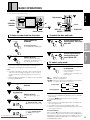
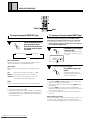
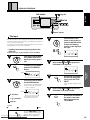
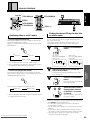
Correcting a title that has already been
input
RENTAL
Titles that have already been input can be corrected (characters
can be cleared or added).
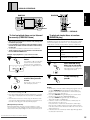
• Clearing a character input by accident
TRACK
REMAIN MIN
RENTAL
SEC
4
REMAIN MIN
SEC
CLEAR
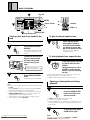
Press the CLEAR button
to clear that character.
INPUT
TITLE
Press the TITLE/INPUT
button.
Downloaded From Disc-Player.com Marantz Manuals
22
TRACK
ALL RANDOM REPEAT - 1 BEST ADLC CUSTOM
SINGLE CD TEXT PREVIOUS SCAN PROGRAM
ALL RANDOM REPEAT - 1 BEST ADLC CUSTOM
SINGLE CD TEXT PREVIOUS SCAN PROGRAM
3
DISC
RENTAL
DISC
TRACK
REMAIN MIN
SEC
ALL RANDOM REPEAT - 1 BEST ADLC CUSTOM
SINGLE CD TEXT PREVIOUS SCAN PROGRAM
RENTAL
DISC
TRACK
REMAIN MIN
SEC
ALL RANDOM REPEAT - 1 BEST ADLC CUSTOM
SINGLE CD TEXT PREVIOUS SCAN PROGRAM
4
INPUT
TITLE
DISC
SEC
For instructions on inputting
characters, refer to “Title input” on
page 19.
Use the 4/1 or ¡/
¢ button to move the
flashing cursor on the
display under the character you want to clear.
RENTAL
REMAIN MIN
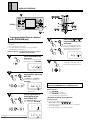
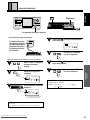
Select the character to be
added.
Set the character input mode.
Perform steps 1 and 2 on page 19.
2
TRACK
ALL RANDOM REPEAT - 1 BEST ADLC CUSTOM
SINGLE CD TEXT PREVIOUS SCAN PROGRAM
3
Operation example:To change “BAEST” to “BEST”
1
DISC
Press the TITLE/INPUT
button.