1
VARIOUS OPERATIONS
DIRECT CUSTOM
TITLE/DISPLAY
TIME/
CHARA
DISC/CHARA
1
2
3
4
5
6
7
8
DEF
1
2
3
GHI
JKL
MNO
4
9
SEARCH
ABC
PQRS
7
ENTER
TITLE
INPUT
DISPLAY
5
6
TUV
WXYZ
8
9
TITLE/SEARCH
F2
ENGLISH
Jog dial
MARK
0
CURSOR
PUSH ENTER
10
DISPLAY
INPUT
SEARCH
TITLE
OPEN/CLOSE
UNLOAD
PLAY/PAUSE
STOP
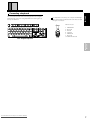
KEYBOARD
TITLE/SEARCH
TITLE/DISPLAY
DISC
DISC
–
+
DISC
SET
REPEAT
TRACK
SET
MODE
PROGRAM
DISC(–/+)
CLEAR
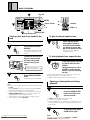
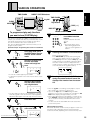
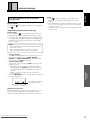
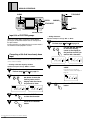
Displaying titles or artist’s name
• For discs equipped with CD Text
DISPLAY
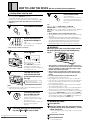
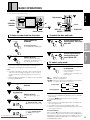
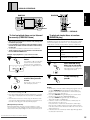
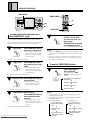
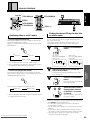
You can search for a specific CD using the first letter of the disc
title or name of the artist.
Searching by using the disc title is called “title search”, and
searching by using the artist’s name is called "artist search".
1
SEARCH
Press the TITLE/SEARCH
button.
3 Track title
3 Disc title
F2
Artist's name 2
RENTAL
• Some CD TEXT data does not include “Artist's name”.
• When scroll display of Track title, Disc title and Name of artist
has finished, the display will return to Track title.
DISC
2
• When scroll display of Disc title and Name of Artist has finished,
the display will return to Disc title.
RENTAL
DISC
TRACK
REMAIN MIN
SEC
ALL RANDOM REPEAT - 1 BEST ADLC CUSTOM
SINGLE CD TEXT PREVIOUS SCAN PROGRAM
For instructions on inputting characters, refer to “Title
input” on page 19.
3
3 Artist's name
SEC
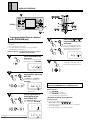
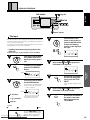
Input the first letter of the desired disc
title (or artist’s name).
SEARCH
(
3 Disc title
REMAIN MIN
Artist search
Press the TITLE/SEARCH
button twice.
4
(
F2
Press the TITLE/SEARCH
button.
(The same operation is possible by
pressing the jog dial.)
)
DISC
DISC
–
+
VARIOUS
OPERATIONS
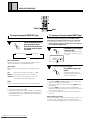
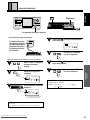
If the title input function has been used to input a disc title and
artist's name, the display switches as shown below each time the
TITLE/DISPLAY button is pressed.
When a disc title and Artist's name have been input.
TRACK
ALL RANDOM REPEAT - 1 BEST ADLC CUSTOM
SINGLE CD TEXT PREVIOUS SCAN PROGRAM
• For discs not equipped with CD Text
DISPLAY
)
Title search
Press the TITLE/SEARCH
button once.
BASIC
OPERATIONS
(
BEFORE
OPERATING
When playback starts, the track title is displayed. After several
seconds, the display starts scrolling.
Display can be switched as shown below by pressing the TITLE/
DISPLAY button.
Finding the desired CD by the disc title
or artist’s name
A different search result is
displayed each time one
of the DISC (–/+) buttons
is pressed.
)
(The same operation is possible by
turning the jog dial.)
• When the desired disc has been found and is displayed, press
3 or ENTER to start playing that disc.
• The title (artist) search mode is canceled if no operation is
performed for 5 seconds.
• The title (artist) search operation can also be performed during
playback.
• When a space has been input before the first letter of the Disc
title or Name of artist, the letter after that space will be detected.
• When detection is carried out at a space, the disc will be
detected as a disc without title input.
Downloaded From Disc-Player.com Marantz Manuals
23