1
1318 Parent Guide Final
03/12/2002
04:05 PM
Page 4
Using the Digital Blue QX3 controls
™
4
Capture button
Magnification ring
1
2
3
Focus knob
Remember the
QX3 ™ microscope
can be used in
handheld mode,
but you need to
have a clear view
of the monitor to
see what is being
examined.
Arrange your
play area with
this in mind.
6
Checking
out the QX3
controls
Focus
™
Once the software is running,
you can use the controls on
the microscope to focus,
change magnification level,
and capture pictures or
movies (in handheld mode).
Look at the computer screen and
adjust the focus knob until the image is
clear. Focusing may take a little
practice. On some computers, there
can be a delay between knob
movement and screen image
adjustment. Try making small changes
and waiting for the screen to catch up.
Capturing
pictures and
movies in
handheld mode
Sample platform
Setup
suggestion
4
5
USB cable
Base stand
™
™
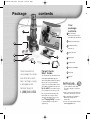
The QX3 Computer
Microscope consists of
a base stand and a
detachable microscope.
There are two light sources:
one in the sample platform
and another in the
microscope. The base also
has focus knobs, while
the microscope has a
magnification ring and
capture button.
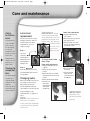
In handheld mode, click the Capture
button to take a picture. Click and
hold the button to capture a movie.
For more information on how to use
the microscope in handheld mode,
press F1 for Online Help.
Changing
magnification
Choose the level by rotating the
magnification ring on the microscope
until the desired magnification level
label faces you. You will hear a click
when the lens is properly aligned.
The levels correspond roughly to 10x,
60x and 200X*. In this guide, we refer
to magnification as low, medium,
or high.
NOTE:
In
handheld mode,
focus by slowly
moving the
microscope closer
to or farther away
from the object
being examined.
You can get a good idea of the focal
range with the microscope on the base
stand and watching the upper and
lower limits of the focus adjustment.
*These magnification levels are approximate and
have been measured using a 15 in. (38 cm.)
monitor. Actual magnification will vary according to
the size of your monitor.