1
3.8 SENSOR STARTUP PERIOD
The sensor needs a 2-hour startup period to adjust to being under the skin.
When you press the SELECT button during the
startup period to turn the receiver display on, your
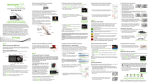
trend graph will include a 2-hour countdown symbol
in the upper right hand corner.
Over time, the countdown symbol
will fill to indicate
that you are getting closer to initial calibration time. See the pictures below for
an example of what this looks like. During the countdown period, you will not get
sensor glucose readings, alerts and alarms.
Start
[0-12]
minutes
[24-48]
minutes
[48-72]
minutes
[72-96]
minutes
Throughout the 2-hour startup period if you see the out of range
the top of the screen review the following troubleshooting tips.
Ready for
calibration
symbol at
• Make sure your receiver and transmitter are within 6 meters of each other.
Check in 10 minutes to see if the antenna symbol reappears in the upper left
corner of the receiver screen.
• If the receiver and transmitter are still not communicating, check the device
information screen to make sure the correct transmitter ID is entered into your
receiver (see Chapter 2, Section 2.3, Checking Information About Your Receiver).
• If the correct transmitter ID has been entered into your receiver and the receiver
and transmitter are still not communicating, then contact your local distributor.
At the end of the 2-hour startup period the receiver will let you know that it is time
to calibrate your sensor. Chapter 4, Calibrating Your Dexcom G4 System, tells
you how to calibrate your sensor.
Dexcom G4 User’s Guide | 43