1
Getting Started
a b
03
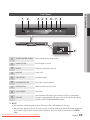
Front Panel
cde f g h
5V
500mA
i
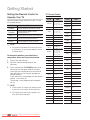
1
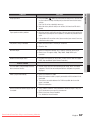
REMOTE CONTROL SENSOR
Detects signals from the remote control.
3
POWER BUTTON
Turns the player on and off.
DISPLAY
Displays the playing status, time, etc.
DISC SLOT
Inserts a disc.
STOP BUTTON
Stops disc playback.
PLAY/PAUSE BUTTON
Plays a disc or pauses playback.
ENTER BUTTON
Selects menu items or starts a disc.
EJECT BUTTON
Ejects a disc.
USB HOST
You can connect a USB memory flash stick here and use it as storage when
the player is connected to BD-LIVE. You can also use the USB Host for software
upgrades and MP3/JPEG/DivX/MKV/MP4 playback.
2
4
5
6
7
8
9
✎✎ NOTE
`` You can perform software upgrades using the USB Host jack with a USB memory flash stick only.
`` When the player displays the Blu-ray Disc menu, you may not start the movie by pressing the Play button on the player
or the remote. To play the movie, you must select Play Movie or Start in the disc menu, and then press the ENTER
button.
Downloaded From Disc-Player.com Samsung Manuals
English
17