1
Appendix
7. Appendix
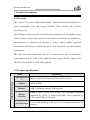
7.1 Troubleshooting and Solutions
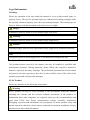
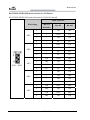
Common
Malfunctions
The device is not
operating
Reasons
No power supply
Please check the power supply
and the power cable/connector.
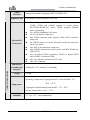
Improper
device
operating environment
1. Check with the environment
conditions;
2. Please wait for twelve hours
before powering on the device
shipped in cold weather.
The display has not been
turned on
Turn on the display
The display is under
“power saving” mode
Press any key on the keyboard.
The luminance control is
set to “Black”.
Increase the screen luminance by
luminance control. Please refer to
the instructions of the display for
detailed information.
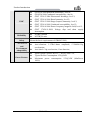
Power cable or display
cable is not connected
1. Please check whether the
power
cable
is
correctly
connected with the display, the
system unit or the ground port.
2. Please check whether the
display cable is correctly
connected with the display and
the system unit.
3. Contact Technique Support if
the screen remains black after
implementing
the
above
measures.
Incorrect BIOS setting
Follow the power-on prompt and
press the key to enter the BIOS
Setup; adjust the time and date in
BIOS Setup.
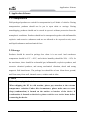
The
external
display is black
Incorrect time or
date on PC
Troubleshooting and Solution
ERC-1005
- 25 -