1
DLM4100 User’s Manual
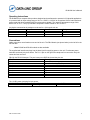
S24 Sleep Mode Timer: S24 sets the length of time in seconds that the modem must be idle before
entering the low power, sleep mode. When S24 is set to 0, sleep mode is disabled.
Range:0 to 255
Units: seconds
Default: 0
S27 Pulse Dialing Bit-Mapped Options: S27 reflects the state of several “AT” commands.
Bit 0
0
1
0
1
0
0
1
3
0=Normal mode (AT&Q0)
1=Error control enabled (AT&Q5)
1=Direct mode (AT&Q6)
Bit 2, 4- 5, 7 Not used
Bit 6
0=CCITT Protocols (ATB0)
1=Bell Protocols (ATB1)
S28 Pulse Dialing Bit-Mapped Options: S28 stores the modem’s pulse dialing configuration.
Bit 0-2, 5-7 Not used
Bit 3-4 0=Make/Break ratio 39%/61%; 10 pulses per second (AT&P0)
1=Make/Break ratio 33%/67%; 10 pulses per second (AT&P1)
2=Make/Break ratio 39%/61%; 20 pulses per second (AT&P2)
3=Make/Break ratio 33%/67%; 20 pulses per second ( AT&P3)
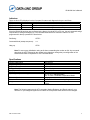
S29 Hook Flash Timer: S29 determines the length of time the modem closes its off-hook relay on receipt
of the “I” dial modifier to simulate a switch hook flash.
Range: 0 to 255
Units: 10 Milliseconds
Default: 70
S30 Disconnect on Inactivity Timer: S30 sets the period the modem is idle before it disconnects. A 0
disables the inactivity timer.
Range: 0 to 255
Units: 10 Seconds
Default: 0
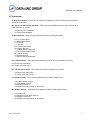
S31 General Bit-Mapped Options: S31 stores the status of various AT commands.
Bit 0
0=No single-line connect messages (AT\V0)
1=Single-line connect messages
Bit 1
0=No auto mode detection (ATN0)
1=Auto mode detection active (ATN1)
Bit 2-3 0=Report host speed (ATW0)
1=Report all parameters (ATW1)
2=Report modem speed only (ATW2)
Bit 4-7 Not used
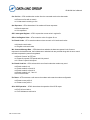
S32 XON Character: S32 determines the ASCII character to be sent as XON for in-band flow control.
Range: 0 to 255
Units: ASCII Character
Default: 11 (VT)
P/N 161-09977-001B
13