1
Quick Start (cont’d)
Enter a Manager Code
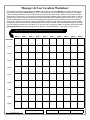
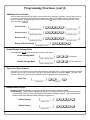
Manager Codes are located at locations 00, 10, 20, 30, 40, 50, 60, 70, 80, and 90 (see grid on page 4). Note:
New Manager Codes MUST use the same number of digits as the (new) Master Code. Enter as follows.
1. Press the (new) Master Code.
2. Press ; [press a Manager location i.e. 00, 10, 20, 30, 40, 50, 60, 70, 80, or 90] ;.
3. Press a new Manager Code using the same number of digits as the (new) Master Code. A 6-beep acknowledgement (with a red LED) will sound. Wait 5 seconds for lock to re-lock.
For example, if you want to add a Manager Code of "33333" in location 00,
[Press the (new) Master Code] ; 00 ; 33333.
4. If lock remains open, repeat from step 2; otherwise restart from step 1 for each new Manager Code.
Enter Basic User Access Codes
See the grid on page 4 for more information regarding User locations. You can choose to enter your User Codes
in many possible locations, and in any order you wish. User Codes do not have programming privileges (entry
only). Duplicate User Codes are not allowed.
1. Press the (new) Master Code or associated Manager Code.
2. Press ; [press a 2-digit location number] ;.
3. Press a new User Access Code using the same number of digits as the (new) Master Code. A six-beep acknowledgement (with a red LED) will sound. Wait 5 seconds for lock to re-lock. The new User Access Code is
now entered in that location number.
For example, if you want to add a User Access Code of "22222" in User Number 01, press:
[(New) Master Code] ; 01 ; 22222.
4. If lock remains open, repeat from step 2; otherwise restart from step 1 for each new User Access Code.
Delete a User Access Code
The Master Code cannot be deleted. Manager Codes can only be deleted with the Master Code. If the location
(User Number) of the Code is unknown, use the Code Location Function (page 8).
1. Press the (new) Master Code or Manager Code.
2. Press ; [press the 2-digit location number] ; :. A six-beep acknowledgement (with a red LED) will
sound. Wait 5 seconds for lock to re-lock. The User Access Code is now deleted.
For example, if you want to delete a User Access Code located in location 47, press:
[(New) Master/Manager Code] ; 4 7 ; :.
3. If lock remains open, repeat from step 2; otherwise restart from step 1 for each User Access Code you want to
delete.
Testing Codes
VALID CODE - The Green LED will flash (with 1 beep) after a valid code is entered. The lock will unlock immediately and
remain unlocked for about 5 seconds (this "unlocked" time is the "Pass Time"). To make the Pass Time longer or
shorter, use the Pass Time Function on page 9. Note: While the lever or knob may be rotated at any time, the latch
will not be engaged to unlock the door unless a valid User Access Code is entered at the keypad.
INVALID CODE - The Red LED will flash 5 times (with 5 beeps) after an invalid code is entered. (To quickly clear an invalid
User Access Code, press ; and immediately re-enter the correct Code).
KEYPAD ANTI-TAMPER LOCKOUT - If 3 invalid User Access Codes are entered in succession, the lock will turn off for
approximately 30 seconds to prevent tampering. The DL5200 will emit 2 beeps with a Red LED flash warning at the
end of the anti-tamper period. The lock will exit Anti-Tamper mode in 30 seconds or upon activation of the Remote
Switch Input (white wires). Note: The lock will go into Anti-Tamper after 3 unsuccessful Code entries even if entered
by different users and spaced apart in time. Therefore, the lock may “appear” to go into Anti-Tamper Lockout even
after the entry of just one invalid User Access Code.
3